solarized-osaka.nvim: A Solarized Dark Theme Rebuilt for Modern Neovim
🏯 A clean, dark Neovim theme written in Lua, with support for lsp, treesitter and lots of plugins.
At a glance
- What is it?
- Solarized Osaka is a Lua colour scheme for Neovim that starts from Ethan Schoonover's sixteen colour Solarized palette and extends it for modern plugins, with light and vivid variants, configurable sidebars, terminal colours and two hooks for overriding the generated highlights. It is Apache-2.0 licensed and needs Neovim 0.7.2 or newer.
- Who is it for?
- Solarized Osaka fits a Neovim user who likes the muted warmth of Solarized but has hit the limits of the original sixteen colours with modern plugin interfaces, and who wants a theme that still ships a light variant and a higher contrast vivid style for bright rooms.
- Can I use it commercially?
- Yes. Apache-2.0 is a permissive licence: you can use, modify and sell software built on it, as long as you keep its copyright and licence notices.
- Is it still maintained?
- Yes. The repository last received commits 76 days ago.
- What is it written in?
- Mainly Lua, according to GitHub's language statistics.
Answers come from the project's GitHub data, last synced on November 7, 2026, and from our analysis. They are not legal advice.
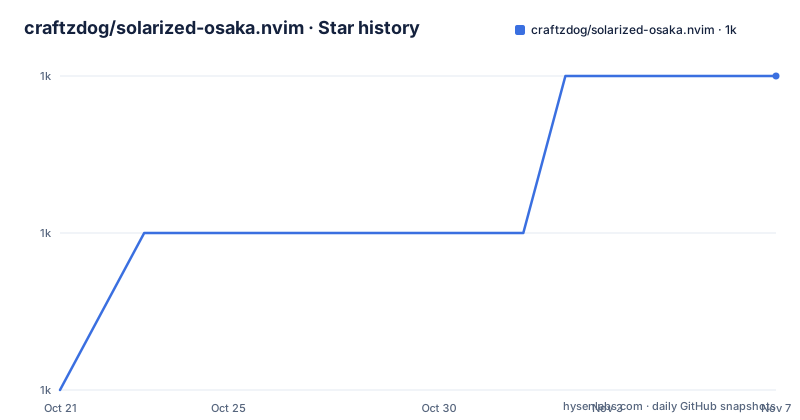
Star history
- craftzdog/solarized-osaka.nvim1,039 ★ · +2
| Repository | 2026-10-21 | 2026-11-07 |
|---|---|---|
| craftzdog/solarized-osaka.nvim | 1k | 1k |
2 Stars in the last 17 days, measured from the daily GitHub snapshot. Compare with other projects
Editorial analysis
Sixteen Original Colours Were Not Enough
Solarized Osaka starts from a known problem with the original scheme. Ethan Schoonover created Solarized in 2011 with a set of sixteen colours, and the README argues that this assortment falls short in providing adequate variations for the additional signs, alerts, tooltips and other UI components that recent Neovim plugins make available. It also notes that the text colours in the original theme are somewhat too dark on modern, bright monitors.
The theme's answer is to introduce additional colours and to brighten the base colours slightly, which the README describes as creating a visually appealing and functional palette. A palette image and a Figma design are published, so the intended result is a designed system rather than a hand-tuned stylesheet, and a design file is the thing to look at when you want to know what a given colour is meant to signal.
The result is still recognisably Solarized. The base sixteen remain, in a slightly brighter rendering, and the extra colours fill the gaps that plugins opened up. That is a different proposition from a theme built on a different foundation, and it is the reason someone who likes Solarized would come here rather than to a general purpose dark scheme.
Installing Through lazy.nvim and Requiring Neovim 0.7.2
The theme is a Lua plugin, and the README gives the lazy.nvim spec as the installation route:
{
  "craftzdog/solarized-osaka.nvim",
  lazy = false,
  priority = 1000,
  opts = {},
}
The priority of 1000 is what makes the theme load before other plugins that depend on highlight groups, and lazy = false means it is loaded at startup rather than on demand, which is what a colour scheme needs. The opts field is empty by default, because the theme works without configuration, and the README states that it uses the default options unless setup is explicitly called.
The version requirement is stated separately and is worth checking against your configuration. The theme requires Neovim 0.7.2 or newer, and the feature list says it supports the 0.9.0 features of Neovim. So it targets a fairly recent Neovim and uses the highlight APIs that came with those releases.
The repository is a normal Lua plugin layout with lua/ for the implementation, colors/ and autoload/ for the colour scheme entry points, doc/ for the help file, extras/ for additional material, and scripts/ for helper scripts. The development tooling is visible too, with a .lua-format file, a .luarc.json, selene.toml for linting and stylua.toml for formatting, plus a .lazy.lua file for local development.
Three Colour Scheme Names: Dark, Light and Vivid
Loading the theme is a single command, and the README shows three names for the three variants:
colorscheme solarized-osaka
# light mode
colorscheme solarized-osaka-light
# vivid mode
colorscheme solarized-osaka-vivid
From Lua the same thing goes through vim.cmd:
vim.cmd[[colorscheme solarized-osaka]]The light variant is what you get when the background is set to light, and in the configuration it is selected with the light_style option, whose default value is the string light. The vivid variant is the one to reach for in a bright environment, and the configuration describes it as a higher contrast variant that stays readable in bright environments, with a vivid_brightness option that adjusts how far the vivid style brightens text colours, as a number between 0 and 1 running from the default palette to white, defaulting to 0.3.
So the three names are not three separate designs. They are one palette with a background switch and a brightness control, which is a simpler model than a theme that ships independent light and dark palettes, and it means the light variant inherits the same colour decisions as the dark one.
setup() Has to Run Before the Colorscheme Command
This is the single most important practical detail, and the README puts it in a callout: set the configuration before loading the colour scheme with colorscheme solarized-osaka. A configuration block that runs after the theme is loaded will not take effect, because the highlight groups are set at the moment the colour scheme command runs.
The options are grouped into a few families. The top level has style for the default dark style, light_style for the light background case, transparent to disable setting the background colour, and terminal_colors, which configures the colours used when opening a :terminal in Neovim. The theme also enhances terminal colours as one of its listed features, so the :terminal experience is part of the design rather than an afterthought.
The styles table covers the syntax groups, with comments and keywords defaulting to italic and functions and variables left empty. It also holds the background styles for sidebars and floats, each of which can be dark, transparent or normal. The sidebars option is a list of window names that get the darker background, and the README gives the example of qf, vista_kind, terminal and packer, with the default being qf and help.
on_colors and on_highlights as Two Escape Hatches
The theme offers two hooks rather than one, and the difference between them is worth understanding because it determines what you can change.
The README describes the order in which highlight groups are calculated. First, colors are determined based on your configuration, with the ability to override them using config.on_colors(colors). Second, those colors are used to generate the highlight groups. Third, config.on_highlights(highlights, colors) can be used to override the highlight groups themselves.
So on_colors operates on the palette, before anything is generated, and on_highlights operates on the generated groups, after generation. The two callbacks are documented as receiving a ColorScheme table and a Highlights and ColorScheme table respectively, and the default values for both are in the colors.lua file in the lua/solarized-osaka directory.
A short example shows the palette hook in use, remapping the hint colour to the orange colour and forcing a bright red for errors:
require("solarized-osaka").setup({
  on_colors = function(colors)
    colors.hint = colors.orange
    colors.error = "#ff0000"
  end
})
The highlight hook is what the README demonstrates for a borderless Telescope, where every prompt, border and title group is rewritten against a chosen prompt colour.
Window Treatment, Status Lines and a Few Extra Switches
Beyond colour, the configuration has options that change how the interface is structured, and they are the difference between a theme and a designed workspace.
hide_inactive_statusline, off by default, hides inactive status lines and replaces them with a thin border instead, and the README says it should work with the standard StatusLine and with LuaLine. dim_inactive, also off by default, dims inactive windows. lualine_bold makes the section headers in the lualine theme bold when true. The introduction of a darker background option for sidebar-like windows is one of the listed features, and it is what the sidebars and floats background style options implement.
Each of these is off by default, which is a deliberate choice worth noting. A theme that changes your window borders or dims inactive panes by default makes claims about your workflow that it cannot justify, so Solarized Osaka asks instead, and the README is explicit that these are per-user preferences rather than defects.
The same restraint shows in the plugin claim. The feature list says the theme supports all major plugins, but the plugin-specific work is expressed through the group names it defines, and the Telescope example in the README is a case of a user rewriting those groups for one particular plugin, which is the intended extension path.
Undercurls Need Tmux Configuration, and the Theme Is Apache-2.0
There is one environment-specific fix that the README includes, and it is the kind of detail that otherwise costs an afternoon. Undercurl, the wavy underline used to mark spelling errors and diagnostics, needs to be enabled in the terminal and in Tmux. The README gives the configuration to add:
# Undercurl
set -g default-terminal "${TERM}"
set -as terminal-overrides ',*:Smulx=\E[4::%p1%dm'  # undercurl support
set -as terminal-overrides ',*:Setulc=\E[58::2::%p1%{65536}%/%d::%p1%{256}%/%{255}%&%d::%p1%{255}%&%d%;m'
The same block also sets the Alacritty terminal feature to RGB, and the Setulc override for coloured underlines needs tmux 3.0. Without the Smulx override, an undercurl in a Tmux session renders as a plain underline or not at all, which looks like a theme bug when it is a terminal capability gap.
On licensing, the theme is under the Apache-2.0 licence, a permissive licence with an explicit patent grant, which makes it straightforward to use in a work or a redistributed configuration. The repository publishes no GitHub releases, so the version of the theme you have is whatever the plugin manager last fetched, and the CHANGELOG.md is the record of what changed. The repository is not archived and the last push was on 2026-08-24.
Editorial conclusion
Solarized Osaka fits a Neovim user who likes the muted warmth of Solarized but has hit the limits of the original sixteen colours with modern plugin interfaces, and who wants a theme that still ships a light variant and a higher contrast vivid style for bright rooms. It is a poor fit if you are on Vim rather than Neovim, since the theme is written in Lua and expects Neovim 0.7.2 or newer, and it is the wrong choice if you need a light terminal colour scheme with a large palette, since the light variant is a background switch rather than a separate design. Before installing, call setup before the colorscheme command, because the README is explicit that configuration has to happen first. The theme is Apache-2.0 licensed, the repository publishes no GitHub releases, and the last push was on 2026-08-24.
Frequently asked questions
How do I install solarized-osaka.nvim?
With lazy.nvim, add the spec shown in the README with "craftzdog/solarized-osaka.nvim", lazy = false, priority = 1000 and opts = {}. The theme requires Neovim 0.7.2 or newer and supports the Neovim 0.9.0 features.
How do I switch between the dark, light and vivid versions?
With the colorscheme command, using solarized-osaka for the default dark style, solarized-osaka-light for the light background and solarized-osaka-vivid for the higher contrast style. From Lua you can use vim.cmd[[colorscheme solarized-osaka]].
Why are my configuration changes not taking effect?
Because setup has to be called before the colour scheme is loaded. The README states that the configuration must be set before loading the colour scheme with colorscheme solarized-osaka, and that the theme uses its default options unless setup is explicitly called.
How do I change a single colour in solarized-osaka?
Use the on_colors callback, which receives the ColorScheme table before the highlight groups are generated. The README example remaps the hint colour to the orange colour and sets the error colour to a hex value, and on_highlights is the hook for changing generated highlight groups themselves.
Undercurls do not show in my terminal, what should I check?
The README gives Tmux configuration for undercurl support, setting default-terminal and the Smulx terminal override, plus a Setulc override for coloured underlines that needs tmux 3.0. The same block sets the Alacritty terminal feature to RGB.
Official sources
Add this badge to your README
If you maintain this project, the badge below links readers to this analysis and shows its maintenance status from the daily GitHub snapshot. Paste the markdown into your README; add ?metric=license or ?metric=stars to the image URL for a different field.

[](https://hysenlabs.com/projects/craftzdog-solarized-osaka-nvim)Star history chart for your README
[](https://hysenlabs.com/projects/craftzdog-solarized-osaka-nvim)Was this useful?