Simulated-Project adds physics contraptions to Minecraft with Create
Build anything from airships to planes and cars!
At a glance
- What is it?
- Simulated-Project is a suite of Minecraft mods that extends Create with physics-based contraptions, split into a core mod called Simulated and two content mods, Aeronautics for flying machines and Offroad for land vehicles. The repository is a Gradle multi-project, and the mods reach players through Modrinth and CurseForge rather than through GitHub releases.
- Who is it for?
- Simulated-Project suits a Minecraft player who already uses Create and wants vehicles that move because of simulated physics rather than because a block teleports them, and it suits a mod developer who wants to build on the Simulated core layer instead of writing physics interaction from scratch. It is the wrong tool for a server that cannot run Java mods at all, or for a player who wants a single finished vehicle rather than a set of parts to assemble.
- Can I use it commercially?
- Check first. The repository uses a licence we do not classify automatically, so read its LICENSE file before any commercial use.
- Is it still maintained?
- Yes. The repository last received commits 23 days ago.
- What is it written in?
- Mainly Java, according to GitHub's language statistics.
Answers come from the project's GitHub data, last synced on November 7, 2026, and from our analysis. They are not legal advice.
Star history
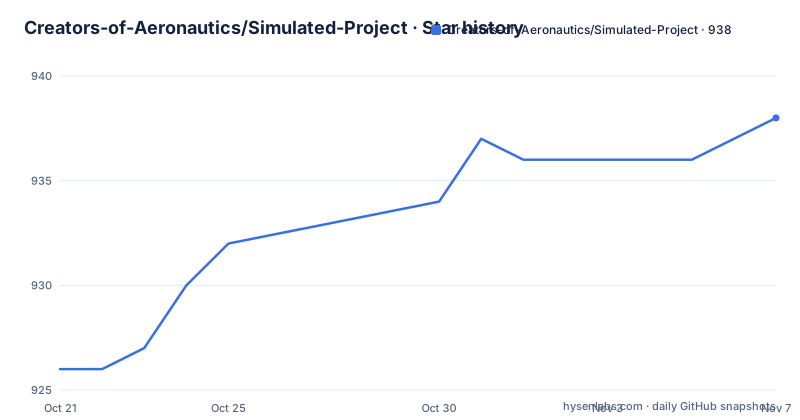
- Creators-of-Aeronautics/Simulated-Project938 ★ · +12
| Repository | 2026-10-21 | 2026-11-07 |
|---|---|---|
| Creators-of-Aeronautics/Simulated-Project | 926 | 938 |
12 Stars in the last 17 days, measured from the daily GitHub snapshot. Compare with other projects
Editorial analysis
One core mod and two content mods, not a single plugin
The repository description says it lets you build anything from airships to planes and cars. The structure of the project shows how that is split.
Simulated is the core of the project. The README describes it as providing assembly, redstone components, and all the tools necessary for interacting with simulated contraptions. That is the layer where the physics objects live and where the player interacts with them.
Aeronautics is the flying layer. It enables all manner of flying contraptions with hot air, propellers, and magic floating rocks. Offroad is the land layer, and it allows almost anything that looks like a wheel to be used in making land vehicles.
So the arrangement is a platform and two content packs on top of it. A player who wants a working aeroplane needs the core as well as the Aeronautics mod, and the same holds for a car built out of Offroad parts. The value of the split is that the interaction layer, the redstone components and the assembly tools are written once.
The topic tags place the project in the NeoForge ecosystem, and the primary language is Java, which is what a Minecraft mod of this scale is written in. The project also distributes through a Discord server, with the link in the README banner, and the artwork credits a separate project named sable as the tool behind the rendering.
The audience is Minecraft players who already play with Create and enjoy building machines, and secondarily mod developers who want to extend a physics framework rather than write one.
The Gradle tree shows three mods and one bundle
The repository layout is a Gradle multi-project, and the directory names map directly onto the mod structure described in the README.
Five directories sit at the top level: simulated/, aeronautics/, offroad/, aeronautics-bundled/ and all-neoforge/. Alongside them are build.gradle, settings.gradle.kts, gradle.properties, a buildSrc/ directory holding shared build logic, a gradle/ directory with the wrapper, and the gradlew and gradlew.bat launcher scripts. There is also a changelog.md, a crowdin.yml for translations, an images/ folder for the README banners, a .jenkins/ directory, and an AGENTS.md.
Two of those directory names carry information. The all-neoforge/ directory reads as a module that aggregates everything against the NeoForge target, and aeronautics-bundled/ reads as a packaged variant that bundles Aeronautics with its dependencies. Neither is described in the README text, so what exactly they contain is not documented in what is available here.
The buildSrc/ directory is the standard Gradle convention for build logic that several modules share, which is what you would expect from a project that builds three mods against one shared core.
One thing the README does not do is give build commands. There is a Gradle wrapper in the repository, so the project can be built from source, but the documentation does not state the task names to run or the JDK version required, and it does not describe the configuration of the NeoForge build.
Distribution runs through Modrinth and CurseForge, not GitHub releases
For players, the install path is a mod manager rather than a build. The README banner links to a Modrinth project page for create-aeronautics and a CurseForge page for the same mod under the identifier 676721. Both carry download badges in the banner, which tells you the project expects players to arrive through one of those two platforms.
The repository itself has no GitHub releases, and the last push was on 2026-10-15 on the main branch. So the source is the canonical home for the code, and the platforms are where the compiled artefacts live.
That split has consequences for anyone tracking versions. Because releases are not published on GitHub, there is no release page to bookmark and no tag history to browse in the usual place. Version discovery happens on Modrinth and CurseForge, which is also where dependency versions for the core mod have to resolve.
The project also runs a Crowdin translation project, listed in the README with the link to crowdin.com/project/create-aeronautics, and the crowdin.yml file at the root of the repository is the configuration for it. That means the user-facing text of the mods is translated by that service rather than by translators committing to the repository, which matters if you are reviewing a locale string or contributing a translation.
The physics idea is the whole point, and it is also the hard part
The stated aim of the mods is to give players a cohesive way to interact with physics objects in Minecraft, so that planes, cars and strange insect machines become possible through Create Simulated.
That framing explains the module split better than any feature list would. Aeronautics and Offroad do not each invent a vehicle system; they add parts that plug into the Simulated layer. The consequence for a player is that assembly, redstone and the interaction tools are shared, so a contraption that mixes flying and land components still behaves the same way.
For a mod developer, the same split means the entry point is the Simulated layer. If you are writing your own add-on, the interesting question is what that layer exposes, and the README does not answer it. There is no documented API surface, no list of events, and no description of the component model in what is available here. The presence of AGENTS.md at the root of the repository suggests there is guidance for automated or delegated contributors, but its content is not quoted, so it cannot be summarised.
This is the honest limit of what can be said from the documentation. The project tells you what the mods are for and how they are packaged. It does not tell you how the physics are implemented, whether the simulation is authoritative on the server or on the client, or how to write an add-on against it.
Writing your own NeoForge mod instead of taking this one
The alternative is to write the physics interaction layer yourself inside your own NeoForge mod, or to skip the simulation entirely and build vehicles the way most Minecraft mods do, with blocks that move on their own.
The difference in approach is where the physics lives. In this project, the contraption is assembled from parts and then behaves as a simulated object, so a vehicle is something you construct out of components and control with redstone, and it can be extended by the two content mods without new code from you. In a mod that moves vehicles directly, the movement is a property of the vehicle block and the assembly is decorative, which is simpler to implement and much less interesting to play with.
If you only need one vehicle, the second approach may be less work, because it needs no physics core, no assembly system and no redstone component set. If you want players to build the vehicle, the first approach is the one you want, and taking Simulated as a dependency is far less work than reimplementing it.
For players, the practical comparison is the same. A server that runs vanilla Minecraft or a lightweight mod set cannot run this suite at all, since it requires NeoForge and Java mods, and the parts and the core have to be installed together.
A custom licence file and a repository that ships without releases
Two administrative details are worth flagging for anyone considering depending on this code.
First, the licence. The repository metadata reports a custom licence that GitHub cannot classify, and the LICENSE.md file is the authoritative text. Unlike a permissive licence with a familiar name, a custom file has to be read, and what it permits has to be judged on its own terms rather than assumed from the label.
Second, there are no GitHub releases and no changelog on the release page, although the repository does carry a changelog.md file at the root. For a project whose artefacts are distributed through Modrinth and CurseForge, that is the normal arrangement rather than a warning sign, but it does mean the source repository is not a self-contained record of what shipped when.
On activity, the last push was on 2026-10-15, and the presence of a Jenkins directory alongside the GitHub workflows shows that the build runs in more than one place. The project is also linked to a Discord server and a Crowdin translation project, which is the shape of a community-run mod suite with outside contributors rather than a single developer.
Editorial conclusion
Simulated-Project suits a Minecraft player who already uses Create and wants vehicles that move because of simulated physics rather than because a block teleports them, and it suits a mod developer who wants to build on the Simulated core layer instead of writing physics interaction from scratch. It is the wrong tool for a server that cannot run Java mods at all, or for a player who wants a single finished vehicle rather than a set of parts to assemble. Verify first that the three mods you need are published at compatible versions on Modrinth or CurseForge, because the repository publishes no GitHub releases and the LICENSE.md file carries a custom licence that GitHub cannot classify.
Frequently asked questions
What is the difference between Simulated, Aeronautics and Offroad in Simulated-Project?
Simulated is the core mod and provides assembly, redstone components and the tools for interacting with simulated contraptions. Aeronautics adds flying contraptions with hot air, propellers and floating rocks, and Offroad adds wheels and land vehicles. The content mods build on the core.
Where can I download the Simulated-Project Minecraft mods?
The README links to a Modrinth project page for create-aeronautics and a CurseForge page for the same mod. The GitHub repository publishes no releases, so the mod platforms are where the compiled mods and their version history live.
What loader and language does Simulated-Project use?
The repository topics name NeoForge and the primary language is Java, which is what Minecraft mods are built on. The source is organised as a Gradle multi-project with modules for simulated, aeronautics, offroad, a bundled variant and an all-neoforge module.
Can I build Simulated-Project from source?
The repository includes a Gradle wrapper with gradlew and gradlew.bat scripts and a buildSrc/ directory, so it can be built from source. The README does not document the build commands, the required JDK version or the NeoForge configuration, so those details are not covered by the available documentation.
How is Simulated-Project translated?
The project uses Crowdin for translations, with the configuration in crowdin.yml at the root of the repository and the Crowdin project linked in the README. Translations are handled on that service rather than through commits to the repository.
Official sources
Add this badge to your README
If you maintain this project, the badge below links readers to this analysis and shows its maintenance status from the daily GitHub snapshot. Paste the markdown into your README; add ?metric=license or ?metric=stars to the image URL for a different field.

[](https://hysenlabs.com/projects/creators-of-aeronautics-simulated-project)Star history chart for your README
[](https://hysenlabs.com/projects/creators-of-aeronautics-simulated-project)Was this useful?