DockMon for Docker Monitoring and Remote Host Control
DockMon - Modern Docker container monitoring with auto-restart and alerts
At a glance
- What is it?
- DockMon is a Docker monitoring and management platform for operators who need container metrics, logs, alerts, auto-restart, and multi-host administration. It combines a Python backend, React dashboard, Go metrics service, and an optional agent for remote Docker hosts.
- Who is it for?
- DockMon fits operators who want a browser-based control plane for Docker hosts and need monitoring, alerting, logs, and container actions in one place. It is less suitable for a small setup that only needs Docker restart policies or a lightweight host-level metrics agent.
- Can I use it commercially?
- Check first. The repository uses a licence we do not classify automatically, so read its LICENSE file before any commercial use.
- Is it still maintained?
- Yes. The repository last received commits 1 day ago.
- What is it written in?
- Mainly Python, according to GitHub's language statistics.
Answers come from the project's GitHub data, last synced on November 7, 2026, and from our analysis. They are not legal advice.
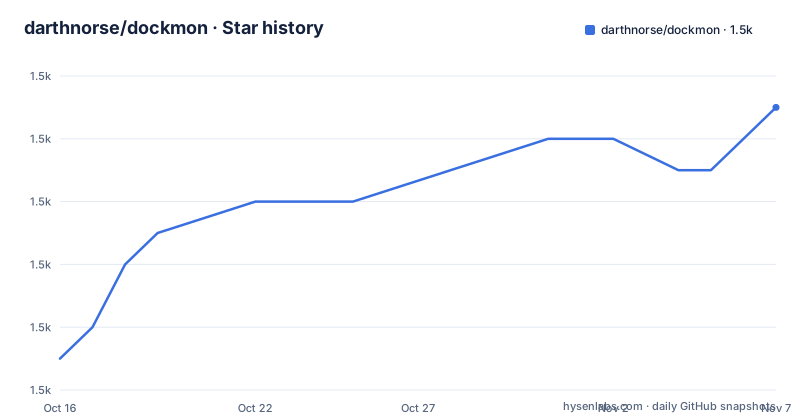
Star history
- darthnorse/dockmon1,547 ★ · +8
| Repository | 2026-10-16 | 2026-11-07 |
|---|---|---|
| darthnorse/dockmon | 1.5k | 1.5k |
8 Stars in the last 22 days, measured from the daily GitHub snapshot. Compare with other projects
Editorial analysis
DockMon's Docker Control Plane
DockMon targets operators who need more than a container status page. It is designed for Docker environments that may include a local daemon, several remote hosts, or both. The documented capabilities include monitoring container CPU, memory, and network metrics, viewing logs from several containers at once, recording events, starting, stopping, and restarting containers, and managing Docker Compose stacks. Automatic image updates and health checks add operational actions to the same interface.
The intended audience is broader than application developers with one development machine. The README describes a platform for monitoring across Docker hosts, with multi-user access, group-based roles, API keys, OIDC single sign-on, and approval workflows. That scope matters because DockMon is not only a viewer. Its restart and update settings can change running workloads, so the relevant question is whether its authentication and host access model fits an existing operations setup.
DockMon also documents an agent-based remote monitoring option. The agent is written in Go and can run as a container or systemd service. According to the README, this approach is intended to avoid exposing Docker ports to the monitoring system. The trade-off is added deployment and certificate configuration. DockMon remains dependent on Docker connectivity and on the security of the connection between its services and remote hosts.
Metrics, Logs, Events, and WebSockets
The repository describes a split architecture. Python 3.13 provides the FastAPI backend and asynchronous application code. A Go 1.23 stats service streams real-time metrics, while the React 18.3 frontend receives live updates through WebSockets. Nginx acts as a reverse proxy with SSL/TLS, and Supervisor manages the processes inside the Docker image. SQLAlchemy 2.0 and Alembic handle persistence and schema migrations.
The real-time path is therefore not limited to periodic browser refreshes. The dashboard uses WebSocket updates for live container information and statistics, while the Event Viewer is documented as receiving real-time updates with filtering and search. The multi-container log viewer is also intended to provide live updates. This is a practical design for operators who need to inspect several containers while an incident is developing.
Historical statistics are optional rather than mandatory. The README says persistence for CPU, memory, and network time series is disabled by default for privacy reasons. When enabled, the dashboard offers ranges from five minutes through ninety days through a selector in host and container modals. The choice has direct storage and privacy consequences. A team that needs trend analysis can enable persistence, but a team that only needs a current operational view can leave it off.
DockMon's event logging, automatic tagging from Docker labels, bulk operations, and Compose deployment progress are useful for reconstructing operational activity. At the same time, the README does not describe retention limits for event logs or the exact behavior of every failure path. Those details should be checked in the Event Viewer and API documentation before using the platform as a compliance record.
Alerting, Auto-Restart, and Health-Check Boundaries
The alerting system supports Discord, Slack, Telegram, Pushover, Gotify, and SMTP. The README also refers to customizable templates, blackout windows for maintenance periods, and notification action links that can point to the DockMon URL. Those features place DockMon between observation and response: it can report a problem and provide a route to act on it.
Auto-restart is configurable per container and includes retry logic. DockMon also documents HTTP and HTTPS health checks with auto-restart when a check fails. This can reduce manual recovery for a failing service, but it is not the same as root-cause diagnosis. A restart loop can clear a symptom while consuming resources or repeatedly restarting a workload that cannot start correctly.
The platform also detects and executes image updates on a schedule. That capability should be treated as a change-management feature rather than a harmless monitoring setting. The README does not specify a default update window, rollback procedure, or application-level compatibility check. Operators should therefore confirm the schedule, the containers covered, and the expected recovery action before enabling automatic updates for production services.
Multi-host control compounds these considerations. A restart or update issued from one dashboard can affect several systems if permissions or host selection are broader than intended. DockMon documents granular capabilities and API-key permissions, but the exact policy configuration is not reproduced in the README. Reviewing those permissions is more important than merely confirming that alerts arrive.
Remote Agents and Transport Security
DockMon documents mTLS for remote hosts and an optional Go agent for secure remote monitoring. The stated purpose is to support remote Docker environments without exposing Docker daemon ports directly. The compose file exposes the main DockMon service as HTTPS, while the README identifies Nginx as the TLS reverse proxy. The agent can run as a container or as a systemd service, which gives operators two deployment contexts.
This approach differs from simply opening a Docker daemon over the network. It requires certificates, service installation, and coordination between the agent and the DockMon host configuration. The v2 upgrade documentation specifically says that mTLS certificates must be regenerated because of stricter OpenSSL 3.x requirements. Remote operators should therefore budget for certificate rotation and host reconnection checks when upgrading from v1.
The repository's top-level entries include separate `agent/`, `backend/`, `stats-service/`, and `ui/` directories, matching the documented service split. That separation can make deployment and maintenance clearer, but it also creates more moving parts than a single container viewer. A failed agent, expired certificate, unavailable stats service, or incorrect Nginx route can look like a DockMon outage when the underlying issue belongs to one component. The wiki's Remote Docker Setup and Security Guide are the relevant project documentation for these cases; the README does not provide a complete remote-host command sequence.
Docker Compose Installation and First Browser Check
The repository provides a `docker-compose.yml` at its root. The documented Docker installation route points to the Installation and Quick Start wiki pages, while the compose file shows the expected service name `dockmon`, a container name of `dockmon`, HTTPS port mapping `8001:443`, and an automatic restart policy of `unless-stopped`. Because the README does not give a complete first-run command sequence, the compose file is the concrete deployment reference rather than an invented setup script.
After the repository files are available to Docker Compose, the first real action is to build and start the service with the standard compose command implied by the project layout:
docker compose up -dThis starts the service in the background and uses the compose configuration in the repository. The compose file sets `TZ=America/New_York` as an example timezone, `PYTHONPATH=/app/backend`, and `PYTHONUNBUFFERED=1`. It also sets `DOCKMON_CORS_ORIGINS` to an empty value. The operator should change the timezone and configure CORS for a production deployment rather than treating those example values as universal defaults.
The first browser check should use the HTTPS endpoint exposed by the compose file, then follow the Quick Start guide for initial authentication and Docker host configuration. The README does not document the exact initial credential or default URL beyond the port mapping, so those details must come from the wiki or the running service. Do not expose the service outside a trusted deployment until its authentication, CORS, proxy, and certificate settings have been reviewed.
v2 Migration and Custom Licence Review
DockMon's v2 migration introduces changes that go beyond a normal container replacement. The README says that alert rules must be recreated, mTLS certificates must be regenerated, and a one-time database migration runs from v1.1.3 to v2.0.0. Hosts, containers, container history, event logs, user accounts, and preferences are listed as preserved. The Migration Guide is the appropriate source for the exact sequence.
That migration list gives an operator a concrete upgrade checklist. Existing alert rules are not carried forward as equivalent rules. Remote connections need renewed certificates. After the upgrade, the README says to regenerate certificates, recreate alert rules, and verify host connections. This indicates that an upgrade can temporarily remove alerting or remote visibility until those tasks are complete.
The repository is marked with a custom BSL 1.1 licence badge, while GitHub classifies the repository licence as other. The LICENSE file is therefore the source that must be reviewed for permitted use, distribution, modification, and any additional conditions. This review is especially relevant for redistribution, managed service use, or internal deployment. This article does not interpret the licence or provide legal advice. The repository is not archived, and its last push was on 2026-10-13. The recent releases include `v2.5.0` on 2026-09-19, `agent-v1.2.0` on 2026-09-19, and `v2.4.5` on 2026-07-13, but release frequency does not by itself establish operational suitability.
Editorial conclusion
DockMon fits operators who want a browser-based control plane for Docker hosts and need monitoring, alerting, logs, and container actions in one place. It is less suitable for a small setup that only needs Docker restart policies or a lightweight host-level metrics agent. Before adoption, verify the Docker Compose deployment, the permissions required for host access, your notification provider, and the certificate and alert-rule work required when upgrading from v1.
Frequently asked questions
How do I install DockMon for Docker monitoring?
The repository includes a root `docker-compose.yml`, and the README directs users to the Docker Installation and Quick Start guides. The compose configuration defines a `dockmon` service, maps `8001:443`, and uses `restart: unless-stopped`.
Can DockMon monitor remote Docker hosts?
Yes. The README documents multi-host monitoring and a Go agent for remote Docker monitoring. The agent can run as a container or systemd service, and the project documentation says this avoids exposing Docker ports directly.
What happens to alerts and certificates when upgrading DockMon from v1 to v2?
The README says old alert rules must be recreated and mTLS certificates must be regenerated. It also lists a one-time database migration from v1.1.3 to v2.0.0, while host, container, history, event, user, and preference data is listed as preserved.
Does DockMon store historical container statistics by default?
No. Historical CPU, memory, and network persistence is disabled by default, according to the README. When enabled, it supports time ranges from five minutes to ninety days.
Which notification channels does DockMon support?
The documented channels are Discord, Slack, Telegram, Pushover, Gotify, and SMTP. The README also documents customizable templates, blackout windows, and optional notification action links.
Official sources
Add this badge to your README
If you maintain this project, the badge below links readers to this analysis and shows its maintenance status from the daily GitHub snapshot. Paste the markdown into your README; add ?metric=license or ?metric=stars to the image URL for a different field.

[](https://hysenlabs.com/projects/darthnorse-dockmon)Star history chart for your README
[](https://hysenlabs.com/projects/darthnorse-dockmon)Was this useful?