Databricks AI Dev Kit: what it installs, where it stops, and what moved to AI Tools
Databricks Toolkit for Coding Agents provided by Field Engineering
At a glance
- What is it?
- The AI Dev Kit is a Field Engineering repository that puts Databricks agent skills into Claude Code, Cursor, Codex and other editors. Its bundled skills are now deprecated in favour of Databricks AI Tools, while the MCP server and Builder App remain here.
- Who is it for?
- Adopt the AI Dev Kit if you want the official Databricks skills inside Claude Code, Cursor, Codex, Gemini CLI or Copilot, or if you need the Builder App and the MCP server that are still maintained in this repository. Do not adopt it as a source of skill content: the bundled skill files are marked deprecated and kept for reference only, and several were renamed or merged in the official install.
- Can I use it commercially?
- Check first. The repository uses a licence we do not classify automatically, so read its LICENSE file before any commercial use.
- Is it still maintained?
- Yes. The repository last received commits 14 days ago.
- What is it written in?
- Mainly Python, according to GitHub's language statistics.
Answers come from the project's GitHub data, last synced on November 22, 2026, and from our analysis. They are not legal advice.
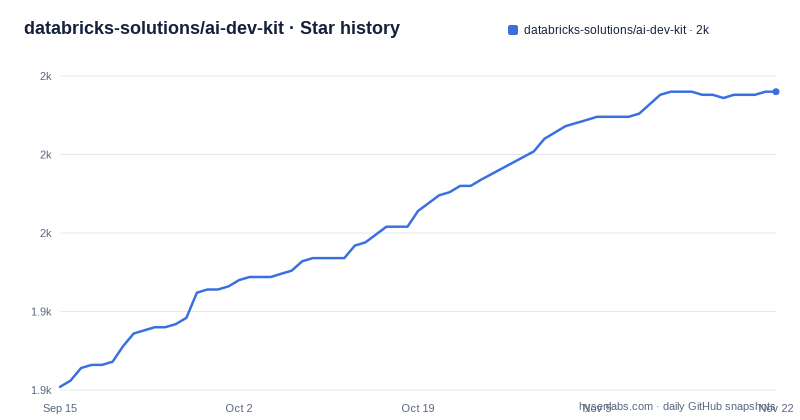
Star history
- databricks-solutions/ai-dev-kit1,995 ★ · +94
| Repository | 2026-09-15 | 2026-11-22 |
|---|---|---|
| databricks-solutions/ai-dev-kit | 1.9k | 2k |
94 Stars in the last 68 days, measured from the daily GitHub snapshot. Compare with other projects
Editorial analysis
The problem: Databricks knowledge inside a general-purpose coding agent
A general coding agent knows Python and SQL. It does not know how a Databricks job task graph is structured, what a streaming table looks like in a declarative pipeline, or how Unity Catalog volumes are addressed. The AI Dev Kit exists to close that gap by shipping curated Databricks material, described in the README as tutorials, patterns and the official Databricks agent skills, into the editor the engineer already uses.
The README frames the choice explicitly. Genie Code is the free, first-party option built into every Databricks workspace, with notebooks, jobs and Unity Catalog data already in scope. The AI Dev Kit is the other path: Databricks expertise in an external editor. The audience is therefore narrow and specific. It is a Databricks user who works in Claude Code, Cursor, Codex, Gemini CLI, Copilot, Antigravity, Windsurf or OpenCode and wants the agent to produce Databricks-shaped artifacts rather than generic Python.
The README lists the intended outputs: Spark Declarative Pipelines with streaming tables, CDC, SCD Type 2 and Auto Loader; Jobs with scheduled workflows and multi-task DAGs; AI/BI dashboards; Unity Catalog tables, volumes and governance; Genie Spaces; RAG-based knowledge assistants; MLflow experiments; model serving endpoints; and Databricks Apps. That list is the real specification of scope. If your work sits outside it, the kit adds little.
How the skills reach your agent, and what the installer delegates to
The mechanism is file-based rather than runtime-based. Skills are prompt and reference material installed into a location your agent reads: the README describes adding Databricks skills for your user or an existing project folder. The repository layout supports that reading, with a .claude-plugin directory, a .claude directory, a hooks directory, a databricks-tools-core package and an install script per platform (install.sh and install.ps1).
The important architectural change is delegation. The README states that Databricks AI Tools are installed and kept up to date directly through the Databricks CLI, and that the AI Dev Kit installer delegates to that CLI while still guiding you through the process. So the installer is a wrapper, not the source of truth. That matters for troubleshooting: if the CLI is missing or out of date, the wrapper has nothing to call.
The repository also contains a standalone MCP server under databricks-mcp-server/, which exposes Databricks actions to AI clients. The README is direct about preference here: skills are recommended, and the MCP server is maintained as a foundation for cases where a custom MCP server is required. The Builder App under databricks-builder-app/ is a separate web-based UI for Databricks development. Three delivery paths, three different maintenance commitments.
Install the Databricks AI Dev Kit and run a first skill
The README points to the Quick Start install section as the starting point for adding skills to your user or an existing project folder. The repository ships install.sh for Unix-like systems and install.ps1 for Windows, so the entry point is a shell script rather than a package manager command.
./install.shRunning that script starts the guided flow. According to the README, the installer delegates to the Databricks CLI, which performs the actual install and keeps the tools up to date. Expect the process to uninstall older skills and the MCP server before installing the official AI Tools if you have installed before; the README says to re-run the Quick Start to do exactly that.
There is a second path when your target is a Databricks workspace rather than a local editor. The repository includes install_genie_code_skills.py for uploading selected skills into a workspace for Genie Code, though the README notes that much of the public Databricks skills content is already included in Genie Code.
python install_genie_code_skills.pyThe README does not document the flags, output or exit codes of either script, so treat the first run as exploratory and read the prompts it prints. After installation, the practical check is whether your agent can act on a Databricks-specific request, for example generating a declarative pipeline definition rather than a plain PySpark script. If it still answers generically, the skills are not being read from where the agent looks.
Where the AI Dev Kit is the wrong tool, and where it is now a pointer
The largest limitation is stated by the project itself. The bundled skill files in this repository are deprecated and kept for reference only. The skills now ship as part of Databricks AI Tools, an engineering-owned repository built with field engineering. Anyone arriving at this repository expecting the current skill content is arriving at the wrong place, and the README says so before it explains anything else.
The rename table is the practical consequence. databricks-bundles becomes databricks-dabs, databricks-genie becomes databricks-genie-agents, databricks-spark-declarative-pipelines becomes databricks-pipelines, databricks-lakebase-autoscale and databricks-lakebase-provisioned merge into databricks-lakebase, and databricks-config merges into databricks-core. Any prompt, note or internal script that names the old skills will silently stop matching. That is a quiet failure mode, not a loud one.
Maintenance is split by component. The README says the Builder App will keep being developed and improved, while the MCP server will be maintained and updated on a best-effort basis as GitHub issues are filed. Best-effort plus issue-driven means the MCP server is not the component to build a long-lived internal platform on. The last push to this repository was on 2026-08-13, and version v0.2.0 was released on 2026-07-28.
There is also a supply-chain note worth reading in full. The maintainers audited dependencies after a disclosed incident affecting litellm versions 1.82.7 through 1.82.8, removed the litellm dependency for most usage, and pinned it to a safe version where it remains, in the test directory for skills evaluation and optimization. That is a responsible disclosure, and it is also a reminder that an installer which pulls dependencies into your development environment deserves the same scrutiny as any other build tool.
AI Dev Kit versus Genie Code: two answers to the same question
The README presents these as the two paths for AI-assisted development on Databricks, and the difference is not quality but location and context.
Genie Code runs inside the workspace. It is free, first-party, and its context is native: notebooks, jobs and Unity Catalog data are already in scope without configuration. Nothing is installed on a developer machine, and there is no version skew to manage. The trade-off is that it lives where Databricks lives, so it does not help an engineer whose work spans a local repository, a CI pipeline and a Databricks workspace in one editor session.
The AI Dev Kit takes the opposite approach. It brings Databricks material to Claude Code, Cursor, Codex, Gemini CLI, Copilot and others, so the agent that writes your application code also understands the Databricks side. The cost is installation, upgrade and the rename problem described above. The README's own positioning is that Genie Code suits users who have not started with AI-driven development or who are comfortable inside the workspace, while the AI Dev Kit targets the editor you already use. Choosing between them is really choosing where your agent's context boundary sits.
Versions, licensing and the cost of keeping this installed
The repository carries a VERSION file and releases are tagged, with v0.2.0 on 2026-07-28, v0.1.14 on 2026-07-21 and v0.1.13 on 2026-07-02. The cadence through July suggests active release work at that time; the last push to the default branch was on 2026-08-13.
Upgrade cost is concentrated in one place. Because the installer delegates to the Databricks CLI, keeping skills current is the CLI's job, and the AI Dev Kit installer is the guided entry point rather than the update mechanism. The README instructs anyone who already installed to re-run the Quick Start in order to uninstall older skills and the MCP server before installing the official AI Tools. That is a manual migration step, and it is the step most likely to be skipped.
The licence is reported as NOASSERTION, meaning no standard SPDX identifier was detected for the repository. LICENSE.md and NOTICE.md are present at the top level, and the README points to NOTICE.txt for full third-party attribution. Read those files directly before redistributing anything from this repository, particularly the bundled skill content and the Builder App. Nothing here is legal advice, and the absence of a detected identifier is not the same as the absence of terms.
Editorial conclusion
Adopt the AI Dev Kit if you want the official Databricks skills inside Claude Code, Cursor, Codex, Gemini CLI or Copilot, or if you need the Builder App and the MCP server that are still maintained in this repository. Do not adopt it as a source of skill content: the bundled skill files are marked deprecated and kept for reference only, and several were renamed or merged in the official install. Before installing, check your Databricks CLI version, since the installer delegates to it, and read the rename table if any of your prompts or scripts refer to databricks-bundles, databricks-genie, databricks-spark-declarative-pipelines, databricks-lakebase-autoscale, databricks-lakebase-provisioned or databricks-config.
Frequently asked questions
What is the Databricks AI Dev Kit?
It is a Databricks Field Engineering repository that installs Databricks agent skills into external coding agents such as Claude Code, Cursor, Codex, Gemini CLI and Copilot, alongside a Builder App and a standalone MCP server. The bundled skill files are now deprecated and kept for reference only, with official skills delivered through Databricks AI Tools.
How do I install the Databricks AI Dev Kit?
Run the Quick Start install flow described in the README, which is started by install.sh on Unix-like systems or install.ps1 on Windows. The installer delegates to the Databricks CLI, which performs the actual install and keeps the tools up to date.
Does the Databricks AI Dev Kit work with Claude Code and Cursor?
The README lists Claude Code, Cursor, Codex, Gemini CLI and GitHub Copilot among the supported agents, with Antigravity, Windsurf and OpenCode also named. The skills are installed into your user or project folder, so the agent needs to read from that location.
What replaced the AI Dev Kit skills?
The skills from this repository are now delivered as part of Databricks AI Tools, an engineering-owned repository, and are installed through the Databricks CLI with databricks aitools install. The AI Dev Kit installer still guides you through the process but delegates to that CLI.
Do I need to uninstall older skills before upgrading?
Yes. The README says that if you already installed, you should re-run the Quick Start in this repository to uninstall older skills and the MCP server before installing the official AI Tools. Several skills were also renamed or merged, so prompts referencing the old names may stop matching.
Official sources
Add this badge to your README
If you maintain this project, the badge below links readers to this analysis and shows its maintenance status from the daily GitHub snapshot. Paste the markdown into your README; add ?metric=license or ?metric=stars to the image URL for a different field.

[](https://hysenlabs.com/projects/databricks-solutions-ai-dev-kit)Star history chart for your README
[](https://hysenlabs.com/projects/databricks-solutions-ai-dev-kit)Was this useful?