Build with Claude: A Central Hub for Claude Code Extensions
A single hub to find Claude Skills, Agents, Commands, Hooks, Plugins, and Marketplace collections to extend Claude Code, Claude Desktop, Agent SDK and OpenClaw.
At a glance
- What is it?
- Build with Claude is a plugin marketplace and discovery platform that aggregates agents, commands, hooks, skills, and MCP servers for Claude Code. It offers a CLI-based marketplace and a web UI, but its breadth comes with curation trade-offs.
- Who is it for?
- Adopt Build with Claude if you want a broad, searchable collection of Claude Code extensions and prefer a single marketplace command to install them. It suits developers who value quantity and discovery over hand-picked curation.
- Can I use it commercially?
- Yes. MIT is a permissive licence: you can use, modify and sell software built on it, as long as you keep its copyright and licence notices.
- Is it still maintained?
- Yes. The repository received new commits within the last day.
- What is it written in?
- Mainly TypeScript, according to GitHub's language statistics.
Answers come from the project's GitHub data, last synced on November 14, 2026, and from our analysis. They are not legal advice.
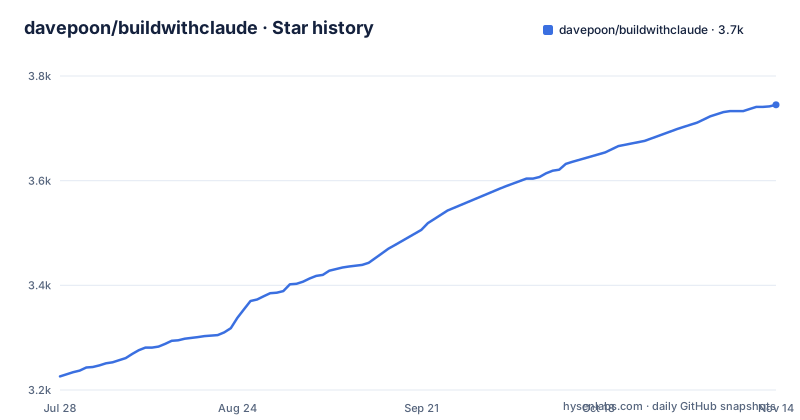
Star history
- davepoon/buildwithclaude3,745 ★ · +519
| Repository | 2026-07-28 | 2026-11-14 |
|---|---|---|
| davepoon/buildwithclaude | 3.2k | 3.7k |
519 Stars in the last 109 days, measured from the daily GitHub snapshot. Compare with other projects
Editorial analysis
What Build with Claude Solves
Claude Code users face a discovery problem. Extensions come as agents, commands, hooks, skills, and plugins, scattered across individual repositories and marketplaces. Build with Claude consolidates these into one place. It is a plugin marketplace and discovery platform. The README positions it as a way to browse curated plugins and discover community contributions. The target user is a Claude Code developer who wants to extend workflows without hunting through GitHub for each piece. The repository maintains its own curated collections: 117 agents, 175 commands, 28 hooks, 26 skills, and 51 plugins. It also indexes external sources: over 20,000 community plugins, more than 4,500 MCP servers, and over 1,100 plugin marketplaces. That scale is the point. The problem it solves is fragmentation, and the solution is a single index with install commands.
How the Marketplace Mechanism Works
The core mechanism is the Claude Code plugin marketplace. You add the repository as a marketplace using the /plugin command inside Claude Code. Once added, you can search and install extensions by name, prefixed with @buildwithclaude. The repository itself is structured as a set of plugin packages under the plugins/ directory. Each plugin contains markdown files for agents, commands, or hooks. For example, an agent lives at plugins/agents-*/agents/*.md. The frontmatter of each markdown file defines metadata like name, description, category, and tools. The body contains the prompt or implementation. This is a file-based architecture. Claude Code reads these definitions and makes them available. The web UI at buildwithclaude.com provides a browsable interface with filtering and copy-paste install commands. The CLI package bwc-cli, with recent releases up to 1.2.4, likely automates parts of this, though the README does not detail its commands. The data flow is straightforward: repository files become marketplace entries, which Claude Code consumes.
Getting Started: Commands and Configuration
The README gives clear installation steps. The recommended path is to add the marketplace inside Claude Code: /plugin marketplace add davepoon/buildwithclaude. Then search with /plugin search @buildwithclaude. To install a specific plugin, you run /plugin install <plugin-name>@buildwithclaude. Examples include agents-python-expert, commands-version-control-git, and hooks-notifications. You can also install entire categories: /plugin install all-agents@buildwithclaude, all-commands, or all-hooks. There is a manual fallback. Clone the repository, then use find commands to copy agent and command markdown files into ~/.claude/agents/ and ~/.claude/commands/. After copying, restart Claude Code. The manual path is useful if you cannot or do not want to use the marketplace mechanism. Note that the README shows find commands for agents and commands, but not for hooks or skills, so the manual route is incomplete for those types. The contributing section says to run npm test to validate new plugins, which implies a test suite exists in the repository.
What the Collections Actually Contain
The curated collections are categorized. Agents span development, language specialists, quality and security, infrastructure, data and AI, and crypto and blockchain. Commands cover version control, code analysis, documentation, and project management. Hooks handle notifications, git operations, development tasks, and security. The README gives usage examples. Agents are invoked by context or explicit mention, like "Use the python-pro to optimize this function" or "@agent-security-auditor review this authentication code." Commands use a slash prefix: /commit, /create-pr, /docs, /tdd, /code_analysis. Hooks run automatically on events like PreToolUse or PostToolUse. The plugin format is standardized. Each agent file has frontmatter with name, description, category, and tools, followed by the role prompt. Commands have description, category, and argument-hint. Hooks specify which events they trigger. This structure makes contributions predictable. However, the README does not list the actual names of all 117 agents or 175 commands. It shows categories and a few examples. The full catalogue is on the web UI, which is not part of the repository material. So the repository itself is a starting point, not the complete index.
Limitations and Failure Modes
The biggest limitation is curation depth. The repository maintains 51 plugins, but indexes 20,000 community plugins. That is a ratio of about 0.25 percent curated. The README calls the in-repo collections curated, but the community index is not. Quality varies wildly. A plugin that installs cleanly may still contain a flawed prompt or a hook that fires too often. The README does not describe any vetting process for community plugins. Another failure mode is the manual installation route. It copies files into global directories, which can overwrite existing agents or commands with the same name. There is no mention of conflict resolution. Also, the find command examples only cover agents and commands. Hooks and skills are left out. If a user relies on the manual path, they miss those types entirely. The repository's own test suite validates plugin format, not runtime behavior. A markdown file can pass npm test and still break a workflow. Finally, the project depends on Claude Code's evolving plugin system. If Anthropic changes the marketplace format, the repository and its 1,100 indexed marketplaces may need updates. The last push was October 2025, so it is active, but that is no guarantee of future compatibility.
Alternatives and How They Differ
The README itself links to Vexilo, described as a visual index of 31 agents, 99 commands, 123 skills, and 13 rules, organized around a 5-step workflow. That is a different approach. Vexilo is a field guide, not a marketplace. It presents a smaller, hand-picked set of extensions with a visual, workflow-oriented organization. Build with Claude is a bulk aggregator. Vexilo is for someone who wants a curated starting point and a mental model of how to use Claude Code. Build with Claude is for someone who wants to search a large index and install many things. Another alternative is the official Claude Code plugin marketplace system itself. You can add any marketplace, not just this one. The README links to the plugin marketplaces documentation. That approach gives you direct control over sources, but you lose the aggregation. Build with Claude's advantage is the single entry point and the web UI. Its disadvantage is that you are trusting one maintainer's index. The choice is between a wide net and a focused guide.
Maintenance, Contribution, and License
The project is MIT licensed, which allows free use and modification. The repository has a contributing guide and a test command. The README outlines a contribution flow: create a directory in plugins/, add files, run npm test, and submit a pull request. That suggests an active maintenance model, but the README does not state how often the community index is refreshed. The 20,000+ plugins and 4,500+ MCP servers are external. Keeping that index current requires ongoing work. The bwc-cli releases, with 1.2.4 in October 2025, indicate regular updates. However, the maintenance cost for a user is the need to re-run /plugin marketplace add or update the index to get new entries. There is no documented auto-update mechanism. For contributors, the format is simple markdown, so the barrier to entry is low. For users, the risk is that a plugin you rely on may become stale or break with a Claude Code update. The MIT license means you can fork and fix it yourself, but you inherit the maintenance burden. The README does not mention any security review process for community plugins, so treat them as untrusted code.
Editorial conclusion
Adopt Build with Claude if you want a broad, searchable collection of Claude Code extensions and prefer a single marketplace command to install them. It suits developers who value quantity and discovery over hand-picked curation. Avoid it if you need strict quality control or work in a regulated environment where unvetted community plugins pose a risk. Before adopting, verify the maintenance status of individual plugins, check the license of each component, and test a few in a sandbox. The repository's own validation via npm test is a start, but it does not guarantee runtime safety. The project's value lies in its aggregation, not in the depth of any single extension, so judge it on that basis.
Frequently asked questions
what is build with claude
A plugin marketplace and discovery platform for Claude Code, with a browsable web interface. It curates agents, commands, hooks, skills and plugin packages in this repository, and also indexes community plugins, MCP servers and other marketplaces from elsewhere.
How do I install a plugin from Build with Claude?
Add the marketplace with the marketplace add command naming the repository, then install a plugin by its name suffixed with the marketplace name. The README also shows bulk install commands for all agents, all commands and all hooks.
What does the Build with Claude repository contain?
Over a hundred agents, 175 commands, 28 hooks, 26 skills and 51 bundled plugin packages, each in its own directory under a plugins directory, alongside a web interface workspace, validation scripts, tests and a Dockerfile for deployment.
How do I contribute a plugin to Build with Claude?
Create a directory under the plugins directory following the naming convention, add your agent, command or hook markdown files with the documented frontmatter block, run the test script to validate, and open a pull request.
How does Build with Claude validate its plugins?
The test script runs a validation step over everything and then unit tests for the validation scripts and the interface's search code. The runtime dependencies include a JSON schema validator and a frontmatter parser, which is what the per-file format checks rely on.
Official sources
Add this badge to your README
If you maintain this project, the badge below links readers to this analysis and shows its maintenance status from the daily GitHub snapshot. Paste the markdown into your README; add ?metric=license or ?metric=stars to the image URL for a different field.

[](https://hysenlabs.com/projects/davepoon-buildwithclaude)Star history chart for your README
[](https://hysenlabs.com/projects/davepoon-buildwithclaude)Was this useful?