Huashu Design: an agent skill that turns one prompt into HTML prototypes, decks and MP4, if the install is complete
Huashu Design · HTML-native design skill for Claude Code · Claude Code 里 HTML 原生的设计 skill · 高保真原型 / 幻灯片 / 动画 + 20 设计哲学 + 5 维评审 + MP4 导出 · Agent-agnostic.
At a glance
- What is it?
- Huashu Design is an MIT-licensed skill for Claude Code, Cursor, Codex and other agents that produces clickable prototypes, editable PPTX decks, animations and infographics from plain HTML and CSS. Its direction advisor and style library are the real mechanism; its weak points are a fragile install path and optional features tied to Volcengine API keys.
- Who is it for?
- Huashu Design fits people already working inside a skills-capable agent who want prototypes, decks, animations or Xiaohongshu post sets without opening Figma or After Effects, and it is free for commercial use under MIT since May 14, 2026. It is a weaker fit if you need its voice or AI video review features without a Volcengine account.
- Can I use it commercially?
- Yes. MIT is a permissive licence: you can use, modify and sell software built on it, as long as you keep its copyright and licence notices.
- Is it still maintained?
- Yes. The repository last received commits 4 days ago.
- What is it written in?
- Mainly HTML, according to GitHub's language statistics.
Answers come from the project's GitHub data, last synced on November 13, 2026, and from our analysis. They are not legal advice.
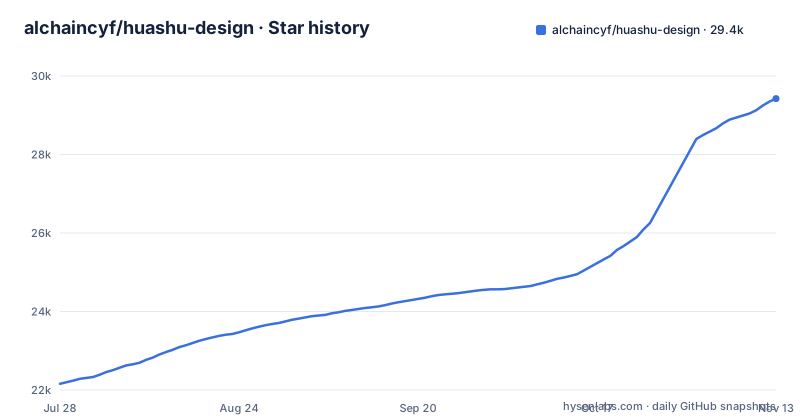
Star history
- alchaincyf/huashu-design29,425 ★ · +7,268
| Repository | 2026-07-28 | 2026-11-13 |
|---|---|---|
| alchaincyf/huashu-design | 22.2k | 29.4k |
7,268 Stars in the last 108 days, measured from the daily GitHub snapshot. Compare with other projects
Editorial analysis
One sentence in the agent, a deliverable HTML design out
Huashu Design is a skill, not an app. There are no buttons, no panels and no Figma plugin: you install it into an agent and then describe what you want in a sentence. The project names Claude Code, Cursor, Codex, OpenClaw and Hermes as agents it installs into, and the install command is the same for all of them:
npx skills add alchaincyf/huashu-designThe deliverables are built in HTML. An interactive prototype comes out as a single HTML file with a real iPhone bezel, clickable screens and Playwright verification. Slides come out as an HTML deck you present in the browser plus an editable PPTX. Timeline animations export to MP4 at 25fps or 60fps with frame interpolation, GIF with palette optimization, and background music. Infographics export to PDF, PNG or SVG. Version 3.1 added Xiaohongshu image sets: groups of up to 18 images at 3:4.
The project attaches a time to each task, from 3 minutes for a review to 15 to 25 minutes for a slide deck. Those are the author's own figures, and every design shown in the README was produced by the skill itself.
Six thumbnails before three real drafts
When a request is vague, the skill falls back to a design direction advisor that uses three complementary logics, each proposing two candidates. The first picks the best designer for the job as if budget were unlimited. The second finds a real reference, an award-winning work in the same medium, and screenshots it before any design starts; a script called `ref_board.py` turns the reference into a board the agent looks at. The third is a seconds roulette that draws a random style from the library to break habits.
In 3.0 the six candidates are first drawn as a single page of thumbnails. The skill then builds the three strongest and most different ones into real visuals for you to choose from, and hands over the other three as alternates. In the 2.0 flow, each logic produced one version directly.
A design check runs alongside. In one of the project's own examples, a museum exhibition site, the check flagged that two drafts used the same Hokusai print on their first screen, and one version was switched to a different print.
92 CSS-only styles and a ledger of what you made before
Behind the advisor is an HTML-native style library of 92 styles: 20 for web, 20 for slides, 20 for infographics, 12 for apps, 12 for Chinese and East Asian design, and 8 for Xiaohongshu. All are pure CSS with no image generation, and each has a sample page. The 3.0 samples use invented subjects and numbers.
Version 3.0 also added an appearance ledger that remembers what your earlier deliveries looked like, so projects stop resembling each other. In the recipe app example, the ledger saw that 5 of the last 6 deliveries used sans-serif headings, and that version chose a Song typeface instead.
The skill also writes lessons into its own experience notes. After the author remarked that a travel photo archive should leave nothing out, it recorded that personal memory archives must include all photos, scoped only to photo archives and not to product interfaces. That scoping matters: preferences you state in one project are meant to stay in that category.
An old skills CLI installs SKILL.md and nothing else
The skill is not a single SKILL.md file. Its `references/`, `assets/`, `scripts/` and `demos/` subdirectories hold 99 referenced recipes, scripts and assets, and the skill needs all of them. The project's own install note warns that `skills` CLI versions up to 1.5.15 had a bug that synced only the single file; it was fixed in 1.5.19.
The consequence is a silent partial install. The agent finds SKILL.md and appears to have the skill, but the recipes and scripts it references are missing. After installing, look at the install directory, for example `~/.claude/skills/huashu-design/`. If it holds only SKILL.md, upgrade the CLI and install again:
npm i -g skills@latest # 或 npx skills@latest add alchaincyf/huashu-designIf that still fails, clone the repository into a skills directory directly:
git clone https://github.com/alchaincyf/huashu-design.git ~/.claude/skills/huashu-designExport depends on Playwright, pptxgenjs, sharp and pdf-lib
The HTML is only half of each deliverable; the rest is conversion, and the repository's package.json declares four dependencies for it: `pdf-lib` ^1.17.1, `playwright` ^1.59.1, `pptxgenjs` ^4.0.1 and `sharp` ^0.34.5.
The PPTX path is the most specific. `html2pptx.js` reads each DOM element's computedStyle and translates it element by element into PowerPoint objects, so the exported deck contains real text boxes you can double-click and edit in PowerPoint rather than flattened images.
The motion engine uses a Stage and Sprite time-segment model with four APIs, `useTime`, `useSprite`, `interpolate` and `Easing`, and one command exports MP4, GIF, 60fps interpolated video or a finished cut with music. The Tweaks panel parameterizes color, typeface and information density, persisting choices in `localStorage` so a refresh keeps them.
The practical consequence is that these are Node packages the skill's scripts call locally. An agent environment that cannot install or run them will still produce HTML but not the exported files.
Voice and AI video review need Volcengine keys
The repository ships a `.env.example` that shows which features reach outside your machine. Voice uses Doubao TTS from Volcengine's openspeech service and needs `DOUBAO_TTS_API_KEY`, `DOUBAO_TTS_VOICE_ID` for a cloned voice, `DOUBAO_TTS_CLUSTER=volcano_icl` and the endpoint `https://openspeech.bytedance.com/api/v1/tts`. Keys are requested from https://console.volcengine.com/speech.
A second optional cloud feature, AI review of a rendered video, lives in `scripts/cloud/ai-review-video.py` and needs an `ARK_API_KEY` for Volcengine Ark, requested from https://console.volcengine.com/ark.
For readers who do not hold Volcengine accounts, these two features are not available, and no other voice or review provider is configured in the example file. The core design work, HTML output and the local exports do not appear in the environment file at all, and the separate 5-dimension review, which scores philosophy consistency, visual hierarchy, detail execution, functionality and innovation from 0 to 10 with a radar chart and a Keep, Fix and Quick Wins list, is listed as a skill capability rather than a cloud one.
MIT since May 14, 2026, with the old commercial clause void
The license changed during the project's life. Since May 14, 2026, the skill has been fully open source under MIT, free for personal and commercial use with no prior authorization. The earlier terms, free for personal use but requiring a license for enterprise commercial use, are explicitly void. If you read about Huashu Design in older posts that mention a commercial license requirement, that requirement no longer applies.
Release history shows recent activity. v2.0 shipped on April 21, 2026, remaking nine capability demos with Chinese and English versions. v3.0.0 followed on October 17, 2026, and v3.1.0 on October 30, 2026, which is also the date of the last push. The default README is in Chinese, with the English version in `README.en.md`, and a beginner tutorial recorded by the author is on YouTube.
Editorial conclusion
Huashu Design fits people already working inside a skills-capable agent who want prototypes, decks, animations or Xiaohongshu post sets without opening Figma or After Effects, and it is free for commercial use under MIT since May 14, 2026. It is a weaker fit if you need its voice or AI video review features without a Volcengine account. Before relying on it, confirm the install directory contains references/, assets/, scripts/ and demos/ next to SKILL.md, and treat the per-task timings as the author's figures.
Frequently asked questions
What is Huashu Design?
Huashu Design is an MIT-licensed, HTML-native design skill for agents such as Claude Code, Cursor and Codex. From a one-sentence prompt it produces clickable prototypes, HTML decks with editable PPTX export, MP4 and GIF animations, infographics and a 5-dimension design review.
How does Huashu Design compare with Claude Design?
Huashu Design's README has a dedicated section on its relationship with Claude Design, which is where the author's own comparison lives. Huashu Design itself is a skill installed with npx skills add alchaincyf/huashu-design into agents including Claude Code, Cursor and Codex.
What is Huashu Design an alternative to?
Huashu Design replaces working in Figma or After Effects for its target tasks: every design page in its README was made by the skill from a one-sentence prompt, with no buttons, panels or Figma plugin.
Official sources
Add this badge to your README
If you maintain this project, the badge below links readers to this analysis and shows its maintenance status from the daily GitHub snapshot. Paste the markdown into your README; add ?metric=license or ?metric=stars to the image URL for a different field.

[](https://hysenlabs.com/projects/alchaincyf-huashu-design)Star history chart for your README
[](https://hysenlabs.com/projects/alchaincyf-huashu-design)Was this useful?