iframe-resizer: sizing cross-domain iframes to their content
Keep iframes sized to their content
At a glance
- What is it?
- iframe-resizer keeps an iframe matched to the height of the document inside it, including cross-domain embeds. Setup lives on the project's own site, and the licence is worth reading before you ship it.
- Who is it for?
- Adopt iframe-resizer when you embed a third-party or cross-domain document and need the parent page to follow its height without a fixed pixel value, and when the GPL-3.0 licence declared in the repository's package.json fits your distribution. Do not adopt it if you cannot add the child script to the embedded document, or if you need a documented rollback path; the README points only to the v5 upgrade guide.
- Can I use it commercially?
- Check first. The repository uses a licence we do not classify automatically, so read its LICENSE file before any commercial use.
- Is it still maintained?
- Yes. The repository last received commits 18 days ago.
- What is it written in?
- Mainly JavaScript, according to GitHub's language statistics.
Answers come from the project's GitHub data, last synced on November 15, 2026, and from our analysis. They are not legal advice.
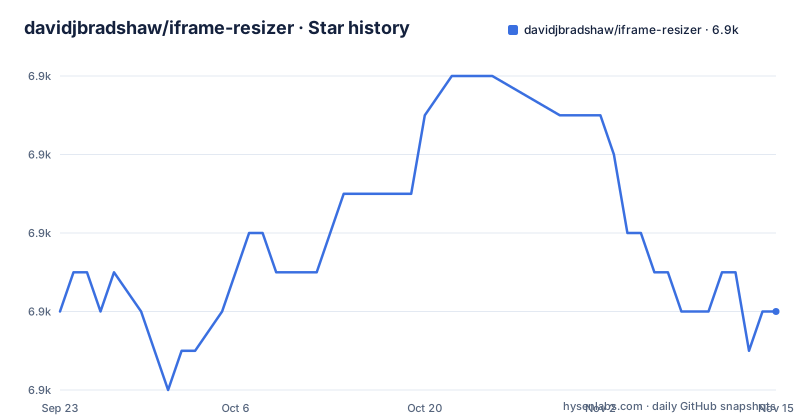
Star history
- davidjbradshaw/iframe-resizer6,930 ★ · +0
| Repository | 2026-09-23 | 2026-11-15 |
|---|---|---|
| davidjbradshaw/iframe-resizer | 6.9k | 6.9k |
0 Stars in the last 53 days, measured from the daily GitHub snapshot. Compare with other projects
Editorial analysis
The problem iframe-resizer exists to remove
An iframe does not grow with the page inside it. The embedding document has to be told a height, and the embedded document has no say in it. Set a fixed height and the shorter page leaves a gap while the longer page gets a scrollbar inside a scrollbar. The usual workaround is a script that measures the child document and posts the number up to the parent, and that is exactly what iframe-resizer packages.
The README states that it supports both internal (same-domain) and external (cross-domain) iframes.
How the parent and child scripts actually talk
There are two halves. The parent page includes the parent script and points it at one or more iframe elements. The document served inside the iframe includes the child script. The two exchange messages over postMessage, which is the only channel available when the origins differ.
The README describes the child script as "a zero impact guest on the sites hosting it", and the sizing logic on the child side is where the interesting work sits. According to the README, browsers still do not offer a single dependable way to measure page content, so the library inspects the page and picks from a range of DOM values plus its own content size calculation. It then watches for changes to both HTML and CSS and reports a revised height. The README states that even on complex pages it can detect a change and update the iframe in sub millisecond time; treat that as the project's own claim rather than a measured figure, because the README does not describe the hardware or the page it refers to.
Version 5 is described as an extensive rewrite around modern browser APIs, with a refreshed and simplified API compared with earlier versions. The README points readers coming from a previous version to an upgrade guide on the project site.
Installing iframe-resizer and resizing your first iframe
The README does not carry install steps. It directs readers to the iframe-resizer website for setup guides, and lists versions for Vanilla JS, React, Vue, Angular and jQuery, plus guides for WordPress and Google Apps Script. The repository's own package.json is named iframe-resizer-mono and is marked private, so it is the workspace root rather than something you install. The README's badge links reference @iframe-resizer/parent and, in a commented-out block, the unscoped iframe-resizer package. Check which one your framework guide names before you add it.
The general shape of a first use is a script tag in each document, but the README prints neither snippet, so treat the exact paths and the initialisation call as something to confirm against the setup guide for your framework. The repository does ship an example directory with html, react and vue variants, which is a safer starting point than reconstructing the call from memory. What you should see after wiring it up is an iframe whose height follows the child document as that document changes, without a fixed height attribute on the element. The README also notes that combined with viewer.js the library can resize iframes containing PDF and ODF documents.
What the extended API adds beyond height
Sizing is the headline, but the README lists a second group of features it calls missing browser API pieces. The child can scroll the parent page, either relative to the iframe or relative to the parent's own position. The child can ask for the iframe's position, the parent's scroll position and the parent's viewport. In-page links inside the iframe are fixed so they work, and links can be allowed to propagate to the parent. The parent side gains onMouseEnter and onMouseLeave events on the iframe element, which the plain DOM does not provide.
Two items in that list deserve attention. The README mentions automatic domain authentication, which is the mechanism that decides which parent origins a child will talk to; the README does not spell out the policy, so read the API page before assuming a default. It also mentions simplified message passing in both directions, which is a convenience wrapper over postMessage rather than a replacement for it.
Where iframe-resizer is the wrong tool
The library works by running script inside the embedded document. If you cannot add the child script to that document, whether because it is a third-party page you do not control or because its content security policy blocks the script, the cross-domain path is closed to you. Same-origin embeds can sometimes be handled with a ResizeObserver or a MutationObserver in the parent alone, without a second script in the child, and that is fewer moving parts if the child is yours.
The second limitation is version churn. The README states that version 5 was extensively rewritten and that the API was refreshed and simplified, and it points to an upgrade guide, which tells you the v4 API is not the v5 API. So a working integration on the older line is not a drop-in upgrade. The README does not document rollback, and it does not describe a compatibility layer. If your embeds are spread across many third-party sites, every one of them has to carry a child script version that agrees with your parent, and the README does not describe how mismatched versions behave.
Alternatives and how they differ
The obvious alternative is to write the postMessage handshake yourself. That is a small amount of code for a fixed layout: the child measures its document, posts a height, the parent listens and sets the style. The difference is everything around that core. iframe-resizer carries the measurement heuristics for pages where no single DOM value is reliable, a change watcher, origin authentication, and the extended API above. A hand-rolled version gives you control and no dependency, and it also gives you the maintenance of all of that.
A second option is to avoid the iframe. If the embedded content is yours and same-origin, rendering it in the page removes the sizing problem entirely, at the cost of style and script collisions that the iframe was isolating you from. For PDFs specifically, the README's own suggestion is viewer.js plus iframe-resizer, so the two are complements rather than alternatives. The project does not name an alternative; in practice it is either your own messaging code or not using an iframe.
Licence and the cost of staying current
The repository's package.json declares GPL-3.0, while the GitHub licence field reports NOASSERTION, which means the platform could not classify the file it found. Those two signals do not agree, and the README does not discuss licensing at all. If you are embedding the library in a distributed product, read the LICENSE file in the repository and the package metadata for the specific package you install; whether GPL-3.0 fits your distribution is a question for your own counsel, not something this article can settle.
On maintenance, the last push to the repository was on 2026-10-28 and the most recent release listed is v5.5.9 from 2026-02-06, following v5.5.8 in January 2026 and v5.5.7 in September 2025. The repository is not archived. The upgrade cost is the v4 to v5 API change described above, and the ongoing cost is that the child script has to be present in every embedded document you want resized.
Editorial conclusion
Adopt iframe-resizer when you embed a third-party or cross-domain document and need the parent page to follow its height without a fixed pixel value, and when the GPL-3.0 licence declared in the repository's package.json fits your distribution. Do not adopt it if you cannot add the child script to the embedded document, or if you need a documented rollback path; the README points only to the v5 upgrade guide. Before you publish, verify two things yourself: which package your app actually imports, since the README's badge links to @iframe-resizer/parent while the repository root is the private iframe-resizer-mono workspace, and whether the licence of the package you install matches the GPL-3.0 declared in package.json.
Frequently asked questions
What is iframe-resizer and what does it do?
It is a JavaScript library that resizes an iframe to match the size of the content inside it and then keeps watching for changes. The README describes it as working for both same-domain and cross-domain iframes, with a separate parent script and child script.
How do I use iframe-resizer?
Add the parent script to the page holding the iframe and the child script to the document served inside it, then initialise the parent script against the iframe element. The README does not include the steps; it points to the iframe-resizer website for setup guides covering Vanilla JS, React, Vue, Angular and jQuery.
How do I resize an iframe with iframe-resizer?
The child script measures the document, choosing between DOM values and the library's own content size calculation, and reports the result to the parent so the iframe height is updated. The parent script runs on the embedding page and applies the new size.
Is there a free alternative to iframe-resizer?
The README does not name one. The practical alternative is your own postMessage height handshake, or dropping the iframe when the content is same-origin and can be rendered in the page directly. The README does note that iframe-resizer works alongside viewer.js for PDF and ODF documents.
Official sources
Add this badge to your README
If you maintain this project, the badge below links readers to this analysis and shows its maintenance status from the daily GitHub snapshot. Paste the markdown into your README; add ?metric=license or ?metric=stars to the image URL for a different field.

[](https://hysenlabs.com/projects/davidjbradshaw-iframe-resizer)Star history chart for your README
[](https://hysenlabs.com/projects/davidjbradshaw-iframe-resizer)Was this useful?