FaceSwap: A Deep Learning Tool for Face Swapping with a Clear Ethical Stance
Deepfakes Software For All. Please see this forum post: Manifesto FaceSwap has ethical uses.
At a glance
- What is it?
- FaceSwap is an open source Python tool for swapping faces in images and videos using deep learning. It offers a complete pipeline for extraction, training, and conversion, but its ethical boundaries and hardware demands are important considerations.
- Who is it for?
- FaceSwap is for developers, researchers, and hobbyists who want to experiment with face swapping technology in a controlled environment. It is not for anyone seeking to create deceptive or non-consensual content, as the project explicitly prohibits such uses.
- Can I use it commercially?
- Yes, with conditions. GPL-3.0 is a copyleft licence: if you distribute software that includes it, you must release that software's source code under the same licence. Running it internally without distributing it does not trigger that obligation.
- Is it still maintained?
- Yes. The repository last received commits 100 days ago.
- What is it written in?
- Mainly Python, according to GitHub's language statistics.
Answers come from the project's GitHub data, last synced on November 13, 2026, and from our analysis. They are not legal advice.
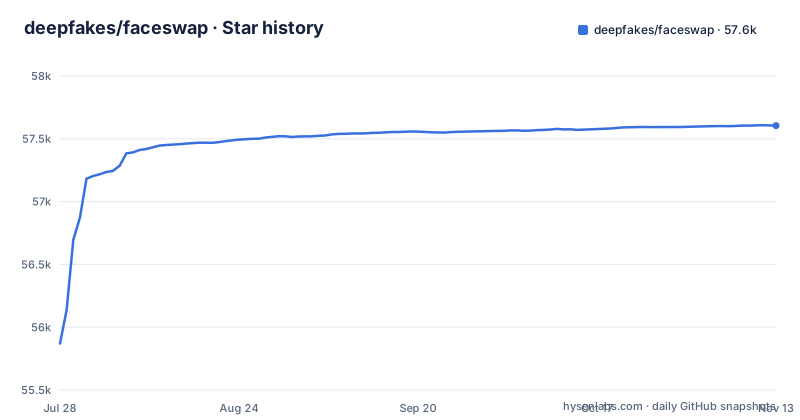
Star history
- deepfakes/faceswap57,605 ★ · +1,735
| Repository | 2026-07-28 | 2026-11-13 |
|---|---|---|
| deepfakes/faceswap | 55.9k | 57.6k |
1,735 Stars in the last 108 days, measured from the daily GitHub snapshot. Compare with other projects
Editorial analysis
What FaceSwap Solves and Who It Is For
FaceSwap addresses a specific technical problem: replacing faces in images and videos using deep learning, in a way that is accessible to non-experts. Before this project, similar techniques were scattered across academic papers and required deep knowledge of AI. FaceSwap bundles the necessary code into a single, runnable tool. It is aimed at programmers, engineers, VFX artists, activists, and hobbyists who want to learn by doing. The README explicitly states that the software exists for experimentation, social commentary, and legitimate faceswapping, not for inappropriate content. This focus makes it a practical choice for those who want to explore the technology without writing models from scratch.
The Three-Stage Pipeline: Extract, Train, Convert
The core workflow is a three-stage pipeline. First, extraction: run `python faceswap.py extract` to pull faces from source photos in the `src` folder into an `extract` folder. Second, training: run `python faceswap.py train` with two folders of face images, and the model is saved in the `models` folder. Third, conversion: run `python faceswap.py convert` to apply the trained model to photos in the `original` folder, outputting to `modified`. This separation of concerns means each stage can be run independently, which is useful for debugging. The README also mentions a GUI alternative. This pipeline is straightforward but requires careful preparation of input data, as the quality of extracted faces directly affects the model.
Installation and Hardware Requirements
Installation is covered in INSTALL.md, which the README points to as a mandatory first step. The software runs on Windows, Linux, and macOS. A modern GPU with CUDA support is recommended for best performance, and many AMD GPUs work on Linux through ROCm. This is a significant constraint: without a compatible GPU, training likely becomes impractically slow. The README sends users to INSTALL.md for full installation instructions. The presence of installers in recent releases, such as v3.0.0 for all three operating systems, suggests that setup has been streamlined, but the underlying hardware dependency remains.
Recent Releases and Maintenance Signals
The repository shows active maintenance. The latest release, v3.0.0, was pushed on December 21, 2025, with installers for Windows, Linux, and macOS. The previous release v2.3.0 came two days earlier, and v2.2.0 was in June 2023. This cadence indicates ongoing development and fixes. The project is not archived, and the default branch is master. The README includes references to a forum and Discord server for support, which suggests a community around the project. However, the README does not specify how often updates are released or whether there are long-term maintenance plans. Users should check the repository for the latest status before adopting it.
The Ethical Stance and Its Practical Implications
The README includes a manifesto that is explicit about the project's ethical boundaries. It states that FaceSwap is not for creating inappropriate content, not for changing faces without consent, and not for illicit purposes. The developers claim a zero tolerance approach to unethical uses. This stance is not just PR; it affects how the tool is positioned and likely how it is received in professional settings. For engineers, this means using the tool requires a clear policy on consent and transparency. The manifesto also highlights that many developers use the code simply to learn, not to produce videos. This framing is important because it separates the tool from its misuse, but it does not change the fact that the output can be deceptive if used irresponsibly.
Limitations and Wrong-Tool Cases
One genuine limitation is the hardware requirement. Without a modern NVIDIA GPU (or AMD with ROCm on Linux), the training phase is likely to be extremely slow, making the tool impractical for casual users on integrated graphics. Another limitation is the complexity of the pipeline: users must gather and prepare photos or videos, run extraction, train a model, and then convert. This is not a one-click solution; it requires patience and some understanding of the underlying process. Furthermore, the documented workflow is a sequence of separate extract, train and convert steps rather than a live feed. It is also the wrong tool for anyone who wants to create content without the consent of the people involved, as that violates the project's stated ethics.
Alternatives and Comparative Approach
Any alternative should be judged against the workflow FaceSwap commits you to: gather photos or videos, extract faces, train a model on the extracted faces, and convert your sources with that model. The README describes that workflow and the hardware it expects (a modern GPU with CUDA support, or many AMD GPUs through ROCm on Linux), so compare tools on those two points.
Maintenance, Upgrade Cost, and License
The project is licensed under GPL-3.0, which means any derivative work must also be open source under the same license. This is a critical consideration for commercial use, as it may require releasing your own code. The forum and Discord are available for help, which lowers the learning curve. However, the GPL license is a legal boundary that engineers must evaluate before integrating FaceSwap into proprietary projects.
Editorial conclusion
FaceSwap is for developers, researchers, and hobbyists who want to experiment with face swapping technology in a controlled environment. It is not for anyone seeking to create deceptive or non-consensual content, as the project explicitly prohibits such uses. Before adopting it, verify that your hardware meets the CUDA or ROCm requirements, and review the full installation guide. Also, consider the GPL-3.0 license implications if you plan to distribute modified versions. Ultimately, FaceSwap is a serious tool for learning and legitimate creative work, not a toy for misuse.
Frequently asked questions
How does Faceswap work?
It runs as a sequence of three commands from a setup folder. `python faceswap.py extract` takes photos from the `src` folder and writes faces into `extract`, `python faceswap.py train` reads from two folders containing both faces and saves a model into `models`, and `python faceswap.py convert` takes photos from `original` and writes results into `modified`. There is also a GUI, and USAGE.md holds the detailed instructions.
How do I install Faceswap?
The README directs you to INSTALL.md before getting started, and describes the program as Python running on Windows, Linux and macOS. For performance it expects a modern GPU with CUDA support, and says many AMD GPUs are supported through ROCm on Linux. The setup script also defines `cpu` and `apple_silicon` backends alongside `nvidia`, `rocm` and `all`.
Is using AI face swap illegal?
The manifesto gives the developers' own position rather than a legal answer: FaceSwap is not for changing faces without consent or with the intent of hiding its use, and not for creating inappropriate content, and the project describes a zero tolerance approach to unethical use. Those are commitments by the developers.
Can faceswaps be detected?
The manifesto states that FaceSwap is not for changing faces with the intent of hiding its use, and lists social and political commentary and movies among its intended ethical uses.
Official sources
Add this badge to your README
If you maintain this project, the badge below links readers to this analysis and shows its maintenance status from the daily GitHub snapshot. Paste the markdown into your README; add ?metric=license or ?metric=stars to the image URL for a different field.

[](https://hysenlabs.com/projects/deepfakes-faceswap)Star history chart for your README
[](https://hysenlabs.com/projects/deepfakes-faceswap)Was this useful?