PaddleOCR: one package, three parsers that do not return the same thing
Turn any PDF or image document into structured data for your AI. A powerful, lightweight OCR toolkit that bridges the gap between images/PDFs and LLMs. Supports 100+ languages.
At a glance
- What is it?
- PaddleOCR bundles a document vision-language model, a structure pipeline and a throughput-tuned parser under one Apache-2.0 name, and the install pins PaddleX to a single minor version. The repository is more than a library as well: an MCP server, a LangChain integration, a browser SDK, an API SDK and eight translations of the same README.
- Who is it for?
- Use PaddleOCR when your input is PDFs or images and you want Markdown or JSON out, and pick a parser before you pick a model tier. Two things to check first.
- Can I use it commercially?
- Yes. Apache-2.0 is a permissive licence: you can use, modify and sell software built on it, as long as you keep its copyright and licence notices.
- Is it still maintained?
- Yes. The repository last received commits 59 days ago.
- What is it written in?
- Mainly Python, according to GitHub's language statistics.
Answers come from the project's GitHub data, last synced on November 13, 2026, and from our analysis. They are not legal advice.
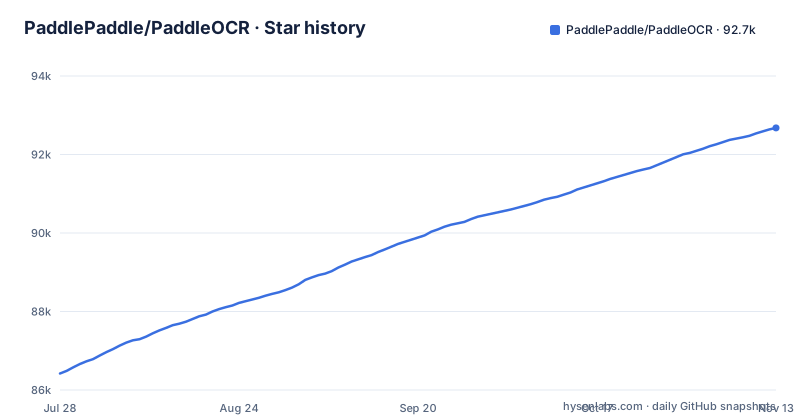
Star history
- PaddlePaddle/PaddleOCR92,678 ★ · +6,258
| Repository | 2026-07-28 | 2026-11-13 |
|---|---|---|
| PaddlePaddle/PaddleOCR | 86.4k | 92.7k |
6,258 Stars in the last 108 days, measured from the daily GitHub snapshot. Compare with other projects
Editorial analysis
setup.py is three lines, and the version number is bumped by hand
setup.py holds a licence header, one import and one call: from setuptools import setup, followed by setup(). Every real decision sits in pyproject.toml, which pins the build requirements to setuptools==72.1.0, wheel and setuptools_scm, and declares the version as dynamic. A comment directly above that line says the version number needs to be incremented after each version release.
Consequence: a release depends on someone following the step the comment describes.
The install pins PaddleX below 3.8, so an upgrade can resolve to nothing
The runtime dependency list is short. It is paddlex[ocr-core] with a floor of 3.7.0 and a ceiling below 3.8.0, PyYAML at 6 or newer, requests, aiohttp at 3.8.0 or newer and typing-extensions at 4.12 or newer:
requires-python = ">=3.8"
dependencies = [
    "paddlex[ocr-core]>=3.7.0,<3.8.0",
Consequence: that upper bound is the whole risk. Once PaddleX 3.8 exists, PaddleOCR cannot move to it until the pin in pyproject.toml is changed. The metadata also states a Python floor of 3.8 while its classifiers run as far as 3.13, so the declared interpreter range is wider than the single PaddleX minor the package will accept.
Two requirements files, and one of them branches on Python 3.9
pyproject.toml declares five runtime dependencies. requirements.txt declares a different and longer set with no floors on any of it: shapely, scikit-image, pyclipper, tqdm, numpy, rapidfuzz, opencv-python, opencv-contrib-python, cython, Pillow, pyyaml, requests, albumentations, albucore and packaging. Only lmdb is constrained, and it is constrained twice, once for Python 3.9 and newer and once with a ceiling for anything older:
lmdb; python_version >= "3.9"
lmdb<1.5; python_version < "3.9"
Consequence: these are not the same list formatted two ways. One is the published contract and the other looks like the set needed for training and evaluation, so installing from requirements.txt gives you a different environment from installing the package. Both opencv distributions appear in the unversioned file, and the comment beside albumentations explains that albucore is there for compatibility, which is the level of detail the pinned file has none of.
Three document parsers, and they do not return the same thing
The README carries three separate parsing products. PaddleOCR-VL-1.6 is a 0.9B vision-language model reporting 96.3% on OmniDocBench v1.6 with Markdown and JSON output. PP-StructureV3 is described as giving finer-grained coordinate information than the PaddleOCR-VL series, including table cell coordinates and text coordinates. HPD-Parsing, announced on 2026.07.22, is the throughput option, using hierarchical parallel decoding and Progressive Multi-Token Prediction to reach a peak of 4,752 tokens per second on public benchmarks, served through an OpenAI-compatible endpoint or a customized vLLM runtime.
Consequence: the real choice is between output shape and speed, and it is not a drop-in one. The README documents finer-grained coordinates for the PP-StructureV3 path, and the throughput figure belongs to a different model behind a different runtime.
PP-OCRv6 covers 50 languages in one model, while the project claims 100+
The scene text side is specific about its scope. PP-OCRv6 handles 50 languages in a single unified model, described as Chinese, English, Japanese and 46 Latin-script languages, with no model switching needed for multilingual documents. Spotting covers IDs, street views, books and industrial components, and the 3.7.0 notes add large gains on digital displays, dot-matrix characters and tire prints. Three tiers ship: tiny at 1.5M parameters, small at 7.7M and medium at 34.5M.
Consequence: the project description says the toolkit supports 100+ languages and the model section names 50, so anyone deploying outside Chinese, English, Japanese and Latin script has to work out which number applies to their case.
Two doc directories, two mkdocs files and eight copies of the README
The top level holds more than a library. There are api_sdk/, mcp_server/, langchain-paddleocr/, paddleocr-js/, skills/, deploy/, applications/ and test_tipc/ beside the paddleocr/, ppocr/ and ppstructure/ packages. Documentation is split across doc/ and docs/, and two mkdocs files sit at the root, mkdocs.yml and mkdocs-ci.yml. The README is duplicated into readme/ in Simplified Chinese, Traditional Chinese, Japanese, Korean, French, Russian, Spanish and Arabic, and the release process has its own pair of documents, RELEASING.md and RELEASING_cn.md.
Consequence: a reader has to work out which of the two directories is live, and a contributor has to work out which mkdocs file builds the site. Eight translated READMEs also mean a correction to an install instruction has to be made in nine places.
The newest tag is 3.7.0 from June, and the last commit is from September
Four release notes sit open in the README: 3.4.0 on 2026.01.29 with PaddleOCR-VL-1.5 at 0.9B and 94.5% accuracy, then 3.5.0 on 2026.04.21, 3.6.0 on 2026.05.28 and 3.7.0 on 2026.06.11. The tagged releases carry the same dates. The cadence then changes shape, because HPD-Parsing is announced on 2026.07.22 with no version number attached to it, and the last commit to main is 2026-09-16.
Consequence: main is more than three months past the newest tag, so what you read in the repository describes a state that no install can reproduce.
Editorial conclusion
Use PaddleOCR when your input is PDFs or images and you want Markdown or JSON out, and pick a parser before you pick a model tier. Two things to check first. The install declares paddlex[ocr-core]>=3.7.0,<3.8.0, so PaddleOCR will not accept PaddleX 3.8 or newer. And the three parsers do not return the same thing, with the finer-grained coordinate information documented for PP-StructureV3 and the throughput figure for HPD-Parsing, so changing parser can change your output. The newest tag is 3.7.0 from 2026-06-11 and the last commit is 2026-09-16, so main carries work that no install can hand you.
Frequently asked questions
What is Paddle OCR used for?
It converts PDF documents and images into structured data in Markdown and JSON, and it also does scene text recognition and spotting across 100+ languages according to the project description. The document side covers text, formula and table recognition, with PP-StructureV3 adding cell-level and text coordinates.
Is PaddleOCR free?
The package is published under the Apache License 2.0, and the project is hosted publicly on GitHub with a homepage at paddleocr.com. Models are published on HuggingFace and ModelScope, and the code additionally ships an MCP server, a LangChain integration and a browser SDK.
Is PaddleOCR better than tesseract?
The visible part of the README makes no comparison with Tesseract. Its published comparisons are against vision-language models instead, with the 3.7.0 notes claiming the 34.5M medium tier surpasses Qwen3-VL-235B and GPT-5.5 on detection and recognition.
How good is PaddleOCR?
The published figures are PaddleOCR-VL-1.6 above 96.3% on OmniDocBench v1.6, and for PP-OCRv6 a gain of 4.6% detection and 5.1% recognition over PP-OCRv5, a 5.2x CPU speedup on OpenVINO, 6.1x on Apple M4 for the tiny tier, and 0.13s on an A100 GPU.
How do I use PaddleOCR-VL?
The PaddleOCR-VL series is the 0.9B vision-language model line for document parsing, returning Markdown and JSON, and since 3.5.0 the series can export parsed results to DOCX for editing in Word. Version 1.6 keeps the same architecture as 1.5, which the 3.6.0 notes describe as a swap-and-go upgrade.
Official sources
Where this project is recommended
Where developers are discussing it
Posts on Hacker News, dev.to and Lobsters that link to this repository, found by our scan of those communities. 0 in the last 30 days; newest first.
- Running OCR entirely in the browser (and making scanned PDFs editable)dev.to · Oct 13, 2026 · 2 points · 6 comments
Add this badge to your README
If you maintain this project, the badge below links readers to this analysis and shows its maintenance status from the daily GitHub snapshot. Paste the markdown into your README; add ?metric=license or ?metric=stars to the image URL for a different field.

[](https://hysenlabs.com/projects/paddlepaddle-paddleocr)Star history chart for your README
[](https://hysenlabs.com/projects/paddlepaddle-paddleocr)Was this useful?