scikit-learn 1.9 needs Python 3.12, ships five dependencies, and caps Cython below 3.2.6
scikit-learn: machine learning in Python
At a glance
- What is it?
- The most widely used Python machine learning library, still BSD licensed, still community run, and still built from Cython and Meson rather than being pure Python. What has moved since the 1.x series people remember is the interpreter floor and the toolchain ceiling, and both are declared in files a reader has to open deliberately.
- Who is it for?
- scikit-learn fits classical supervised and unsupervised work, and the estimate is unremarkable: five runtime dependencies, one install command, and a documentation site with a stable and a development version of the same content.
- Can I use it commercially?
- Yes. BSD-3-Clause is a permissive licence: you can use, modify and sell software built on it, as long as you keep its copyright and licence notices.
- Is it still maintained?
- Yes. The repository received new commits within the last day.
- What is it written in?
- Mainly Python, according to GitHub's language statistics.
Answers come from the project's GitHub data, last synced on November 13, 2026, and from our analysis. They are not legal advice.
Star history
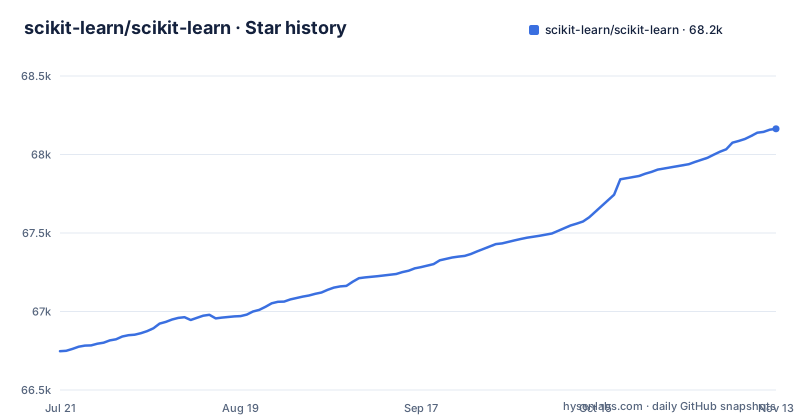
- scikit-learn/scikit-learn68,164 ★ · +1,417
| Repository | 2026-07-21 | 2026-11-13 |
|---|---|---|
| scikit-learn/scikit-learn | 66.7k | 68.2k |
1,417 Stars in the last 115 days, measured from the daily GitHub snapshot. Compare with other projects
Editorial analysis
Six runtime dependencies, and one of them is Narwhals
The dependency list in pyproject.toml is short and worth reading closely, because four of the five names are familiar and one is not. The requirements are numpy at 1.26.0 or newer, scipy at 1.11.4 or newer, joblib at 1.4.0 or newer, threadpoolctl at 3.5.0 or newer, and narwhals at 2.0.1 or newer. The README states the same set as a bulleted list, with the version floors written as reStructuredText substitutions that resolve to those same numbers.
threadpoolctl is the one that earns its place by being unusual: it exists so a library can inspect and limit the thread pools of the numeric libraries it calls into, which is the difference between a library that respects a user's thread configuration and one that quietly oversubscribes the machine. joblib is the parallelism and caching layer. numpy and scipy are the substrate.
Narwhals is the entry with no explanation anywhere in the README. It is a declared hard dependency (narwhals>=2.0.1) listed under the README's installation dependencies, and nothing in the README says what it is for. A reader assembling an environment from the README alone will hit an unrecognised package with a version constraint and no way to learn why it is there from this file. Look it up before you assume it is optional, because uninstalling it to tidy the environment will break the import.
Python 3.12 is a hard floor and 3.15 is already a declared target
The interpreter requirement is stated twice and unambiguously. pyproject.toml sets requires-python to greater than or equal to 3.12, and the README's dependency list opens with Python at the same floor. There is no 3.11 in the file, no 3.10, and no note about older versions being unsupported in a softer way.
The classifier list then runs ahead of the floor rather than behind it. It names Programming Language :: Python :: 3, then 3.12, 3.13, 3.14 and 3.15, and it also names Programming Language :: C and Python :: Implementation :: CPython. The presence of 3.15 as a declared target in a 1.9 series is the detail to notice: the classifiers name Python 3.15, three minor versions above the 3.12 floor.
For a reader the practical effect is a hard cut. An environment on Python 3.11 cannot install the current release, and because the project is the default choice in a great deal of teaching material and internal tooling, the floor move propagates further than the library itself. Check the interpreter before you upgrade anything else, because a failed install with no wheel is a confusing way to learn that your base image is two versions behind.
The install compiles, and Cython is capped below 3.2.6
The user install is the familiar pair of commands, and the README frames pip as the easiest route if NumPy and SciPy are already working, with conda from conda-forge as the alternative:
pip install -U scikit-learnconda install -c conda-forge scikit-learnWhat that hides is that this is not a pure-Python package. The build backend is mesonpy, the build requirement is meson-python at 0.17.1 or newer, and the Cython requirement is written as greater than or equal to 3.1.2 and less than 3.2.6. The classifier list naming Programming Language :: C is the same fact stated in metadata form. The Makefile confirms it, offering a dev target that runs a verbose editable pip install with build isolation switched off.
The upper bound is the interesting part, and the file explains why in a comment: once a specific Cython issue is fixed in a Cython release, the constraint is meant to become a lower bound above the fixed version or a lower bound with several excluded patch versions instead. Until then the ceiling stands. A contributor whose environment has a newer Cython, or who needs a fix that only landed after 3.2.5, has to downgrade their build tool to contribute, and no wheel can help because the constraint is in the build system rather than in the runtime.
Binaries are of course published, and the repository carries a nightly wheel workflow along with a cibuildwheel.toml at the root, so most people installing from PyPI never see any of this. It is the contributors and the air-gapped and unusual-platform builds who feel the toolchain, and they are the ones who read pyproject.toml.
Matplotlib gates every plot_ function and every Display class, and is not a dependency
The plotting surface is gated by a convention rather than a dependency, and the convention is learnable. Functions whose names start with plot_ and classes whose names end with Display need Matplotlib at 3.8.0 or newer. None of that is in the runtime dependency list, so a clean install gives you a working estimator and a broken plot call.
The same pattern extends to the examples, with four tiers of extra requirement. Running the examples at all needs Matplotlib at 3.8.0 or newer. A few examples need scikit-image at 0.24.0 or newer. A few need pandas at 2.1.3 or newer. Some need seaborn at 0.13.0 or newer and Plotly at 5.24.0 or newer.
The tiers are the reason to read this rather than skim it. A reader who copies an example from the gallery, pastes it into a notebook, and hits an ImportError on a plotting or dataframe symbol has hit a documented requirement rather than a broken install, but nothing in the error tells them so. If you are working through the gallery, install the example extras before you start rather than debugging four separate examples, and remember that pandas and scikit-image are only needed by a few pages, so a full plotting stack is not required to use the library.
The test suite has to be launched from outside the source tree
The testing section is short and contains an instruction that will stop you if you miss it. After installation, the suite is launched from outside the source directory, with pytest at 7.1.2 or newer:
pytest sklearnRandom number generation during testing is controlled by an environment variable named SKLEARN_SEED, which is the hook to reach for when a test is flaky and you need the same sequence again.
The Makefile records the other half of the contributor workflow, including a workaround that is worth knowing about before you need it. The clean target uninstalls the package and then removes the Meson build directory outright, with a comment explaining that the clean step is very rarely needed because meson-python recompiles on import, and that removing the folder in some cases avoids odd compilation errors, with the example given being a switch between numpy 2 and numpy 1. The same comment notes that running ninja clean inside the build directory is not sufficient, for a reason the author did not determine.
That is the honest state of a mature C-extension build. Recompilation on import removes most stale-build problems, and the remaining ones are handled by deleting a directory, which is a strategy worth recognising before you spend an afternoon on it.
Twenty-five example directories, two of which describe process rather than subject
The examples directory is organised by subproblem, with a README.txt at its root as the index. The visible categories are applications, bicluster, calibration, callbacks, classification, cluster, compose, covariance, cross_decomposition, datasets, decomposition, developing_estimators, ensemble, feature_selection, frozen, gaussian_process, impute, inspection, kernel_approximation, linear_model, manifold, miscellaneous, mixture and model_selection.
Twenty-two of those name a method family or a task. Two do not. developing_estimators and frozen are named after development topics rather than a subject area.
The version is not in pyproject.toml, and the readme is a reStructuredText file
Two small packaging facts tell you this is an older project with modern tooling. The version field is listed under dynamic in pyproject.toml, meaning the build system derives it rather than storing it, so you cannot read the version out of the source tree's manifest. And the readme field points at README.rst, not README.md, which is why the repository's top level has no markdown readme at all and the file you are reading is reStructuredText with substitution directives and image badges.
The other packaging details are more conventional. The licence is BSD-3-Clause, declared with COPYING as the licence file, which is the three-clause BSD text the README describes. The description field reads A set of python modules for machine learning and data mining, an older phrase than the project's current self-description of machine learning in Python. CITATION.cff sits at the root for citation metadata, and there is a DOI badge pointing at Zenodo.
The history is short and worth knowing for anyone following older tutorials. The project started in 2007 as a Google Summer of Code project by David Cournapeau, and the README carries an explicit note that scikit-learn was previously referred to as scikits.learn. It is maintained by a community of contributors with volunteer support from several organisations, which the README links to a page on, and the release notes live on the documentation site rather than in a changelog file.
Editorial conclusion
scikit-learn fits classical supervised and unsupervised work, and the estimate is unremarkable: five runtime dependencies, one install command, and a documentation site with a stable and a development version of the same content. It does not fit an environment still on Python 3.11, because the floor moved to 3.12 and the classifiers already name 3.15, and it does not fit a contributor who needs a Cython newer than 3.2.6, because the build requirement is capped pending an upstream fix. Before upgrading, check your interpreter against the 3.12 floor and read the release notes for the version you are moving to, since the changelog lives on the documentation site rather than in the repository and the release train has moved from 1.8.0 in December 2025 to 1.9.1 in September 2026.
Frequently asked questions
What is scikit-learn used for?
It is a Python module for machine learning built on top of SciPy and distributed under the three-clause BSD licence. The example gallery is organised by subproblem, with directories for classification, cluster, covariance, cross_decomposition, decomposition, ensemble, feature_selection, gaussian_process, impute, inspection, kernel_approximation, linear_model, manifold, mixture, model_selection and more.
Is sklearn obsolete?
The repository is not archived and its last push was on 2026-11-02. Recent releases are 1.9.1 on 2026-09-11, 1.9.0 on 2026-06-02 and 1.8.0 on 2025-12-10. It is classified as Development Status :: 5 - Production/Stable and its classifiers already name Python 3.12 through 3.15.
How do I install scikit-learn?
Run pip install -U scikit-learn, or conda install -c conda-forge scikit-learn. You need Python 3.12 or newer, plus NumPy at 1.26.0 or newer, SciPy at 1.11.4 or newer, Narwhals at 2.0.1 or newer, joblib at 1.4.0 or newer and threadpoolctl at 3.5.0 or newer. Building from source additionally needs a C toolchain, because the build backend is meson-python and Cython is pinned below 3.2.6.
How do I use scikit-learn?
The project documents usage through its API documentation rather than in the README, at scikit-learn.org for the stable release and scikit-learn.org/dev for the development version, with an FAQ page alongside. The worked examples are the directories under examples/, indexed by examples/README.txt, and the README notes that running them needs Matplotlib and that some also need scikit-image, pandas, seaborn or Plotly.
How do I use scikit-learn for linear regression?
The example gallery has a dedicated linear_model directory covering that family of estimators. Be aware that the examples are not self-contained: running any of them needs Matplotlib at 3.8.0 or newer, and the README notes that a few need pandas, seaborn, Plotly or scikit-image on top of the five runtime dependencies.
Official sources
Add this badge to your README
If you maintain this project, the badge below links readers to this analysis and shows its maintenance status from the daily GitHub snapshot. Paste the markdown into your README; add ?metric=license or ?metric=stars to the image URL for a different field.

[](https://hysenlabs.com/projects/scikit-learn-scikit-learn)Star history chart for your README
[](https://hysenlabs.com/projects/scikit-learn-scikit-learn)Was this useful?