ComfyUI: A Node Graph Engine for Diffusion Workflows, Not Just a GUI
The most powerful and modular diffusion model GUI, api and backend with a graph/nodes interface.
At a glance
- What is it?
- ComfyUI is a GPL-3.0 Python engine that turns diffusion model workflows into editable node graphs, with a local API, App Mode, and support for models from Stable Diffusion to video and 3D. This review covers its architecture, setup, limitations, and where it fits compared to simpler tools.
- Who is it for?
- Adopt ComfyUI if you are a visual professional or pipeline developer who needs fine-grained control over models, parameters, and workflow reuse, and who is comfortable with a node graph and a GPL-3.0 license. Do not adopt it if you want a one-click tool with no graph editing or if you need to embed it in proprietary software without opening your code.
- Can I use it commercially?
- Yes, with conditions. GPL-3.0 is a copyleft licence: if you distribute software that includes it, you must release that software's source code under the same licence. Running it internally without distributing it does not trigger that obligation.
- Is it still maintained?
- Yes. The repository last received commits 1 day ago.
- What is it written in?
- Mainly Python, according to GitHub's language statistics.
Answers come from the project's GitHub data, last synced on November 12, 2026, and from our analysis. They are not legal advice.
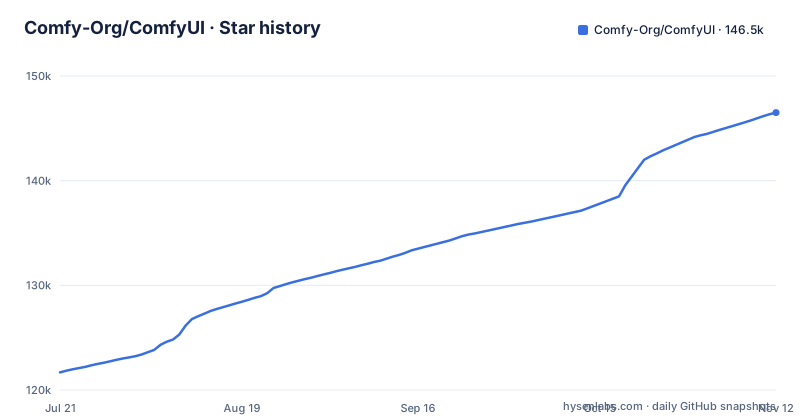
Star history
- Comfy-Org/ComfyUI146,506 ★ · +24,823
| Repository | 2026-07-21 | 2026-11-12 |
|---|---|---|
| Comfy-Org/ComfyUI | 121.7k | 146.5k |
24,823 Stars in the last 114 days, measured from the daily GitHub snapshot. Compare with other projects
Editorial analysis
What ComfyUI Actually Solves
ComfyUI addresses a specific pain: visual professionals who need to control every model, parameter, and output in a diffusion pipeline, not just click a generate button. The README describes it as "the AI creation engine for visual professionals who demand control over every model, every parameter, and every output." That means it is not a consumer app. It is a graph-based interface where you wire nodes together to build image, video, audio, 3D, and text workflows without writing code. The target user is someone who wants to mix a specific text encoder with a specific VAE, apply a LoRA, or chain an upscaler, and then reuse that exact graph later. The project also targets production use: it exposes API endpoints and a local API for integrating workflows into applications. If you are an engineer evaluating it for a product, the core value is that the same graph you build in the GUI can be driven programmatically.
The Node Graph Mechanism and Data Flow
The heart of ComfyUI is a visual node graph. Each node represents an operation: loading a checkpoint, running a sampler, applying a LoRA, or saving an image. You connect outputs to inputs, and the graph defines the data flow. The README mentions "reusable subgraphs, workflow templates, App Mode, and a local API." Subgraphs let you group nodes into a single reusable unit, which is how complex pipelines stay manageable. App Mode is a way to expose a sophisticated workflow through a simple UI, so end users do not see the graph. The execution engine uses asynchronous queueing and partial graph re-execution, meaning if you change one node, it only recomputes what depends on it, not the whole graph. It also manages VRAM and RAM with smart offloading and supports quantized models. That is a real architectural choice: instead of a linear script, you have a directed graph with caching and dependency tracking. The README also states that workflows can be saved and loaded as JSON, and that complete workflows and seeds can be recovered from supported generated media. That is a practical feature for reproducibility.
Getting It Running: Install Paths and Configuration
There are three local install routes. The desktop application is the easiest, available for Windows and macOS. A portable install is also offered. For manual install, the README says it supports all operating systems and GPU types: NVIDIA, AMD, Intel, Apple Silicon, and Ascend. That is a broad claim, so you should verify your specific GPU on the manual install page. After installation, you configure extra model locations with a YAML file named extra_model_paths.yaml, using the example file extra_model_paths.yaml.example as a template. This is how you point ComfyUI to models stored outside the default directory. To force offline operation, you run with --offline, which disables the optional paid Comfy API nodes and keeps all built-in functionality offline. That flag is important for anyone with strict data residency requirements. The core does not download anything unless you request it, per the README, so the default is offline-friendly. You also have the option of Comfy Cloud, a paid service for those without local hardware.
Model Coverage and the Partner Node Strategy
ComfyUI's model support is broad, but it is not monolithic. The README lists native support for image generation models like Stable Diffusion 1.5, SDXL, SD3.5, Flux.1, Flux.2, Qwen Image, and Hunyuan Image 2.1. Video models include Wan 2.1 and 2.2, LTX-Video 2, HunyuanVideo 1.5, and CogVideoX. Audio models include ACE-Step 1.5 and Stable Audio 3. 3D models include Hunyuan3D 2.1 and TripoSplat. Text generation covers Gemma 3 and 4 and Qwen3. That is a long list, and it is explicitly "representative," so you should check the workflow library for the exact model you need. For closed source models like Nano Banana, Seedance, and Hunyuan3D, the README points to "partner nodes" that provide access. This is a notable design decision: instead of trying to support every model natively, ComfyUI has an ecosystem of partner nodes for proprietary offerings. That means the boundary between open and closed is explicit, and you may need to install additional nodes to access certain models. It also means some model support is not free; the partner nodes likely have their own licensing or costs.
Built-in Tools and Media Handling
Beyond generation, ComfyUI includes a set of built-in processing tools. The README lists inpainting, outpainting, reference conditioning, masks and compositing, model merging, upscaling, frame interpolation, segmentation, depth estimation, and media processing. These are not separate plugins; they are part of the core. That is a significant advantage over a bare sampler, because you can build a full pipeline without leaving the graph. For media output, ComfyUI supports high bit depth formats: 16 bit PNG, 32 bit EXR, 10 bit AVIF, and HDR video and images. That matters for professional workflows where 8 bit is not enough. The ability to load separate diffusion models, VAEs, text encoders, LoRAs, ControlNets, adapters, and upscalers from supported formats gives you granular control. The trade-off is complexity: you have to know what each component does. A beginner will not guess why a VAE is mismatched. But for someone who understands diffusion internals, this is exactly the control they want.
Limitations and Failure Modes
The most obvious limitation is the learning curve. A node graph is not intuitive for users who are used to a single prompt box. The README's own language, "demand control over every model, every parameter, and every output," signals that this is not a beginner tool. Another limitation is the release cycle. The README states a weekly release cycle targeting Monday, but it "regularly changes because of model releases or large changes to the codebase." That means the master branch can be unstable. The release process uses major stable versions roughly every two weeks, with patch versions for fixes backported onto the current stable release. If you are deploying ComfyUI in production, you must pin to a stable release and track patch updates. The GPL-3.0 license is another constraint. If you are building a proprietary product, you cannot embed ComfyUI without complying with copyleft terms. That is a hard boundary for many commercial projects. Finally, the README mentions that the core does not download anything unless you request it, but the optional Comfy API nodes are paid. If you accidentally enable them, you may incur costs. The --offline flag (or --disable-partner-nodes) is there to prevent that, but it is an extra step.
Alternatives and the Difference in Approach
The main alternative to ComfyUI is a scripted pipeline using a library like Diffusers from Hugging Face. Diffusers gives you programmatic control in Python, but you write code, not a visual graph. The difference is fundamental: ComfyUI makes the graph the artifact, so you can visually inspect, edit, and reuse it without reading code. Diffusers requires you to write and maintain Python scripts, which is more flexible for complex logic but less accessible for visual artists. Another alternative is AUTOMATIC1111's Stable Diffusion WebUI, which offers a simpler, form-based interface. That tool is easier to learn but less modular. It does not expose a node graph, so you cannot build arbitrary data flows. ComfyUI's approach is closer to a visual programming language, which is more powerful but also more demanding. For a team that needs to embed generation into an application, ComfyUI's local API is a differentiator. With Diffusers, you would build your own API layer. With ComfyUI, the API is already there, but you are tied to its graph model and license.
Maintenance, Upgrades, and Licensing
ComfyUI is actively maintained, with a release cadence that is fast. The last push was 2026-11-01, and recent releases include v0.43.0, v0.42.1, and v0.42.0. That means you will see frequent updates. The README describes a structured release process: major stable versions every two weeks, patch versions for backported fixes, and minor versions off master. For a production user, this means you need a strategy for tracking releases. You cannot ignore updates because model support changes quickly. The license is GPL-3.0, which is a strong copyleft license. If you distribute a modified version, you must make your source available under the same license. That is a critical consideration for commercial adoption. The README also mentions three interconnected repositories. That suggests the project is split across components, which could affect upgrade complexity. You should verify which repositories you need to track. The documentation is referenced heavily, so plan to consult docs.comfy.org for details on partner nodes and API endpoints.
Editorial conclusion
Adopt ComfyUI if you are a visual professional or pipeline developer who needs fine-grained control over models, parameters, and workflow reuse, and who is comfortable with a node graph and a GPL-3.0 license. Do not adopt it if you want a one-click tool with no graph editing or if you need to embed it in proprietary software without opening your code. Before committing, verify your GPU support (NVIDIA, AMD, Intel, Apple Silicon, Ascend) and check the weekly release cycle, since master changes often and patch versions only backport fixes to the current stable release. Also confirm that the models you need are in the supported list or available as partner nodes, and decide whether you want to disable the optional paid Comfy API nodes with --offline to stay fully offline.
Frequently asked questions
how to install comfyui
There are three local routes: a desktop application for Windows and macOS, described as the easiest way to get started, a portable install, and a manual install that supports all operating systems and GPU types, naming NVIDIA, AMD, Intel, Apple Silicon, and Ascend.
Is ComfyUI totally free?
The repository is GPL-3.0 and the readme says the core downloads nothing unless you ask it to. Around that free core sit paid surfaces: an official paid cloud version for people who cannot afford local hardware, optional paid Comfy API nodes that the --offline flag switches off, and partner nodes that reach closed source models.
Is ComfyUI safe to use?
The readme states that the core does not download anything unless you request it, and the repository root carries a security policy file. The parts that reach a network are the paid API nodes and the partner nodes for closed models, which is why the offline flag exists.
Can ComfyUI generate videos?
Yes. The feature list names a video generation template set including Wan 2.1 and 2.2, LTX-Video 2 and 2.3, HunyuanVideo 1.5, Kandinsky 5 Video, CogVideoX, Cosmos Predict2, Bernini-R, SCAIL 2, and Mochi, and the built-in tools include frame interpolation and high dynamic range video saving and loading.
how to use comfyui manager
The repository root carries a requirements file dedicated to the manager, and extensions themselves live in the custom nodes directory. The readme says ComfyUI can be extended with custom nodes.
how to use comfyui locally
Locally you can use the desktop application on Windows and macOS, the portable install, or a manual install covering all operating systems and GPU types from NVIDIA to Apple Silicon and Ascend. The manifest requires Python 3.10 or newer, and the core stays offline unless you ask it to fetch something.
Official sources
Where this project is recommended
Add this badge to your README
If you maintain this project, the badge below links readers to this analysis and shows its maintenance status from the daily GitHub snapshot. Paste the markdown into your README; add ?metric=license or ?metric=stars to the image URL for a different field.

[](https://hysenlabs.com/projects/comfy-org-comfyui)Star history chart for your README
[](https://hysenlabs.com/projects/comfy-org-comfyui)Was this useful?