Deepfence SecretScanner: scanning container images and filesystems for hardcoded secrets
:unlock: :unlock: Find secrets and passwords in container images and file systems :unlock: :unlock:
At a glance
- What is it?
- SecretScanner is a Go-based CLI that walks image layers and host directories against a bundled rule set and writes JSON findings. It is fast to try and deliberately unopinionated about what you do with the results.
- Who is it for?
- Adopt SecretScanner if you already ship containers and want a single binary that reads a Docker socket and emits JSON you can pipe into your own triage. Do not adopt it if you need verified credentials, Git history coverage, or a hosted dashboard: the tool reports candidates and leaves confirmation to you.
- Can I use it commercially?
- Yes. MIT is a permissive licence: you can use, modify and sell software built on it, as long as you keep its copyright and licence notices.
- Is it still maintained?
- Activity is slowing. The repository last received commits 8 months ago.
- What is it written in?
- Mainly Go, according to GitHub's language statistics.
Answers come from the project's GitHub data, last synced on November 25, 2026, and from our analysis. They are not legal advice.
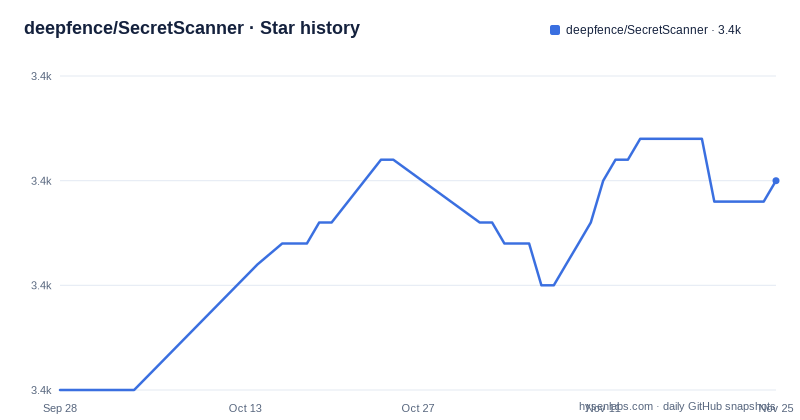
Star history
- deepfence/SecretScanner3,400 ★ · +10
| Repository | 2026-09-28 | 2026-11-25 |
|---|---|---|
| deepfence/SecretScanner | 3.4k | 3.4k |
10 Stars in the last 58 days, measured from the daily GitHub snapshot. Compare with other projects
Editorial analysis
The problem SecretScanner targets: secrets baked into image layers
A secret that reaches a container image is hard to remove. The README frames the cause plainly: developers hard-code passwords, API keys, encryption keys, SSH keys and tokens during fast CI/CD cycles, and sometimes default credentials survive into production. Because image layers are immutable, deleting a file in a later layer does not remove the bytes from the earlier one, so a scanner that only looks at the final filesystem can miss what an attacker can still extract.
SecretScanner is aimed at that surface. It is described as a standalone tool that retrieves and searches container and host filesystems, matching contents against a database of approximately 140 secret types. The intended user is an engineer who already has images to inspect and wants a list of candidates rather than a verdict. The README is explicit that the output is a starting point: you review the possible secrets and decide which should be removed from production deployments. That framing matters, because it sets the expectation that false positives are part of the workflow, not a bug to be filed.
How the scan actually works: YARA rules, a rule bundle, and a JSON report
The mechanism is pattern matching over file content, not entropy scoring or credential validation. The Dockerfile shows the build downloading YARA 4.5.5, compiling it statically, and then fetching a rule archive from artifacts.threatmapper.org named secret_v2.5.8.tar.gz, which is unpacked into /home/deepfence/rules and converted to YARA format by a converter step. The rule set is versioned in lockstep with the release tag, so upgrading the image also upgrades the patterns.
The Go module list confirms the shape of the binary: it depends on github.com/deepfence/YaraHunter, github.com/deepfence/match-scanner, a gRPC plugin package, and github.com/deepfence/vessel for container runtime access. The Makefile builds with CGO_LDFLAGS linking jansson, crypto and magic, which is why the image is not a scratch container. The README credits the configuration file to the shhgit project, so the rule ancestry is public.
Data flow is short. The tool reaches the container runtime through the mounted Docker socket, extracts the image filesystem, walks it, applies the rules, and writes findings. The README states that the result is a JSON file with details of all the secrets found. There is no server component required for the standalone path, and no database of past scans in the CLI workflow.
Installing SecretScanner with Docker and running a first scan
The README gives two routes: build the image yourself, or pull the published one. Building requires the bootstrap script and a Docker daemon, and the build tag in the README matches the current release tag.
./bootstrap.sh
docker build --rm=true --tag=quay.io/deepfenceio/deepfence_secret_scanner_ce:2.5.8 -f Dockerfile .
The faster path is the published image. Pulling it avoids the YARA compile step entirely, which is the slowest part of a local build.
docker pull quay.io/deepfenceio/deepfence_secret_scanner_ce:2.5.8For a first real scan, the README uses node:8.11 as the target. Pull the image you want to inspect, then run the scanner with the Docker socket mounted so it can read image layers.
docker pull node:8.11docker run -i --rm --name=deepfence-secretscanner \
-v /var/run/docker.sock:/var/run/docker.sock \
quay.io/deepfenceio/deepfence_secret_scanner_ce:2.5.8 \
--image-name node:8.11 \
--output json > node.jsonWhat you should see is a JSON file on the host named node.json. The socket mount is not optional for the image path: without it the container has no way to enumerate the image. The README does not document a filesystem-only invocation in the quick start, so treat the image scan as the documented entry point. The repository does contain an Install.Ubuntu file and a config.yaml at the top level, but the README does not describe what they configure, so I would not build a workflow around them without reading the source first.
Where SecretScanner is the wrong tool
The scanner reports candidates. It does not tell you whether a matched string is live. A revoked AWS key and an active one produce the same finding, and the README's own language, possible secrets, is the honest description. If your triage process needs to know which credentials still work, this tool does not answer that question, and the repository material does not describe any verification step.
Coverage is also bounded by the rule bundle. The README says approximately 140 secret types, and the rules ship as a tarball tied to the release tag. A secret format that is not in that bundle will not be found, no matter how obviously it looks like a key to a human reviewer. Custom patterns are not covered in the README, so anyone needing organisation-specific tokens should check the rules directory and the documentation site before assuming extensibility.
The third limit is scope. The README describes scanning container images and filesystems. It does not describe walking Git history, so a credential that was committed and later removed from the working tree is outside the documented behaviour. Teams whose main exposure is repository history rather than built artifacts are looking at the wrong layer of the pipeline. Finally, the disclaimer restricts use to infrastructure you own, which rules out using it against third-party registries you do not control.
SecretScanner versus Gitleaks and TruffleHog
The related searches around this project are dominated by Gitleaks and TruffleHog, and the difference in approach is real rather than cosmetic. Gitleaks and TruffleHog are built around source repositories and Git history: they walk commits, so they find secrets that were committed and later deleted, which is exactly the gap noted above. SecretScanner starts from the built artifact or the mounted filesystem instead. That makes it a post-build check, closer to the end of the pipeline, and it means it sees what actually shipped rather than what was typed.
The rule engines differ too. SecretScanner compiles YARA and loads a versioned rule tarball, which is a general pattern-matching engine repurposed for secret detection. TruffleHog's related-search phrase about verifying secrets points at a capability SecretScanner does not document: confirming that a found credential is live. If your workflow depends on that confirmation step, the choice is made for you.
The practical split is coverage versus confirmation. SecretScanner answers what is inside this image right now. Repository scanners answer what has ever been committed. A team running containers from a registry usually wants both, and the two do not overlap as much as the shared vocabulary suggests.
Maintenance, release cadence and the MIT licence
The repository is not archived, and the last push was on 2026-03-07, which is the same date as the v2.5.8 release. The two prior releases, v2.5.7 and v2.5.6, landed in April 2025, so the gap between v2.5.7 and v2.5.8 is roughly eleven months. That pattern suggests release-driven development tied to the wider ThreatMapper product rather than a steady stream of small patches. Plan upgrades around tagged releases, not around the default branch, which is release-2.5.
The upgrade cost is mostly the rule bundle. Because the Dockerfile pins the rule archive to the same version string as the image tag, moving from 2.5.7 to 2.5.8 changes both the binary and the patterns. A finding that disappears after an upgrade may be a fixed false positive or a narrowed rule, and the README does not document a changelog for rule changes, so diffing the JSON output across versions is the only reliable way to tell.
Licensing is MIT, which permits commercial use and modification with the licence and copyright notice retained. The README also carries a disclaimer stating the tool is not meant for hacking and should be used only on infrastructure you own. That is a usage restriction in prose rather than a licence term, but it is worth reading before pointing the scanner at anything you do not control. This is a description of the repository text, not legal advice.
Editorial conclusion
Adopt SecretScanner if you already ship containers and want a single binary that reads a Docker socket and emits JSON you can pipe into your own triage. Do not adopt it if you need verified credentials, Git history coverage, or a hosted dashboard: the tool reports candidates and leaves confirmation to you. Before rolling it out, run the documented docker run command against one image you own and check how many findings survive manual review, because that ratio decides whether the JSON is usable in CI or only as a periodic audit.
Frequently asked questions
How can I scan code for secrets with Deepfence SecretScanner?
SecretScanner scans container images and filesystems rather than repositories. The documented path is to pull the image, run the container with the Docker socket mounted, and pass --image-name plus --output json, which writes findings to a JSON file on the host.
Does Deepfence SecretScanner work in VS Code?
The repository does not describe a VS Code extension or editor integration. The documented interfaces are the standalone container image and the ThreatMapper integration, so editor-based scanning is not part of the material.
What is Deepfence SecretScanner and who is it for?
It is a standalone tool that retrieves and searches container and host filesystems, matching contents against a database of approximately 140 secret types. It is aimed at engineers who want a candidate list of possible secrets to review before removing them from production deployments.
Does Deepfence SecretScanner verify that a found secret is still active?
The README does not describe any verification step. It describes output as possible secrets that the user reviews, so a finding means a pattern matched, not that the credential is live.
Does Deepfence SecretScanner scan Git history?
The documented scope is container images and filesystems. The README does not describe walking commit history, so secrets removed from a working tree before the image was built are outside the described behaviour.
What licence does Deepfence SecretScanner use?
The repository is MIT licensed, which allows commercial use and modification provided the licence and copyright notice are retained. The README separately states the tool should only be used on infrastructure you own.
Official sources
Add this badge to your README
If you maintain this project, the badge below links readers to this analysis and shows its maintenance status from the daily GitHub snapshot. Paste the markdown into your README; add ?metric=license or ?metric=stars to the image URL for a different field.

[](https://hysenlabs.com/projects/deepfence-secretscanner)Star history chart for your README
[](https://hysenlabs.com/projects/deepfence-secretscanner)Was this useful?