devcontainers/templates: managed Dev Container Templates
Repository for Dev Container Templates that are managed by Dev Container spec maintainers. See https://github.com/devcontainers/template-starter to create your own!
At a glance
- What is it?
- devcontainers/templates is a repository of managed Dev Container Templates for creating containerized development environments through compatible tools. It provides source configuration for complete environments, plus a mirrored test suite, but it is a template collection rather than a standalone runtime.
- Who is it for?
- Adopt this repository when you want a template from the Dev Containers collection and your editor or CI supports the Dev Container specification. Do not treat it as a complete development platform or as a substitute for a self-authored template when your organization needs repository-specific tooling.
- Can I use it commercially?
- Yes. MIT is a permissive licence: you can use, modify and sell software built on it, as long as you keep its copyright and licence notices.
- Is it still maintained?
- Yes. The repository last received commits 4 days ago.
- What is it written in?
- Mainly Shell, according to GitHub's language statistics.
Answers come from the project's GitHub data, last synced on November 7, 2026, and from our analysis. They are not legal advice.
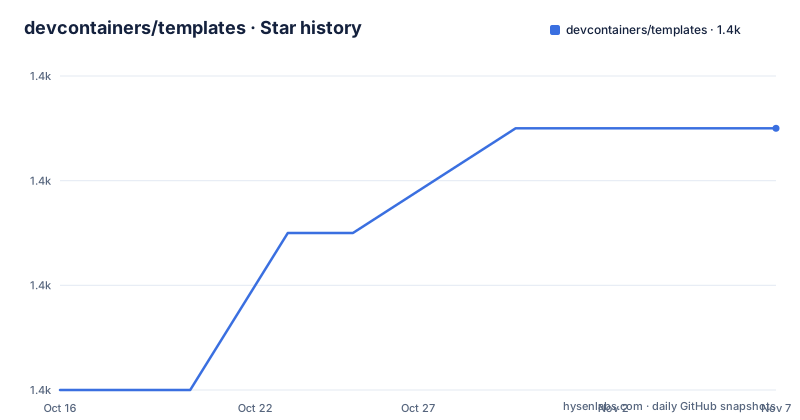
Star history
- devcontainers/templates1,447 ★ · +5
| Repository | 2026-10-16 | 2026-11-07 |
|---|---|---|
| devcontainers/templates | 1.4k | 1.4k |
5 Stars in the last 22 days, measured from the daily GitHub snapshot. Compare with other projects
Editorial analysis
What devcontainers/templates contains
devcontainers/templates addresses the repeated work involved in assembling a development environment from an image, runtime, tools, libraries, prerequisites, and supporting configuration. The README defines a development container as a running Docker container with a well-defined tool or runtime stack and its prerequisites. The repository packages configuration for such environments as Dev Container Templates, which can be applied to a new or existing project.
The intended users are developers who want a repeatable environment, teams standardizing a project setup, and organizations that use editors or services with Dev Container support. The repository is managed by Dev Container spec maintainers, according to its description. It is therefore closer to a catalog of maintained environment definitions than to a general-purpose container builder. A supporting tool consumes a template and uses its configuration to build the development container.
The repository does not document a separate installer for the collection itself. Its usable entry points are compatible tools and services, such as Visual Studio Code and GitHub Codespaces, or the Dev Container CLI. The README also links to the broader templates directory for community-contributed templates.
Template files and repository structure
The `src` directory contains a subfolder for each template. The README states that each subfolder includes at least a `devcontainer-template.json` file and a `devcontainer.json` file. The first file describes the template distribution and its metadata, while the second is the Dev Container configuration consumed for the environment. The repository layout therefore separates template packaging from the configuration that defines the actual development container.
The `test` directory mirrors `src` with one folder per template. Each corresponding folder contains at least a `test.sh` script. According to the README, these tests are executed by the CI workflow in `.github/workflows/test-pr.yaml`. This arrangement gives contributors a direct location for template-specific checks, although the README does not describe the commands or assertions inside those scripts.
The repository also contains `build/`, package metadata, TypeScript configuration, and repository automation files. The repository file `package.json` contains one dev dependency, `@types/node`, with the version range `^25.3.1`. The README does not explain how that dependency relates to applying an individual template, so the documented CLI workflow should not be replaced with an inferred Node.js workflow.
Applying a template with the Dev Container CLI
The Dev Container CLI provides the documented command for applying a template hosted in a supported OCI registry. The command is `devcontainer templates apply`. Its required template identifier selects the template, while `--workspace-folder` identifies the target workspace. The README also documents `--template-args` for JSON arguments, `--features` for adding Features, `--log-level` for selecting `info`, `debug`, or `trace`, and `--tmp-dir` for controlling temporary files.
The documented example applies the C++ template with the `debian-12` image variant and adds an Azure CLI Feature with version `1`:
devcontainer templates apply --workspace-folder . \
    --template-id ghcr.io/devcontainers/templates/cpp:latest \
    --template-args '{ "imageVariant": "debian-12" }' \
    --features '[{ "id": "ghcr.io/devcontainers/features/azure-cli:1", "options": { "version" : "1" } }]'
The command applies the template to the current workspace. The template identifier points into a supported OCI registry, and the arguments replace values in the template. The resulting environment can then be used by a compatible Dev Container supporting tool. The README does not say that running this command alone starts a container, so the output should be treated as configuration for the next supported development-container workflow rather than as a documented standalone launch command.
Using templates through editors and Codespaces
For an initial setup, the README points users to Visual Studio Code and GitHub Codespaces rather than requiring direct inspection of the repository. Both provide user-friendly interfaces for configuring templates hosted in this repository and for community-contributed templates. Visual Studio Code documents automated dev container creation, while Codespaces documents adding a predefined dev container configuration to a project.
This route is useful when the user already works in one of those environments and does not want to manage the CLI invocation manually. It also leaves room to add Features after selecting a template. The README links to the Dev Container supporting tools page, but it does not enumerate every compatible implementation or provide a single cross-tool installation command.
The distinction matters for adoption. Visual Studio Code and Codespaces are integrations for the template format, not components of the `devcontainers/templates` repository. The repository supplies the template collection; the selected supporting tool supplies the user interface and execution path. A team should verify that its editor or service recognizes the template before assuming that the template is available there.
Template customization and contribution boundary
Templates can be extended with available Features. The README describes Features as an additional customization mechanism and shows adding one through `--features` in the CLI example. Template arguments are a second customization path. In the documented command, `--template-args` selects the `imageVariant`, while the Feature JSON selects the Azure CLI version.
The repository accepts improvement and bug fix contributions related to its current set of maintained templates. That boundary is narrower than accepting arbitrary new templates for this repository. The README directs community members and organizations that want to author their own collections to the Dev Container Template specification and points them to `devcontainers/template-starter` and the `devcontainers/action` GitHub Action. Those resources are intended to bootstrap self-authored templates in repositories controlled by the authors.
This split creates a meaningful choice between consuming a centrally managed collection and publishing a project-owned collection. The README does not document a release process for changing an individual template, nor does it state that changes to `src` automatically produce a new named GitHub release. It also does not explain migration behavior when a template changes. Those omissions matter for teams that need a controlled update policy.
Limits, maintenance, and the self-authored alternative
The main limitation is scope. `devcontainers/templates` is not itself a container runtime, editor, CI service, or complete installation package. Its templates require a supporting tool that implements the Dev Container specification, and the repository does not claim that every tool behaves identically. The documented CLI path also depends on a template being available in a supported OCI registry.
There are no GitHub releases listed for the repository. The repository is not archived, and its last push was on 2026-10-16. That supports describing the repository as recently changed, but it does not establish a release cadence or compatibility policy for individual templates. The README says CI executes the mirrored `test.sh` scripts, yet it does not document what those scripts verify or how failures affect template publication.
A real alternative is to self-author a template in a repository you control. The Dev Container Template specification defines the distribution pattern, while `devcontainers/template-starter` provides a starting point. That approach differs by shifting ownership from the managed collection to the organization. The team can tailor files, review changes, and manage updates within its own repository, but the README does not claim that this alternative receives the maintainer review associated with the managed collection. The repository is licensed under the MIT License, with copyright assigned to Microsoft Corporation. Teams should check the `LICENSE` file and their own distribution policies before copying or adapting template content.
Editorial conclusion
Adopt this repository when you want a template from the Dev Containers collection and your editor or CI supports the Dev Container specification. Do not treat it as a complete development platform or as a substitute for a self-authored template when your organization needs repository-specific tooling. Verify first that your chosen supporting tool can use the template, that its arguments and Features are acceptable, and that the resulting `devcontainer.json` matches your project requirements.
Frequently asked questions
How do I apply a devcontainers/templates template with the Dev Container CLI?
Run `devcontainer templates apply` with required `--template-id` and `--workspace-folder`; `--template-args` and `--features` provide optional customization. The README documents templates hosted in a supported OCI registry.
Can I use devcontainers/templates in Visual Studio Code or GitHub Codespaces?
Yes. The README says both Visual Studio Code and GitHub Codespaces provide interfaces for configuring templates hosted in this repository and community-contributed templates.
Where should I create my own Dev Container Templates?
The README directs organizations and community members to the Dev Container Template specification and `devcontainers/template-starter`, with the `devcontainers/action` GitHub Action available to help bootstrap self-authored templates.
Official sources
Add this badge to your README
If you maintain this project, the badge below links readers to this analysis and shows its maintenance status from the daily GitHub snapshot. Paste the markdown into your README; add ?metric=license or ?metric=stars to the image URL for a different field.

[](https://hysenlabs.com/projects/devcontainers-templates)Star history chart for your README
[](https://hysenlabs.com/projects/devcontainers-templates)Was this useful?