yandex_smart_home: putting Home Assistant devices into Yandex and VK smart homes
Управление устройствами из Home Assistant через Алису (Умный дом Яндекса) или Марусю
At a glance
- What is it?
- The dext0r/yandex_smart_home custom component exposes Home Assistant devices to the Yandex smart home platform, so they can be controlled from an Alice speaker, a Yandex TV, or the Dom with Alice app, and since version 1.0.0 also to the VK smart home through Marusya. It requires Home Assistant 2025.12 or newer.
- Who is it for?
- Adopt yandex_smart_home if your household already talks to an Alice speaker or a VK Capsule and you want Home Assistant to be the source of truth behind those voice commands. Do not adopt it if you do not want your devices exposed to a third party platform, since the whole point is to register them there.
- Can I use it commercially?
- Yes. MIT is a permissive licence: you can use, modify and sell software built on it, as long as you keep its copyright and licence notices.
- Is it still maintained?
- Yes. The repository last received commits 67 days ago.
- What is it written in?
- Mainly Python, according to GitHub's language statistics.
Answers come from the project's GitHub data, last synced on November 7, 2026, and from our analysis. They are not legal advice.
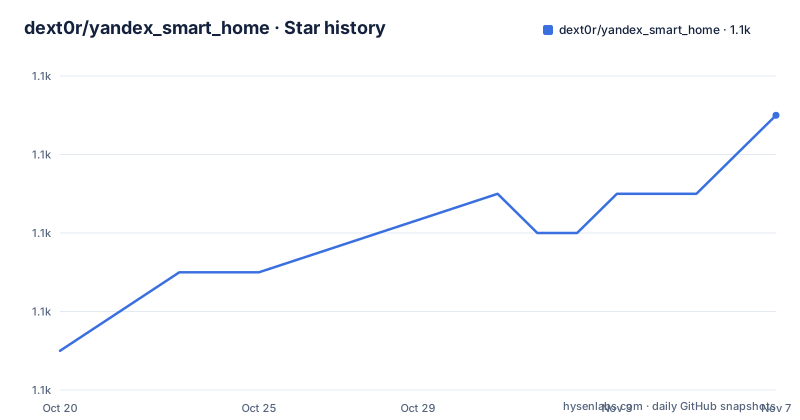
Star history
- dext0r/yandex_smart_home1,095 ★ · +6
| Repository | 2026-10-20 | 2026-11-07 |
|---|---|---|
| dext0r/yandex_smart_home | 1.1k | 1.1k |
6 Stars in the last 18 days, measured from the daily GitHub snapshot. Compare with other projects
Editorial analysis
A bridge in the other direction
Most Home Assistant integrations pull things in. This one pushes them out. The yandex_smart_home component adds devices from Home Assistant to the Yandex smart home platform, and from there they can be controlled from any device with Alice on it, which the component lists as smart speakers and TVs, including Yandex Station and other models, plus the Dom with Alice mobile application.
Since version 1.0.0 the same component also works with the VK smart home and with Marusya, covering VK Capsule speakers, the Marusya mobile application, and the web application for the smart home with Marusya. That is a meaningful change in scope, because it means the component is no longer tied to a single ecosystem's voice assistant, and the underlying Home Assistant side is shared.
The audience is specific. It is a Home Assistant user in a Russian-language household, or one with a Yandex or VK device, who wants the convenience of saying something to a speaker in a room and having a light, a plug, or a climate device respond. The value is that voice control does not require the voice assistant's own smart home platform to be the centre of the home, which is the usual complaint with proprietary assistants: they want to be the only thing that knows about your devices.
The component is MIT licensed, written in Python, and the project ships as a HACS default integration. The default branch is dev, the current release is v1.1.3 from 2026-09-02, and the last push to the repository was on 2026-09-02. Documentation is hosted separately at docs.yaha-cloud.ru, with versioned trees for 1.1.x, 1.0.x, and 0.6.x, and there is a Telegram chat linked from the project page.
The version floor is the real constraint
The component works on Home Assistant version 2025.12 or newer. That line is stated plainly and it matters, because Home Assistant custom components break when the core API underneath them moves, and a component that depends on recent behaviour is not portable back.
The Python side has an equally specific requirement. The project metadata asks for Python ~=3.14.2, which is a compatible release specifier pinning the minor version, so 3.14.2 and its patch releases are what the project is built against, and the linting configuration targets py313.
Taken together, those two numbers define a narrow and modern environment. This is not a component you drop into a long-lived Home Assistant installation that has been pinned to an older release, and the documentation is versioned in step with the component's own releases, which suggests the maintainer expects the supported set to move.
The dependency list also shows what the component is built from. Beyond Home Assistant itself, the homeassistant-components group brings in hassil for intent parsing, home-assistant-intents, pyturbojpeg for image handling, and gazetteer-matcher for name matching. The last two are the interesting ones for understanding the shape of the problem, since matching a spoken device name to a Home Assistant entity and handling the images that a voice assistant displays are both substantial pieces of work rather than protocol plumbing.
What installing it involves
The project is distributed as a HACS default integration, which is the standard route for Home Assistant custom components. The HACS badge in the project header marks it as one of the integrations HACS offers in its default category, and the repository has a hacs.json file describing it. A user adds it through HACS, and the component files land in the custom_components directory of the Home Assistant configuration.
The installation details, including the configuration options and the account linking steps, are not printed in the project page. The page points to the documentation site for the relevant version, and the three versioned trees are linked separately, so a user on 1.1.x reads the 1.1.x documentation, and one still on the older line reads the matching tree. The site is also where the Yaha Cloud service is described, and there is a badge linking to a Yaha Cloud entry in the Yandex dialogs store, which is how a device is linked to the Yandex platform in the first place.
The split documentation is worth noting as a maintenance signal. When a component serves several major versions with different configuration shapes, the documentation has to be maintained per version, and the presence of three separate trees including a 0.6.x tree tells you the configuration has changed materially across those releases. Anyone upgrading should read the changelog for their target version rather than assume the setup steps carried over.
The repository itself is a Home Assistant component repository rather than a standalone application. Alongside custom_components/ there are tests/, docs/, a mkdocs.yml for building the documentation, a pyproject.toml, a uv.lock for dependency pinning, and the usual tooling files, with a cSpell configuration for spelling and a markdownlint configuration for the prose.
How the pieces are tested and linted
The project metadata shows a fairly thorough tooling setup, and it is worth reading because it tells you what kind of project this is.
The test group uses pytest-homeassistant-custom-component, pinned to an exact version, which is the standard way to test a Home Assistant custom component because it provides the fixtures and the mocked core that a component needs in order to run outside a real installation. The test group also includes mypy at a pinned version, and the linting group has ruff pinned, with the ruff configuration selecting all rules and then ignoring a long explicit list.
That ignore list is the interesting part, because it is a statement about what the project has decided not to fix. Docstring rules are disabled, so pydocstyle is out. The boolean trap rule is off, so functions with boolean parameters are acceptable. Several complexity rules are off, including too many return statements, too many branches, too many arguments, and too many statements, and the magic value comparison rule is off too. The pragmatic reading is that this is a component whose functions are large and branchy by nature, because they translate between two different device models, and the maintainer chose to keep the code readable rather than satisfy structural metrics.
The tox configuration is present with tox-uv, and the docs group pins mkdocs, mkdocs-material, and mike, which is the tool for versioning documentation, and that matches the versioned documentation site.
Against exposing devices directly to a voice platform
The realistic alternative is to register each device with the Yandex or VK platform directly, using the platform's own skill or app mechanism, and not to involve Home Assistant at all.
The difference in approach is where the device state lives. If the Yandex platform is the only system that knows about a light, then Home Assistant sees a stale or absent state, and any automation in Home Assistant that depends on that light is reasoning about a copy. With the component in the middle, Home Assistant remains the source of truth and the voice platform is a control surface, which is the arrangement most Home Assistant users want,.
The cost is the third-party dependency. Devices exposed to a voice platform are, by definition, reachable by that platform, and the account linking step involves handing credentials to a service that is not yours. For a light bulb that is a normal trade. For a lock, a garage door, or a camera, the question deserves more thought, and the documentation is the place to find out what the component offers in that respect.
The other alternative is writing a small script yourself, using the Home Assistant API and the platform's own protocol. That gets you exactly the devices and the behaviour you want, and it is the right answer when the requirement is narrow. The component's value is that it already handles the device model translation, the entity matching by name, and the protocol versions, which is most of the work.
The version history and what to check before installing
The release history is short and recent. Version 1.1.3 was published on 2026-09-02, 1.1.2 on 2026-05-04, and 1.1.1 on 2026-03-31, and the v1.0.0 release is where Marusya and the VK smart home support arrived.
The cadence is a few months between minor releases, with a patch release following the last one closely, which is a normal pace for a component that tracks a moving platform API on the other end. Yandex and VK both evolve their smart home protocols, and a component that has to keep working with a voice platform's expectations is on the hook for that churn.
Three checks are worth making before you install. First, that your Home Assistant is on 2025.12 or newer, since that is the stated floor and the component will not work below it. Second, that your Python is 3.14.2 or a compatible patch release, which is the version the project targets. Third, that you read the documentation for your version rather than the newest one, since the site keeps separate trees for 1.1.x, 1.0.x, and 0.6.x and the configuration differs between them.
The project also runs a Telegram chat for support, and a coverage service is wired into the repository, which is a sign that the test suite is maintained rather than decorative. The component is also listed in the Yandex dialogs store as a Yaha Cloud skill, which is the distribution path for the platform side of the pairing.
Editorial conclusion
Adopt yandex_smart_home if your household already talks to an Alice speaker or a VK Capsule and you want Home Assistant to be the source of truth behind those voice commands. Do not adopt it if you do not want your devices exposed to a third party platform, since the whole point is to register them there. Verify first that your Home Assistant version is 2025.12 or newer and that your Python is 3.14.2, since both are stated requirements rather than suggestions.
Frequently asked questions
What does the yandex_smart_home component do for Home Assistant?
It adds devices from Home Assistant to the Yandex smart home platform so they can be controlled from devices with Alice, including Yandex Station speakers and the Dom with Alice mobile app. Since version 1.0.0 it also works with the VK smart home and Marusya.
What are the requirements for installing yandex_smart_home?
The component requires Home Assistant version 2025.12 or newer, and the project metadata asks for Python ~=3.14.2. It is distributed as a HACS default integration, so it can be added through HACS into the custom_components directory.
Where can I find the setup instructions for yandex_smart_home?
On the documentation site at docs.yaha-cloud.ru, which keeps separate versioned trees for 1.1.x, 1.0.x, and 0.6.x. The project page links the Yaha Cloud entry in the Yandex dialogs store, which is the path used to link devices to the platform.
How is the yandex_smart_home component tested?
The test dependency group uses pytest-homeassistant-custom-component pinned to an exact version, which provides the fixtures needed to run a custom component outside a real installation. The project also uses mypy for type checking, ruff for linting with all rules selected and a long ignore list, and tox with tox-uv for test orchestration.
Official sources
Add this badge to your README
If you maintain this project, the badge below links readers to this analysis and shows its maintenance status from the daily GitHub snapshot. Paste the markdown into your README; add ?metric=license or ?metric=stars to the image URL for a different field.

[](https://hysenlabs.com/projects/dext0r-yandex-smart-home)Star history chart for your README
[](https://hysenlabs.com/projects/dext0r-yandex-smart-home)Was this useful?