DingTalk Workspace CLI: A Command-Line Front Door to DingTalk's Enterprise Suite
Project brief: DingTalk Workspace is an officially open-sourced cross-platform CLI tool from DingTalk. It unifies DingTalk s full suite of product capabilities into a single package, is designed for both human users and AI agent scenarios.
At a glance
- What is it?
- DingTalk's official dws CLI bundles chat, calendar, Aitable, and more into one Go binary, with JSON output and OAuth device flow aimed at both humans and AI agents. It is early beta software that demands enterprise admin authorization and careful vetting.
- Who is it for?
- Adopt dws if you are a DingTalk enterprise admin or developer who needs scripted, auditable access to DingTalk data, or if you are building an AI agent that must call DingTalk APIs without building a custom integration. Do not adopt it for personal, non-enterprise use, because it requires admin authorization and is clearly labeled as a co-creation phase beta.
- Can I use it commercially?
- Yes. Apache-2.0 is a permissive licence: you can use, modify and sell software built on it, as long as you keep its copyright and licence notices.
- Is it still maintained?
- Yes. The repository last received commits 1 day ago.
- What is it written in?
- Mainly Go, according to GitHub's language statistics.
Answers come from the project's GitHub data, last synced on November 14, 2026, and from our analysis. They are not legal advice.
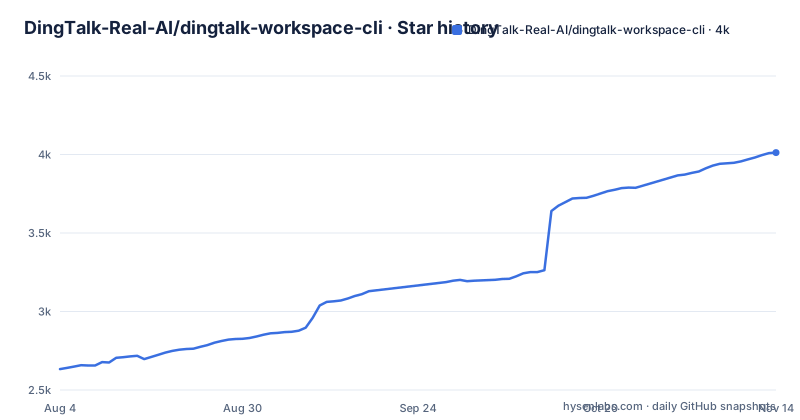
Star history
- DingTalk-Real-AI/dingtalk-workspace-cli4,012 ★ · +1,379
| Repository | 2026-08-04 | 2026-11-14 |
|---|---|---|
| DingTalk-Real-AI/dingtalk-workspace-cli | 2.6k | 4k |
1,379 Stars in the last 102 days, measured from the daily GitHub snapshot. Compare with other projects
Editorial analysis
What dws Actually Solves
DingTalk has a sprawling product family: chat, calendar, Aitable (a spreadsheet-like database), docs, and more. Each has its own API, authentication, and rate limits. For a developer or an AI agent, gluing those APIs together is tedious. dws is an official CLI that wraps the full suite into one Go binary. It gives humans a consistent command syntax and gives AI agents structured JSON responses. The README states it is designed for both human users and AI agent scenarios. The practical problem it solves is integration overhead. Instead of writing several SDK clients, you install one tool that speaks to DingTalk's endpoints. It is for enterprise admins and developers inside organizations that already use DingTalk. The co-creation phase note means it is not a finished product; it is a controlled early access program.
How It Works: Commands, Output Formats, and Agent Skills
The tool exposes product-specific command groups. The README shows examples like `dws aitable ...` and `dws calendar ...`. For humans, there is `--help` for usage, `--dry-run` to preview requests before sending them, and `-f table/json/raw` to choose output format. For AI agents, the key feature is structured JSON responses. The agent-facing side is the skill system. The installer ships skills in one of two layouts. The default is `multi`, which installs per-product skills such as `dingtalk-aitable`, `dingtalk-calendar`, and `dingtalk-chat`. The legacy `mono` mode installs a single `dws` skill covering all products. The CLI commands are identical in both modes; only the agent-side skill layout changes. The README recommends `multi` for single-product tasks because it keeps the context per call smaller, and `mono` for cross-product workflows. This design shows a clear separation between the CLI surface and the agent integration layer.
Getting It Running: Installation and Configuration
Installation is straightforward on macOS and Linux with a one-liner: `curl -fsSL https://raw.githubusercontent.com/DingTalk-Real-AI/dingtalk-workspace-cli/main/scripts/install.sh | sh`. Windows users run a PowerShell equivalent. There is also an npm package (`npm install -g dingtalk-workspace-cli`) and a Homebrew tap. For users in mainland China, the README documents a Gitee mirror. You set `DWS_GITEE_REPO=DingTalk-Real-AI/dingtalk-workspace-cli` and the installer resolves versions and assets from Gitee instead of GitHub. The skill mode is configurable via the `DWS_SKILL_MODE` environment variable or the `dws skill setup --mode mono` command. Upgrades are built-in: `dws upgrade` pulls from GitHub Releases with SHA256 verification and automatic backup. You can also build from source with Go 1.25+ using `go build -o dws ./cmd`. The README notes that static endpoint data is generated from the Wukong baseline and committed in the repository, so source builds do not require a sibling data checkout.
Security Model: Zero Trust and Admin Authorization
The security story is the most distinctive part of dws. The README claims a zero-trust architecture with three components: OAuth device-flow auth, domain allowlisting, and least-privilege scoping. The bold claim is that not a single byte can bypass authentication and audit. Device flow is appropriate for a CLI because it avoids embedding credentials in the binary. Domain allowlisting means the tool only talks to approved DingTalk endpoints. Least-privilege scoping limits what each token can do. However, this is a claim from the README, not something I could verify by running the tool. The co-creation phase warning is important: the project accesses DingTalk enterprise data and requires enterprise admin authorization. That means you cannot just install and use it with a personal account. An admin must grant access, and the tool is not meant for hobbyists. The security model is a reason to trust it, but the beta status is a reason to be cautious.
Limitations and Failure Modes
The most obvious limitation is the co-creation phase. The README explicitly says it requires enterprise admin authorization and directs users to join a DingTalk DWS co-creation group for support. That is a support model, not a public community. If you are not a DingTalk enterprise customer, this tool is not for you. Another limitation is the beta release cadence. The latest release at the time of writing is v1.0.61-beta.2, and there were two beta tags within a day. That suggests rapid iteration but also instability. The README mentions that upgrades require v1.0.7 or later, and for earlier versions you must re-run the install script. That is a compatibility trap. Also, the skill mode has a legacy `mono` mode that the README says remains available but implies is less preferred. If you install with the default one-liner, you get `multi` and cannot easily switch without an interactive command. The reliance on GitHub for releases means users in mainland China must set the Gitee mirror, otherwise the installer may fail or be slow.
Alternatives: SDKs and Custom Integration
The natural alternative is to use DingTalk's official SDKs directly. The README does not name a specific SDK, but the existence of a CLI that wraps DingTalk's APIs implies that raw API access is possible. The difference is in approach. With an SDK, you write code in your language of choice, manage authentication yourself, and build your own output formatting. With dws, you get a pre-built binary that handles auth, request formatting, and JSON output. For an AI agent, the advantage of dws is that it provides structured JSON and agent skills out of the box. With an SDK, you would need to build that integration layer yourself. The trade-off is control. An SDK lets you optimize for specific rate limits or custom endpoints. dws is a black box that you must trust to do the right thing. Also, an SDK does not require a separate installer or a beta version; you can pin a specific SDK version in your dependency manifest. dws requires you to manage the binary and its upgrade process.
Maintenance and Upgrade Cost
The project has a built-in self-upgrade mechanism, which is convenient but also a maintenance burden. You must run `dws upgrade` regularly to stay current, and the fast release cadence means frequent updates. The README says upgrades include SHA256 integrity verification and automatic backup, which is good. However, the requirement that upgrades require v1.0.7 or later is a hard floor. If you are on an older version, you cannot use the built-in upgrade and must re-run the install script. That is an extra manual step. The skill mode also affects upgrades: the installer defaults to `multi`, but if you switched to `mono`, you need to remember that. The license is Apache-2.0, which is permissive and allows commercial use, modification, and distribution. There is no indication of a copyleft requirement. The maintenance cost is moderate: you need to track releases, test upgrades, and ensure your enterprise admin authorization remains valid. The co-creation phase means the API surface may change without notice, so you must read the changelog before each upgrade.
Editorial conclusion
Adopt dws if you are a DingTalk enterprise admin or developer who needs scripted, auditable access to DingTalk data, or if you are building an AI agent that must call DingTalk APIs without building a custom integration. Do not adopt it for personal, non-enterprise use, because it requires admin authorization and is clearly labeled as a co-creation phase beta. Before rollout, verify the current release's stability, test the OAuth device flow in your domain, and confirm that the least-privilege scopes match your data access needs. The project's fast release cadence and frequent beta tags mean you must pin a specific version and test upgrades in a staging environment before trusting it with production data.
Frequently asked questions
What is dingtalk-workspace-cli?
A cross-platform command line client, invoked as dws, that puts a workplace suite's product capabilities behind one interface. It is built for people, offering help output, a dry-run mode and selectable output formats, and for agents, offering structured JSON responses and skills that ship with it.
Do I need permission to use dingtalk-workspace-cli?
Yes. The readme states that the project accesses enterprise data and requires enterprise admin authorisation, and it asks readers to join a co-creation group for support and updates, placing the project in an early phase.
How do I install dingtalk-workspace-cli?
Five documented routes: a piped script for Unix systems, the equivalent for PowerShell, a Node package manager with a separate pre-release channel, a Homebrew formula that needs the repository address in the tap command and installs its pre-release without replacing the stable one, and prebuilt binaries or a source build.
Do I need a C compiler to build dingtalk-workspace-cli?
Yes, by default. The default build includes a message-crypto backend without a build tag and therefore needs a working C compiler. Disabling cgo produces a stub build, which the readme says to use only when that is intentional.
What is the difference between the mono and multi skill modes in dingtalk-workspace-cli?
Only the agent-side layout. Command line behaviour is identical in both. Multi installs one skill per product and gives a smaller context per call, which suits single-product tasks, while mono installs one skill covering everything, which suits cross-product workflows at the cost of a single large skill.
Can I install dingtalk-workspace-cli in China?
Yes, by setting one variable so the installer resolves the version and every release asset from a domestic code host, or by pointing the Node package manager at a domestic registry mirror. A third route installs skills only from the mirror, and is the only one of the three that falls back to the mirror automatically when the primary host is unreachable.
Official sources
Add this badge to your README
If you maintain this project, the badge below links readers to this analysis and shows its maintenance status from the daily GitHub snapshot. Paste the markdown into your README; add ?metric=license or ?metric=stars to the image URL for a different field.

[](https://hysenlabs.com/projects/dingtalk-real-ai-dingtalk-workspace-cli)Star history chart for your README
[](https://hysenlabs.com/projects/dingtalk-real-ai-dingtalk-workspace-cli)Was this useful?