Run and Check need the development build, the Java coordinates say 26.8.21, and the support table has four rows
The verification layer for coding agents
At a glance
- What is it?
- Vibium is a Go binary that gives a coding agent a browser and then lets the agent check its own claims, exposed as a CLI skill, an MCP server and client libraries in three languages; the documentation is unusually plain about its limits, and the limits are the story, from two headline verbs that require the development build to a browser that is visible by default to a platform table with four rows against a build system that knows five.
- Who is it for?
- Vibium fits a team that wants an agent to verify what it just did in a real browser rather than assert it, and the check command writing out a recording archive is the right shape for that. Four things to check first.
- Can I use it commercially?
- Yes. Apache-2.0 is a permissive licence: you can use, modify and sell software built on it, as long as you keep its copyright and licence notices.
- Is it still maintained?
- Yes. The repository received new commits within the last day.
- What is it written in?
- Mainly Go, according to GitHub's language statistics.
Answers come from the project's GitHub data, last synced on November 14, 2026, and from our analysis. They are not legal advice.
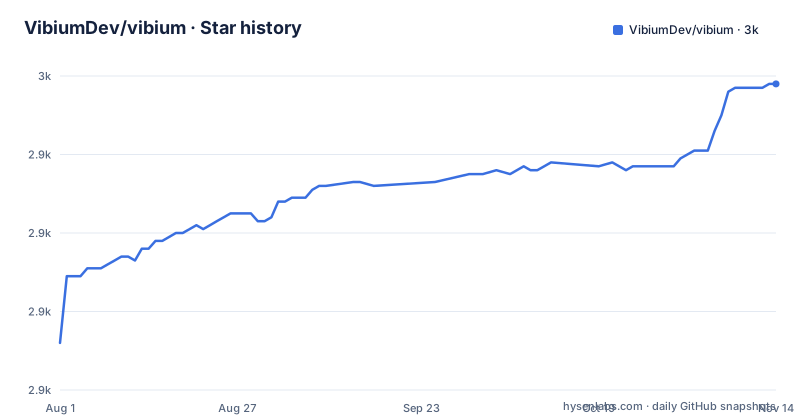
Star history
- VibiumDev/vibium2,958 ★ · +66
| Repository | 2026-08-01 | 2026-11-14 |
|---|---|---|
| VibiumDev/vibium | 2.9k | 3k |
66 Stars in the last 105 days, measured from the daily GitHub snapshot. Compare with other projects
Editorial analysis
The two headline verbs require the development build
The most useful sentence in the README is a limitation, not a feature:
> Run and Check currently require the development build and AI configuration.
So the two commands the project is named around are not in the stable release. The AI configuration is a file: the setup command writes it to a path under the user configuration directory, and a separate command writes just the template.
The release feed explains why. All three of the most recent releases are nightly builds, and the tag names carry a date, a dev marker, a timestamp and a short commit hash, which is the shape a project produces when it publishes continuously and treats the stable line as something else.
That is a coherent choice, and it is also the first thing a reader has to understand. The quick reference at the top of the file shows a natural language command and a check command, and neither of them works on the stable artefact. Anyone who installs the published package and tries the example will be reading a document for a build they do not have.
The Java coordinates pin 26.8.21 against October nightly tags
There are three places a version lives and they do not agree.
The root manifest carries a version of 26.8.21, and the README's Java dependency snippets use the same number in both the Gradle and the Maven forms. The repository root also has a version file that the build reads, with a comment explaining that on Windows the make implementation runs that command through a process call rather than the configured shell, so the file-reading utility has to be on the path.
The release feed is on a different scheme entirely, with tags that read like a date, the word dev, a timestamp and a commit hash. The three newest are all from the last three days of September and the first of October.
A date-based version of 26.8.21 and nightly tags from October 2026 are two months apart. A Java consumer pinning the documented version is therefore working with a build from before the recent work, and the two cannot be compared at a glance.
There is a shorthand in the build for that reason: passing V sets the version variable, so a local build can be stamped without editing the version file.
The browser is installed automatically and visible by default
One of the reasons given for choosing this over other browser automation is a single line in a list of five:
> Zero config. One install, browser downloads automatically, visible by default.
The automatic download is repeated in the language section, where the Java clients are described as installing the binary and fetching Chrome with no manual browser setup, and again in the agent setup section, where the setup command is said to install Chrome when it is missing.
The visible-by-default part is the detail with consequences. A browser automation tool that opens a real window is doing something different from one that runs headless, and the difference shows up everywhere: a screen recording or a screenshot of the machine contains the window, a machine with no display needs different handling, and anyone watching the process sees exactly what the agent is doing.
For a verification tool that is arguably the right default, since the point is to produce evidence a person can look at. It is also the opposite of what most continuous integration setups assume, and the documentation does not say how to turn it off.
The support table lists four platforms and the build knows five
The platform table has four rows, and all four are marked supported: Linux on x64, macOS on Intel, macOS on Apple Silicon, and Windows on x64.
The build system disagrees. Its platform detection walks the operating system name and the machine type through nested conditionals and produces a package name for each combination, and one of those names is for Linux on arm64, which the table does not list.
The list of combinations in the build is worth reading in full, because it shows what the project considers a distinct target rather than what it claims to support: Windows on x64, macOS on Apple Silicon, macOS on Intel, Linux on arm64 and Linux on x64.
So an arm64 Linux build is something the build system can produce and something the documentation does not promise. That may well be deliberate, since the table is about tested support rather than about buildable targets, but a reader has to infer it.
The browser side of the same table is also spelled out. Chrome is the default, Firefox is supported with a guide for switching, and a version of Firefox from 154 upwards can record video of a session.
The two MCP one-liners differ by a separator
The alternative to using the command line is a Model Context Protocol server, and the file gives two one-line examples side by side:
claude mcp add vibium -- npx -y vibium mcp    # Claude Code
gemini mcp add vibium npx -y vibium mcp       # Gemini CLI
The first separates the command with a double dash. The second does not.
That difference matters because the separator is what tells each client where the server command begins. A client that expects it will read the run command as arguments to the add subcommand, and the failure will look like a configuration error rather than a missing flag in a documentation example.
It is a small thing, and it is the kind of small thing that costs a reader an afternoon on their first attempt with a second client. Both lines are otherwise identical, which is what makes the omission easy to miss while reading.
The rest of that section points at a setup guide for the protocol route and describes it as the option for structured tool use instead of the command line.
A binary with no runtime dependencies, built with three toolchains
The reasons list says lightweight: a single binary of roughly ten megabytes with no runtime dependencies.
That describes the artefact, and the build system is where the other half of the story is. The contributing notes say source builds require Go, Node.js with its package manager, and Python. The make file picks a Python interpreter per platform, a virtual environment activation path that differs between Windows and everywhere else, and a platform-specific package name, which is how the same build produces five different artefacts.
The Windows branch is a small lesson in itself. It overrides the shell to a Git Bash installation, sets the shell flags separately, appends an executable suffix, and points the virtual environment at a Windows path. A comment beside it explains the reason: the Unix commands the file relies on have to work, and they are not native to the Windows shell.
The root package manifest is four keys. A name identifying it as a monorepo, that same version number, a private flag, and a list of two workspaces. There are no scripts and no dependencies in it at all, which is why the make file is where every command in this repository actually lives.
The architecture diagram stops halfway down
The diagram is drawn with box characters and shows one agent talking to one binary by two routes.
At the top is a box for the model or agent, with three named examples inside it. Two arrows leave it, one labelled as a command line over a shell and one labelled as the protocol server over standard input and output. Both point into a single box for the binary, which contains two smaller boxes side by side: one for the command line commands and one for the protocol server.
That is the whole architecture claim, and it is a good one: the same binary serves both channels, so an agent using the structured tool interface and a person typing commands are talking to the same implementation.
The drawing finishes before the picture does. The second row inside the binary's box is empty, a box to the right of the binary is started with a title and no content, and the frame is never closed. The layer between the binary and a browser is the part that is missing from the picture, and it is also the part the rest of the file is mostly about.
Two skills, and one of them audits the other
The installer offers two skills, and the split between them is the design.
The first is called browser. It covers exploring pages, automating actions, recording sessions, and carrying out browser tasks from plain-language instructions. The second is called check, and it is described as independently assessing whether a claim holds in the browser or in a recording.
That word independently is doing the work. A check skill that simply re-reads what the browser skill did would be reporting the agent's own account of itself. One that assesses a claim against the page state is a second look.
How the check is invoked matches the shape. A natural language command does the work, a second one states a claim to verify, and a third saves a recording as a zip archive. The archive is the artefact: something a person can open after the fact rather than a line of output that has to be trusted.
Invocation is spelled out per agent, with slash-prefixed names for agents that use slash skills and dollar-prefixed names for one particular client. A readiness command is provided to check the setup, and a walkthrough is offered for a first check.
Editorial conclusion
Vibium fits a team that wants an agent to verify what it just did in a real browser rather than assert it, and the check command writing out a recording archive is the right shape for that. Four things to check first. Run and Check require the development build and an AI configuration file written to a documented path, so the two headline verbs are not in the stable release. The browser is installed and visible by default, which changes what an automated run looks like and needs thought before it goes on a machine with no display. The platform table lists four combinations while the build system computes five, including a Linux build for arm64 that the table does not claim. And the version a Java user pins is two months older than the tags in the release feed. Verify a claim by running the check rather than by reading the transcript, keep the recording it saves, and read the capability limits page before trusting a result. The branch was pushed on 2026-10-02.
Frequently asked questions
how to install vibium
With npm install -g vibium followed by vibium setup, which prompts for the agent and installation scope and installs Chrome if it is missing, or vibium setup --non-interactive for an unattended run. There are also libraries: npm install vibium for JavaScript and TypeScript, pip install vibium for Python, and a Gradle or Maven dependency at version 26.8.21 for Java, which installs the binary and downloads Chrome automatically.
is vibium open source
The repository is published under the Apache-2.0 licence, with a licence file and a notice file at the root of the tree. The source builds are described as requiring Go, Node.js with its package manager, and Python, and the development setup is in a contributing guide at the root.
What is Vibium used for?
It describes itself as a verification layer for coding agents: a single binary that lets an agent navigate pages, fill forms, click buttons and take screenshots through command line commands. It ships two skills, one for driving the browser and one for independently checking whether a claim holds, and it is also available as a protocol server and as JavaScript, Python and Java libraries.
Does Vibium use Playwright or Selenium?
The documentation says it is built on the WebDriver BiDi standard rather than on proprietary protocols, and presents that as one of five reasons to choose it. Chrome is the default browser and Firefox is supported, with a guide for switching and session video recording from Firefox 154 upwards.
What do the Vibium run and check commands require?
The README states that they currently require the development build and AI configuration. The setup command writes an environment file under the user configuration directory, or a template can be written with the config init command, and a separate reference page covers the model providers. The three most recent releases are all nightly builds.
Official sources
Add this badge to your README
If you maintain this project, the badge below links readers to this analysis and shows its maintenance status from the daily GitHub snapshot. Paste the markdown into your README; add ?metric=license or ?metric=stars to the image URL for a different field.

[](https://hysenlabs.com/projects/vibiumdev-vibium)Star history chart for your README
[](https://hysenlabs.com/projects/vibiumdev-vibium)Was this useful?