pi-vs-cc is a bench of Pi extensions for guarding bash and delegating to agents
Comparison between open source PI agent and closed source Claude Code agent
At a glance
- What is it?
- The pi-vs-cc repository is a collection of customized Pi Coding Agent harnesses, each one loading a TypeScript extension through just tasks, covering UI, safety auditing, subagents and agent-to-agent networking. It suits an engineer evaluating an open agent as an alternative to Claude Code, and it is a demonstration set rather than a distributable library.
- Who is it for?
- Adopt pieces of pi-vs-cc if you already run Pi and want a working reference for a footer widget, a safety rule file or a subagent dispatcher, because each extension is a single TypeScript file you can read in one sitting. Do not adopt the repository as a dependency, since package.json marks it private with a single yaml dependency and there are no releases.
- Can I use it commercially?
- Yes. MIT is a permissive licence: you can use, modify and sell software built on it, as long as you keep its copyright and licence notices.
- Is it still maintained?
- Yes. The repository last received commits 120 days ago.
- What is it written in?
- Mainly TypeScript, according to GitHub's language statistics.
Answers come from the project's GitHub data, last synced on November 6, 2026, and from our analysis. They are not legal advice.
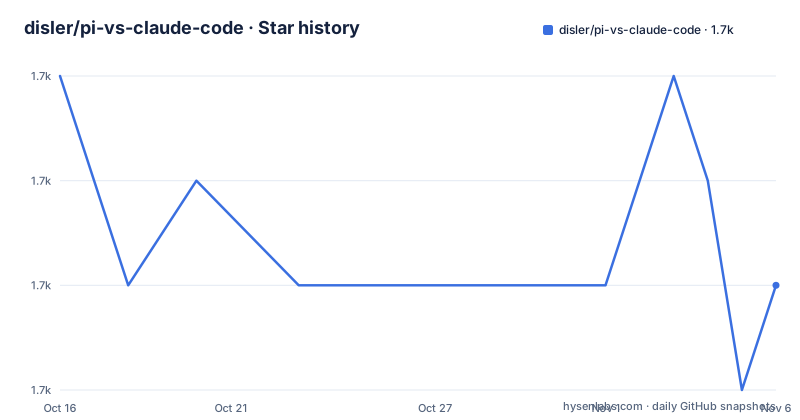
Star history
- disler/pi-vs-claude-code1,715 ★ · -2
| Repository | 2026-10-16 | 2026-11-06 |
|---|---|---|
| disler/pi-vs-claude-code | 1.7k | 1.7k |
-2 Stars in the last 21 days, measured from the daily GitHub snapshot. Compare with other projects
Editorial analysis
Sixteen extensions, one runtime, and no packaging
The repository's stated purpose is comparison: it presents customized instances of the Pi Coding Agent as a hedge against Claude Code, and the README is explicit that the point is to demonstrate customization of UI, orchestration tools, safety auditing, agent-to-agent orchestration and cross-agent integrations.
What it actually is: a directory of TypeScript extension files under extensions/, and a justfile with one recipe per configuration. package.json is marked private, declares a single dependency on yaml, and has no build script. There is no library to import and nothing published.
That shape is the useful part. Each extension is one file loaded with the -e flag, so you can read exactly what an extension intercepts before you trust it with your shell. The justfile makes that readable as a catalogue, with numbered recipes from ext-pure-focus through the orchestrators.
Prerequisites are three tools: Bun 1.3.2 or newer as the runtime and package manager, just as the task runner, and the pi CLI itself.
Keys must exist before you launch, which the README treats as a feature
Pi does not auto-load .env files, so API keys have to be in your shell environment before you start it. A template is provided:
cp .env.sample .env
source .env && pi
The sample covers OPENAI_API_KEY, ANTHROPIC_API_KEY, GEMINI_API_KEY and OPENROUTER_API_KEY, plus FIRECRAWL_API_KEY for the pi-pi research agents that crawl documentation.
The repository offers three ways to source it. Manually each session, as an alias such as alias pi='source $(pwd)/.env && pi', or through just, which is the cleanest because the justfile sets set dotenv-load := true, so every recipe gets the environment automatically. That last point is why the recipes work at all: without it, ext-minimal would launch pi with no keys at all.
Installation is one command, bun install, which fetches the yaml dependency the rules files need.
damage-control intercepts bash, and the rules live in YAML you can read
Two extensions implement the same rule set with different failure behaviour, which is the most interesting pair in the repository. damage-control does real-time safety auditing: it intercepts dangerous bash patterns and enforces path-based access controls loaded from .pi/damage-control-rules.yaml.
damage-control-continue applies the same rules but returns actionable feedback instead of aborting, so the agent's turn keeps running and can adapt. That difference is a real design decision rather than a variation. The first variant is a hard stop for a workflow where you would rather review a diff yourself; the second suits a supervised session where stopping the turn loses context.
The rule file being YAML rather than code means you can audit the policy without reading TypeScript, and the yaml package in package.json is there to parse it. That is the pattern the rest of the repository follows: policy in a data file, enforcement in the extension.
Orchestration comes in four flavours: dispatcher, chain, subagents and coms
agent-team is a dispatcher-only orchestrator where the primary agent delegates all work to named specialists through dispatch_agent, with a grid dashboard showing the team. agent-chain is the sequential alternative: each step's output feeds into the next step's prompt, selected with /chain.
subagent-widget takes the lighter route, a /sub <task> command that spawns background Pi subagents, each with its own streaming live-progress widget. tilldone is not orchestration but discipline: define tasks before starting work, track completion state across steps, and show a persistent task list with live progress in the footer.
Then there is the agent-to-agent layer. coms is a peer-to-peer mechanism, and .env.sample documents coms-net as an HTTP and SSE communication hub with its own settings block. That block is worth reading closely because it shows what the authors consider the security boundary:
PI_COMS_NET_AUTH_TOKEN=
PI_COMS_NET_PORT=
PI_COMS_NET_SERVER_URL=
The comments in the sample state that the token is required to bind a LAN or remote server, that for 127.0.0.1-only operation the server auto-generates a token and writes it to ~/.pi/coms-net/projects/<project>/server.secret.json with mode 0600, and that the port can be left blank or 0 to let the OS claim one. A token written next to the project is fine for a single user on one machine and is exactly the thing you must not leave in place on a shared or network-exposed host.
Interface extensions are the cheap part and the reason to start here
The presentation layer has more entries than any other category, which tells you where the low-risk experimentation is. pure-focus removes the footer bar and status line entirely. minimal replaces it with a compact footer showing the model name and a ten-block context usage meter. tool-counter builds a two-line footer with model, context meter, token and cost statistics on one line and working directory, branch and a per-tool call tally on the other.
tool-counter-widget moves that information above the editor as a live-updating widget with per-tool call counts and background colours. purpose-gate makes you declare session intent at startup, shows a persistent widget, and blocks prompts until you have answered.
There is also theme-cycler, which appears in the recipes alongside several of the others and has no row of its own in the README table, and system-select, a /system command that switches between agent personas or system prompts read from .pi/agents/, .claude/agents/, .gemini/agents/ and .codex/agents/.
cross-agent is the interoperability one: it scans the .claude/, .gemini/ and .codex/ directories for commands, skills and agents and registers them in Pi. If you already have a working setup for another agent, that is the extension that saves you the most time.
Maintenance state and the risk of running agent extensions on your machine
The repository is not archived. The last push was on 2026-07-10, and there are no GitHub releases, so there is no version to pin. The MIT license is permissive, which makes the code easy to reuse in your own configuration.
Beyond versioning, the risk here is not legal but operational. These extensions run inside an agent that can execute shell commands, and several of them exist precisely to control what that agent does. damage-control is the mitigation, so the sensible order is to install and configure the auditing extension before any orchestrator that dispatches work to subagents.
The repository also carries documents beyond the README: COMPARISON.md, PI_VS_OPEN_CODE.md, TOOLS.md, THEME.md, RESERVED_KEYS.md, CLAUDE.md, a .claude/ directory, a .pi/ directory, scripts/ and specs/. The comparison documents are where the actual argument with Claude Code is made, and they are written by someone with a position to state, so read them as a viewpoint rather than as measurement.
Editorial conclusion
Adopt pieces of pi-vs-cc if you already run Pi and want a working reference for a footer widget, a safety rule file or a subagent dispatcher, because each extension is a single TypeScript file you can read in one sitting. Do not adopt the repository as a dependency, since package.json marks it private with a single yaml dependency and there are no releases. Before running anything, read the damage-control rules in .pi/damage-control-rules.yaml, set PI_COMS_NET_AUTH_TOKEN to a real random value before exposing the coms hub beyond localhost, and note the last push was on 2026-07-10.
Frequently asked questions
How do I install and run the pi-vs-cc extensions?
Install Bun 1.3.2 or newer, just and the pi CLI, then run bun install. Each configuration has a just recipe such as ext-minimal or ext-agent-team that launches pi with the relevant extension files loaded through the -e flag.
Why are my API keys not being picked up in pi-vs-cc?
Pi does not auto-load .env files, so keys must be in your shell environment before you launch it. Copy .env.sample to .env, fill it in, and either source it with source .env && pi or run pi through just, since the justfile sets set dotenv-load := true for every recipe.
What is the difference between damage-control and damage-control-continue?
Both intercept dangerous bash patterns and enforce path based rules from .pi/damage-control-rules.yaml. damage-control aborts the blocked tool call, while damage-control-continue returns actionable feedback and lets the agent's turn continue so it can adapt.
How do I secure the coms-net hub in pi-vs-cc?
Set PI_COMS_NET_AUTH_TOKEN to a long random string before exposing the hub beyond localhost. On 127.0.0.1 only, the server generates a token and stores it at ~/.pi/coms-net/projects/<project>/server.secret.json with mode 0600. PI_COMS_NET_PORT pins the port and PI_COMS_NET_SERVER_URL points clients at a remote hub.
Official sources
Add this badge to your README
If you maintain this project, the badge below links readers to this analysis and shows its maintenance status from the daily GitHub snapshot. Paste the markdown into your README; add ?metric=license or ?metric=stars to the image URL for a different field.

[](https://hysenlabs.com/projects/disler-pi-vs-claude-code)Star history chart for your README
[](https://hysenlabs.com/projects/disler-pi-vs-claude-code)Was this useful?