DNSControl: infrastructure as code for DNS zones across 65 providers
Infrastructure as code for DNS!
At a glance
- What is it?
- DNSControl keeps DNS records in a JavaScript-compatible config file and pushes them to Route 53, Cloudflare, BIND and dozens of other providers. It is a good fit for teams that already review infrastructure changes in Git, and a poor fit for anyone who wants a hosted control plane.
- Who is it for?
- Adopt DNSControl if your zones live in a provider API and you want the zone file reviewed in a pull request rather than edited in a web console. Do not adopt it if you need a hosted UI, per-record access control, or a provider it does not support: the README lists 65 providers and registrars, and anything outside that list is not covered.
- Can I use it commercially?
- Yes. MIT is a permissive licence: you can use, modify and sell software built on it, as long as you keep its copyright and licence notices.
- Is it still maintained?
- Yes. The repository received new commits within the last day.
- What is it written in?
- Mainly Go, according to GitHub's language statistics.
Answers come from the project's GitHub data, last synced on November 15, 2026, and from our analysis. They are not legal advice.
Star history
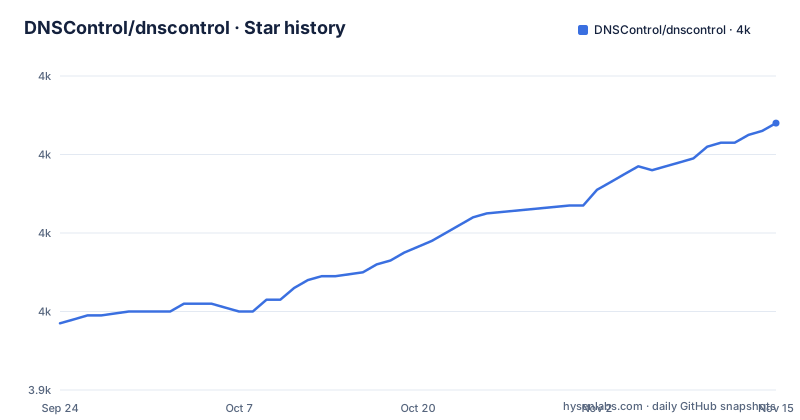
- DNSControl/dnscontrol4,008 ★ · +51
| Repository | 2026-09-24 | 2026-11-15 |
|---|---|---|
| DNSControl/dnscontrol | 4k | 4k |
51 Stars in the last 52 days, measured from the daily GitHub snapshot. Compare with other projects
Editorial analysis
What DNSControl replaces, and for whom
Most DNS changes happen in one of two places: a zone file edited over SSH, or a web console where someone clicks through a record form. Both leave no review trail. DNSControl's answer is to treat the zone as source code. Records live in a file called dnsconfig.js, the file goes through the same review process as the rest of your repository, and a command applies it to the provider's API.
The README frames the benefit in three lines: it is "less error-prone than editing a BIND zone file", "more reproducible than clicking buttons on a web portal", and vendor-agnostic, so the same records can be sent to more than one provider. That third point is the one that separates it from a simple API wrapper. If you are migrating from one DNS host to another, or running the same zone in two places during a cutover, the same config can target both.
The audience is narrow and specific. You need the zone to live behind a provider API that DNSControl supports, which the README puts at 65 DNS providers and registrars. You need somewhere to run a Go binary or the published container. And you need to be comfortable with the idea that the config file, not the provider console, is the source of truth. If any of those three is missing, the tool adds a layer without removing one.
How the JavaScript config becomes provider API calls
The configuration language is JavaScript-compatible, and the README's example is short enough to read in one pass. You declare a registrar and a DNS provider by name, then call D() with a domain, the registrar, the provider, and a list of records:
// define our registrar and providers
var REG_NAMECOM = NewRegistrar("ndc_main");
var DSP_ROUTE53 = NewDnsProvider("r53_main");

D("example.com", REG_NAMECOM, DnsProvider(DSP_ROUTE53),
  A("@", "1.2.3.4"),
  CNAME("www","@"),
  MX("@",5,"mail.myserver.com."),
  A("test", "5.6.7.8")
)
The names passed to NewRegistrar and NewDnsProvider are keys, not credentials. The credentials themselves live in a separate creds.json file, which is what keeps the zone definition safe to commit. The README describes dnscontrol init as writing both files for you after asking for your provider and registrar and verifying the credentials.
The execution model is two-step and read-before-write. According to the README, `dnscontrol preview` talks to the providers (name.com as registrar, Route 53 as the DNS host in the example) and works out which changes are needed. `dnscontrol push` then makes those changes. The preview is not a dry-run flag bolted onto push; it is the first half of the workflow, and the diff it prints is the artifact you review.
Because the language is JavaScript, a config file can contain loops, variables and helper functions. That matters once you have more than a handful of zones, but it also means a config file can compute records rather than list them, which is harder to review than a flat list. The repository layout reflects the same split: the command implementations sit in commands/, the provider implementations in providers/, and the language and data model in pkg/ and models/.
Installing DNSControl and running a first preview
The README gives the Docker container as the easiest path, and the command mounts the current directory at /dns, which is also the working directory set in the Dockerfile:
docker run --rm -it -v "$(pwd):/dns" ghcr.io/dnscontrol/dnscontrol previewRun it from the directory holding your dnsconfig.js and creds.json. With no config present, the tool has nothing to preview; the README instead points at the interactive wizard as the quickest way to start, which asks for your DNS provider and registrar, verifies your credentials, and writes a working creds.json and dnsconfig.js including the records that already exist in your zones:
dnscontrol initAfter the wizard finishes, `dnscontrol preview` should print the difference between the records in your config and the records currently at the provider. If you have just imported the existing records, that diff should be empty or close to it. That is the state you want before you change anything.
From there the loop is: edit dnsconfig.js, run preview, read the diff, then run push. The README also points at a separate starter repository, DNSControl/dns-config, for teams that want the config under Git with CI. The project is written in Go and the README states it runs anywhere Go runs (Linux, macOS, Windows), so a local binary is an option alongside the container.
Where DNSControl is the wrong tool
The config file is the source of truth, and that cuts both ways. If someone edits a record in the provider's web console, the next push will reconcile the zone back to what the config says. That is the intended behaviour for a GitOps setup, and a surprise for a team that treats the console as the primary interface. Before adopting it, decide who is allowed to touch the console, because DNSControl will not preserve those edits.
Provider coverage is the second boundary. The README lists 65 providers and registrars, and the footnotes mark which ones also handle registrar functions and which are registrar-only. If your DNS host is not on that list, there is no fallback path described in the README; the provider model is described as extensible, which means writing a provider rather than configuring one.
The third limitation is the language itself. A JavaScript-compatible config is powerful and also executable. That is a real difference from a static zone file: a config can branch on environment variables or loop over a list, and the preview diff is then the only place the result becomes visible. Teams that want a config they can read top to bottom without running it should weigh that.
Finally, nothing in the README describes rollback. Preview shows the change before it happens and push applies it, but there is no documented undo. Recovery means editing the config back and pushing again, which works only if you still have the previous state and the provider will accept the reversal.
DNSControl compared with Terraform and OctoDNS
The closest comparison is Terraform with a DNS provider. Terraform models each record as a resource with its own lifecycle and state file, and can manage DNS alongside the rest of your cloud infrastructure in one graph. DNSControl does not have a state file in the same sense; it reads the zone from the provider and computes a diff against the config. That makes the zone itself the state, which removes the drift problem where a state file and reality disagree, but it also means DNSControl only knows about records, not about the load balancer whose address should end up in an A record.
OctoDNS takes a similar stance to DNSControl: records in a config, multiple providers, a sync step. The difference is the config format and the surrounding ecosystem, not the idea. If your team already writes Python for infrastructure, OctoDNS fits without a new language; if you would rather not run Python tooling, DNSControl's single Go binary and container image are the argument.
The multi-provider feature is worth reading carefully rather than assuming. The README says DNSControl "will upload your DNS records to multiple providers, which means you can test one while" the other serves production. That is a migration and redundancy pattern, not a load-balancing or failover system. It copies records; it does not decide which provider answers a query.
Licence, releases and the cost of staying current
DNSControl is MIT licensed, which permits commercial and closed-source use and modification. The practical implication for adopters is that the provider integrations are the part you depend on, and those integrate with vendor SDKs under their own licences. The go.mod file lists SDKs from AWS, Azure, Cloudflare, DigitalOcean, Gandi, Gcore and others, each with its own terms. If you redistribute DNSControl inside a product, that dependency set is what to review; nothing here is legal advice, and the LICENSE file in the repository is the authoritative text.
The release cadence is visible from the tags: v5.0.4 on 2026-09-08, v5.1.0 on 2026-09-16, and v5.2.0 on 2026-09-22. The last push to the default branch was on 2026-09-22, so the project is not archived and is being changed. Frequent minor releases are good for provider fixes and less good for pinning: the Dockerfile copies a binary from a build stage and the container is published as ghcr.io/dnscontrol/dnscontrol, so pinning a digest is the way to keep a stable version in CI.
Upgrade cost is mostly the config language and the credentials. The module path in go.mod is github.com/DNSControl/dnscontrol/v5, so v5 is the current major line. The README does not document a migration guide between majors, so read the release notes for the version you are moving to before you change the tag in your pipeline.
Editorial conclusion
Adopt DNSControl if your zones live in a provider API and you want the zone file reviewed in a pull request rather than edited in a web console. Do not adopt it if you need a hosted UI, per-record access control, or a provider it does not support: the README lists 65 providers and registrars, and anything outside that list is not covered. Verify first that `dnscontrol preview` against a copy of the zone produces the diff you expect, and check your provider's entry in the docs for the credential keys it expects in creds.json.
Frequently asked questions
What is DNSControl?
DNSControl is infrastructure as code for DNS. It keeps records in a JavaScript-compatible config file and uses provider plug-ins to send those records to DNS provider APIs such as AWS Route 53, Cloudflare and Gandi.
How does DNSControl handle DNS zones?
A zone is declared with a D() call that names the domain, a registrar and one or more DNS providers, followed by the record list. The dnscontrol init wizard can write a config that includes the records already present in your zones.
Can DNSControl work with Cloudflare?
Yes. Cloudflare appears in the README's provider table and links to its own provider page in the documentation, and the go.mod file lists the cloudflare-go SDK as a dependency.
How do I install DNSControl?
The README gives the Docker container as the easiest route, mounting the current directory at /dns and running the preview command. It also states that DNSControl runs anywhere Go runs, so a local binary is an option.
Official sources
Add this badge to your README
If you maintain this project, the badge below links readers to this analysis and shows its maintenance status from the daily GitHub snapshot. Paste the markdown into your README; add ?metric=license or ?metric=stars to the image URL for a different field.

[](https://hysenlabs.com/projects/dnscontrol-dnscontrol)Star history chart for your README
[](https://hysenlabs.com/projects/dnscontrol-dnscontrol)Was this useful?