docker/metadata-action: tags and labels for container images from Git refs
GitHub Action to extract metadata (tags, labels) from Git reference and GitHub events for Docker
At a glance
- What is it?
- docker/metadata-action is a GitHub Action that turns the current Git ref and GitHub event into Docker image tags and labels, so a build step no longer has to hard code a version. It is written in TypeScript, published as a compiled bundle, and it is most useful paired with docker/build-push-action or docker/bake-action.
- Who is it for?
- docker/metadata-action suits a team publishing images from GitHub Actions who wants semver aware tags, a moving latest tag and standard OCI labels computed once instead of in every workflow. It does not suit a pipeline that pushes outside GitHub Actions, and it does not replace the build step, since it produces metadata that docker/build-push-action then consumes.
- Can I use it commercially?
- Yes. Apache-2.0 is a permissive licence: you can use, modify and sell software built on it, as long as you keep its copyright and licence notices.
- Is it still maintained?
- Yes. The repository last received commits 2 days ago.
- What is it written in?
- Mainly TypeScript, according to GitHub's language statistics.
Answers come from the project's GitHub data, last synced on November 7, 2026, and from our analysis. They are not legal advice.
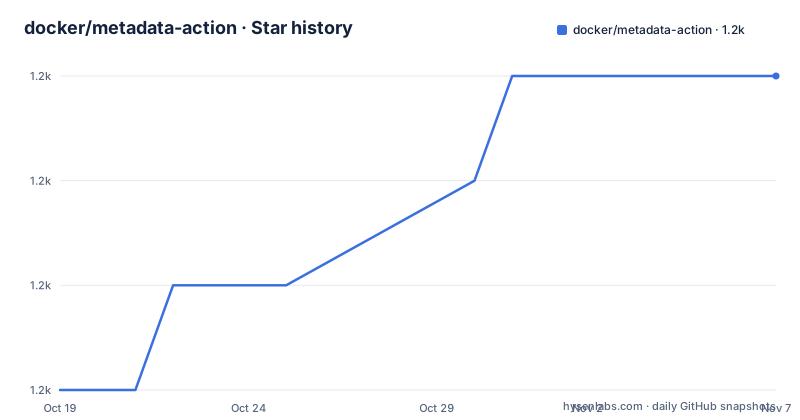
Star history
- docker/metadata-action1,155 ★ · +3
| Repository | 2026-10-19 | 2026-11-07 |
|---|---|---|
| docker/metadata-action | 1.2k | 1.2k |
3 Stars in the last 19 days, measured from the daily GitHub snapshot. Compare with other projects
Editorial analysis
One action that computes tags and labels, then hands them to the build
The problem this solves is small and specific. A workflow that pushes container images has to decide what to call them, and a build job that hard codes a version string breaks the moment you release more than once. docker/metadata-action reads the Git reference and the GitHub event and derives a set of tags and labels from them, exposing them as step outputs. The documented pairing is with Docker Build Push, and the basic workflow shows the shape of that integration. The action runs as a step with an id, and the build step then consumes its outputs.
      -
        name: Docker meta
        id: meta
        uses: docker/metadata-action@v6
        with:
          images: name/app
      -
        name: Login to DockerHub
        if: github.event_name != 'pull_request'
        uses: docker/login-action@v4
        with:
          username: ${{ secrets.DOCKERHUB_USERNAME }}
          password: ${{ secrets.DOCKERHUB_TOKEN }}
      -
        name: Build and push
        uses: docker/build-push-action@v7
        with:
          push: ${{ github.event_name != 'pull_request' }}
          tags: ${{ steps.meta.outputs.tags }}
          labels: ${{ steps.meta.outputs.labels }}
The key design decision is that the action does not build anything. It is a metadata producer, and the build step stays in charge of the image, which keeps the tagging rules in one place across a repository with many workflows.
Tag types decide what a ref turns into
The tag types are the substance of the action, and the documentation lists them with their own sections. type=ref derives a tag from a branch, a pull request or a tag ref. type=semver parses a semver tag and can emit the full version, the major and minor pair, or other patterns, with the pattern written as a handlebars expression such as {{version}} or {{major}}.{{minor}}. type=pep440 handles Python style versions, and the dependency list shows the @renovate/pep440 package behind it. type=match matches a pattern against a branch name, which is how nightly or release-candidate builds get their names. type=edge produces a rolling edge tag, type=raw passes a literal value through, type=schedule generates a tag from a cron schedule, and type=sha appends the short commit hash. The basic configuration in the documentation produces a small default set, and the table maps events to results. A pull request gives pr-2, a push to refs/heads/master gives master, a push to refs/heads/releases/v1 gives releases-v1, and a push of a v1.2.3 tag gives v1.2.3 along with latest, while a v2.0.8-beta.67 tag gives that exact tag plus latest. Once semver patterns are configured the same table changes, so v1.2.3 yields 1.2.3, 1.2 and latest, and the beta tag yields only 2.0.8-beta.67, without latest.
The priority attribute decides which tag is latest
When several tag types can produce a latest tag, the priority attribute resolves the conflict, and this is the detail most often missed. The rule is simple: a tag with a higher priority wins, and the first entry in the tags list has the highest priority. The default behaviour of the action is to generate a latest tag for a pushed tag, and a plain type=ref,event=branch configuration does not produce a moving latest tag for every branch push. A related behaviour is that the latest tag is not applied to prerelease versions by default, so 2.0.8-beta.67 does not move latest. The other convention in the tag expressions is the branch sanitisation, where a slash in a branch name such as releases/v1 becomes a dash, which is why the same ref shows up as releases-v1 in the table. Image names and tags are also sanitised, since a registry will not accept certain characters in a name or a tag.
Global expressions let one tag input serve many images
The tags input is not a list of literal strings but a set of type expressions, which is what allows a single configuration to produce different tags for different images. The context input sets the source of the Git ref, and the images input can list several repositories, with each one optionally carrying its own tags block. The global expressions are the substitution mechanism inside those blocks, and the documentation lists the ones available. {{branch}} and {{tag}} give the ref name, {{sha}} the commit hash, {{base_ref}} the base of the ref, and {{is_default_branch}} and {{is_not_default_branch}} are booleans that let one rule apply to the default branch and another to everything else. There are also two date expressions, {{date '<format>' tz='<timezone>'}} and {{commit_date '<format>' tz='<timezone>'}}, which use moment and moment-timezone, both of which appear in the dependency list. A consequence worth naming is that the same tag expression list applied to two images produces the same tags for both, so per image overrides exist to break that symmetry when one repository needs a different scheme.
Labels, annotations and the JSON output object
Besides tags, the action produces labels, and the documentation has a section on overwriting labels and annotations, which tells you what happens when you need values the action cannot derive. The action also supports annotations on the image, and the JSON output object is a machine readable form of the whole result, which is what you want if a later step needs to make a decision based on the computed metadata rather than just passing tags along. A related behaviour is the treatment of major version zero. The documentation has a section on it because the semver rules around 0.x releases are a common source of surprise, since a 0.x version conventionally signals an unstable API and the usual pattern of maintaining a major.minor tag alongside the patch tag does not apply the same way. The action exposes the raw values and the documentation tells you to write the pattern accordingly. For anyone who wants a quick answer rather than a worked example, the recommended reading path is the inputs and outputs sections first, then the individual tag type sections, since the tag types are the part with the most behaviour.
A TypeScript action shipped as a compiled bundle
The repository layout explains how the action is built and consumed. The source lives in src/, the entry point is src/main.ts, and the compiled output in dist/ is what GitHub Actions actually runs, which is why dist/ is committed to the repository. The build is a single esbuild command that bundles to CommonJS targeting node24, with sourcemaps, minification and keep names, and it is followed by a license step that regenerates the dependency license file. The rest of the toolchain is modern and conventional. Vitest runs the tests, with a coverage configuration through @vitest/coverage-v8 and a codecov.yml for reporting, and eslint with a flat config, prettier and typescript strict settings handle linting and formatting. The runtime dependencies tell you what the action does internally: @actions/core and @actions/github for the Actions runtime, @docker/actions-toolkit for Docker specific handling, handlebars for the template expressions, moment and moment-timezone for the date expressions, semver for version parsing, csv-parse for parsing the comma separated tags input, and @renovate/pep440 for Python style versions. The action is published to the GitHub Marketplace, is licensed Apache-2.0, and its releases run on a v6 major line with v6.2.0 tagged on 2026-07-02.
Where docker/metadata-action is the wrong tool
The boundary is narrow and easy to state. This action runs inside GitHub Actions, so a pipeline that builds images elsewhere, in a local script or in another CI system, gets nothing from it, and the same is true of a registry that is not OCI compatible enough to carry the labels. It also does not build, push or sign anything, so on its own it does nothing to a registry, and using it without a build step that consumes steps.meta.outputs.tags and steps.meta.outputs.labels is a common and confusing mistake. The second limitation is the label surface. The labels the action generates are a fixed set that the documentation lists, so anything outside that set has to be added by hand, and the overwriting labels and annotations section exists precisely because the built in set does not cover every case. The third is the priority and latest behaviour, which is correct but subtle, and a pipeline that pushes several tags at once can end up moving latest in a way the release process did not intend if the priority attribute is not set deliberately. The fourth consideration is version pinning. The action is used as docker/metadata-action@v6, a moving major tag, so a workflow that wants reproducibility should pin to a specific release, and the project ships frequent releases across a v6 line, so the digest of the version in use is worth recording in the workflow.
Editorial conclusion
docker/metadata-action suits a team publishing images from GitHub Actions who wants semver aware tags, a moving latest tag and standard OCI labels computed once instead of in every workflow. It does not suit a pipeline that pushes outside GitHub Actions, and it does not replace the build step, since it produces metadata that docker/build-push-action then consumes. Before adopting it, check your tag types against the table in the documentation, because a semver pattern that does not match your release tag names silently produces no tag for that entry, and note that the action is referenced as docker/metadata-action@v6 with the newest release at v6.2.0 from 2026-07-02 and the last push on 2026-10-19.
Frequently asked questions
How do I use docker/metadata-action in a GitHub Actions workflow?
Add a step with an id that uses docker/metadata-action@v6 and give it an images input, then pass steps.meta.outputs.tags and steps.meta.outputs.labels to the build and push step. The documentation pairs it with docker/build-push-action or docker/bake-action.
What tag types does docker/metadata-action support?
The documented types are ref, semver, pep440, match, edge, raw, schedule and sha, each with its own section covering how a Git ref is turned into a tag name.
How does docker/metadata-action decide which tag is latest?
The priority attribute resolves it, with the first entry in the tags list having the highest priority. Prerelease versions do not move latest by default.
Can docker/metadata-action be used with Docker Bake?
Yes. The action handles a bake definition file, and the documentation shows declaring an empty target named docker-metadata-action in the bake file and inheriting from it in the build target.
Official sources
Add this badge to your README
If you maintain this project, the badge below links readers to this analysis and shows its maintenance status from the daily GitHub snapshot. Paste the markdown into your README; add ?metric=license or ?metric=stars to the image URL for a different field.

[](https://hysenlabs.com/projects/docker-metadata-action)Star history chart for your README
[](https://hysenlabs.com/projects/docker-metadata-action)Was this useful?