Materialize 1.0: A Material Design CSS Framework Whose Last Release Dates from 2018
GitHub describes it as Materialize, a CSS Framework based on Material Design. The repository metadata lists JavaScript as its primary language. The metadata lists the MIT license. This article stays within the project description and details documented in the GitHub repository README.
At a glance
- What is it?
- Materialize is a CSS framework that implements Google's Material Design with prebuilt components and JavaScript widgets. It reached 1.0 in September 2018, but that is still its latest release, so adoption today means relying on a version with no release in years.
- Who is it for?
- Adopt Materialize if you need a quick Material Design look with minimal custom CSS and you can live with a framework whose latest release dates from 2018. Avoid it for new long-lived projects where ongoing security patches, modern JavaScript, or active community fixes matter.
- Can I use it commercially?
- Yes. MIT is a permissive licence: you can use, modify and sell software built on it, as long as you keep its copyright and licence notices.
- Is it still maintained?
- Yes. The repository last received commits 87 days ago.
- What is it written in?
- Mainly JavaScript, according to GitHub's language statistics.
Answers come from the project's GitHub data, last synced on November 15, 2026, and from our analysis. They are not legal advice.
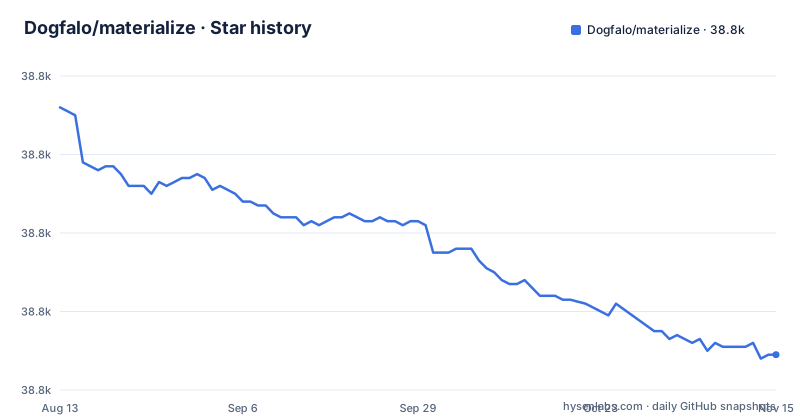
Star history
- Dogfalo/materialize38,769 ★ · -63
| Repository | 2026-08-13 | 2026-11-15 |
|---|---|---|
| Dogfalo/materialize | 38.8k | 38.8k |
-63 Stars in the last 94 days, measured from the daily GitHub snapshot. Compare with other projects
Editorial analysis
What Materialize Solves and Who It Targets
Materialize is a CSS framework that brings Google's Material Design to the web without requiring you to write the design system from scratch. It targets developers who want prebuilt components like buttons, cards, modals, and forms that follow Material Design's visual language. The README positions it as a direct implementation of material design, and the project's homepage materializecss.com offers a getting started guide. The intended audience is front-end developers who prefer a ready-made CSS and JavaScript bundle over hand-rolling styles.
How Materialize Works: CSS, JavaScript, and the Build Pipeline
Materialize is not a single file; it is a set of CSS and JavaScript components. The JavaScript part handles interactive components such as modals, dropdowns, and carousels, while the CSS provides the visual styling. The documentation runs locally via a Grunt task: after cloning the repo and running npm install, you execute grunt monitor to compile the docs and serve them at localhost:8000 using BrowserSync. That setup tells you the framework's source is built with Grunt, a task runner, and that the distribution files are generated from that build. For users, the actual mechanism is simple: you include the compiled CSS and JS files in your page, then initialize components either automatically or via JavaScript calls, though the README does not detail the initialization API.
Getting It Running: Installation Paths and Commands
The README lists several ways to get Materialize. You can download the latest release from GitHub, clone the repository directly, use a CDN via cdnjs, or install through package managers. The npm command is npm install materialize-css, and for the beta branch you use npm install materialize-css@next. Bower is mentioned but deprecated, and there is a Meteor package via atmosphere. For local development, the commands are git clone https://github.com/Dogfalo/materialize, cd materialize, npm install, and then grunt monitor to compile and serve the documentation. These are the only commands the README provides. There is no mention of Sass variables, custom theming, or build customization, which is a gap for developers who want to tweak the design tokens.
Browser Support and Its Practical Limits
Materialize states compatibility with Chrome 35+, Firefox 31+, Safari 9+, Opera, Edge, and IE 11+. That list reflects the state of browsers in 2018. Today, those versions are ancient, but the real issue is that the framework's JavaScript may rely on APIs that modern browsers still support, yet the lack of updates means no fixes for any new browser quirks. The explicit IE 11 support is a double-edged sword: it broadens reach. For a new project, targeting IE 11 is rarely necessary. The README gives no guidance on which components are CSS-only versus JavaScript-dependent, so you cannot easily strip out the legacy support.
The 2018 Freeze: Maintenance and Upgrade Cost
The latest release, 1.0.0, was published on September 9, 2018, and no later release exists, although the default branch is v1-dev and the repository's last push was in August 2026. This is the single most important fact for adoption. With no release since 1.0.0, you cannot count on published security patches, compatibility fixes for new browser versions, or dependency updates. The README points to a changelog and a releases section, but with no new releases, that history is static. The upgrade cost is effectively zero because there is nothing to upgrade to, but the cost is the risk of relying on a library with no release in years. If a bug appears in a component, you have to fork the code yourself or live with it. The MIT license allows forking, which is a mitigation, but it places the maintenance burden on you.
Limitations and Failure Modes
The most obvious limitation is the lack of active development. Even at 1.0, the framework was not without issues. Without updates, any known bugs remain. The documentation is published at materializecss.com and can also be built locally with Grunt, which is an older toolchain than the webpack or Vite setups many modern projects use. Another failure mode is the framework's opinionated design: if you deviate from Material Design, you fight the framework's styles. The README does not describe a theming system, so customizing colors or typography likely means overriding CSS, which can become messy. For a project that needs a unique brand identity, Materialize may be the wrong tool.
Alternatives: What Else Fills the Same Niche
The obvious alternative is Bootstrap, which offers a similar all-in-one CSS and JavaScript framework but with a much larger community and continuous releases. Bootstrap does not implement Material Design by default, so you would need a theme or custom styles to achieve that look. Another alternative is Material-UI (now MUI) for React, which implements Material Design as React components and is actively maintained. The difference in approach is fundamental: Materialize is a static CSS and vanilla JavaScript framework, while MUI is a component library tied to a specific framework. If you are not using React, MUI is not an option. For a vanilla JS project, you could use a CSS-only approach with a Material Design theme for Bootstrap, but that requires more assembly. The choice depends on whether you want the Material Design aesthetic out of the box (Materialize) or a more flexible base that you style yourself (Bootstrap).
Licensing and Legal Considerations
Materialize is released under the MIT license, as stated in the README. That allows you to use, modify, and distribute the code, including in commercial projects, as long as you include the copyright notice. The README says 'Code Copyright 2018 Materialize,' which is the copyright holder. The MIT license is permissive and does not require you to share your modifications. The README does not mention any trademark issues, but 'Material Design' is a Google trademark, so using the name in your project's branding could be a concern, though that is a legal question beyond this review. The practical implication is that you can fork the project without legal friction, which is the main escape hatch if you need fixes.
Editorial conclusion
Adopt Materialize if you need a quick Material Design look with minimal custom CSS and you can live with a framework whose latest release dates from 2018. Avoid it for new long-lived projects where ongoing security patches, modern JavaScript, or active community fixes matter. Before committing, verify that every component you plan to use works in your target browsers, especially IE 11 and older Safari, and check the GitHub issues for unresolved bugs that were never fixed after 1.0. If you need active maintenance, choose a framework like Bootstrap or Material-UI instead, as Materialize's latest release (1.0.0) dates from September 2018 and its default branch is still v1-dev.
Frequently asked questions
what is materialize
It is a CSS framework based on Material Design, published as materialize-css under the MIT license. The current version is 1.0.0, and the repository states that code copyright 2018 Materialize, released under the MIT license.
how to install materialize
There are several routes. Use `npm install materialize-css` for the stable line or `npm install materialize-css@next` for the beta, include the files from cdnjs, download the latest release from GitHub, or use `meteor add materialize:materialize`. The Bower route is listed but marked deprecated.
how to use materialize css
Include the compiled files from cdnjs, or install the package and reference `dist/css/materialize.css`, with the stylesheet source at `sass/materialize.scss`. A getting started guide is published at materializecss.com, and the main documentation lives on the same site.
how to use materialize
Start with the getting started guide at materializecss.com/getting-started.html, which the README points to for more information on how to use Materialize. To read the documentation offline, clone the repository, run `npm install`, then `grunt monitor` and open `localhost:8000`.
Official sources
Add this badge to your README
If you maintain this project, the badge below links readers to this analysis and shows its maintenance status from the daily GitHub snapshot. Paste the markdown into your README; add ?metric=license or ?metric=stars to the image URL for a different field.

[](https://hysenlabs.com/projects/dogfalo-materialize)Star history chart for your README
[](https://hysenlabs.com/projects/dogfalo-materialize)Was this useful?