doocs/md: A Markdown Editor Built for WeChat Official Account Formatting
WeChat Markdown Editor - a highly streamlined Markdown editor for WeChat, supporting Markdown syntax, custom themes, content management, multiple image hosts, an AI assistant and more.
At a glance
- What is it?
- doocs/md is a TypeScript based editor that renders Markdown into WeChat-ready styled articles. It targets content creators who want to avoid manual formatting, offering themes, image hosting, and AI assistance.
- Who is it for?
- Adopt doocs/md if you regularly publish to WeChat Official Accounts and want a browser-based tool that converts Markdown to styled WeChat content without manual CSS tweaks. Avoid it if your team relies on real-time collaboration, or if you cannot accept the WTFPL license.
- Can I use it commercially?
- Yes. WTFPL is a permissive licence: you can use, modify and sell software built on it, as long as you keep its copyright and licence notices.
- Is it still maintained?
- Yes. The repository last received commits 1 day ago.
- What is it written in?
- Mainly TypeScript, according to GitHub's language statistics.
Answers come from the project's GitHub data, last synced on November 14, 2026, and from our analysis. They are not legal advice.
Star history
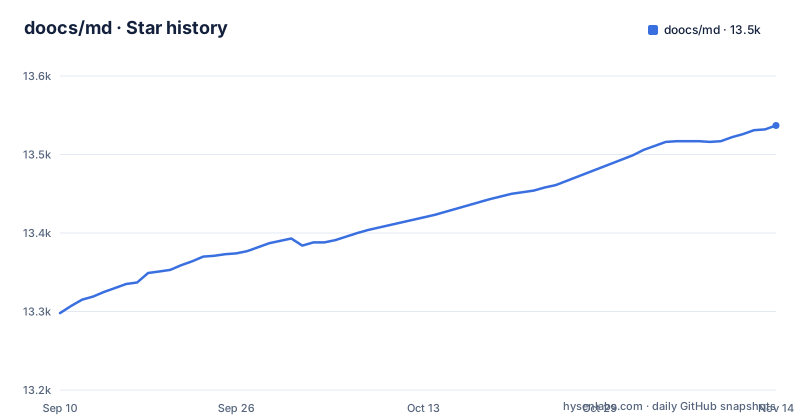
- doocs/md13,537 ★ · +239
| Repository | 2026-09-10 | 2026-11-14 |
|---|---|---|
| doocs/md | 13.3k | 13.5k |
239 Stars in the last 65 days, measured from the daily GitHub snapshot. Compare with other projects
Editorial analysis
What Problem This Editor Solves
WeChat Official Account articles do not accept Markdown directly. Editors typically write in the platform's rich text editor or paste from Word, then spend time adjusting fonts, spacing, and image alignment. doocs/md addresses this by rendering Markdown into a styled WeChat article format in real time. The README states that the project exists because existing open source WeChat Markdown editors have complex styles and require repeated layout adjustments. The intended user is a content creator who knows basic Markdown and wants to focus on writing rather than formatting. The editor is not a general-purpose Markdown tool; it is specifically tuned for the WeChat article output format, including support for elements like Ruby annotations and GFM warning blocks that are useful in Chinese technical writing.
How the Rendering Pipeline Works
It is a web application that processes Markdown input and generates styled HTML in a preview pane. The styling is applied through themes, which the user can select or customize with custom CSS. The README lists support for KaTeX math formulas, Mermaid and PlantUML diagrams, and GFM warning blocks. These are converted into the appropriate HTML and CSS that WeChat's web viewer can display. The README also lists file import and export.
Getting It Running: Online, Local, and CLI Options
The simplest way to use doocs/md is the hosted version at md.doocs.org. The README recommends Chrome for the best experience. For local deployment, the project provides a Docker image on Docker Hub, tagged as doocs/md:latest. You can also run from source with `nvm i && nvm use`, `pnpm i` and `pnpm web dev`, which serves http://localhost:5173/md/; package.json requires node >=22.22.2. The npm package @doocs/md-cli installs with `npm i -g @doocs/md-cli` and starts with `md-cli`, listening on port 8800 by default, or another port with `md-cli port=8899`. The cloud sync feature requires logging into an account, and the README points to a separate document, docs/cloud-sync.md, for details. Check that document for the exact authentication mechanism.
Image Hosting Is the Core Complexity
WeChat articles require images to be hosted on accessible URLs. doocs/md offers a wide range of image hosting backends, from a default no-configuration option to GitHub, Alibaba OSS, Tencent COS, Qiniu, MinIO, S3-compatible services, Cloudflare R2, and even Telegram. Each backend requires different configuration parameters. For example, GitHub needs a repository name and a personal access token, while Alibaba OSS needs AccessKey ID, AccessKey Secret, Bucket, and Region. The README provides a table with links to official setup guides for each service. This breadth is both a strength and a burden. A user who only needs one host must configure the parameters for that host.
AI Assistant Integration and Its Limits
The editor integrates with several AI models, including DeepSeek, OpenAI, Qwen, Tencent Hunyuan, Volcano Ark, and 302.AI. This feature is listed under the editor's capabilities as an aid to content creation. The AI models are external services, so using them incurs API costs and requires a network connection to those providers, which may be a concern for users in regions with restricted access.
Where It Falls Short: Sync, Offline Use, and Collaboration
The editor's local draft management supports automatic saving, which is useful for preventing data loss. However, syncing preferences across devices requires an account login, and the README points to docs/cloud-sync.md for details. Besides the hosted web app, it can run locally through the md-cli package or Docker, and the repository builds Chrome and Firefox extensions and a uTools plugin. If your workflow involves multiple editors working on the same article simultaneously, doocs/md is not the right tool. These constraints mean the editor is best suited for individual writers who draft in Markdown and then publish to WeChat, not for teams with complex editorial processes.
Alternatives and How They Differ
A common alternative is markdown-nice, another open source WeChat Markdown editor. Another approach is to use a general-purpose Markdown editor like Typora or VS Code with a WeChat export plugin, which gives you full control over the Markdown environment but requires you to manage the WeChat styling and image hosting yourself. The key difference is that doocs/md bundles the image upload and theme selection into one workflow, whereas general editors leave those steps to the user. If you already use a specific image hosting service, check whether doocs/md supports it before switching.
Maintenance, Licensing, and Upgrade Considerations
The repository is actively maintained, with the last push dated 2026-11-01 and recent releases including v2.1.0 in October 2025 and @doocs/[email protected] on 2026-10-30. The license is WTFPL, which is a permissive license that allows unrestricted use, modification, and distribution. However, it comes with no warranty and no requirement to preserve copyright notices. For a company, using WTFPL code in a commercial product is legally straightforward, but it also means the project offers no liability protection. The README invites pull requests and discussions, indicating a community-driven development model. When upgrading between versions, users should check the release notes for breaking changes, especially in configuration keys for image hosting or AI providers. The cloud sync feature may change its backend, so users relying on it should monitor the docs/cloud-sync.md file for updates.
Editorial conclusion
Adopt doocs/md if you regularly publish to WeChat Official Accounts and want a browser-based tool that converts Markdown to styled WeChat content without manual CSS tweaks. Avoid it if your team relies on real-time collaboration, or if you cannot accept the WTFPL license. Before committing, verify that your preferred image host is supported, test the AI model integration with your chosen provider, and confirm that the cloud sync feature meets your privacy expectations, since account-based sync stores editor preferences remotely.
Frequently asked questions
What does a markdown editor do in doocs/md?
It renders your Markdown as you type into styled WeChat article markup. On top of standard syntax it handles math with KaTeX, Mermaid diagrams, PlantUML, GFM alert blocks, and a Ruby annotation extension written as `[文字]{注音}` or `[文字]^(注音)`.
Which image hosts does doocs/md support?
Thirteen entries are listed: a default host that needs no configuration, GitHub, Aliyun, Tencent Cloud, Qiniu, MinIO, the S3 protocol, WeChat official account, Cloudflare R2, Upyun, Telegram, Cloudinary, and custom upload. Each row names the exact credential fields it requires.
How do I self-host doocs/md?
Install the CLI globally with `npm i -g @doocs/md-cli` and run `md-cli`, which listens on port 8800 by default, or run `docker run -d -p 8080:80 doocs/md:latest` and open http://localhost:8080. Building from source uses the pnpm scripts in the repository.
What does doocs/md need to build locally?
Node 22 or newer, since the manifest requires node >=22.22.2, and pnpm 12, pinned as [email protected]. The setup block starts with `nvm i && nvm use` and then `pnpm i` before `pnpm web dev`.
Official sources
Add this badge to your README
If you maintain this project, the badge below links readers to this analysis and shows its maintenance status from the daily GitHub snapshot. Paste the markdown into your README; add ?metric=license or ?metric=stars to the image URL for a different field.

[](https://hysenlabs.com/projects/doocs-md)Star history chart for your README
[](https://hysenlabs.com/projects/doocs-md)Was this useful?