Scream: a Windows sound card that puts PCM audio on the LAN
Virtual network sound card for Microsoft Windows
At a glance
- What is it?
- Scream is a virtual Windows audio driver that publishes whatever plays through it as a multicast PCM stream, with receivers for PulseAudio, JACK, ALSA and Windows. The catch is installation on modern Windows, which may mean test signing.
- Who is it for?
- Adopt Scream when you need audio from a Windows machine on other machines without a long chain of virtual audio plumbing, and when you have receivers ready on the receiving side, since the driver alone plays nothing.
- Can I use it commercially?
- Yes. MS-PL is a permissive licence: you can use, modify and sell software built on it, as long as you keep its copyright and licence notices.
- Is it still maintained?
- Yes. The repository last received commits 88 days ago.
- What is it written in?
- Mainly C++, according to GitHub's language statistics.
Answers come from the project's GitHub data, last synced on November 7, 2026, and from our analysis. They are not legal advice.
Star history
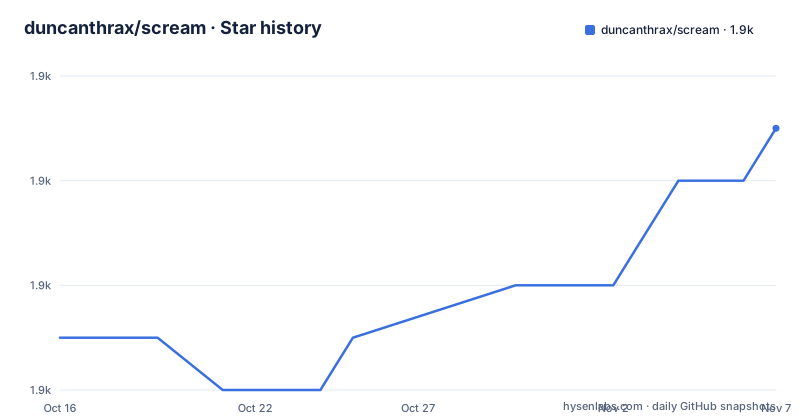
- duncanthrax/scream1,947 ★ · +4
| Repository | 2026-10-16 | 2026-11-07 |
|---|---|---|
| duncanthrax/scream | 1.9k | 1.9k |
4 Stars in the last 22 days, measured from the daily GitHub snapshot. Compare with other projects
Editorial analysis
A virtual device that becomes a network sender
Scream presents itself inside Windows as an ordinary sound device. You select it as the output for an application, and whatever that application plays is not sent to your speakers. It is written to the network.
The mechanism is a kernel mode driver. The README is explicit that all processing is done on kernel level and that there is no userspace portion, which is what it means by minimal delay. The driver is based on Microsoft's MSVAD audio driver sample code, and the changes and additions are under the same MS-PL licence, with LICENSE holding the actual text. MS-PL is a Microsoft Public License, not one of the permissive licences most projects assume, and this is not legal advice.
The output is raw LSB PCM, sent in UDP frames to a multicast target, with unicast available as an option. The default multicast target is 239.255.77.77 on port 4010. Frames carry a payload of at most 1157 bytes, made of a 5 byte header and 1152 bytes of audio.
That frame layout is not incidental. Because the stream is unencrypted raw PCM on the LAN, anything that can see the multicast group can listen, and the format is simple enough that receivers exist for microcontrollers.
Sample rate and channel layout live in the driver property pages
Two Windows dialogs control what goes onto the wire.
The default sampling rate and sample size are set as the Default format in the driver Advanced property page. The default speaker and channel configuration is set on the Configure dialog of the Scream sound device. Neither is configured in a file, which means the format of a stream is a property of the sending machine's driver settings rather than something a receiver negotiates.
That has a practical consequence. Receivers have to be told what to expect, or they have to be built to match.
The header is documented separately by the Wireshark dissector shipped in the repository under tools/wireshark. That Lua plugin colourises and decodes Scream UDP packets in Wireshark 3.4 and later, and the README in that folder explains how to install it, how to interpret the five byte header consisting of a sample rate marker, a sample width and a channel mask, and how to change the UDP port or the heuristic registration when analysing captures.
Having a dissector in the repository is a good sign for a protocol you have to debug, and it is also the fastest way to confirm on the sending side that packets are actually leaving with the header you expect.
Receivers exist for Unix, Windows, embedded boards and third party tools
The driver produces a stream; something has to play it. The Unix receiver is not in the installer package and has its own README under Receivers/unix, where it interfaces with PulseAudio or ALSA. The contributor list in the main README shows what that receiver has absorbed over time: JACK support, the original ALSA code, IVSHMEM support, a refactoring into a single binary with cmake, and raw output support.
The Windows receiver, ScreamReader, is included in the installer package as of version 1.2. It carries a documented limitation: it does not support positional mapping of multichannel setups beyond stereo, so a mismatch in speaker setup can play channels in the wrong position.
Beyond the bundled receivers, the README points at third party implementations. Cornrow supports Scream streams and is aimed at embedded devices. A third party streamer, receiver, visualizer and room and DAC measurement tool suite supports Scream and aes67 streams and is aimed at desktops. There are also receivers for low power embedded boards, including an STM32F429 ARM receiver and an ESP32 receiver for Scream and RTP, which are described as good for building ethernet attached active speakers.
Receivers can usually be run as unprivileged users. The one network requirement is that any receiving system with an input firewall must open UDP port 4010, or whatever custom port you configured.
Windows 10 install works until the cross-signing rules apply
Signed builds for Windows 10 on x64, x86 and arm64 are published as a ZIP on the GitHub releases page. The installer is a batch file that must be run with administrator rights.
The complication is driver signing. Microsoft tightened the rules for signing kernel drivers, and those rules apply to newer Windows 10 installations that were not upgraded from an earlier version. If your installation is subject to them, the driver will not install. The README lists the exceptions under which Windows 10 version 1607 and greater still accepts cross-signed drivers: the driver is a boot-up driver, Windows 10 was upgraded from a version preceding 1607, Secure Boot is disabled in BIOS or not available, the certificate was issued before 29 July 2015, or a special registry value has been set.
The first documented workaround is disabling Secure Boot in the BIOS, with the project pointing at its own issue for more detail. The second is that registry value:
[HKEY_LOCAL_MACHINE\SYSTEM\CurrentControlSet\Control\CI\Policy]
"UpgradedSystem"=dword:00000001
Setting UpgradedSystem claims the system was upgraded, which is a statement about the machine rather than about the driver. It is a deliberate weakening of a security control on that machine, and the decision belongs to whoever owns it.
Windows 11 needs Test Mode, pnputil and a reboot cycle
On Windows 11 none of the above works, because the installation batch file relies on devcon-x64, which is not compatible with Windows 11. The documented alternative replaces devcon with its successor pnputil and puts Windows into Test Mode through bcdedit.
The sequence, all from an administrator command prompt, is this. First ensure Secure Boot is not enabled. Then enable Test Mode with `bcdedit /set testsigning on`, reboot, and confirm that Test Mode appears in the bottom right corner of the wallpaper. Then navigate to `<scream folder>/Install/driver/<architecture>/` and install the driver with `pnputil /add-driver .\Scream.inf /install`. Finally turn test signing off again with `bcdedit /set testsigning off` and restart, confirming that the Test Mode message is gone.
The Scream audio device should then appear in your audio devices, and client setup can proceed.
Two reboots are involved, and the Test Mode message is the confirmation at each step rather than anything the tool reports. Test signing means the machine will accept unsigned drivers, which is a system-wide security posture change for the length of the install, and the README is candid that this is the path Windows 11 requires.
Kernel latency is the reason to use it, unicast is the reason to question it
The argument for Scream is the same argument that makes it unusual: the audio path never enters userspace. A virtual driver with a user mode component would add scheduling and buffering; a kernel driver that writes UDP directly does not.
That advantage shrinks with distance. The stream is raw PCM over UDP, so the bandwidth follows the sample rate, the sample width and the channel count, and packet loss on a congested network shows up as audio artefacts rather than as retransmission. The 1152 byte payload per packet is what keeps the packet rate moderate for a given stream.
Multicast is the default and unicast is optional. Multicast is the right default when receivers move between machines on the same subnet, since a receiver can join the group and leave it without the sender knowing. It also means the stream is available to anything that joins 239.255.77.77 on port 4010, which is fine on a trusted network and not fine anywhere else. There is no encryption and no authentication in the format as documented.
There is a fourth path for virtual machines, contributed by @martinellimarco: transferring audio through the IVSHMEM driver mechanism, similar to the GPU pass-through software Looking Glass, for the case of a Windows guest on a QEMU host. On that setup the audio does not have to leave the machine at all, which is the configuration where the whole network design is unnecessary.
Maintenance status tells you which installer you can expect
The repository is not archived and the last push was on 2026-08-11, inside the six month window before 2026-10-17.
The releases are older than that. The most recent are 4.0 dated 2022-09-17, 3.9 dated 2022-01-11 and 3.8 dated 2021-08-01, each an installer package for x64, x86 and arm64. So the trunk receives work while the installers people download are from 2022. That gap is the thing to plan around: if you need a Windows 11 install, you are relying on the 4.0 package or on building from source rather than on a recent tagged build.
The build system is visible in the repository as well. Scream.sln is the Visual Studio solution, Install/ holds the installer material including the driver directories referenced in the Windows 11 instructions, and azure-pipelines.yml is the continuous integration definition. Receivers/ holds the Unix receiver with its own README, tools/ holds the Wireshark dissector, and doc/ holds documentation.
The project credits Microsoft's MSVAD sample as its base, which means the driver inherits the structure of a well known sample rather than being written from scratch, and the Scream Package/ directory is the packaged artefact that gets shipped.
Editorial conclusion
Adopt Scream when you need audio from a Windows machine on other machines without a long chain of virtual audio plumbing, and when you have receivers ready on the receiving side, since the driver alone plays nothing. Do not adopt it on a machine where you cannot disable Secure Boot or enter Test Mode, because that is the whole installation story on Windows 11, and do not expect the Windows receiver to place multichannel audio correctly since it does not support positional mapping beyond stereo. Before installing, check whether your Windows build is subject to the cross-signing rules and open UDP port 4010 on every receiving firewall, otherwise you will hear silence and blame the driver.
Frequently asked questions
What network port does Scream use?
Multicast audio goes to 239.255.77.77 on UDP port 4010 by default, and any receiving system with an input firewall has to open UDP port 4010 or whichever custom port you use.
How do I install Scream on Windows 11?
The devcon based batch file does not work there. With Secure Boot off, run bcdedit /set testsigning on, reboot into Test Mode, then from <scream folder>/Install/driver/<architecture>/ run pnputil /add-driver .\Scream.inf /install, then run bcdedit /set testsigning off and restart.
Does Scream work on Linux receivers?
Yes. A receiver for Unix interfacing with PulseAudio, JACK or ALSA exists in the Receivers/unix folder, but it is not included in the installer package and has its own README.
What format is the Scream audio stream?
Raw LSB PCM sent in UDP frames with a payload of at most 1157 bytes, made of a 5 byte header and 1152 bytes of audio. The default sample rate, sample size and channel layout are set in the driver's Advanced and Configure property pages.
Can I inspect Scream traffic in Wireshark?
Yes. The tools/wireshark folder contains a Lua plugin that colourises and decodes Scream UDP packets in Wireshark 3.4 and later, and the README there explains installation and how to read the five byte header.
Official sources
Add this badge to your README
If you maintain this project, the badge below links readers to this analysis and shows its maintenance status from the daily GitHub snapshot. Paste the markdown into your README; add ?metric=license or ?metric=stars to the image URL for a different field.

[](https://hysenlabs.com/projects/duncanthrax-scream)Star history chart for your README
[](https://hysenlabs.com/projects/duncanthrax-scream)Was this useful?