egametang/ET: A Unity3D Client and C# Server Framework Built Around AI Verification
Unity3D Client And C# Server Framework
At a glance
- What is it?
- ET10 pairs a distributed actor runtime with Unity with analyzer rules and multi-bot testing, so generated code has to compile, pass gameplay tests and survive hot reload. The trade-off is a large, opinionated stack and a licence that restricts commercial use.
- Who is it for?
- Adopt egametang/ET if you are building a long-running online game in C# and want the client and server in one repository, with analyzers and a multi-bot test package acting as the gate on generated code. Do not adopt it for a small standalone project, a non-C# stack, or any commercial product before you have read LICENSE and priced the 4999 licence the README states.
- Can I use it commercially?
- Check first. The repository uses a licence we do not classify automatically, so read its LICENSE file before any commercial use.
- Is it still maintained?
- Yes. The repository last received commits 81 days ago.
- What is it written in?
- Mainly C#, according to GitHub's language statistics.
Answers come from the project's GitHub data, last synced on November 15, 2026, and from our analysis. They are not legal advice.
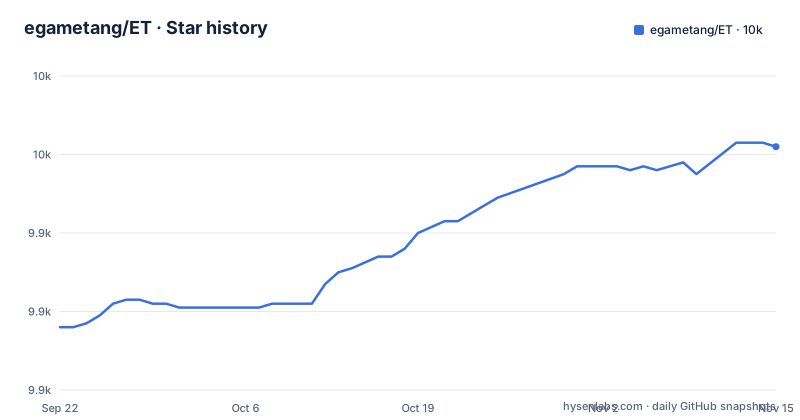
Star history
- egametang/ET9,962 ★ · +46
| Repository | 2026-09-22 | 2026-11-15 |
|---|---|---|
| egametang/ET | 9.9k | 10k |
46 Stars in the last 54 days, measured from the daily GitHub snapshot. Compare with other projects
Editorial analysis
What egametang/ET Is For, and Who Should Care
egametang/ET describes itself as a Unity3D client and C# server framework, and the current line is branded ET10, the AI Native Framework. The stated goal is not raw runtime speed. The README frames the project around a different problem: most AI coding tools can produce code, but that code still has to compile, pass gameplay tests, obey architecture rules, survive hot reload and scale across distributed servers before anyone accepts it. ET10 is the attempt to make that acceptance path mechanical.
The intended user is a team building a large-scale online game, most likely an MMO or MMORPG, in C# with Unity on the client. The README says the framework is designed for long-running, scalable online games rather than small standalone projects. That is a real boundary. If you are shipping a single-player title or a small prototype, the distributed actor model, service discovery and multi-process server layout are weight you will carry without using.
The Actor Runtime, Packages and Analyzer Enforcement
The mechanism visible in the repository is a fiber-based actor runtime paired with a package ecosystem. The README lists the runtime pieces as a distributed actor model, dynamic room scaling, service discovery, cloud-native deployment, location services, hotfix workflows, runtime observability and a multi-process server architecture. The top-level entries confirm the shape: Assets/ and Packages/ for the Unity side, Scripts/ for the C# side, and a Book/ directory holding the running guide.
The enforcement layer is the more distinctive part. The README describes an analyzer ecosystem covering async safety rules, entity lifecycle protection, package dependency constraints, actor usage validation and runtime safety checks, and states that this exists so AI works within strict architectural boundaries instead of generating uncontrolled code. Several analyzers are named in the package table, including a package analyzer and an await analyzer, both shipped in cn.etetet.harness alongside skills such as et-code, et-async, et-excel, et-luban, et-build, et-test and et-tdd.
Other packages fill in gameplay and operations. cn.etetet.behaviortree defines BTNode, Sequence, Selector, Not, Condition and Action nodes with Unity editor visual editing and config code export. cn.etetet.conditionexpr compiles condition expressions written in Excel or Luban into behavior trees, with numeric comparison, &&, ||, !, parentheses, error code binding and multiple owner keys. cn.etetet.spell provides skill and Buff configuration, runtime casting logic and client presentation components. cn.etetet.servicediscovery handles registration, deregistration, query, subscription, heartbeat, lease and change notification, with a process-level ServiceDiscoveryAgent forwarding requests to the current discovery master node and supporting master switching and failure recovery. cn.etetet.aspire integrates the framework with .NET Aspire, creating an Aspire service per ET process and room from StartConfig and passing SceneName, StartConfig and internal and external ports as startup arguments, with OTLP and OpenTelemetry wired in.
Installing ET10 and Running a First Multi-Bot Test
The README points at Book/1.1Running Guide.md for running instructions, and the repository confirms that Book/ exists at the top level. Treat that guide as the starting point.
What the README does document is the test workflow, which is the fastest way to see whether the framework fits. The cn.etetet.test package is described as a test framework that can simulate an entire game environment and exercise the full client and server interaction. The README gives a concrete example: for a team feature, you write a test that creates five client bots and has them send messages to form a team, which tests the whole client and server team logic. The stated review loop is that you ask the AI to write the test, then review that test yourself and confirm it passes.
A test therefore looks like a harness that spawns bot clients and drives messages through the real server.
The Unity side is driven through cn.etetet.unitybridge, which the README says registers 68 commands. They cover state and lifecycle (Ping, HostState, Compile, Refresh, RegenProject, EnterPlay, ExitPlay, Reload, EditorGetStateRequest, EditorPauseRequest, EditorUndoRequest, EditorRedoRequest), assets (AssetSearchRequest, AssetFindRequest, AssetGetPathRequest, AssetLoadRequest, AssetImportRequest, AssetRefreshRequest, AssetReadTextRequest), scenes (SceneGetHierarchyRequest, SceneGetActiveRequest, SceneLoadRequest, SceneSaveRequest, SceneNewRequest), selection sets, GameObjects, Transform, Inspector components and properties, Prefabs, GameView resolution, and a catch-all group with ConsoleGetLogsRequest, EditorLogRequest, ScreenshotCaptureRequest, UnityTestRunRequest, MenuItemExecuteRequest, BatchExecuteRequest and TestEcho. That command list is the interface an AI agent uses to create GameObjects, modify components, control Play Mode, refresh assets, read logs and run gameplay tests.
Where ET10 Gets in the Way
The licence is the first constraint, and it is not a footnote. The README states that the open source version uses the ET License, that it may only be used for learning, that the open source code may not be modified and re-released, and that commercial use requires a purchased licence at a price of 4999. The repository LICENSE file is the document that governs this, and the GitHub licence metadata reports NOASSERTION rather than a recognised SPDX identifier. If you plan to ship a commercial game, read LICENSE before you write code, because the README's own summary rules out the free path for that case.
The second constraint is scope. The README is explicit that the framework targets long-running, scalable online games rather than small standalone projects. A team that wants a lightweight client library or a single-process server will spend its time configuring service discovery, multi-process layout and Aspire orchestration for no benefit.
The third is that the AI workflow is the product, not a bonus. The analyzer rules and the test harness exist to constrain what a coding agent may produce. A team that does not use AI-assisted development still gets the actor runtime and the packages, but pays the cost of an opinionated architecture and a package dependency system whose rules are enforced by analyzers. Treat the enforcement as a commitment rather than a dial.
ET10 Against a Traditional Server Framework
The obvious comparison is a server-only framework such as KBEngine. A server-only framework gives you the authoritative game server and expects you to bring your own client, wiring the protocol yourself. ET10 instead ships the Unity client and the C# server in one repository, which is exactly what makes the multi-bot test package possible: a single test can instantiate client bots and push messages through the real server logic, so client and server behaviour is exercised together rather than mocked on one side. That is the difference in approach, and it is the README's central claim, that having both ends in one framework is what makes end-to-end automated testing practical.
The cost is coupling. Choosing ET10 means choosing Unity for the client and C# for the server, and accepting the package layout, the analyzer rules and the licence. A server-only framework leaves the client stack open. If your client is not Unity, or your team is not on C#, the ET10 test story does not transfer, and a server-only framework is the more honest starting point.
Maintenance, Upgrade Cost and Licence Implications
The repository is not archived, and the last push was on 2026-08-26, which is recent enough that the project is being worked on. The repository has no published GitHub releases; the README's own heading refers to ET10.0 (昭君). Pin a specific Git commit and review changes to the branch and package set before upgrading; and the package table shows how much surface that covers: harness, unitybridge, test, behaviortree, servicediscovery, conditionexpr, spell and aspire are all separately named packages with their own responsibilities. A change in the analyzer rules or the Unity bridge command list can affect generated code and tests at the same time.
The changelog exists at ChangeLog.md and the running guide at Book/1.1Running Guide.md, so there are places to read before upgrading. On licensing, the README states the open source version is for learning only, that modification and re-release of the open source code is not permitted, and that commercial use requires a purchased licence at 4999. This is not legal advice; the LICENSE file is the binding text and should be read in full before any commercial deployment.
Editorial conclusion
Adopt egametang/ET if you are building a long-running online game in C# and want the client and server in one repository, with analyzers and a multi-bot test package acting as the gate on generated code. Do not adopt it for a small standalone project, a non-C# stack, or any commercial product before you have read LICENSE and priced the 4999 licence the README states. Verify first by following Book/1.1Running Guide.md to a running build, then writing one test in cn.etetet.test that drives several client bots through a single server flow.
Frequently asked questions
What is egametang/ET in Unity?
It is a Unity3D client and C# server framework, currently branded ET10, aimed at large-scale online games. The repository contains both the Unity project under Assets/ and Packages/ and the C# code under Scripts/, with a Unity runtime bridge package that lets an agent create GameObjects, modify components, control Play Mode and read logs.
How do I install and run egametang/ET?
The README points to Book/1.1Running Guide.md for running instructions, and the Book/ directory is present at the repository top level, so start there.
Can I use egametang/ET commercially?
The README states that the open source version uses the ET License, is for learning only, may not be modified and re-released as open source, and that commercial use requires purchasing a licence at a price of 4999. The LICENSE file is the governing document.
What does the cn.etetet.test package do in egametang/ET?
It is a test framework that simulates a whole game environment so a test can drive client and server interaction together. The README's example creates five client bots that send messages to form a team, exercising the full team logic on both ends.
Official sources
Add this badge to your README
If you maintain this project, the badge below links readers to this analysis and shows its maintenance status from the daily GitHub snapshot. Paste the markdown into your README; add ?metric=license or ?metric=stars to the image URL for a different field.

[](https://hysenlabs.com/projects/egametang-et)Star history chart for your README
[](https://hysenlabs.com/projects/egametang-et)Was this useful?