Rally: Elasticsearch macrobenchmarking from a single esrally race command
Macrobenchmarking framework for Elasticsearch
At a glance
- What is it?
- Rally installs as esrally on PyPI and runs timed benchmarks against named Elasticsearch versions on Linux or macOS. It handles cluster setup, teardown and results reporting, but the driver machine must run Unix regardless of where the Elasticsearch nodes live.
- Who is it for?
- Rally is the right tool when you need reproducible macrobenchmarks for Elasticsearch across multiple versions, run from a Linux or macOS driver machine. Skip it when your target is not Elasticsearch, when your team has no Unix machine for running the driver, or when you want to benchmark a live cluster under real traffic without isolation guarantees that Rally does not document.
- Can I use it commercially?
- Yes. Apache-2.0 is a permissive licence: you can use, modify and sell software built on it, as long as you keep its copyright and licence notices.
- Is it still maintained?
- Yes. The repository last received commits 1 day ago.
- What is it written in?
- Mainly Python, according to GitHub's language statistics.
Answers come from the project's GitHub data, last synced on November 7, 2026, and from our analysis. They are not legal advice.
Star history
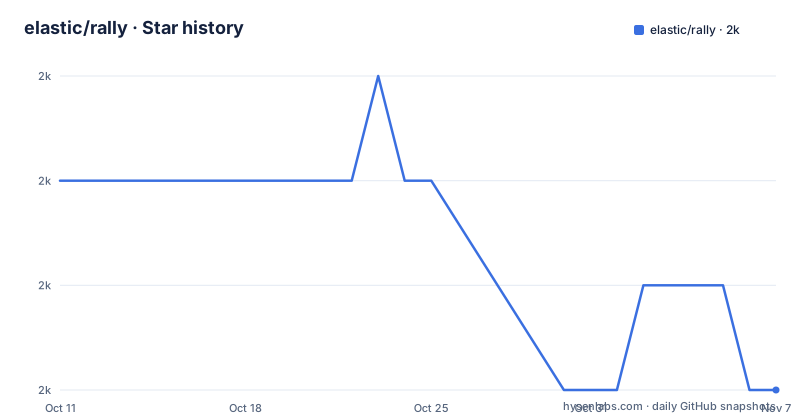
- elastic/rally2,029 ★ · -2
| Repository | 2026-10-11 | 2026-11-07 |
|---|---|---|
| elastic/rally | 2k | 2k |
-2 Stars in the last 27 days, measured from the daily GitHub snapshot. Compare with other projects
Editorial analysis
Rally targets Elasticsearch macrobenchmarks and nothing else
Rally is Elastic's benchmarking framework for one purpose: measuring Elasticsearch at the cluster level across a full workload cycle. Five capabilities are named in the README: setting up and tearing down an Elasticsearch cluster for benchmarking, managing benchmark data and specifications across Elasticsearch versions, running benchmarks and recording results, attaching telemetry devices to find performance problems, and comparing results between runs.
Macrobenchmarking is distinct from unit testing or integration testing. A macrobenchmark runs a full cluster under a representative workload and records throughput, latency and resource consumption across the whole run. Rally does not test individual Elasticsearch components in isolation, and it is not a generic HTTP load generator that works against arbitrary targets. For teams that need to benchmark a system other than Elasticsearch, Rally has nothing to offer.
Reproducibility is stated as a design goal. According to the README, the team put considerable effort into ensuring that benchmarking data are reproducible. What that means in practice is covered in the user guide at esrally.readthedocs.io rather than in the README itself.
pip3 install esrally needs Python 3.10 to 3.13, git 1.9+ and a JDK under JAVA_HOME
Published under the name esrally on PyPI, the package declares requires-python = ">=3.10,<3.14" in pyproject.toml. That window covers Python 3.10, 3.11, 3.12 and 3.13. Python 3.14 falls outside it.
pip3 install esrallyRunning pip3 alone does not finish setup. Beyond Python 3.10+ and pip3, the README requires git 1.9+ and an appropriate JDK with JAVA_HOME set to its path. Git is needed because Rally uses it internally to manage track repositories and specifications. A JDK is required by Elasticsearch itself rather than by Rally's Python code, and the right version depends on which Elasticsearch version you plan to benchmark. Elastic's support matrix for the JVM maps Elasticsearch versions to compatible JDKs. A missing git binary or an unset JAVA_HOME stops the first race before Elasticsearch starts.
Two install modes are described in the README. A simple pip3 install suits teams benchmarking stable Elasticsearch releases. If you are actively developing Elasticsearch itself, installing Rally in development mode is recommended, because Elasticsearch is fast moving and Rally always adapts to the latest main version. Documentation for that path lives separately at esrally.readthedocs.io.
esrally race downloads a named Elasticsearch version and runs a named track against it
In the README's quick start, the first meaningful command is a complete benchmark:
esrally race --distribution-version=6.0.0 --track=geonamesThis downloads Elasticsearch 6.0.0, starts a cluster on the local machine, runs the geonames track against it, collects metrics, and writes a summary to the terminal. According to the README, the example run completed in 2634 seconds, which is about 44 minutes.
Two parameters control the run. Distribution-version specifies which Elasticsearch binary to download and start. Track names the benchmark workload specification, which lives in a separate repository at github.com/elastic/rally-tracks. Running the geonames track in the README example produces output for two tasks: index-append and painless_dynamic.
Version 6.0.0 in the quick-start command is illustrative rather than a current recommendation. Any current Elasticsearch version number substitutes in practice, and the quick start exists to show the structure of the command rather than to prescribe a specific historical version as the one to benchmark.
Latency and service time appear as separate columns, and the numbers differ sharply
After a race finishes, the summary table is the main deliverable. It holds more rows than first reading shows. For the geonames run, cluster-level metrics cover: total indexing time (28.0997 min), total merge time (6.84378 min), total refresh time (3.06045 min), total flush time (0.106517 min), total merge throttle time (1.28193 min), median CPU usage (471.6%), GC times for young and old generations, index size (2.60124 GB), total bytes written (11.8144 GB), segment count (97), and heap usage split across doc values, terms, norms, points and stored fields.
For each task, columns report minimum, median and maximum throughput, plus latency percentiles at the 50th, 90th, 99th, 99.9th and 100th positions. Service time appears as a parallel set of percentile columns next to latency.
No explanation accompanies the two columns in the README. Looking at the painless_dynamic task in the sample output, the 50th percentile latency is 172208 ms while the 50th percentile service time is 393.02 ms. Both figures sit in the same table row without any note about what distinguishes them. Any reader who scans only the task names and throughput numbers will miss that the two metric families measure different stages in a request's life, and that for this task they diverge by orders of magnitude at the median.
Telemetry devices attach diagnostic instrumentation to a cluster during a race
Finding performance problems is one of the five stated capabilities, and telemetry devices are the named mechanism for it. In the README, the phrase is "finding performance problems by attaching so-called telemetry devices," where the qualifier "so-called" acknowledges that the name is unconventional. These attachments collect diagnostic data from a running cluster alongside the standard summary metrics.
Which telemetry devices exist, how to attach one, and what each one records is not described in the README. That detail lives in the user guide at esrally.readthedocs.io. For teams running periodic regression checks against summary table numbers alone, telemetry devices are not necessary. For a team investigating a specific regression in a subsystem and needing data beyond per-task throughput and latency rows, they are the project-specific extension point.
Nothing in the README describes whether attaching a telemetry device adds overhead to a cluster or alters the benchmark results being measured. For any instrumentation that attaches to a live process, that question is worth answering before relying on a run where one was active.
Rally runs its driver on Linux or macOS; the benchmarked cluster can be elsewhere
Developed for Unix and actively tested on Linux and macOS, Rally places that restriction on the machine running the driver, not on the Elasticsearch cluster under test. A link in the README points to a recipes page for benchmarking Elasticsearch clusters running on Windows, which means the cluster can be on Windows as long as the machine running esrally is on Linux or macOS.
For teams with no Unix machine, there is no documented path to run Rally as a driver. At the top level of the repository, there is a docker/ directory and build-dev-docker.sh scripts, but the README does not describe a Docker-based driver option or confirm that it substitutes for a native Unix install. A team attempting to use the Docker path as a workaround for a Windows-only environment would need to work out that setup from the Docker scripts rather than from the quick-start documentation.
Benchmarking a Windows-hosted cluster from a Linux or macOS driver is supported by the recipes documentation. Driving from a Windows machine is not.
Benchmarking an existing cluster is covered in recipes, not in the quick start
Downloading and starting a fresh Elasticsearch process is the quick-start path. It gives a clean state with no existing data, no pre-allocated shards and no live traffic competing for resources, which makes apples-to-apples comparisons across versions straightforward. Teams that need to benchmark a cluster they already operate, rather than one Rally provisions, use a different invocation. A link in the README points to the recipes page at esrally.readthedocs.io for that scenario, but no commands for it appear inline.
An existing cluster carries all the context that a provisioned one does not: existing data, existing shard allocations, existing mappings and possibly live traffic. Nothing in the README addresses how Rally isolates a benchmark run from concurrent traffic on an existing cluster, or whether isolation is a design goal for that path at all.
Release 2.13.0 arrived on 2026-06-03 and the last push was on 2026-10-06, with the full release history tracked in CHANGELOG.md at the repository root.
Editorial conclusion
Rally is the right tool when you need reproducible macrobenchmarks for Elasticsearch across multiple versions, run from a Linux or macOS driver machine. Skip it when your target is not Elasticsearch, when your team has no Unix machine for running the driver, or when you want to benchmark a live cluster under real traffic without isolation guarantees that Rally does not document. Before a first run, confirm that JAVA_HOME points at a JDK compatible with the Elasticsearch version you pass to --distribution-version, and check the recipes page at esrally.readthedocs.io before benchmarking an existing cluster rather than a freshly downloaded one.
Frequently asked questions
What is Rally and what does it benchmark?
Rally is Elastic's macrobenchmarking framework for Elasticsearch. It downloads a named Elasticsearch version, starts a cluster, runs a benchmark workload called a track, and reports throughput, latency and cluster metrics. It does not benchmark other search engines.
How do I install Rally?
Run pip3 install esrally on Linux or macOS. You also need Python 3.10 to 3.13, git 1.9+, and a JDK with JAVA_HOME set to its path. Installation on Windows as the driver machine is not supported.
What is a track in Rally?
A track is a benchmark workload specification that defines what data to load and what operations to run. Geonames is the track shown in the quick-start example. Track definitions live in a separate repository at github.com/elastic/rally-tracks.
Can Rally benchmark Elasticsearch running on Windows?
The Elasticsearch cluster under test can run on Windows. Rally itself must run on Linux or macOS as the driver. The README links to a recipes page for benchmarking an existing cluster on Windows from a Unix driver machine.
What Python versions does esrally support?
The pyproject.toml sets requires-python = ">=3.10,<3.14", so esrally supports Python 3.10, 3.11, 3.12 and 3.13. Python 3.14 is excluded by the upper bound in the current release.
Official sources
Add this badge to your README
If you maintain this project, the badge below links readers to this analysis and shows its maintenance status from the daily GitHub snapshot. Paste the markdown into your README; add ?metric=license or ?metric=stars to the image URL for a different field.

[](https://hysenlabs.com/projects/elastic-rally)Star history chart for your README
[](https://hysenlabs.com/projects/elastic-rally)Was this useful?