YAPF: Google's clang-format style Python formatter
A formatter for Python files
At a glance
- What is it?
- YAPF reformats Python by searching for the layout a programmer would have written, rather than enforcing a fixed set of rules. Here is how the style resolution order, the ignore files and the diff return code work, and where the tool stops being the right choice.
- Who is it for?
- Adopt YAPF if you want a formatter whose output is decided per file by a cost model and you are prepared to pin a style file, because the default pep8 style and a custom one produce different diffs. Skip it if you need a formatter that is finished rather than in beta, or if you want one tool to also lint and sort imports.
- Can I use it commercially?
- Yes. Apache-2.0 is a permissive licence: you can use, modify and sell software built on it, as long as you keep its copyright and licence notices.
- Is it still maintained?
- Yes. The repository last received commits 8 days ago.
- What is it written in?
- Mainly Python, according to GitHub's language statistics.
Answers come from the project's GitHub data, last synced on November 14, 2026, and from our analysis. They are not legal advice.
Star history
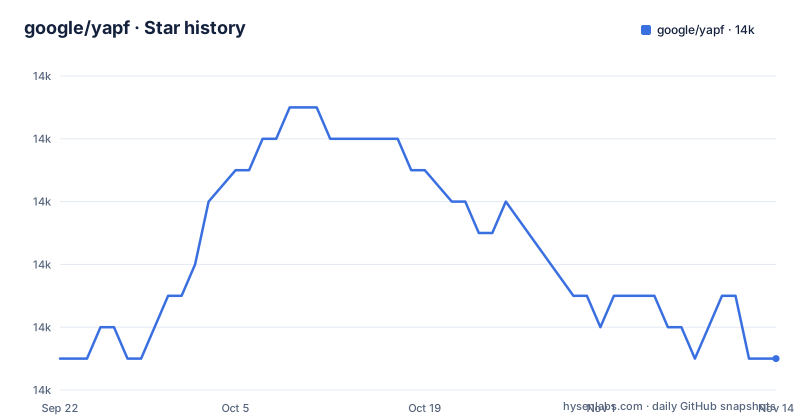
- google/yapf13,985 ★ · +0
| Repository | 2026-09-22 | 2026-11-14 |
|---|---|---|
| google/yapf | 14k | 14k |
0 Stars in the last 53 days, measured from the daily GitHub snapshot. Compare with other projects
Editorial analysis
The problem YAPF solves, and who it is aimed at
Most Python formatters apply a fixed rule set to every file. YAPF takes the other route: it borrows the approach of clang-format, which is described in the README as the basis for the algorithm, and searches for the formatting that best conforms to the configured style. The stated goal is that the code YAPF produces is as good as the code a programmer would write if they were following the style guide.
That distinction matters when a codebase has strong local conventions. A rule-based formatter will collapse a carefully aligned argument list because the rule says so. YAPF, given the same input, weighs the alternatives and can keep a layout that reads well. The audience is therefore teams that already have a style document and want a tool that approximates it, rather than teams that want a single canonical format imposed on them.
The README is explicit that YAPF is not an official Google product, experimental or otherwise, and that it is just code that happens to be owned by Google. The project metadata in pyproject.toml carries the classifier Development Status :: 4 - Beta, and the README repeats that YAPF is still considered in beta, with the released version subject to frequent change. Treat the beta label as information about API and output stability, not as a warning that the tool does not work.
How the formatting search and style resolution actually work
The formatter does not rewrite lines one at a time. It takes a file, considers the possible line breaks and spacings permitted by the active style, and picks the combination with the best score. Every knob in the style therefore changes the search space, not just a single rule.
Style selection follows a documented order. The command line wins first. Then YAPF looks for a [style] section in a .style.yapf file in the current directory or a parent, then a [yapf] section in setup.cfg, then a [tool.yapf] section in pyproject.toml, and finally a [style] section in ~/.config/yapf/style in your home directory. If none of those exist, the default is pep8. For stdin, the current directory is used for the search.
Four styles ship with the tool: pep8, google (based on the Google Python Style Guide), yapf for Google open source projects, and facebook. A custom style is defined by a based_on_style key plus overrides, which the README describes as working like subclassing. The full list of settings lives in the style.py module rather than in the README, so the practical way to discover what can be tuned is to run the tool and read its own output.
Exclusion is handled separately from style. YAPF reads a .yapfignore file or the [tool.yapfignore] section of pyproject.toml from the directory where it is invoked, using UNIX-style patterns where * matches everything, ? matches a single character, and [seq] and [!seq] match or exclude a character set. No entry should begin with ./.
Installing YAPF and formatting a first file
The README gives a plain PyPI install as the normal path, and notes that you can also install straight from the repository because the released version may change often.
$ pip install yapfIf you would rather track main, the README offers the git form:
$ pip install git+https://github.com/google/yapf.gitFor a first real use, run the formatter in diff mode before touching anything. Diff mode prints the changes and returns a non-zero exit code when changes are needed, which is the behaviour the README recommends for CI.
$ yapf -dWhen the diff looks right, apply it in place. The -i flag is what makes changes to files.
$ yapf -iTo format a tree, add recursion and let YAPF use multiple processes:
$ yapf -i -r -pBefore committing to a style, dump the settings and keep them. The README states that the output of --style-help can be saved to .style.yapf to make the settings permanent.
$ yapf --style-helpYou do not have to install YAPF at all to use it as a command-line tool. If you cloned or unzipped it into a directory, the README shows running it through PYTHONPATH:
$ PYTHONPATH=DIR python DIR/yapf [options] ...Configuration files and what the style search order implies
The search order has a consequence that is easy to miss: a style file in a parent directory applies to everything below it, and a file closer to the source wins. In a monorepo where one subdirectory carries its own .style.yapf, files under that directory will be formatted differently from the rest of the tree without any command-line flag saying so. If you want one format for the whole repository, keep a single style file at the root and be careful about stray copies.
A custom style is a short key and value list under a [style] heading. The README gives this example, which takes pep8 and changes two behaviours:
[style]
based_on_style = pep8
spaces_before_comment = 4
split_before_logical_operator = true
The same overrides can be passed inline as a dictionary, which is useful for testing a change before writing it into a file:
--style='{based_on_style: pep8, indent_width: 2}'Exclusions can live in pyproject.toml instead of a separate ignore file. The README shows the ignore_patterns key under a [tool.yapfignore] section, with entries such as temp/**/*.py and temp2/*.py. Note that this section is read from the working directory where YAPF is invoked, not discovered by walking up the tree the way the style files are, so a CI job that runs from the repository root behaves differently from a developer running the command inside a subdirectory.
Return codes, CI use, and where YAPF is the wrong tool
The return code contract is the part most worth understanding before wiring YAPF into a pipeline. Normally it returns zero on success and non-zero otherwise. With --diff, it returns zero when no changes were necessary and non-zero when changes are needed, including on program error. That makes a diff run a usable check, but it also means a genuine crash and a formatting violation are indistinguishable by exit code alone. A pipeline that only inspects the code cannot tell the two apart; you need the output.
The --lines START-END option reformats a one-based range, which is convenient for a pre-commit hook that should not touch untouched code.
The clearest case where YAPF is the wrong tool is a project that wants one canonical format with no discussion. YAPF's value is that it approximates a style you already have; if you do not have one, the search has nothing to aim at beyond the pep8 default, and you get the cost of a configurable tool without the benefit. The beta status is the second boundary. If you need a formatter whose output you can treat as frozen across upgrades, the README's own statement that the released version may change often is a reason to pin the version and re-check diffs after every upgrade rather than to avoid the tool.
Python version support is bounded. The README states YAPF supports Python 3.7+, and pyproject.toml sets requires-python to >=3.7 with the same range in its classifiers. The runtime dependencies are platformdirs and, for Python below 3.11, tomli, which is what makes pyproject.toml style reading work on older interpreters.
YAPF versus Black and autopep8
Black and autopep8 are the tools people most often weigh against YAPF, and the difference is not cosmetic. Black is a rule-based formatter: it has a fixed output and very few options, so the same input always produces the same bytes and there is nothing to configure or debate. autopep8 works from the other direction, fixing violations of PEP 8 in place rather than reflowing the file to a chosen layout.
YAPF sits between them. Like Black it decides the whole layout, but unlike Black the decision is made by a cost model against a style you supply, and the style has many knobs. That is why the four built-in styles exist and why based_on_style is described as subclassing. The trade-off is real in both directions: Black gives you a smaller configuration surface and a more predictable upgrade path, while YAPF gives you a formatter that can be pointed at an existing house style. If your team argues about line length and alignment, YAPF gives you a place to encode the answer; if the argument itself is the problem, Black ends it by removing the options.
The comparison also matters for tooling scope. YAPF formats. It does not lint, and the repository keeps separate configuration for that purpose, with .flake8, .isort.cfg and pylintrc at the top level. A project that wants formatting, import sorting and linting from one command is looking at a different class of tool.
Maintenance, upgrades and licence
The repository is not archived, and the last push was on 2026-10-30. That is recent, but the README's beta note and the Development Status :: 4 - Beta classifier still describe the project's own view of its stability, and the README says the released version may change often. The repository has no published GitHub releases, so the upgrade cadence cannot be stated; the CHANGELOG.md at the repository root is the file to read before an upgrade.
Upgrade cost is concentrated in the style search. A change to a default in style.py, or to the scoring, can produce different output on files you have not touched. The cheap defence is to keep a .style.yapf in the repository rather than relying on the pep8 default, and to run yapf -d in CI so that a formatting change shows up as a failing check with a diff attached instead of as a surprise commit.
YAPF is licensed under Apache-2.0, and pyproject.toml declares the licence by pointing at the LICENSE file. Apache-2.0 is a permissive licence with an explicit patent grant and a notice requirement, which is generally straightforward for commercial use, but the specifics depend on how you redistribute the code and what notices you carry. That is a question for your own legal review, not something the README answers.
Editorial conclusion
Adopt YAPF if you want a formatter whose output is decided per file by a cost model and you are prepared to pin a style file, because the default pep8 style and a custom one produce different diffs. Skip it if you need a formatter that is finished rather than in beta, or if you want one tool to also lint and sort imports. Before rolling it out, run yapf --style-help, save the output as .style.yapf, and check that yapf -d returns zero on your current tree.
Frequently asked questions
How do I install YAPF?
The README gives pip install yapf for the PyPI release, and pip install git+https://github.com/google/yapf.git to install from the repository. You can also run it without installing by setting PYTHONPATH to the directory you cloned or unzipped it into.
Where does YAPF look for its configuration file?
It checks the command line first, then a [style] section in .style.yapf in the current directory or a parent, then [yapf] in setup.cfg, then [tool.yapf] in pyproject.toml, and finally [style] in ~/.config/yapf/style. If none exist, the default is pep8.
How do I use YAPF to check formatting in CI without changing files?
Run it with --diff. The README states that with --diff YAPF returns zero when no changes were necessary and non-zero otherwise, including program error, which is what makes it usable as a check.
Which Python versions does YAPF support?
The README states YAPF supports Python 3.7+, and pyproject.toml sets requires-python to >=3.7 with matching classifiers. On interpreters below 3.11 it depends on tomli to read pyproject.toml.
Official sources
Add this badge to your README
If you maintain this project, the badge below links readers to this analysis and shows its maintenance status from the daily GitHub snapshot. Paste the markdown into your README; add ?metric=license or ?metric=stars to the image URL for a different field.

[](https://hysenlabs.com/projects/google-yapf)Star history chart for your README
[](https://hysenlabs.com/projects/google-yapf)Was this useful?