elasticdump: moving Elasticsearch and OpenSearch indices between clusters, files and object storage
Import and export tools for elasticsearch & opensearch
At a glance
- What is it?
- elasticdump is a Node.js CLI that copies analyzers, mappings, aliases, templates and documents between an Elasticsearch or OpenSearch endpoint and a file, S3 bucket or CSV. It is a transport tool, not a backup system, and the README is explicit about the version breakages along the way.
- Who is it for?
- Adopt elasticdump when you need to move an index, its analyzer, its mapping and its aliases between two clusters, or to land a JSON copy on disk or in S3, and you are willing to script the ordering yourself. Do not adopt it as a backup product: the README documents no snapshot integration, no incremental state and no restore verification, and the 6.1.0 release note says record ordering is no longer guaranteed.
- Can I use it commercially?
- Yes. Apache-2.0 is a permissive licence: you can use, modify and sell software built on it, as long as you keep its copyright and licence notices.
- Is it still maintained?
- Yes. The repository last received commits 13 days ago.
- What is it written in?
- Mainly JavaScript, according to GitHub's language statistics.
Answers come from the project's GitHub data, last synced on November 14, 2026, and from our analysis. They are not legal advice.
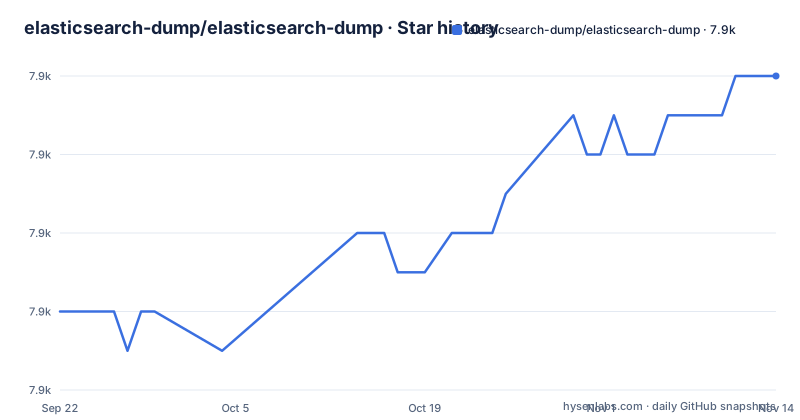
Star history
- elasticsearch-dump/elasticsearch-dump7,946 ★ · +6
| Repository | 2026-09-22 | 2026-11-14 |
|---|---|---|
| elasticsearch-dump/elasticsearch-dump | 7.9k | 7.9k |
6 Stars in the last 53 days, measured from the daily GitHub snapshot. Compare with other projects
Editorial analysis
The gap elasticdump fills between snapshots and hand-written scroll loops
Elasticsearch snapshot and restore works at the repository level and keeps you inside the cluster's own storage. When the destination is a file on a laptop, an S3 bucket owned by a different team, or an OpenSearch cluster that a snapshot repository cannot reach, that path is not available. elasticdump exists for that case. It takes an input and an output, each of which is either an Elasticsearch or OpenSearch URL, a file path, or the shell's standard input and output, and moves one type of payload across.
The audience is narrow and practical: platform engineers migrating an index between clusters, developers seeding a local cluster from production, and people who need a JSON copy of an index for debugging. The repository description puts it plainly as import and export tools for elasticsearch and opensearch, and the 6.76.0 release note records that OpenSearch support arrived as a fork of Elasticsearch 7.10.2.
The tool is not a snapshot replacement and does not pretend to be one. It reads from a live cluster with scroll queries and writes documents back in batches.
Input to output: how the scroll, the batch and the file formats fit together
Every invocation is a single transfer from one endpoint to another. The type flag decides what is read: analyzer, mapping, data, alias or template. Running a full index copy means running the command several times, once per type, and the README's first example shows exactly that sequence against a production and a staging URL.
Data transfers use scroll queries. The 2.1.0 release note records the move from scan/scroll on Elasticsearch 1.x to scroll alone on 2.x, and notes that performance may suffer on versions before 2.x. The 3.0.0 note says the default queries were updated to work only with Elasticsearch 5 and later, and that version detection may not work for every cluster topology. That is a real constraint for unusual cluster topologies.
Batching is where the design changed most. The 6.1.0 release note describes overlapping promise processing, which improves throughput through parallel work but means records are no longer processed in sequential order. Anything that depends on document order, such as a restore that expects a specific sequence of updates to the same document, has to account for that.
Files are line-delimited JSON: the dump file itself is not valid JSON, but each line is, so dump files can be streamed and appended. There is also an s3 transport; the 5.0.0 release note records a breaking change there, with s3Bucket and s3RecordKey replaced by s3urls.
Installing elasticdump and running a first dump to a file
The package is on npm and the README gives both a local and a global install. A local install keeps the binary under node_modules and is invoked through the bin path; a global install puts elasticdump on your PATH.
npm install elasticdump -g
elasticdump
Node 18.0.0 or newer is required. The package.json engines field sets that floor, and the 6.67.0 release note records that the tool quits when the Node version does not match the minimum requirement. If you are on an older runtime, the process exits rather than degrading.
A first useful run is a mapping backup. The README's backup example uses two commands, one for mapping and one for data, writing to separate files.
elasticdump \
  --input=http://production.es.com:9200/my_index \
  --output=/data/my_index_mapping.json \
  --type=mapping
You should end up with a JSON file holding the mapping for that index. Repeat with --type=data and a different output path to capture documents. The README also shows --type=analyzer as a separate run, which is the point: a complete copy of an index takes four or five invocations, not one.
For a direct cluster-to-cluster copy, point both flags at URLs and keep the same type sequence. For S3, the s3 transport takes s3urls since 5.0.0; the exact flags are in the README's options reference.
Where elasticdump stops being the right tool
The most important limitation is that the data type alone does not reconstruct an index. Analyzer, mapping, alias and template are separate types with separate invocations, and the tool does not chain them or check that they ran in a workable order. If you dump data into a fresh index without pushing the mapping first, the destination will infer field types from the first documents it sees, and the result will not match the source. That failure is silent.
Ordering is the second issue. Since 6.1.0, records are not processed sequentially. For a straight index copy this rarely matters. For anything where two documents touch the same field and the last write wins, it does.
Third, the visible README documents no incremental mode, so plan for a run to read the whole index.
Finally, memory and file format are coupled. The README's version warnings note that an out of memory error is most likely caused by files written in the 0.x format being read by 1.0.0 or later. If you inherit old dump files, convert them rather than assuming the tool is broken.
If your requirement is point-in-time recovery with verification, use the cluster's snapshot and restore instead. elasticdump is a transport, and it does not verify what it wrote.
elasticdump against Logstash and the Elasticsearch reindex API
Two other tools cover overlapping ground, and the difference is architectural rather than cosmetic.
The reindex API runs inside Elasticsearch. You POST a source and destination to _reindex and the cluster moves the documents itself, with no external process, no scroll management on your side, and no file in between. It is faster for cluster-to-cluster work because the data never leaves the network. What it cannot do is write to a file, an S3 bucket, or a CSV, and it cannot copy analyzers, aliases or templates. If your destination is a filesystem, reindex is simply not an option.
Logstash takes the opposite approach: a persistent pipeline with input, filter and output plugins, configured in a file and run as a service. It handles continuous replication, transformation, and many source and sink types. The cost is a JVM process, a configuration language, and a pipeline to operate. elasticdump is a command you run and that exits. For a one-off migration of a handful of indices, that difference decides it. For ongoing synchronization, Logstash is the better fit, and elasticdump has no scheduler, no daemon mode and no state to resume from.
Licence, maintenance and what an upgrade actually costs
The package is Apache-2.0, stated in package.json and shipped as LICENSE.txt at the repository root. That is a permissive licence, and it means you can embed the tool in internal scripts and images without a copyleft obligation. It says nothing about the licence of the Elasticsearch or OpenSearch distribution you point it at, which is a separate question and outside this project's scope. This is not legal advice.
The repository is not archived, and the last push was on 2026-11-01. The most recent release listed is v6.125.1 on 2026-05-12. Version numbering is frequent: 6.125.x implies a long series of small releases rather than a slow cadence.
Upgrade cost is the part worth budgeting for. The README's own version warnings are a list of breakages: 1.0.0 changed the dump file format, 2.0.0 removed the bulk options, 3.0.0 changed the default queries to Elasticsearch 5 and later, 5.0.0 replaced the S3 parameters with s3urls, and 6.1.0 changed record ordering. Each of those can break a script that worked before. Pinning the version in your automation and reading the release notes before bumping is the practical response. Note also that the Dockerfile installs elasticdump from npm at build time using an ES_DUMP_VER build argument that defaults to latest, so an image built today and an image built next month can contain different code unless you pass that argument explicitly.
Editorial conclusion
Adopt elasticdump when you need to move an index, its analyzer, its mapping and its aliases between two clusters, or to land a JSON copy on disk or in S3, and you are willing to script the ordering yourself. Do not adopt it as a backup product: the README documents no snapshot integration, no incremental state and no restore verification, and the 6.1.0 release note says record ordering is no longer guaranteed. Before relying on it, confirm the Node version you are running against the engines field, which requires 18.0.0 or newer, and confirm that your source cluster's version falls inside the range the default queries target, since the 3.0.0 note limits them to Elasticsearch 5 and later.
Frequently asked questions
How can I get all data from an Elasticsearch index with elasticdump?
Run elasticdump with --type=data, an --input pointing at the index URL and an --output pointing at a file or another cluster. The README's backup example uses exactly that pair of flags to write the index to a JSON file. Repeating the run with --type=mapping, --type=analyzer and --type=alias captures the rest of the index definition.
How do I extract data from Elasticsearch into a file with elasticdump?
Set --output to a file path and --type=data. The README shows a file output such as /data/my_index_mapping.json, and also documents $ as the stdin/stdout format.
Can elasticdump export selected documents rather than a whole index?
The README's core options let you choose the source index and type with --input-index (example: index/type), so you can export one index or type rather than everything; check the full options list for query filtering.
Does elasticdump work with OpenSearch?
Yes. The 6.76.0 release note records that support was added for OpenSearch, forked from Elasticsearch 7.10.2. The repository description covers both Elasticsearch and OpenSearch.
Which Node.js version does elasticdump need?
Node 18.0.0 or newer, according to the engines field in package.json. The 6.67.0 release note states that the tool quits when the Node version does not match the minimum requirement.
Can elasticdump read from or write to S3?
Yes. The README's version warnings refer to an s3 transport, and the 5.0.0 release note records that the older s3Bucket and s3RecordKey parameters were removed in favour of s3urls.
Official sources
Add this badge to your README
If you maintain this project, the badge below links readers to this analysis and shows its maintenance status from the daily GitHub snapshot. Paste the markdown into your README; add ?metric=license or ?metric=stars to the image URL for a different field.

[](https://hysenlabs.com/projects/elasticsearch-dump-elasticsearch-dump)Star history chart for your README
[](https://hysenlabs.com/projects/elasticsearch-dump-elasticsearch-dump)Was this useful?