gethomepage/homepage: a proxied Next.js dashboard driven by YAML and Docker labels, and the security line it draws
A highly customizable homepage (or startpage / application dashboard) with Docker and service API integrations.
At a glance
- What is it?
- Homepage is a self-hosted application dashboard with over 100 service integrations, configured through YAML files or Docker label discovery. This analysis covers the allowed hosts setting, the Docker socket mount, how the container runs, and why the project insists on a reverse proxy before you expose it.
- Who is it for?
- Homepage suits self-hosters who run many containers and services, such as the *arr apps, Plex or Jellyfin, and want one page with live status and widgets configured in YAML. It is the wrong choice if you plan to expose it directly to the internet without a reverse proxy that enforces authentication, TLS and Host header checks, because the built-in login is only an opt-in yes or no guard.
- Can I use it commercially?
- Yes, with conditions. GPL-3.0 is a copyleft licence: if you distribute software that includes it, you must release that software's source code under the same licence. Running it internally without distributing it does not trigger that obligation.
- Is it still maintained?
- Yes. The repository received new commits within the last day.
- What is it written in?
- Mainly JavaScript, according to GitHub's language statistics.
Answers come from the project's GitHub data, last synced on November 15, 2026, and from our analysis. They are not legal advice.
Star history
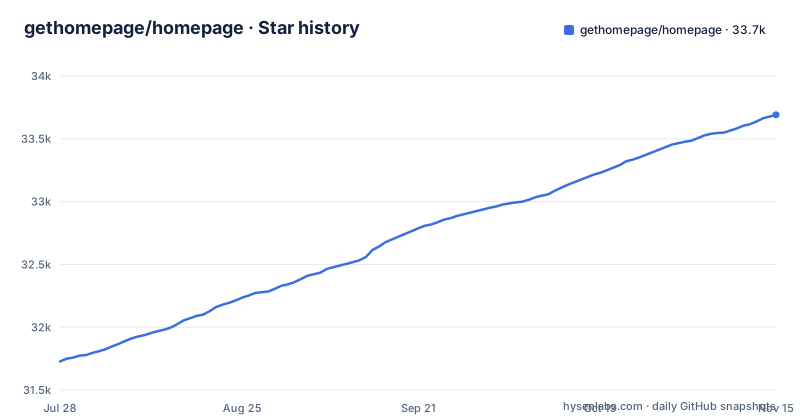
- gethomepage/homepage33,691 ★ · +1,964
| Repository | 2026-07-28 | 2026-11-15 |
|---|---|---|
| gethomepage/homepage | 31.7k | 33.7k |
1,964 Stars in the last 110 days, measured from the daily GitHub snapshot. Compare with other projects
Editorial analysis
HOMEPAGE_ALLOWED_HOSTS has to match the address you browse to
The first setting to get right is HOMEPAGE_ALLOWED_HOSTS. In both the compose example and the docker run example it is marked as required, with a note that it may need the port, and the from source start command sets it explicitly with a port attached:
HOMEPAGE_ALLOWED_HOSTS=gethomepage.dev:1234 pnpm startThe value gethomepage.dev in the examples is a placeholder for your own hostname. The practical consequence is that the address you type into the browser, including a non default port, needs to appear in this variable. If you reach the dashboard by a LAN IP on one device and a hostname on another, plan for both before you start debugging, and check the HOMEPAGE_ALLOWED_HOSTS section of the installation docs on gethomepage.dev. The troubleshooting guide on the same site is pitched as the first stop for basic config and network problems.
Docker label discovery needs the Docker socket, read only
Homepage can find services on its own by reading labels on your containers, and it shows container status and stats. Both depend on mounting the Docker socket into the container, which the compose file marks as optional and mounts read only:
docker run --name homepage \
  -e HOMEPAGE_ALLOWED_HOSTS=gethomepage.dev \
  -e PUID=1000 \
  -e PGID=1000 \
  -p 3000:3000 \
  -v /path/to/config:/app/config \
  -v /var/run/docker.sock:/var/run/docker.sock:ro \
  --restart unless-stopped \
  ghcr.io/gethomepage/homepage:latest
The other volume, /path/to/config mapped to /app/config, holds the YAML files, and the compose comment warns that the local config directory must already exist. If you leave out the socket line, label discovery and container stats are off and every service has to be declared in YAML by hand. If you keep it, the dashboard process can read your Docker daemon's state, which is one more reason the reverse proxy requirement below matters. The dependency list also includes dockerode and @kubernetes/client-node, and a kubernetes.md file sits at the repository root for cluster users.
Proxied API calls hide keys, but the dashboard still sees your data
Every request Homepage makes to a backend service goes through its own server rather than from your browser, so API keys for Sonarr, Radarr, Plex, qBittorrent and the rest never reach the client. That design protects the keys; it does not make the dashboard itself private. When widgets are enabled, Homepage can access personal information, for example from a home automation system, and shows it on the page. The project's security notice is blunt about the consequence: if Homepage is reachable from any untrusted network, it must sit behind a reverse proxy or VPN that enforces authentication and TLS and strictly validates Host headers. An optional built-in OIDC login or a simple password login exists, but it is opt-in and gives only an authenticated or not guard. Treat that guard as a second layer, not a replacement for the proxy.
Building from source refuses anything but pnpm
Running without Docker means cloning the repository, installing dependencies and building the production bundle:
git clone https://github.com/gethomepage/homepage.gitpnpm install
pnpm buildThe package.json preinstall script runs npx only-allow pnpm, so the project accepts pnpm as its only package manager. The build script is next build --webpack, which makes this a Next.js application, and pnpm dev starts a development server on http://localhost:3000. On a first start you must copy the src/skeleton directory to config/ yourself to populate the initial example config files, so a source install starts from a manual copy step rather than a generated config. The package.json also carries a telemetry script that runs next telemetry disable, and the Dockerfile sets NEXT_TELEMETRY_DISABLED=1 during its own build.
The container starts as root and drops to PUID and PGID
The image is built in two stages. The builder stage uses node:24-slim, enables pnpm through corepack and runs pnpm install --frozen-lockfile before the build, unless the CI argument is true, in which case it reuses an app prebuilt in CI. The runtime stage uses node:24-alpine, copies only the Next.js standalone output and static assets, and installs su-exec, iputils-ping and shadow. It sets USER root, listens on port 3000 and defines a healthcheck every 10 seconds with a 3 second timeout. PUID and PGID, both optional and set to 1000 in the examples, are how you set your user id and group id for the app. Images are published for AMD64 and ARM64. If your security policy forbids containers that start as root, check docker-entrypoint.sh before deploying, since the root user is set in the Dockerfile.
Image metadata says Apache-2.0 while the repository is GPL-3.0
The repository's license is GPL-3.0, but the Dockerfile labels the image with org.opencontainers.image.licenses set to Apache-2.0. The same label block also points org.opencontainers.image.documentation at the GitHub wiki, while the README sends readers to gethomepage.dev for all documentation. These are metadata mismatches, but they have a real consequence: tools that scan container images for licenses read the label, not the LICENSE file, and will report Apache-2.0. If your organization tracks licenses for what it runs, record GPL-3.0 from the repository rather than trusting the image label, and use gethomepage.dev rather than the wiki link when you need configuration reference.
Weekly minor releases against a :latest tag
Releases have been arriving about a week apart: v2.5.0 on 2026-10-10, v2.6.0 on 2026-10-17 and v2.7.0 on 2026-10-23, with the last push on 2026-11-02. Development happens on the dev branch, which is the default branch, and its package.json still reads version 2.6.0. Both install examples pull ghcr.io/gethomepage/homepage:latest with restart set to unless-stopped, so every time the container is recreated it picks up whatever latest points to that day. With three minor versions in two weeks, that means configuration you wrote against one release can meet a newer one without you choosing to upgrade. The documentation itself is a separate Python project, homepage-docs, built with Zensical and requiring Python 3.13 or later through uv:
uv syncThe README is explicit that most help requests turn out to be answered in the docs or to be simple YAML configuration issues, so read the configuration pages before opening a discussion.
Editorial conclusion
Homepage suits self-hosters who run many containers and services, such as the *arr apps, Plex or Jellyfin, and want one page with live status and widgets configured in YAML. It is the wrong choice if you plan to expose it directly to the internet without a reverse proxy that enforces authentication, TLS and Host header checks, because the built-in login is only an opt-in yes or no guard. Before deploying, decide the exact host and port for HOMEPAGE_ALLOWED_HOSTS, decide whether the container really needs the Docker socket, and pin an image tag instead of latest if you want to control when releases land.
Frequently asked questions
How do I install homepage on Docker?
Use the ghcr.io/gethomepage/homepage:latest image with docker compose or docker run, publish port 3000, set HOMEPAGE_ALLOWED_HOSTS, and mount a config directory to /app/config. Mounting /var/run/docker.sock read only is optional and enables Docker integrations.
How do I install Homepage without Docker?
Clone github.com/gethomepage/homepage, run pnpm install and pnpm build, copy src/skeleton to config/ on first start, then run HOMEPAGE_ALLOWED_HOSTS=gethomepage.dev:1234 pnpm start with your own host and port.
How do I access Homepage after starting it?
Homepage listens on port 3000, and the address you use must be listed in HOMEPAGE_ALLOWED_HOSTS, including the port if needed. From an untrusted network it must sit behind a reverse proxy or VPN that enforces authentication and TLS.
How do I use Homepage once it is running?
Homepage is configured through YAML files in its config directory or through Docker label discovery. The settings, widgets and service options are documented on gethomepage.dev.
Official sources
Add this badge to your README
If you maintain this project, the badge below links readers to this analysis and shows its maintenance status from the daily GitHub snapshot. Paste the markdown into your README; add ?metric=license or ?metric=stars to the image URL for a different field.

[](https://hysenlabs.com/projects/gethomepage-homepage)Star history chart for your README
[](https://hysenlabs.com/projects/gethomepage-homepage)Was this useful?