open-dev-data: a migration-based taxonomy of crypto ecosystems and their repositories
A taxonomy for open source cryptocurrency, blockchain, and decentralized ecosystems
At a glance
- What is it?
- open-dev-data classifies open source blockchain, web3 and decentralized ecosystems and the repositories inside them through timestamped migrations, whose state can be exported for a particular date. The CLI can export the taxonomy as JSONL or hand you a DuckDB of the parquet data, and the licence splits code from data.
- Who is it for?
- Adopt open-dev-data when you need a defensible list of which repositories belong to which crypto ecosystem, since the migration history lets you reconstruct that list as it stood on a past date, which is what research and attribution work actually needs. Do not treat it as an authoritative registry: the README states outright that the dataset is not complete and expects never to be.
- Can I use it commercially?
- Check first. The repository uses a licence we do not classify automatically, so read its LICENSE file before any commercial use.
- Is it still maintained?
- Yes. The repository last received commits 11 days ago.
- What is it written in?
- Mainly Python, according to GitHub's language statistics.
Answers come from the project's GitHub data, last synced on November 7, 2026, and from our analysis. They are not legal advice.
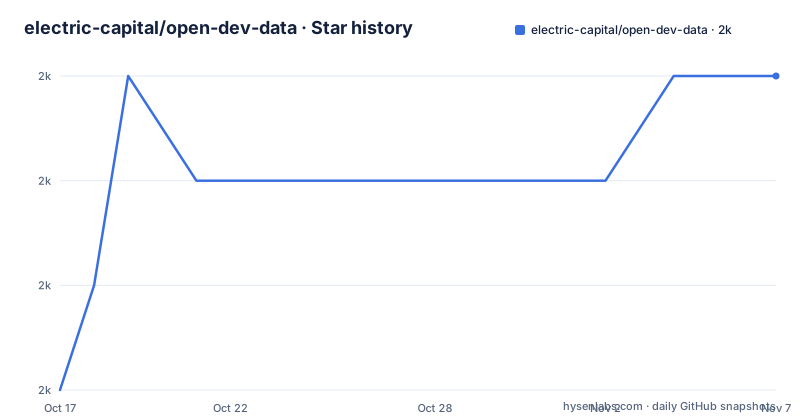
Star history
- electric-capital/open-dev-data1,970 ★ · +3
| Repository | 2026-10-17 | 2026-11-07 |
|---|---|---|
| electric-capital/open-dev-data | 2k | 2k |
3 Stars in the last 21 days, measured from the daily GitHub snapshot. Compare with other projects
Editorial analysis
A taxonomy is a set of migrations, not a spreadsheet
open-dev-data is a taxonomy of open source blockchain, web3, cryptocurrency and decentralized ecosystems together with the code repositories inside them. The interesting design choice is how it is updated.
There is no YAML file to edit and no admin interface. Changes are made by adding files under migrations/ named for the moment the change happens:
migrations/YYYY-MM-DDThhmmss_description_of_your_migrationThe timestamp format is described as a loose ISO8601 with the colon characters removed, specifically so the filenames stay valid on Windows. The README gives 2009-01-03T181500_add_bitcoin and 2015-07-30T152613_add_ethereum as examples, and that pair of dates tells you the intended scope: this history goes back to the beginning of the ecosystems it covers.
Because every change is an ordered, named file, the taxonomy has a timeline you can query.
Three keywords, and they cover most of what you would add
Changes to the taxonomy are written in a domain specific language whose examples fit in three lines. `ecoadd` creates an ecosystem, `repadd` attaches a repository to an ecosystem with a tag, and `ecocon` connects one ecosystem to another as a sub ecosystem:
-- Add ecosystems with the ecoadd keyword.  You can start a line with -- to denote a comment.
ecoadd Lightning
-- Add repos to ecosystems using the repadd keyword
repadd Lightning https://github.com/lightningnetwork/lnd #protocol
-- Connect ecosystems using the ecocon keyword.
-- The following connects Lighting as a sub ecosystem of Bitcoin.
ecocon Bitcoin Lightning
The comment convention means a migration file is self-describing to whoever opens it later. The tag on the repadd line is a classification marker, and the connection is directional: Lightning is a sub ecosystem of Bitcoin, which is a claim about how the ecosystem relates rather than a flat list of names.
A `validate` command checks the migrations, optionally against a custom directory:
open-dev-data validate
open-dev-data validate -r ./migrations  # Specify custom migrations directory
Export as JSONL, and filter by ecosystem or by date
The export command writes one JSON object per line, which is the format to build on if you are not using the query tools. The README shows the exact shape, and the `branch` field is what tells you how a repository is attributed to its parent ecosystem:
{"eco_name":"Bitcoin","branch":["Lightning"],"repo_url":"https://github.com/alexbosworth/balanceofsatoshis","tags":["#developer-tool"]}
{"eco_name":"Bitcoin","branch":["Lightning"],"repo_url":"https://github.com/bottlepay/lnd","tags":[]}
Line-delimited JSON can be processed incrementally, including with tools such as jq.
The flags cover the three questions you are likely to ask. `-e Bitcoin` exports a single ecosystem, `-r./migrations` points at a non-default migrations directory, and `-m 2023-12-31` reconstructs the taxonomy state as it was at a date:
open-dev-data export output.jsonl
open-dev-data export -e Bitcoin bitcoin.jsonl
open-dev-data export -r ./migrations output.jsonl
open-dev-data export -m 2023-12-31 output.jsonl
That last flag is the reason the migration design is worth the trouble. Asking what the taxonomy looked like in December 2023 is a normal question for anyone comparing an old report against the present, and here it is one flag.
Installing means uvx, and there is no pip path documented
The Python packaging is uv-centric. The easiest route needs no installation at all, running the CLI straight from the published package:
uvx open-dev-data --helpA persistent install uses `uv tool install open-dev-data`, which puts `open-dev-data` on your path. Working from a clone is `uv sync` followed by `uv run open-dev-data --help`, with the clone step shown explicitly as `git clone https://github.com/electric-capital/open-dev-data.git`.
There is also a GUI, at opendevdata.org, where you can query ecosystems and repositories and export all repositories for specific ecosystems from the browser. The README presents it as the first option under how to use the taxonomy, with the CLI second, which tells you where the project expects most people to start.
pyproject.toml requires Python 3.10 or newer, and the runtime dependencies are modest: aiohttp, blake3, duckdb, harlequin, platformdirs and rich. The build backend is setuptools with packages found under src.
The heavy path is parquet into DuckDB, and it wants about 100GB
Past the taxonomy itself sits a larger dataset. The `download` command pulls parquet files from the Open Dev Data manifest, and downloads are organised into version folders such as ./data/20251119T124952/, with every file validated using blake3 checksums. Interrupted downloads can be resumed, skipping files that already exist with matching checksums, and worker count is adjustable:
open-dev-data download -o ./data
open-dev-data download -o ./data -w 8
open-dev-data download -o ./data --resume
The `duckify` command imports a directory of parquet files into a DuckDB database, and the README's warning about resources is direct: reserve about 100GB to work with both the parquet files and the database. That figure is the deciding number for whether you use this path at all.
open-dev-data duckify -i ./data/20251119T124952 -o odd.duckdbThe TUI runs on Harlequin and can skip the 100GB path entirely
The interactive SQL interface is powered by Harlequin and has a shortcut that changes how you should approach the whole project. `open-dev-data tui --lite` downloads the lite dataset and opens the interface directly, so you can be querying without first provisioning a hundred gigabytes. A `--refresh` flag forces a refresh of cached data, `--db` points at an existing DuckDB file, and `--clear-cache` throws the cache away.
The interface itself provides a SQL query editor with syntax highlighting, a results viewer with sorting and filtering, a schema browser and query history. For a dataset you are still exploring, that is enough to answer most questions without writing a script.
The four-step workflow in the README is the full version of the same path: download with `--resume`, duckify with `--show-schema` to see what you loaded, then open the resulting file with `tui --db`. Starting from `--lite` and only building the full database once a specific question requires it is the cheaper order.
MIT for the code, CC BY 4.0 for the data, and the attribution has three parts
The project is dual licensed, and the split follows the content type. All software code, source files, scripts, build configurations and libraries are MIT, with the text in LICENSE-MIT.md. All data, documentation and creative works are under the Creative Commons Attribution 4.0 International licence in LICENSE-CC-BY.md, which covers the ecosystem taxonomy data, the parquet files, documentation files, and examples and tutorials. A combined LICENSE.md holds the full details and disclaimers.
GitHub classifies the repository licence as Other because there are two, which is expected rather than a warning sign.
The attribution requirement for data is specific and worth copying verbatim into whatever you publish. It has three components: the source line "Open Dev Data by Electric Capital", a link to https://github.com/electric-capital/open-dev-data, and the licence CC BY 4.0 with its URL. Code usage has its own, shorter requirement: include a copy of the MIT licence and attribute Electric Capital.
The README adds an optional request that makes sense for the domain: anyone using the data is asked to include a request for contributions next to their attribution, since the taxonomy improves when ecosystem maintainers submit their own repositories. This paragraph describes the stated terms and is not legal advice.
Incompleteness is stated up front, and the release tags lag the commits
The README makes a point of saying the dataset is not complete and hopes it never will be, because new ecosystems and repositories are created every day. That framing is useful to take at face value rather than as a disclaimer: a taxonomy in this domain has no completion date, and any snapshot you take has a vintage you should record.
The release history shows that vintage problem. The tags are 1.0 and 1.1, both dated 2023-12-21, and 1.2 on 2024-10-29, the last one titled for support of multichain infrastructure and tech stack projects. Meanwhile pyproject.toml declares version 1.3, and the last push to the repository was on 2026-10-02.
So the packaged version and the tags disagree by one increment, and both trail the default branch by roughly two years of commits. If you install from a package index you get 1.2 semantics; if you run from a clone you get whatever master currently holds. The example download directory in the README, 20251119T124952, is dated November 2025 and postdates every tag, which suggests the parquet data moves on its own schedule independent of the taxonomy releases.
For anything time-sensitive, pin the data version directory you analysed rather than citing the package version.
Editorial conclusion
Adopt open-dev-data when you need a defensible list of which repositories belong to which crypto ecosystem, since the migration history lets you reconstruct that list as it stood on a past date, which is what research and attribution work actually needs. Do not treat it as an authoritative registry: the README states outright that the dataset is not complete and expects never to be. If you reuse it, keep the two licences apart, MIT for the code and CC BY 4.0 with its three-part attribution for the taxonomy data and parquet files, and check the release cadence before assuming a version is current.
Frequently asked questions
How do I install and run the open-dev-data CLI?
The README documents `uvx open-dev-data --help` with no installation, `uv tool install open-dev-data` for a persistent install, or `git clone` followed by `uv sync` and `uv run open-dev-data --help` from source. Python 3.10 or newer is required.
How do I add a new ecosystem or repository to open-dev-data?
Create a timestamped file under migrations/ using the format migrations/YYYY-MM-DDThhmmss_description_of_your_migration, then use the `ecoadd` keyword for an ecosystem, `repadd` for a repository with a tag, and `ecocon` to connect one ecosystem as a sub ecosystem of another.
Can I get the open-dev-data taxonomy as it was on a past date?
Yes. The export command takes `-m` with a date, for example `open-dev-data export -m 2023-12-31 output.jsonl`, which reconstructs the state of the taxonomy at that point. Output is one JSON object per line.
How much disk space do the open-dev-data parquet files need?
The README asks you to reserve about 100GB to work with both the parquet files and the DuckDB database. If that is impractical, `open-dev-data tui --lite` downloads a lite dataset and opens the interactive interface without the full import.
What license applies to open-dev-data code and data?
The code is MIT and the data and documentation are CC BY 4.0. Data attribution needs three parts: the source "Open Dev Data by Electric Capital", a link to the GitHub repository, and the CC BY 4.0 licence with its URL.
Official sources
Add this badge to your README
If you maintain this project, the badge below links readers to this analysis and shows its maintenance status from the daily GitHub snapshot. Paste the markdown into your README; add ?metric=license or ?metric=stars to the image URL for a different field.

[](https://hysenlabs.com/projects/electric-capital-open-dev-data)Star history chart for your README
[](https://hysenlabs.com/projects/electric-capital-open-dev-data)Was this useful?