advertools for Python marketing data workflows
advertools - online marketing productivity and analysis tools
At a glance
- What is it?
- advertools is a Python package for independent SEO, SEM, SERP, and online marketing data functions that return DataFrames or files. It fits teams that want composable Python workflows, but its broad surface and inconsistent version metadata require careful evaluation.
- Who is it for?
- advertools is appropriate for Python-based marketers and SEO engineers who want small functions that fit pandas and Scrapy workflows. It is less suitable for users seeking one integrated campaign platform or a stable release history with GitHub releases.
- Can I use it commercially?
- Yes. MIT is a permissive licence: you can use, modify and sell software built on it, as long as you keep its copyright and licence notices.
- Is it still maintained?
- Yes. The repository last received commits 116 days ago.
- What is it written in?
- Mainly Python, according to GitHub's language statistics.
Answers come from the project's GitHub data, last synced on October 24, 2026, and from our analysis. They are not legal advice.
Star history
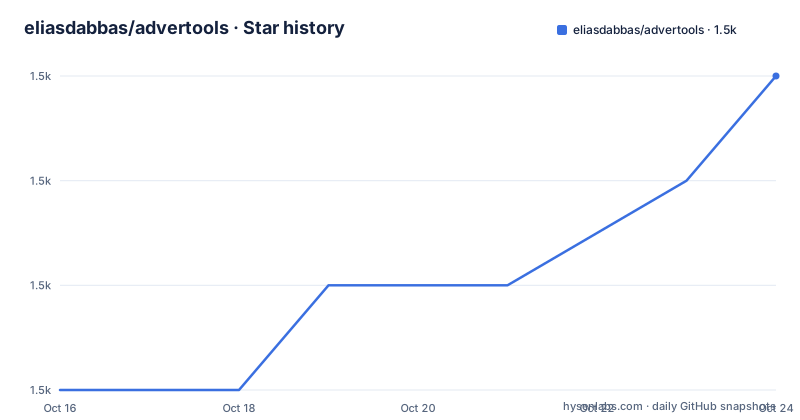
- eliasdabbas/advertools1,485 ★ · +3
| Repository | 2026-10-16 | 2026-10-24 |
|---|---|---|
| eliasdabbas/advertools | 1.5k | 1.5k |
3 Stars in the last 8 days, measured from the daily GitHub snapshot. Compare with other projects
Editorial analysis
The marketer's DataFrame problem
advertools addresses repetitive data preparation rather than campaign execution. The README describes work such as manipulating URLs, joining tables, protecting date values, generating keywords, crawling sites, checking robots.txt rules, and downloading XML sitemaps. These are common obstacles between raw marketing inputs and analysis. The package is aimed at digital marketers who are comfortable with basic Python, as well as practitioners running automated platforms.
Its central design choice is a collection of independent functions instead of a unified marketing application object. The README compares the learning model to spreadsheet formulas: a user selects a function for a defined task and receives an ordinary result. This matters for teams that already use pandas. Most functions return a DataFrame or a file intended to be read into one, so downstream work can remain in Python.
That approach does not solve campaign strategy by itself. advertools helps prepare and collect data, while decisions about search intent, ad messaging, landing pages, and content still belong to the marketer. The package is best understood as a set of data plumbing utilities, not an autonomous advertising system.
How advertools composes independent marketing functions
The architecture follows a UNIX-style division of labor. Separate functions can handle narrow jobs such as extracting hashtags, crawling websites, testing URLs against robots.txt files, or downloading XML sitemaps. A caller can use one function without adopting the complete package workflow. This lowers the amount of project-specific infrastructure required for an isolated task.
The functions can also form pipelines. Collection or generation occurs first, tabular results are returned, and pandas supplies the next layer of filtering and transformation. Plotly or machine-learning libraries can consume the resulting table later. That separation keeps remote data acquisition or URL handling out of the analysis code, although it does not guarantee that every function has identical inputs or output conventions.
For search campaigns, the README organizes the domain around three linked entities: keywords represent intention, ads represent the promise, and landing pages deliver that promise. The `kw_generate` function handles keyword generation. `ad_create` supports a bottom-up method in which product names are substituted into ad text, while `ad_from_string` takes a top-down approach and splits longer copy into headlines, descriptions, or other specified slots. These functions produce campaign inputs rather than publishing campaigns.
The SEO side includes a Scrapy-based crawler called `advertools.spider`. It extracts common page elements by default, including title, heading tags, body text, status codes, and request or response headers. It also accepts CSS and XPath selectors for page-specific data. Scrapy settings remain available for controls such as custom headers and user agents. Based on the documented design, advertools acts as a convenience layer over familiar Python components rather than replacing them.
Installing advertools and beginning with SEM data
The README gives one direct installation method. This command installs the package from Python's package index into the active Python environment:
python3 -m pip install advertoolsThe command does not create an environment, select a virtual environment, or install the optional Claude integration. Those are separate choices that the README excerpt does not specify, so they should not be inferred from the installation line.
A first useful workflow is keyword generation rather than crawling. After installation, open a Python session, import the documented `kw_generate` function, and follow its API page for the supported seed text and options. The README names the function but does not provide a complete invocation example, so supplying invented arguments would be misleading. A beginner should start with the function reference at `https://advertools.readthedocs.io/en/master/advertools.kw_generate.html`, run the smallest documented example, and retain the returned table for inspection.
That first result matters because advertools is designed to return data that can move directly into pandas. Check column names, row types, missing values, and duplicate records before using the output in a campaign. The package can generate a starting set of keywords, but the README does not claim that generated phrases represent measured search demand or production-ready targeting.
Pandas interoperability and the boundary of advertools
DataFrame output is the package's most important integration point. Once an advertools function returns a table, the caller can apply pandas operations, pass it to visualization software, or prepare it for another analytical library. Files are treated similarly because the intended next step is loading them into a DataFrame.
This makes advertools different from a hosted marketing dashboard. A dashboard usually supplies its own interface, storage, and reporting model. advertools leaves those choices outside the package. The user must decide where results are stored, how they are validated, how failures are handled, and how a function's output joins the rest of a workflow. That is a real trade-off. It offers control over a Python pipeline, but the caller owns more integration work.
The function-oriented approach can also create API discoverability costs. The README covers areas such as keyword generation, ad creation, crawling, robots.txt checks, sitemap downloads, hashtag extraction, and SERP analytics. Each area may have its own parameters and return shape. The package avoids requiring users to learn a special object model, but broad documentation and API examples become more important as the number of independent functions grows.
Operational limits of the SEO crawler and APIs
The Scrapy crawler is customizable, but customization transfers responsibility to the operator. CSS and XPath selectors can target page-specific fields, while Scrapy settings control request behavior. The crawler documentation does not define safe crawl-rate defaults, retry behavior for changing pages, JavaScript rendering support, or a complete policy for handling hostile responses. Those omissions matter because a successful HTTP response does not necessarily contain the same elements on every URL.
Several package dependencies indicate that advertools also reaches beyond crawling. It depends on `pandas`, `scrapy`, `twython`, `pyarrow`, `requests`, and `pyasn1`. The presence of Twython relates to the package's social-media and Twitter API coverage, while `pyarrow` supports its data and file ecosystem. The README excerpt does not document credential setup, rate-limit behavior, retry semantics, or error handling for every remote API. Users should consult the relevant function reference before scheduling unattended collection.
The optional `claude` dependency is separate from the base package and is declared as `anthropic>=0.51.0`. The README mentions Claude SERP analytics in version 0.18.0, but the excerpt does not provide an environment variable, invocation, authentication procedure, or cost model for that integration. It should therefore be treated as a separate feature evaluation rather than assumed to work immediately after the base installation.
Distribution metadata, maintenance, and upgrade work
The repository is not archived, and its last push was on 2026-06-30. That indicates recent repository activity as of the available history, but it does not establish a formal release cadence. The repository has no GitHub releases. Version information is instead distributed through package metadata, the README, and the changelog file `HISTORY.rst`.
There is a concrete metadata inconsistency. `pyproject.toml` identifies version 0.18.0 and defines the project with `flit_core.buildapi`. `setup.py` still declares version 0.17.2 and contains an older set of package classifiers, including Python 3.7 and 3.8 even though the current project metadata requires Python 3.9 or later. Modern builds should use the `pyproject.toml` build system, but a team using an older build path could encounter stale information. This inconsistency should be checked against the built artifact before pinning a production environment.
Upgrading can therefore require more than replacing one function. Users should review `HISTORY.rst`, compare dependency constraints, and confirm the version embedded in the wheel or installed package. The project uses an MIT license, which permits broad use, modification, and redistribution under the license terms. That is a licensing classification, not legal advice about a particular deployment.
advertools versus a conventional marketing suite
A conventional marketing suite is a useful alternative when the team wants a single interface for campaign management, reporting, permissions, and operational controls. advertools does not claim to be that kind of application. It exposes Python functions, relies on pandas for much of the tabular workflow, and exposes Scrapy for crawler configuration.
The practical difference is control versus integration. advertools lets a Python practitioner assemble inputs and outputs around existing scripts, notebooks, databases, and deployment systems. Its independent functions can be selected one at a time. A conventional suite moves more of the workflow into a managed product, with the trade-off that its supported integrations and data model determine what can be customized.
advertools is the wrong choice for a marketer who does not want to write Python, manage dependencies, inspect tabular results, or debug web data pipelines. It also fits poorly when one fixed end-to-end interface is more important than composable functions. For an engineering team with pandas and Scrapy experience, the package is more relevant because it reduces repeated implementation of narrowly scoped marketing data tasks.
Editorial conclusion
advertools is appropriate for Python-based marketers and SEO engineers who want small functions that fit pandas and Scrapy workflows. It is less suitable for users seeking one integrated campaign platform or a stable release history with GitHub releases. Before adoption, verify the installed version, because pyproject.toml declares 0.18.0 while setup.py declares 0.17.2. The first project-specific judgement is that its function-oriented design is useful, but its packaging metadata must be reconciled before version-sensitive automation relies on it.
Frequently asked questions
How do I install advertools?
The README documents installing it with `python3 -m pip install advertools`. The current `pyproject.toml` requires Python 3.9 or later.
Does advertools return pandas DataFrames?
The README says most functions return either a DataFrame or a file that can be read into one. This makes pandas the stated integration point for later manipulation and analysis.
Can advertools crawl websites with CSS and XPath selectors?
The documented Scrapy-based SEO crawler extracts standard page elements and accepts additional CSS and XPath selectors. It also exposes Scrapy settings for request and crawling behavior.
Which Claude integration does advertools provide?
The README announces Claude SERP analytics for version 0.18.0. `pyproject.toml` declares an optional `claude` extra containing `anthropic>=0.51.0`, but the excerpt does not document authentication or a complete invocation.
Official sources
Add this badge to your README
If you maintain this project, the badge below links readers to this analysis and shows its maintenance status from the daily GitHub snapshot. Paste the markdown into your README; add ?metric=license or ?metric=stars to the image URL for a different field.

[](https://hysenlabs.com/projects/eliasdabbas-advertools)Star history chart for your README
[](https://hysenlabs.com/projects/eliasdabbas-advertools)Was this useful?