GHOST: a self-hosted OSINT investigation CRM with hard project boundaries
GHOST - Global Human Operations & Surveillance Tracking: Open-source investigation management platform for tracking people, connections, and intelligence data. Because Excel spreadsheets are for accountants, not investigators. Non-commercial license.
At a glance
- What is it?
- GHOST is a full-stack OSINT case management system for individual investigators, built on Node.js, React and PostgreSQL, with people records, an entity relationship graph, a global map, WiGLE wireless network imports and per-project data isolation enforced on the backend. It is explicitly a single-maintainer research project under a non-commercial licence, and its own status section says what it is not for.
- Who is it for?
- Adopt GHOST when you are an individual investigator or researcher running cases on infrastructure you control and you want structured case data, relationship graphs and geocoded locations instead of spreadsheets, and when the non-commercial licence suits your use. Do not adopt it for multi-tenant SaaS, for regulated environments with personal data at scale, or anywhere loss of availability has third-party consequences, because the project says it is not suitable for those.
- Can I use it commercially?
- Check first. The repository uses a licence we do not classify automatically, so read its LICENSE file before any commercial use.
- Is it still maintained?
- Yes. The repository received new commits within the last day.
- What is it written in?
- Mainly JavaScript, according to GitHub's language statistics.
Answers come from the project's GitHub data, last synced on November 7, 2026, and from our analysis. They are not legal advice.
Star history
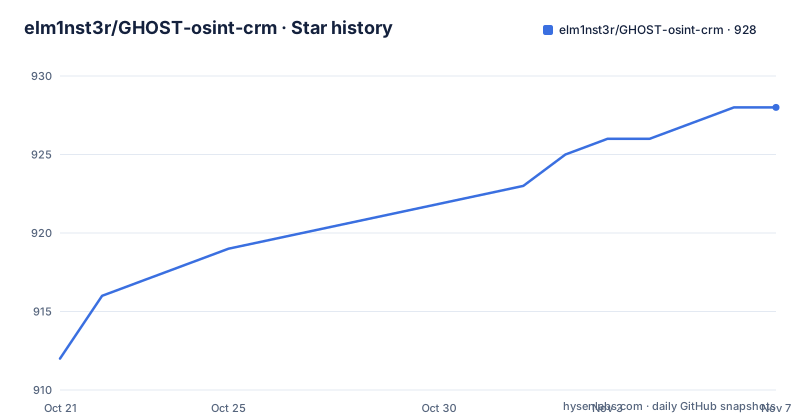
- elm1nst3r/GHOST-osint-crm928 ★ · +16
| Repository | 2026-10-21 | 2026-11-07 |
|---|---|---|
| elm1nst3r/GHOST-osint-crm | 912 | 928 |
16 Stars in the last 17 days, measured from the daily GitHub snapshot. Compare with other projects
Editorial analysis
Case management for one investigator, not for a team of analysts
GHOST stands for Global Human Operations and Surveillance Tracking, and it describes itself as an open-source investigation management platform for tracking people, connections and intelligence data, with the slogan that Excel spreadsheets are for accountants, not investigators.
The stack is unremarkable and well chosen for the job: Node.js, React and PostgreSQL, with the badge on the repository confirming all three. The frontend is a React application served by Nginx, the backend is a Node.js and Express API, and the data lives in PostgreSQL.
The project status section at the top of the README is the part to read before anything else, because it is unusually specific about posture. It describes GHOST as actively maintained by a single author, a self-hosted hobby and research project, and not a commercial product. Security reports and bug reports are triaged on a best-effort basis, typically within days rather than hours, and there is no SLA, no on-call rotation and no paid support tier.
The intended audience is stated as individual investigators, researchers, students and hobbyists self-hosting on infrastructure they control, and the README adds a pointed clarification that the investigation CRM framing describes the feature set rather than a claim of enterprise-grade operational guarantees. That sentence, written by the maintainer, is the most useful line in the document for anyone about to deploy it.
What the project says it is not suitable for
The same status section lists the exclusions, and they are worth reading as design boundaries rather than as disclaimers.
GHOST is not suitable for multi-tenant SaaS, for regulated environments that lack their own additional controls, with HIPAA, GDPR-regulated personal information at scale and law-enforcement evidentiary chains named as examples, and for any deployment where loss of availability or data integrity would have third-party consequences without the operator's own redundancy and review.
The responsibility paragraph is equally explicit. Production deployments are possible, but the operator is responsible for HTTPS termination, backups, network isolation, operating system patching, threat modelling for the data, and meeting any regulatory obligations that apply to the data being stored. SECURITY.md holds the current hardening posture and the known limitations, and it is also where the security disclosure process lives for reports that should not go into a public issue.
There is also a promise about the end state. If the project is ever shelved, that section will be updated and the repository will be archived. For an open source project with one maintainer, that is the correct thing to state, and it is more useful than silence.
One consequence worth planning around: with no support tier and a single author, the operational burden of running this system sits with the person who deployed it, and the README is honest about that rather than pretending otherwise.
Projects are the hard isolation boundary, enforced on the backend
The most interesting engineering decision in GHOST is the project model, and it is described with unusual precision.
Projects are the hard isolation boundary. Every person, business, asset, transaction, wireless network and relationship belongs to exactly one project, and separate investigations do not bleed into each other, including in the geocoding cache. That last clause matters more than it first appears, because a shared geocoding table is exactly the kind of quiet leak that turns two unrelated cases into one searchable dataset.
Cases nest inside a project as a lighter grouping for different angles or hypotheses within the same investigation. Cross-project linking is off by default and is an opt-in per-project setting, for the rare case where the same person legitimately resurfaces in an unrelated story. When it is enabled, linked entities stay owned by their home project and display a from Project X badge, so ownership never becomes ambiguous.
Access control is per project and per user. Administrators see and manage every project. Every other user is added to specific projects as either a Manager, who also edits project settings and membership, or an Investigator, who has full access to that project's data only. The README stresses that this is enforced on the backend and not just in the user interface, which is the difference between a boundary and a filter.
There is also a first-run project gate: a fresh install or a newly added user is walked through picking or creating a project before anything else is usable. That is a small piece of interface design that enforces an invariant the rest of the system depends on.
People, a relationship graph and a map that follows them
The core data model is a person record with a lot of structure behind it.
People carry a role based category, with suspects, witnesses, persons of interest, associates and victims as the categories. Each person has addresses, phone numbers, emails and social media handles, a travel history with timeline and analysis of movements, case associations, a status of active, inactive, under investigation or cleared, custom fields for extra data, and multi-parameter search with filters.
On top of that sit two visual surfaces. The entity network visualisation uses ReactFlow for interactive relationship diagrams across people, businesses, locations, phones and emails, with connection types for family, business, criminal, social and known associates, drag and drop node handling, live updates and filtering by entity type and relationship.
The global intelligence map geocodes addresses with a database cache, clusters markers for large datasets so the map stays responsive, correlates people with locations to show movements, opens interactive popups on click, and filters by person, date range or location type.
On top of the records sit three operational modules: task management with investigation todos linked to cases and people, priority levels from low to urgent and status tracking; case management with custom statuses, case-person linking, timeline tracking and cross-referencing between cases; and business intelligence that tracks companies, maps employees while distinguishing board members and decision-makers from regular staff, and models ownership chains where a business can be owned by another business.
Wireless network records and a catalogue of OSINT tools
The wireless network intelligence module is the most distinctive part of the feature set, and it is built around WiGLE data.
Networks can be entered manually through comprehensive forms, or imported from WiGLE wardriving data as KML files. Each record tracks SSID, BSSID, encryption, signal strength and passwords, and there is full support for WiFi 7 frequency bands across 2.4GHz, 5GHz and 6GHz. Networks can be associated with multiple people and businesses, linked to investigations, shown on the global map with WiFi icons, and filtered by signal strength, encryption or the KML file they came from.
Two details are worth noting. Validation is deliberately flexible, with only the SSID required and the BSSID and location optional, which means a partial observation can still be recorded. And the passwords field exists, which tells you what kind of artefact this is: a list of networks you observed is evidence, and a list of networks with passwords attached is potentially credential material. That is a handling decision the operator has to make.
The tools and resources arsenal is a catalogue rather than a tool: investigation tools catalogued into categories such as social media, background check, data mining and surveillance, with one-click access, usage notes, and search and filtering to find an entry. It keeps a researcher's reference list inside the same system as the case data, which is a practical reason to use one application rather than two.
Two published images, one database, and an HTTPS requirement
Deployment is a Compose file with three concerns: the frontend container, the backend container and the database.
docker compose pull && docker compose up -dImages are published to GHCR on every release, so updating means pulling and restarting. The build sections are kept in the file for developers and for anyone modifying the source, who can still build locally with docker compose up -d --build. A GHOST_VERSION variable pins a specific release, for example GHOST_VERSION=2.12.1, while the default tracks the latest tag.
  frontend:
    image: ghcr.io/elm1nst3r/ghost-osint-crm-frontend:${GHOST_VERSION:-latest}
    ports:
      - "8080:80"
restart: unless-stopped backend:
image: ghcr.io/elm1nst3r/ghost-osint-crm-backend:${GHOST_VERSION:-latest}
ports:
- "3001:3001"
environment:
NODE_ENV: ${NODE_ENV:-production}
SESSION_SECRET: ${SESSION_SECRET}The environment template is where the operational warnings live. The database password is required, and the template suggests generating it with openssl rand -base64 24.
openssl rand -base64 24The session secret is required with a minimum length of 32 characters, generated with openssl rand -base64 32.
openssl rand -base64 32And the detail that bites hardest: NODE_ENV=production marks the session cookie as Secure, so the app must be served over HTTPS in production or the login cookies are silently dropped, meaning login returns 200 and you stay logged out. The template tells you to terminate TLS at a reverse proxy in front of the container, and to use a non-production value for HTTP only local testing. Geocoding runs on a Photon service started as a Docker container, and there is an interactive API reference at /api/docs for signed-in users, which can be switched off, while the OpenAPI JSON at /api/openapi.json is unaffected.
A non-commercial licence, an MCP directory and a fast release cadence
The licence badge reads CC BY-NC-SA 4.0, and the repository description states non-commercial licence in the same breath. That combination of terms means the code can be shared and adapted with attribution, but not used for commercial purposes, and the licence field on the repository carries a custom classification that GitHub cannot label, so the LICENSE file is the text that governs.
For an investigator working on their own cases, that is workable. For a consultancy that would bill for the work, or for an agency, it is not, and the constraint is about the licence rather than about the software.
The repository layout shows how seriously the operational side is taken. There is a SECURITY.md with the hardening posture, a USER_MANAGEMENT.md, a QUICK-START.md, a CHANGELOG.md, and an.env.example with the required variables and their rationale. Translations are handled through crowdin.yml. There is an mcp directory, which suggests the project exposes itself through the Model Context Protocol, a natural fit for an investigation tool that an assistant could query.
Maintenance is frequent. The recent releases are v2.18.3 from 2026-10-10, v2.18.2 and v2.18.1 from 2026-10-01, and the last push was on 2026-10-21. The version numbers sit in a 2.x line with patch releases several times a week, which is what an actively developed single-author project looks like in practice.
Editorial conclusion
Adopt GHOST when you are an individual investigator or researcher running cases on infrastructure you control and you want structured case data, relationship graphs and geocoded locations instead of spreadsheets, and when the non-commercial licence suits your use. Do not adopt it for multi-tenant SaaS, for regulated environments with personal data at scale, or anywhere loss of availability has third-party consequences, because the project says it is not suitable for those. Before the first deployment, set a strong DB_PASSWORD and a SESSION_SECRET of at least 32 characters, terminate TLS in front of the container because NODE_ENV=production marks the session cookie Secure, and decide whether you will use the bundled PostgreSQL container or your own server, since the compose file supports both and the external database is yours to back up.
Frequently asked questions
What is GHOST and who is it built for?
GHOST is a full-stack, self-hosted OSINT investigation management system with a Node.js and Express backend, a React frontend and PostgreSQL. The project states it is aimed at individual investigators, researchers, students and hobbyists who self-host on infrastructure they control.
Is GHOST suitable for a team or a regulated environment?
The project's own status section says it is not suitable for multi-tenant SaaS, for regulated environments without additional controls of your own, or for deployments where loss of availability has third-party consequences. It also states there is no SLA, no on-call rotation and no paid support, and that the operator handles HTTPS, backups, patching and threat modelling.
How does GHOST keep separate investigations apart?
Projects are the hard isolation boundary: every person, business, asset, transaction, wireless network and relationship belongs to exactly one project, including in the geocoding cache. Cases nest inside a project, and cross-project linking is off by default as an opt-in per project, with role access enforced on the backend.
How do I deploy GHOST and what must I configure?
Images are published to GHCR on every release, so docker compose pull and docker compose up -d is enough, with GHOST_VERSION to pin a specific release. You must set a strong DB_PASSWORD and a SESSION_SECRET of at least 32 characters, and you must serve the app over HTTPS in production because NODE_ENV=production marks the session cookie Secure and otherwise login returns 200 while you stay logged out.
Can GHOST import wireless network data?
Yes. Networks can be added manually or imported as KML from WiGLE wardriving data, and records cover SSID, BSSID, encryption, signal strength and passwords, with support for the 2.4GHz, 5GHz and 6GHz WiFi 7 bands. Networks can be linked to people, businesses and investigations and shown on the map.
Official sources
Add this badge to your README
If you maintain this project, the badge below links readers to this analysis and shows its maintenance status from the daily GitHub snapshot. Paste the markdown into your README; add ?metric=license or ?metric=stars to the image URL for a different field.

[](https://hysenlabs.com/projects/elm1nst3r-ghost-osint-crm)Star history chart for your README
[](https://hysenlabs.com/projects/elm1nst3r-ghost-osint-crm)Was this useful?