rancher-sandbox/rancher-desktop: the readme is a build guide, not an install guide
Container Management and Kubernetes on the Desktop
At a glance
- What is it?
- Rancher Desktop bundles Kubernetes and container management into an Electron application written mainly in TypeScript, with a Go command line tool called rdctl. Its readme says outright that it is about developing the project, so the pages a new user wants are elsewhere. What the readme does document is a build environment with two Windows paths, a Node 22 and Yarn 4 floor, an M1 environment variable, and a warning about quoting an MSBuild path.
- Who is it for?
- Rancher Desktop suits a contributor who wants to run the project from source and can afford a Windows VM, a Visual Studio install with the C++ workload, or an M1 workaround. It does not suit someone looking for installation steps, because this readme deliberately sends that reader to rancherdesktop.io and docs.rancherdesktop.io instead.
- Can I use it commercially?
- Yes. Apache-2.0 is a permissive licence: you can use, modify and sell software built on it, as long as you keep its copyright and licence notices.
- Is it still maintained?
- Yes. The repository last received commits 1 day ago.
- What is it written in?
- Mainly TypeScript, according to GitHub's language statistics.
Answers come from the project's GitHub data, last synced on November 14, 2026, and from our analysis. They are not legal advice.
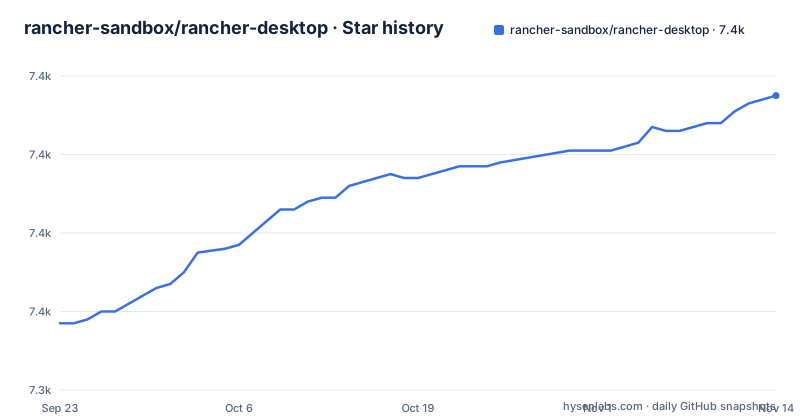
Star history
- rancher-sandbox/rancher-desktop7,415 ★ · +58
| Repository | 2026-09-23 | 2026-11-14 |
|---|---|---|
| rancher-sandbox/rancher-desktop | 7.4k | 7.4k |
58 Stars in the last 52 days, measured from the daily GitHub snapshot. Compare with other projects
Editorial analysis
The readme says it is about development, not use
The first substantive line of this readme sets its scope. It says the file pertains to the development of Rancher Desktop and sends user-oriented information to rancherdesktop.io and user-oriented documentation to docs.rancherdesktop.io, with a DeepWiki link beside them. Everything that follows is therefore about working on the code rather than running the application, which is why the setup instructions go straight to virtual machines, Visual Studio and MSBuild instead of a download. The project itself is described as an Electron application written mainly in TypeScript that bundles other technologies into one cohesive application, with a command line tool called `rdctl` written in Go, and a repository tree that already carries a `docs/` directory for the other half of the audience. One further sentence explains the tooling policy: most developer activities, running a development build, building and packaging, unit tests and end-to-end tests, all go through yarn scripts, with a handful of exceptions such as the BATS tests.
Windows has two setup paths, and the fast one pipes a script into iex
Building from source on Windows comes in two shapes. The development VM setup starts from a Microsoft Windows 10 development virtual machine, opens PowerShell, and runs an automated setup script that is downloaded and piped straight into the shell:
Set-ExecutionPolicy RemoteSigned -Scope CurrentUser
iwr -useb 'https://github.com/rancher-sandbox/rancher-desktop/raw/main/scripts/windows-setup.ps1' | iex
The privileged prompt is closed afterwards, and the remaining work is configuration rather than installation. The manual path is the same idea without the virtual machine: install WSL unless it is already there, install Scoop with `iwr -useb get.scoop.sh | iex`, then pull in the toolchain with `scoop install 7zip git go mingw nvm python unzip`, install yarn globally, and add Visual Studio 2017 or higher with the Windows SDK component and the Desktop development with C++ workload. Both paths end the same way, with a clone and `yarn`. The manual list also pins a Node version, telling you to check with `nvm list` and, if 22 is not installed or current, to run `nvm install 22` and then `nvm use 22.xx.xx`, so the runtime floor is enforced by hand rather than by a version manager reading the manifest.
Quoting the MSBuild path is warned about in both setup paths
One instruction appears twice and it is the one with a failure attached. Two properties have to reach `.npmrc`, `msvs_version` and `msbuild_path`, and the documented way to set them is `npm config set` with a version number and a path. If that command errors, the fallback is `npm config edit` and typing the lines by hand, such as `msvs_version=2022` with a matching `msbuild_path`. Both sections then repeat the same warning: do not quote the value to the right of the equals sign, because the quotes are not needed and some processors will treat them as literal parts of the path and fail. The wording differs slightly between the two sections, one processor against some, which suggests the paragraphs were written at different times. The example given for Visual Studio 2022 is a full Community edition path ending in `MSBuild.exe`, and the second example deliberately uses a different install root under Program Files x86, which is the kind of inconsistency that produces the error the paragraph is warning about.
Line endings are the hidden cause of failing lint:go tests
Both Windows paths close with the same two git commands, and the comment attached to them is more useful than the commands:
git config --global --replace-all core.autocrlf false
git config --global --replace-all core.eol lf
The stated reason is that git has to be configured to work with files originating on Linux and macOS, and the symptom to watch for is the `lint:go` tests failing mysteriously, which the readme attributes to incorrect line endings rather than to anything in the Go code. This matters more than it looks in a repository with a Go toolchain and a Go workspace file in the same tree as the TypeScript sources, since a checkout that rewrites line endings can produce failures that point at the wrong layer entirely. Note that the setting is applied globally and with `--replace-all`, so it changes behaviour for every repository on the machine rather than for this one, and both Windows sections repeat the pair in full instead of referring back to the first.
macOS needs nvm first, and M1 needs a variable before yarn
The macOS section is shorter and has one trap of its own. Node and npm come from nvm, installed with the upstream script, and the note explains that the installer writes nvm handling into a profile file such as `~/.bash_profile`, which means a shell you already have open needs to source that file before nvm works. Node 22.14 is the version to install, `npm install --global yarn` follows, Go comes from `brew install go`, and `yarn` installs the dependencies. Then there is the Apple silicon case, set out in its own callout: the `M1` environment variable has to be exported before installing dependencies and before any npm script runs.
export M1=1
yarn
If dependencies were installed without it, `git clean -fdx` removes the cached assets so they are fetched again with the right architecture. That callout is the whole difference between a working checkout and a subtly wrong one on Apple silicon, and it is the kind of instruction that only appears because someone filed the bug that produced it.
Go and TypeScript share one tree through go.work and a Yarn 4 workspace
The build is two toolchains in one repository, and the files say so. `go.work` puts the Go side in a workspace, `pkg/` and `background.ts` at the root mark the two halves, and the package manager is declared as `[email protected]` with a `.yarn/` directory and `.yarnrc.yml` beside a committed `yarn.lock`. The engine floor is `node: ^22.14.0`, which matches the 22.14 the platform instructions tell you to install, and the package is marked as an ES module package, with babel.config.cjs kept as CommonJS. Most scripts go through one wrapper, `node scripts/ts-wrapper.js`, which is how linting for both languages is launched from Yarn, while `.golangci.yaml` and `.golangci` tooling cover the Go side and a separate `lint:spelling` target runs `bash scripts/spelling.sh`. Other files in the tree make the same point about tooling choices: `jest.config.js` and `tsconfig.jest.json` for tests, `eslint.config.mts` and `babel.config.cjs` for linting and transpilation, `.editorconfig` for whitespace, and `.gitmodules` for dependencies that stay outside the tree.
One test target fans out into seven suites and a spelling check
The scripts section shows how wide the test surface is. `test` runs lint without fixes, then the unit suites, then an extra group, and `test:unit` is a chain of nine named pieces: jest, typecheck, a nerdctl stub, a WSL helper, `rdctl`, a guest agent, an i18n report, ports and networking. Linting has a fix and a no-fix variant for both TypeScript and Go, with spelling as a third axis. Outside the Yarn scripts, the readme names one exception, the BATS tests, and the tree carries a `bats/` directory for them, alongside `e2e/` for end-to-end runs, a `sign` target, a `wix` target for Windows packaging, and `dev-app-update.yml` for update delivery. There is also a PowerShell target for generating a nerdctl stub on Windows and a target that regenerates extension data, which is the pattern to read if you want to know which parts of the build have a platform specific branch.
Editorial conclusion
Rancher Desktop suits a contributor who wants to run the project from source and can afford a Windows VM, a Visual Studio install with the C++ workload, or an M1 workaround. It does not suit someone looking for installation steps, because this readme deliberately sends that reader to rancherdesktop.io and docs.rancherdesktop.io instead. Before you start, read the platform section for your machine rather than assuming it matches, set the M1 variable before the first yarn run on Apple silicon, and leave the MSBuild path unquoted.
Frequently asked questions
What does Rancher Desktop do?
It brings Kubernetes and container management to the desktop and runs on Windows, macOS and Linux. The application is an Electron program written mainly in TypeScript, bundling several technologies, with a command line tool called rdctl written in Go.
Is Rancher Desktop free for commercial use?
The package manifest declares Apache-2.0 as the licence and a LICENSE file sits at the repository root, with SUSE named as the author. The readme points user-oriented information to rancherdesktop.io and docs.rancherdesktop.io.
How do I install Rancher Desktop?
The readme covers building from source rather than installing, and sends user questions to docs.rancherdesktop.io. On Windows it offers two build paths, a Microsoft development VM with an automated setup script, or a manual environment using WSL, Scoop and Visual Studio.
how to use rancher desktop
For development, almost everything runs through yarn scripts: dev, build, package, sign and a test target that chains lint, unit and extra suites. Node ^22.14.0 and yarn 4.18.0 are the declared floors, and the BATS tests are the one documented exception.
Official sources
Add this badge to your README
If you maintain this project, the badge below links readers to this analysis and shows its maintenance status from the daily GitHub snapshot. Paste the markdown into your README; add ?metric=license or ?metric=stars to the image URL for a different field.

[](https://hysenlabs.com/projects/rancher-sandbox-rancher-desktop)Star history chart for your README
[](https://hysenlabs.com/projects/rancher-sandbox-rancher-desktop)Was this useful?