wafw00f: fingerprinting the web application firewall in front of a site
WAFW00F allows one to identify and fingerprint Web Application Firewall (WAF) products protecting a website.
At a glance
- What is it?
- Enable Security's BSD licensed Python tool identifies which WAF sits in front of a host by sending one ordinary request, then escalating to deliberately malicious ones, with over a hundred vendor signatures covering everything from Cloudflare to F5 BIG-IP.
- Who is it for?
- wafw00f answers one narrow question well: which WAF is answering here, and from which vendor. Its three stage escalation from benign to hostile request is the reason it beats a single header check, and the signature table is the reason it beats a guess.
- Can I use it commercially?
- Yes. BSD-3-Clause is a permissive licence: you can use, modify and sell software built on it, as long as you keep its copyright and licence notices.
- Is it still maintained?
- Activity is slowing. The repository last received commits 6 months ago.
- What is it written in?
- Mainly Python, according to GitHub's language statistics.
Answers come from the project's GitHub data, last synced on October 23, 2026, and from our analysis. They are not legal advice.
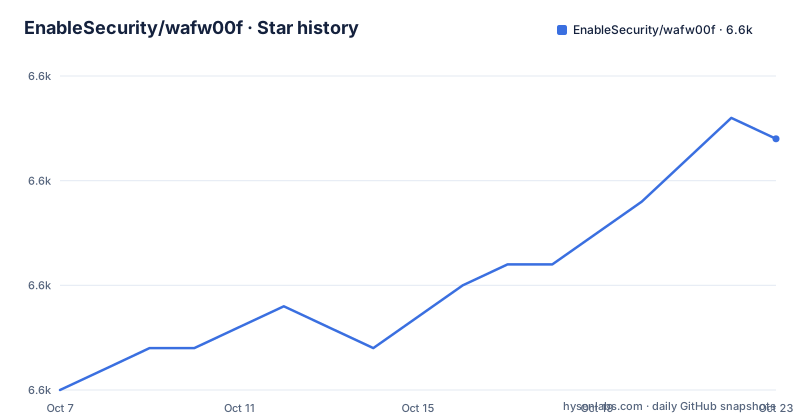
Star history
- EnableSecurity/wafw00f6,582 ★ · +12
| Repository | 2026-10-07 | 2026-10-23 |
|---|---|---|
| EnableSecurity/wafw00f | 6.6k | 6.6k |
12 Stars in the last 16 days, measured from the daily GitHub snapshot. Compare with other projects
Editorial analysis
A three stage guess built on ordinary and hostile requests
The README describes the detection method in three steps, and the order matters more than the detail. First, wafw00f sends a normal HTTP request and analyses the response, which is enough to identify a number of WAF products on its own. If that does not settle it, it sends a number of potentially malicious HTTP requests and uses simple logic to deduce which WAF is in the path. If that also fails, it analyses the responses collected earlier and runs another algorithm to guess whether a WAF or other security solution is actively responding to the attacks.
That escalation from a polite request to an impolite one is the whole design. A WAF that adds a distinctive header or an error page fingerprint will show itself immediately. A WAF that only intervenes when it sees an attack pattern has to be provoked first, which is why the second stage exists, and why a scanner that only ever sends clean requests will miss it. The third stage is a fallback that reasons over the response history rather than issuing anything new.
The tool identifies products rather than defeating them. Nothing in the README describes payload evasion, and the detection logic is described as simple in both places where it is introduced. That is a reasonable scope for a reconnaissance utility, and it is also the difference between this and the WAF bypass tooling you will find elsewhere.
The signature list is the real asset
The best documented command in the project is the listing one, which prints every product wafw00f can test for along with the manufacturer behind it:
wafw00f -lThe visible portion of that table in the README runs alphabetically from 360PanYun through PerimeterX and already contains over a hundred entries, so the full list is longer still. Coverage is broad rather than boutique: Cloudflare and Incapsula from the managed CDN and edge vendors, AWS Elastic Load Balancer and Azure Application Gateway from the clouds, FortiGate, FortiGuard and FortiWeb from Fortinet, four separate BIG-IP entries from F5 Networks covering the local traffic manager, application security manager and the AP manager, four from Microsoft, and a long tail of regional and single product vendors such as Azion Edge Firewall, Chuang Yu Shield, Cloudbric, IndusGuard, Jiasule, Link11 WAAP, LiteSpeed, Nemesida and NexusGuard Firewall.
The manufacturer column is more useful than it first appears, because most organisations run several products at once and the names in this table overlap heavily with what appears in procurement documents. Seeing which vendor families are represented tells you what a deployment here probably looks like.
The banner the same command prints is a small time capsule worth quoting, since the ASCII art declares the version as v2.4.2 and the tool's own subtitle as Sniffing Web Application Firewalls since 2009.
Packaging that moved to modern Python
The `pyproject.toml` is the current source of truth for installation. It declares `requires-python` as greater than or equal to 3.10, depends only on `requests` and `requests[socks]`, which is why proxy support needs no separate package, and exposes a single console script entry point named `wafw00f` pointing at `wafw00f.main:main`. Version is read dynamically from `wafw00f.__version__`, so the badge in the README and the string the tool prints come from the package itself.
Two optional dependency groups exist. The `dev` group is prospector, pytest, pytest-mock and responses, and the `docs` group is Sphinx. Pytest is configured inline with `testpaths` set to `tests`, file and function name patterns of `test_*.py` and `test_*`, and `addopts` of `-v`, so a bare pytest run from a checkout is already set up correctly.
The `Makefile` wraps the same ground with named targets, and it is worth reading because the coverage and lint targets are not obvious:
pip install -q -e .[dev,docs]
pytest
pytest --cov=$(SRC_DIR) --cov-report=term-missing
prospector wafw00f --strictness veryhigh
`SRC_DIR` is set to `wafw00f` at the top of the Makefile, so that coverage command measures the package rather than the whole checkout. Container use is supported through a small `Dockerfile` built on `python:3.11.9-alpine`, which copies the source in, installs the package, and sets the entrypoint to `wafw00f` directly. That is the fastest way to run it on a host where you would rather not install Python packages, and it also means the tool can sit in a scanning pipeline without polluting the system interpreter.
Three releases in a week, and what they changed
The recent release history is unusually concentrated. v2.4.0 landed on 2026-01-19, v2.4.1 on 2026-01-20, and v2.4.2 on 2026-01-26, so the three most recent versions shipped inside eight days.
v2.4.0 added detection for Anubis from Techaro, Scutum from Secure Sky Technology, 360PanYun from 360 Technologies, ThreatX from A10 Networks and Link11 WAAP, tightened the Fastly detection with a tighter regular expression for the `X-Served-By` header, and added the pytest suite with 45 tests along with a `pyproject.toml` for modern packaging. That release also dropped the `pluginbase` dependency in favour of the standard library `importlib`, fixed an infinite hang on streaming responses, and updated the Python requirement to 3.8 or later.
v2.4.1 was a timeout fix, and the release notes are precise about what had been wrong. v2.4.0 fixed the hang but did not enforce the `--timeout` parameter while reading a response body, only while establishing the connection, so slow streaming servers could still stretch a scan past two minutes. That release tracks elapsed time through the chunk reading loop and breaks out once the timeout is exceeded.
v2.4.2 removed `setup.py` to fix local installations, raised the supported Python versions to 3.10 or later, added Vercel WAF and Reflected Networks WAF signatures, and improved the existing Tencent WAF signature. The signature work is the steady drip that keeps this tool useful, and the two packaging releases in three weeks are the reason your Python 3.8 or 3.9 install will not take v2.4.2.
Project shape and where the documentation stops
The repository is compact: a `wafw00f/` package directory, a `tests/` directory, a `docs/` directory with Sphinx configuration behind it, and the usual metadata files including `MANIFEST.in`, `CODE_OF_CONDUCT.md` and a `CREDITS.txt` for attribution. There is also a `CLAUDE.md` at the root, which is a working file for AI coding tools and is not something a user of the library needs.
What the repository does not settle is the signature format itself. The README describes the detection stages and prints the product list, but the mechanics of how a vendor is fingerprinted, how false positives are suppressed, and how a signature is validated against a live product are all in the source. For anyone extending the tool with a new vendor, `wafw00f/` is where the work is, and the 45 tests introduced in v2.4.0 are the model for what a new detection needs to come with.
The documentation wiki is linked from the `pyproject.toml` as the Documentation URL, so beyond the README the practical usage reference lives outside the repository. The homepage for the project is enablesecurity.com, and the package metadata names Sandro Gauci at enablesecurity.com as the author. The package classifiers place it at Production or Stable, mark the intended audience as system administrators and information technology staff, and list operating system as independent.
Editorial conclusion
wafw00f answers one narrow question well: which WAF is answering here, and from which vendor. Its three stage escalation from benign to hostile request is the reason it beats a single header check, and the signature table is the reason it beats a guess. Its honest limits are equally clear, since it identifies rather than evades, it reports the vendor rather than the version or configuration, and a false negative simply looks like a site with no WAF. The tool has no open issues and its last release was v2.4.2 on 2026-01-26, with the repository pushed on 2026-04-19, so it is quiet rather than abandoned. Run `wafw00f -l` first to see what your version actually recognises, and treat a negative result as unknown rather than as proof of absence.
Frequently asked questions
What does wafw00f detect?
It identifies which web application firewall product is protecting a site, by sending a normal HTTP request first and escalating to deliberately malicious requests if that is not enough. The tool fingerprints the product, it does not attempt to bypass it.
How many WAF products does wafw00f know about?
The product table in the README runs alphabetically from 360PanYun to PerimeterX and holds more than a hundred entries in that visible portion alone, covering managed CDN edges, cloud load balancers and single product vendors. The full list is longer, since the table continues past what the README shows.
What are wafw00f's dependencies and Python requirement?
pyproject.toml requires Python 3.10 or later and depends only on requests and requests[socks]. Optional groups are dev, which pulls in prospector, pytest, pytest-mock and responses, and docs, which pulls in Sphinx.
How do I install wafw00f for development and run its tests?
The Makefile install target runs pip install -q -e .[dev,docs], and the test targets run pytest, pytest -v --tb=short or a coverage variant pointed at the wafw00f package. Linting goes through prospector at veryhigh strictness.
What is the latest wafw00f version and what changed in it?
v2.4.2, released 2026-01-26. It removed setup.py to fix local installations, raised the supported Python to 3.10 or later, added Vercel WAF and Reflected Networks WAF signatures, and improved the existing Tencent WAF signature.
Official sources
Add this badge to your README
If you maintain this project, the badge below links readers to this analysis and shows its maintenance status from the daily GitHub snapshot. Paste the markdown into your README; add ?metric=license or ?metric=stars to the image URL for a different field.

[](https://hysenlabs.com/projects/enablesecurity-wafw00f)Star history chart for your README
[](https://hysenlabs.com/projects/enablesecurity-wafw00f)Was this useful?