DB-GPT: An Open-Source Agentic Data Assistant That Writes SQL and Runs Code in a Sandbox
open-source agentic AI data assistant for the next generation of AI + Data products.
At a glance
- What is it?
- DB-GPT is a Python-based platform that connects to databases, files, and knowledge bases, plans analysis tasks, writes and executes SQL and code, and packages workflows as reusable skills. It targets teams that want AI-native data agents without building orchestration from scratch.
- Who is it for?
- Adopt DB-GPT if you need a self-hosted, agentic layer that turns natural language into SQL and code across databases, files, and knowledge bases, and if you value a sandboxed execution model and skill-based reuse. Do not adopt it if your primary need is a simple chat interface over one database, or if you cannot supply an LLM API key or a local model endpoint.
- Can I use it commercially?
- Yes. MIT is a permissive licence: you can use, modify and sell software built on it, as long as you keep its copyright and licence notices.
- Is it still maintained?
- Yes. The repository received new commits within the last day.
- What is it written in?
- Mainly Python, according to GitHub's language statistics.
Answers come from the project's GitHub data, last synced on November 13, 2026, and from our analysis. They are not legal advice.
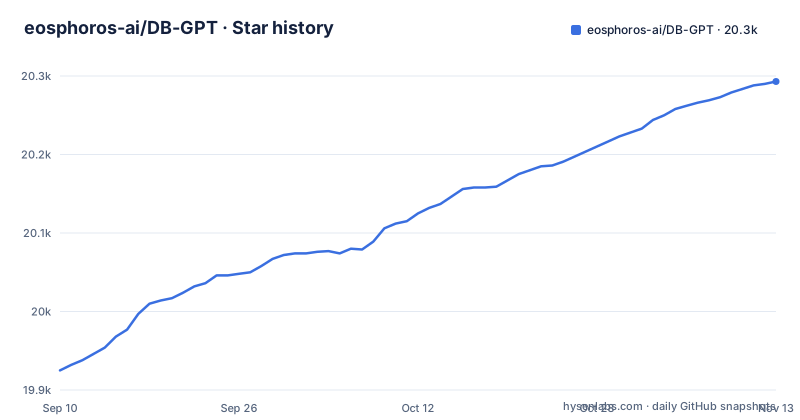
Star history
- eosphoros-ai/DB-GPT20,293 ★ · +368
| Repository | 2026-09-10 | 2026-11-13 |
|---|---|---|
| eosphoros-ai/DB-GPT | 19.9k | 20.3k |
368 Stars in the last 64 days, measured from the daily GitHub snapshot. Compare with other projects
Editorial analysis
The Problem It Solves and Who It Targets
DB-GPT addresses a recurring friction in data work: analysts spend time translating business questions into SQL queries, cleaning datasets, and assembling reports. The project positions itself as an agentic AI data assistant, meaning it does not just generate a query suggestion. It plans a task, breaks it into steps, calls tools, writes SQL and Python, executes that code, and produces charts, dashboards, or HTML reports. The intended user is an engineer or data practitioner who wants a platform to build AI-native data agents for a team or product, not a single-user notebook plugin. The README lists concrete use cases: analyzing CSV and Excel files, connecting to databases for profiling reports, answering business questions with auto-generated SQL, and performing financial report analysis with code and narrative summaries. It also targets developers who want to assemble workflows that combine code, SQL, retrieval, and tools in one agentic pipeline.
How DB-GPT Works: Agents, Skills, and Sandboxes
The architecture visible in the README has three layers. First, multi-source data access connects structured sources like databases and spreadsheets with unstructured ones like documents and knowledge bases. Second, an agent layer plans tasks, writes SQL and code, and executes them step by step. Third, a sandboxed execution environment isolates the code and tools. The README emphasizes that skills are a core mechanism: domain knowledge, analysis methods, and execution workflows can be packaged into reusable units. This means repetitive analysis patterns, such as a standard SQL profiling routine, can be loaded rather than re-prompted. The product workflow is described as explore data, plan and execute, use skills, and generate reports. This is not a simple query generator. It is a workflow engine where the AI reasons through a multi-step task and produces a decision-ready artifact.
Getting Started: Installer Profiles and API Keys
The README provides a one-line installer for macOS and Linux. The base command is curl -fsSL https://raw.githubusercontent.com/eosphoros-ai/DB-GPT/main/scripts/install/install.sh | bash. To select a model provider, you pass a profile and an API key as environment variables. For OpenAI, the command is curl -fsSL ... | OPENAI_API_KEY=sk-xxx bash -s -- --profile openai. The README also shows profiles for Kimi 2.5 via the Moonshot API and for MiniMax via an OpenAI-compatible API, each requiring its own key. This design implies that DB-GPT is provider-agnostic at the API level, but the quick start only demonstrates cloud APIs. If you have a local checkout, the installer can reuse it instead of cloning a fresh copy into ~/.dbgpt/DB-GPT, which is useful for development. The README also documents a PyPI route (uv pip install dbgpt-app or pip install dbgpt-app, then dbgpt start, which runs an interactive setup wizard) and links Docker, local GPU model and source-code guides in the docs.
What the Repository Actually Contains and What It Does Not
The repository is eosphoros-ai/DB-GPT, with Python as the primary language and an MIT license. The default branch is main, and recent releases show a steady cadence: v0.8.0 in March 2026, v0.8.1 in June 2026, and v0.8.2 in August 2026. The README mentions AWEL, RAG, and multi-model support as part of the platform for building AI-native data agents and workflows. The README links an AWEL Flow Usage guide in the docs. The documentation site is at docs.dbgpt.cn. The PyPI route requires Python 3.10+ with uv or pip; for how the sandbox works and which databases are supported, a potential adopter should consult the docs or the source to verify compatibility with their existing data stack.
Real Limitations and Cases Where It Is the Wrong Tool
The most obvious limitation is that DB-GPT is not a zero-config tool. It requires an external LLM API key or a local model endpoint, and the one-line installer only covers macOS and Linux; for other setups the README points to the PyPI package and the Docker and source-code guides. The sandboxed execution is a stated feature, but the README gives no detail on isolation boundaries, network access, or resource limits, so you cannot assess whether it meets your security requirements without deeper investigation. Another limitation is the learning curve for building custom skills and workflows. The README says reusable skills can be loaded; check the skills/ directory and the docs for the skill format before planning to author one. If your need is a simple text-to-SQL interface over one database, DB-GPT is overkill. Its agentic planning and sandbox execution add complexity that a lightweight tool would not. Also, because the installer pipes a remote script directly to bash, you must trust the repository and the network path, a common but real supply-chain concern.
Alternative Approaches and How They Differ
A common alternative is a direct text-to-SQL tool that maps natural language to a single database query, such as a LangChain SQL agent or a tool like Vanna. The difference is architectural. Those tools typically generate SQL and optionally execute it, but they do not plan multi-step analyses, write and run Python for data cleaning, or produce HTML reports as a workflow. They also do not provide a skill system for packaging domain-specific analysis methods. Another alternative is a general-purpose agent framework like AutoGPT or a coding agent, which can write code but has no native data source connectors or report generation. DB-GPT sits between those: it is domain-specific for data, with built-in connectors and output formats, but it is more general than a single-purpose SQL generator. The tradeoff is that you adopt a specific platform with its own workflow abstractions, which may not fit if you already have a preferred orchestration stack.
Maintenance, Upgrade Cost, and License Implications
The release history shows active maintenance: three releases in about five months between March and August 2026. That cadence suggests ongoing feature work, but it also implies an upgrade burden. Each release may change APIs, skill formats, or configuration profiles, so you should pin a version and test before upgrading. The README does not mention a migration guide or backward compatibility policy, so you cannot assume a drop-in upgrade. The project is MIT licensed, which is permissive: you can use, modify, and distribute it, including in commercial products, as long as you preserve the copyright notice. That is a low-license-risk choice for internal adoption. However, the MIT license does not cover the LLM APIs you connect to, which have their own terms and costs. Also, any skills or data you load may be subject to separate licenses. The README mentions a paper on arXiv, which could provide deeper architectural detail, but the paper is not a substitute for documentation on version-specific behavior.
Editorial conclusion
Adopt DB-GPT if you need a self-hosted, agentic layer that turns natural language into SQL and code across databases, files, and knowledge bases, and if you value a sandboxed execution model and skill-based reuse. Do not adopt it if your primary need is a simple chat interface over one database, or if you cannot supply an LLM API key or a local model endpoint. Before production use, verify which LLM providers and profiles are officially supported in the version you install, confirm how the sandbox isolates code and SQL execution from your network, and test whether the installer works in your environment, since the one-line curl installer only covers macOS and Linux.
Frequently asked questions
What is DB-GPT, in the project's own terms?
DB-GPT calls itself an open-source agentic AI data assistant for AI plus Data products. It connects to databases, CSV and Excel files, warehouses and knowledge bases, writes SQL from natural language questions, runs Python and code driven analysis, loads reusable skills, and produces charts, dashboards, HTML reports and summaries.
Which model providers does the DB-GPT installer support?
Three profiles are documented: --profile openai with OPENAI_API_KEY, --profile kimi with MOONSHOT_API_KEY for Kimi 2.5 through the Moonshot API, and --profile minimax with MINIMAX_API_KEY through the OpenAI compatible API. The PyPI default also includes DashScope and Tongyi support, and OpenAI compatible LLM support.
Can I install DB-GPT on Windows?
The one line installer is scoped to macOS and Linux in the README, with no PowerShell form given. The alternatives are the PyPI route, which needs Python 3.10 or later with uv or pip, or the Docker and source code guides in the docs. The Makefile branches on the OS variable and lays its virtualenv out in Windows style when it is Windows_NT.
What does the dbgpt-app package from PyPI include?
The default installation carries the core framework with its CLI, FastAPI and Agent, OpenAI compatible LLM support, DashScope and Tongyi support, RAG document parsing, and a ChromaDB vector store. Local GPU models through vLLM or llama.cpp and Docker are separate advanced installation paths in the docs.
Where does DB-GPT keep its files and configuration?
The default installer clones into ~/.dbgpt/DB-GPT, and the README starts the server from there with uv run. The compose file mounts a config directory at /app/configs and keeps pilot data and message state in named volumes. A --repo-dir install writes elsewhere by design.
What licence is DB-GPT released under?
MIT, with a LICENSE file at the repository root. The README does not discuss relicensing, trademark or commercial use, so a deployment question is answered by that file.
Official sources
Add this badge to your README
If you maintain this project, the badge below links readers to this analysis and shows its maintenance status from the daily GitHub snapshot. Paste the markdown into your README; add ?metric=license or ?metric=stars to the image URL for a different field.

[](https://hysenlabs.com/projects/eosphoros-ai-db-gpt)Star history chart for your README
[](https://hysenlabs.com/projects/eosphoros-ai-db-gpt)Was this useful?