Scratch keeps notes as plain .md files and refuses to grow
A minimalist, offline-first markdown note-taking app
At a glance
- What is it?
- Scratch is a Tauri and React markdown note app that stores notes as plain files you own, with optional git push and pull for multi-device sync. Its author calls it mostly stable and says he is no longer monitoring issues regularly, so the feature set is deliberately closed.
- Who is it for?
- Scratch fits a person whose notes must remain readable files on disk with no account and no cloud, and who wants Mermaid and math rendering without a plugin ecosystem. It does not fit anyone planning to extend it, because the contributing section says issues and pull requests are not monitored regularly and major changes should be done by forking, and the built-in Tantivy reference in the README is not backed by a described search layer.
- Can I use it commercially?
- Not without permission. GitHub finds no licence file in the repository, and without a licence all rights are reserved by default: you may read the code but not reuse it. Check the README, or ask the authors, before using it.
- Is it still maintained?
- Yes. The repository last received commits 103 days ago.
- What is it written in?
- Mainly TypeScript, according to GitHub's language statistics.
Answers come from the project's GitHub data, last synced on November 7, 2026, and from our analysis. They are not legal advice.
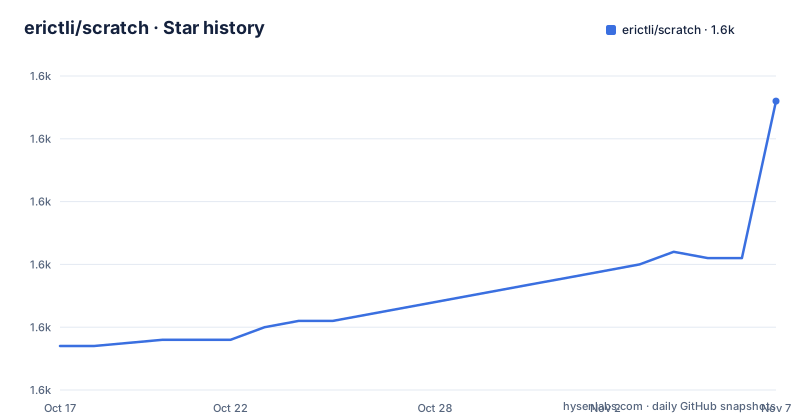
Star history
- erictli/scratch1,636 ★ · +39
| Repository | 2026-10-17 | 2026-11-07 |
|---|---|---|
| erictli/scratch | 1.6k | 1.6k |
39 Stars in the last 21 days, measured from the daily GitHub snapshot. Compare with other projects
Editorial analysis
Plain files as the contract, with preview mode as the escape hatch
The storage decision is the whole design, and the README states it plainly: notes are stored as plain `.md` files you own, with no cloud, no account and no internet required.
The editing side is rich text. WYSIWYG editing saves as markdown, and syntax highlighting covers 20 languages with a GitHub-inspired colour scheme. What makes that combination credible is the source mode toggle: `Cmd+Shift+M` switches to raw markdown, so the file on disk is inspectable and editable even if the editor disagrees with your intent.
Preview mode extends the contract beyond a notes folder. You can open any `.md` file by drag-and-drop or with Open With, without it living in the app's notes directory. For someone whose existing notes are already loose markdown files, that removes the import step entirely.
Wikilinks follow the same pattern: type `[[` and autocomplete offers the note to link to. Slash commands, triggered with `/`, insert headings, lists, code blocks and diagrams. Focus mode at `Cmd+Shift+Enter` fades the sidebar and toolbar with an animation, which is the kind of detail you only build for someone who writes for hours.
The rendering features sit on the markdown rather than replacing it. Mermaid diagrams render from fenced code blocks, so ` ```mermaid ` in a note becomes a flowchart. KaTeX renders block math written as `$$...$$`. Both live inside the file, so a reader with no Scratch installed still sees the source.
Two integrations that break the offline claim in interesting ways
Offline-first is the headline, and two of the features pull against it.
The first is AI editing. The README lists Edit with Claude Code, OpenAI Codex, OpenCode, or Ollama, using your local CLI to edit notes, including fully offline via Ollama. That phrasing is careful: the app does not ship a model, it invokes a CLI you already have. Offline use therefore depends on Ollama being installed locally, and which agent you get depends on which CLI is on your PATH.
The second is agent interoperability. The README says Scratch works with other AI agents and detects external file changes. That is the load-bearing sentence. If an agent outside the app rewrites a note on disk, the app notices rather than clobbering it. Without that, an offline-first editor becomes a stale-buffer editor the first time anything else touches the file.
Git integration is the third. It is optional version control with push and pull for multi-device sync, which is the pragmatic answer to syncing notes without an account: the repo is the backend, and you choose whether it is local, on a private remote, or somewhere else.
Folders are opt-in. The README describes a collapsible folder tree with drag-and-drop, and calling it opt-in matters: a flat notes directory is a legitimate configuration, and a tool that forces a hierarchy onto someone is a tool that fights them.
Tauri, React and a dependency list that explains the small binary
The stack is named in one line: Tauri, React, TipTap, Tailwind CSS and Tantivy. The package.json shows what that means in practice.
"@tauri-apps/api": "^2",
"@tauri-apps/plugin-clipboard-manager": "^2.3.2",
"@tauri-apps/plugin-dialog": "^2.6.0",
"@tauri-apps/plugin-opener": "^2",
"@tauri-apps/plugin-updater": "^2.10.0",
"@tiptap/core": "^3.19.0",
"@tiptap/react": "^3.18.0",
"@tiptap/markdown": "^3.18.0",
"beautiful-mermaid": "^1.1.3",
"katex": "^0.16.33",
"highlight.js": "^11.11.1",
"lowlight": "^3.3.0",
"react": "^19.1.0",
"react-dom": "^19.1.0"
The Tauri choice is what produces the size claim. The README states Scratch is 5-10x smaller than Obsidian or Notion, and that follows from shipping a system webview instead of bundling a browser. It also creates the platform requirement: Windows needs WebView2, which the README says is downloaded automatically if needed and is pre-installed on Windows 11.
TipTap is the editor, and the extension list is a map of the feature list: image, link, mathematics, placeholder, table with cell, header and row, task item, task list, code block with lowlight, and `@tiptap/markdown` for the markdown round-trip. `beautiful-mermaid` handles diagrams, KaTeX math, and highlight.js with lowlight covers the 20 languages.
There is a `@tiptap/suggestion` extension, which is the machinery behind the `[[` wikilink autocomplete rather than a separate link picker.
The repository layout is the standard Tauri shape with `src-tauri/` for the Rust side and `src/` for the React side, plus `vite.config.ts`, `index.html` and `tsconfig.json`. Scripts are minimal: `dev` is vite, `build` is `tsc && vite build`, and `tauri` forwards to the Tauri CLI. A `CLAUDE.md` at the root indicates the project carries agent instructions.
Install paths, and Windows needs the runtime before it needs the app
macOS has the smoothest route, a Homebrew cask in a personal tap:
brew tap erictli/tap
brew install --cask erictli/tap/scratch
The manual path is a `.dmg` from the releases page, opened and dragged to Applications. Windows is an `.exe` installer from the same page. Linux is an `.AppImage` or a `.deb`, also from releases.
Building from source needs Node.js 18 or newer and Rust 1.70 or newer, plus Xcode Command Line Tools on macOS and the WebView2 Runtime on Windows:
git clone https://github.com/erictli/scratch.git
cd scratch
npm install
npm run tauri dev
npm run tauri build
Note that the root package.json is named `tauri-app`, marked private, at version 1.0.0, and that its scripts are `vite` and `tsc && vite build` rather than Tauri-specific ones. The `npm run tauri` script forwards to the Tauri CLI, which is how `dev` and `build` in the README work.
The one runtime detail worth knowing on Windows comes from the README rather than from a bug report: WebView2 will be downloaded automatically if needed. On a locked-down machine where that download is blocked, the installer fails for a reason that has nothing to do with Scratch.
Release history is regular: v0.9.1 in March 2026, v0.10.0 in April, and v1.0.0 on 2026-07-28. The last push was on 2026-07-28, so the 1.0 line is recent.
The feature set is closed on purpose, and the author says so
The contributing section is the most useful paragraph in the README, and it should be read before adopting rather than after.
Scratch is mostly stable and intentionally minimal, so the author is no longer monitoring issues and pull requests regularly. People are welcome to open them but he cannot guarantee he will get to everything, and it may take a while when he does. He also says he generally will not go back and forth on review comments, and that if he merges he will make any additional changes directly.
Then the design statement: what makes Scratch special is its minimal feature set and focus on user experience, with the explicit statement that they are not trying to build Obsidian or Notion, so not every feature will be a fit. If you want major changes or a new direction, fork it. It is MIT licensed.
That is a coherent position rather than an abandonment. A note app that ships a plugin system accumulates a maintenance surface; one that does not can stay small. The cost is that a bug you hit is a bug you fix, or a bug you report and wait for.
The MIT licence is the stated answer to the fork instruction, and it is a permissive one: you can fork, modify and redistribute, including inside a closed product, provided the notice is kept. Note that the repository metadata does not declare a licence identifier even though the README says MIT and the contributing section relies on that grant, which is a small inconsistency worth resolving before you vendor it.
Tantivy is listed as one of the built-with projects, the Rust search engine. The README lists Find in note and Search notes as shortcuts but does not describe a corpus-wide index, so if full-text search across a large note collection is your requirement, that is the feature to test first rather than assume.
Editorial conclusion
Scratch fits a person whose notes must remain readable files on disk with no account and no cloud, and who wants Mermaid and math rendering without a plugin ecosystem. It does not fit anyone planning to extend it, because the contributing section says issues and pull requests are not monitored regularly and major changes should be done by forking, and the built-in Tantivy reference in the README is not backed by a described search layer. Verify first by installing the cask on macOS with `brew tap erictli/tap` and `brew install --cask erictli/tap/scratch`, opening a note with `Cmd+Shift+M` to confirm the markdown round-trips, and deciding about git sync only after that round-trip holds on your own writing style.
Frequently asked questions
How do I install Scratch on macOS?
Use the Homebrew cask from the author's tap with brew tap erictli/tap followed by brew install --cask erictli/tap/scratch. Alternatively download the .dmg from the GitHub releases page and drag Scratch into Applications.
Does Scratch require an account or internet connection?
No. The README describes it as offline-first with no cloud, no account and no internet required, storing notes as plain .md files you own. Git push and pull is optional version control for multi-device sync, not a requirement.
What are the system requirements for building Scratch from source?
Node.js 18 or newer and Rust 1.70 or newer, plus Xcode Command Line Tools on macOS and the WebView2 Runtime on Windows, which is pre-installed on Windows 11. Build commands are npm install, npm run tauri dev and npm run tauri build.
Is Scratch still being actively developed?
The README says Scratch is mostly stable and intentionally minimal and that the author is no longer monitoring issues and pull requests regularly. v1.0.0 was released on 2026-07-28, which is also the date of the last push.
Can I use AI to edit notes in Scratch?
Yes. The README lists editing with Claude Code, OpenAI Codex, OpenCode or Ollama through your local CLI, including fully offline via Ollama. It also says Scratch detects external file changes so other AI agents can edit notes too.
Official sources
Add this badge to your README
If you maintain this project, the badge below links readers to this analysis and shows its maintenance status from the daily GitHub snapshot. Paste the markdown into your README; add ?metric=license or ?metric=stars to the image URL for a different field.

[](https://hysenlabs.com/projects/erictli-scratch)Star history chart for your README
[](https://hysenlabs.com/projects/erictli-scratch)Was this useful?