snapshotify: Pre-rendered HTML and Critical CSS for create-react-app, With Caveats
Creates a static HTML snapshot for your `create-react-app` app, to improve initial page load times.
At a glance
- What is it?
- snapshotify turns a create-react-app build into static HTML with inlined critical CSS and preloaded assets. It is a work in progress, so production use requires care.
- Who is it for?
- Adopt snapshotify if you run a create-react-app site with client-side routing, need faster first paint and better SEO for non-JS crawlers, and can accept a work-in-progress tool. Do not use it if you need stable production features or if your app depends on complex client-side logic that breaks under static pre-rendering.
- Can I use it commercially?
- Not without permission. GitHub finds no licence file in the repository, and without a licence all rights are reserved by default: you may read the code but not reuse it. Check the README, or ask the authors, before using it.
- Is it still maintained?
- Probably not. The repository last received commits 46 months ago, on December 17, 2022.
- What is it written in?
- Mainly JavaScript, according to GitHub's language statistics.
Answers come from the project's GitHub data, last synced on October 4, 2026, and from our analysis. They are not legal advice.
Star history
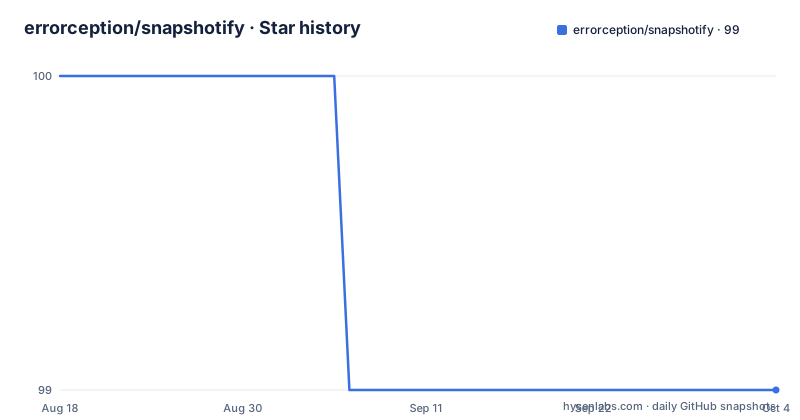
- errorception/snapshotify99 ★ · -1
| Repository | 2026-08-18 | 2026-10-04 |
|---|---|---|
| errorception/snapshotify | 100 | 99 |
-1 Stars in the last 47 days, measured from the daily GitHub snapshot. Compare with other projects
Editorial analysis
What snapshotify Actually Fixes
A create-react-app build ships a single HTML file that loads a large JavaScript bundle. The browser must download, parse, and execute that bundle before it can render anything. That makes the first paint slow and leaves crawlers that do not run JavaScript with an empty page. snapshotify addresses both problems by generating a static HTML snapshot of each route. The snapshot contains the rendered markup, the minimal CSS needed for that view, and preload hints for scripts and fonts. The result is that the server sends meaningful HTML immediately, and the client only hydrates after the page is visible. This is aimed at developers who already use create-react-app and want a performance boost without switching to a full server-side rendering framework. It is not for apps that need dynamic per-request data, because the snapshot is static.
The Mechanism: Headless Rendering and Asset Rewriting
The README describes a pipeline that starts an express server to serve the built app, then uses puppeteer to render each page in a headless browser. It parses the rendered DOM and the CSS files with postcss, keeping only the rules that apply to nodes present in the page. It preserves @font-face, pseudo-selectors, media queries, and keyframe animations that are actually used. The surviving CSS is minified with CSSO and inlined as a style tag. The tool then removes external script tags and stylesheets, replacing them with preload links. It identifies code-split chunks needed for the initial render and preloads those too. An inline script loader injects the main script after page load, so the window-onload event is not blocked. For fonts, it preloads only woff2, since that format is supported by all browsers that support preloading. The final HTML is minified with html-minifier. This is a specific, technical process, not a vague bundler tweak.
Getting It Running: Commands and Config Keys
Installation is a single npm command: npm install snapshotify. You add a postbuild script to package.json: "postbuild": "snapshotify". Then you modify your index.js to check whether the root element already has child nodes. If it does, you call loadScripts() from snapshotify and then hydrate. If not, you render normally. Build with npm run build, and snapshotify runs automatically. Configuration is optional. You can pass --config snapshot.json, and the tool looks for snapshot.json by default. The config supports inlineCSS, preloadScripts, preloadFonts, addCSPHashes, cspAlgo, and dryRun. All are booleans except cspAlgo, which accepts sha256, sha384, or sha512. The README notes that some config properties are truncated in the material, so you should check the full documentation for any additional options.
The Trade-Off: Static Snapshots vs. Dynamic Apps
The biggest limitation is that snapshotify produces static HTML. If your app fetches data on the client after mount, the snapshot will show the loading state, not the final content. The README explicitly says it is a work in progress and that many production features are missing. That means you should not assume it handles authentication, personalized content, or real-time updates. Another constraint is that the snapshot is taken with a headless browser, so any client-side logic that depends on browser APIs not available in puppeteer will fail or produce incomplete markup. The tool also assumes your routes are crawlable from links. If you use react-router with dynamic routes that are not linked, they will not be snapshotted. For apps that need server-side rendering with per-request data, this is the wrong tool. A full SSR framework like Next.js would be more appropriate, because it renders on each request and can pass data to the client.
A Real Alternative: react-snap and the SSR Difference
snapshotify is inspired by react-snapshot and react-snap, which are direct alternatives. react-snap uses a similar approach: it runs your built app in a headless browser and saves the resulting HTML for each route. The key difference is that snapshotify adds extra optimizations like critical CSS extraction and parallel preloading of chunks. react-snap is more mature and has a larger user base, but it does not do the same level of CSS pruning. If you need a production-ready tool today, react-snap is a safer choice. If you want the performance gains of critical CSS inlining and are willing to debug a work in progress, snapshotify offers a more aggressive optimization. The choice depends on whether you prioritize stability or maximum speed.
Maintenance and Upgrade Cost
The repository has no recent releases listed and the last push date is unknown. The README says the module is under development, which suggests the API may change. Upgrading snapshotify could break your postbuild script or your index.js hydration code. The license is listed as unknown, which is a red flag for adoption. You should not use an unlicensed library in a commercial project without contacting the author. The dependency on puppeteer means you need a recent Node.js version and a Chromium binary installed, which increases your build environment's footprint. The tool also relies on create-react-app's build output structure. If create-react-app changes its output format, snapshotify may stop working. There is no maintenance promise in the README. Before committing to snapshotify, check the repository's commit history and open issues to see how actively it is maintained.
Editorial conclusion
Adopt snapshotify if you run a create-react-app site with client-side routing, need faster first paint and better SEO for non-JS crawlers, and can accept a work-in-progress tool. Do not use it if you need stable production features or if your app depends on complex client-side logic that breaks under static pre-rendering. Before adopting, verify that your app hydrates correctly from the snapshot, test with your actual routing structure, and confirm that the config file defaults match your build. Also check the repository's commit history and open issues, since the README itself warns that many production features are missing.
Frequently asked questions
What does snapshotify do to a create-react-app build?
It serves the built app with a temporary express server, renders it in a headless browser through puppeteer, prunes the CSS to what the rendered page needs, inlines and minifies it, preloads fonts and scripts, and writes the rewritten HTML back into your build folder ready for a web server.
How do I install and run snapshotify?
Install it with npm install snapshotify, add a postbuild key set to snapshotify in your package.json scripts, adjust your entry file to wait before hydration, then run npm run build. The postbuild hook means the extra render pass happens after every build.
What does the snapshot.json configuration file control?
Four booleans and a hash algorithm: inlineCSS, preloadScripts, preloadFonts and addCSPHashes, all defaulting to true, plus cspAlgo which defaults to sha256 and also accepts sha384 or sha512. Without a --config flag the file is assumed to be snapshot.json, and if it cannot be found the defaults are used.
Does snapshotify handle Content Security Policy pages?
It adds hashes to the script-src and style-src directives of an existing CSP meta tag so the inline scripts and styles it injects are permitted. Nothing is added when the page has no CSP tag, and nothing is added if a directive already contains unsafe-inline.
Is snapshotify ready for production?
The README labels it a work in progress and says many features needed for production use are not implemented yet, while encouraging you to try it for the speed. The last push to master is dated 2022-12-17 and the package publishes no releases; the version in package.json is 0.7.0.
Official sources
Add this badge to your README
If you maintain this project, the badge below links readers to this analysis and shows its maintenance status from the daily GitHub snapshot. Paste the markdown into your README; add ?metric=license or ?metric=stars to the image URL for a different field.

[](https://hysenlabs.com/projects/errorception-snapshotify)Star history chart for your README
[](https://hysenlabs.com/projects/errorception-snapshotify)