yggdrasil-go: two config formats, two run modes, and a Go version set only in go.mod
An experiment in scalable routing as an encrypted IPv6 overlay network
At a glance
- What is it?
- Yggdrasil is an early-stage, self-arranging IPv6 overlay network with end-to-end encryption that also runs over IPv4. Everything it needs lives in one Go module, one build script, and a generated config file.
- Who is it for?
- Use yggdrasil-go when you need a small encrypted overlay that any IPv6 capable application can join, and you are willing to run a privileged daemon on each node. Do not expect turnkey operations from it: configuration is a file you generate and then hand-edit, running it needs permission to create TUN and TAP adapters, and the project still describes itself as early-stage without published throughput or latency figures.
- Can I use it commercially?
- Check first. The repository uses a licence we do not classify automatically, so read its LICENSE file before any commercial use.
- Is it still maintained?
- Yes. The repository last received commits 22 days ago.
- What is it written in?
- Mainly Go, according to GitHub's language statistics.
Answers come from the project's GitHub data, last synced on November 15, 2026, and from our analysis. They are not legal advice.
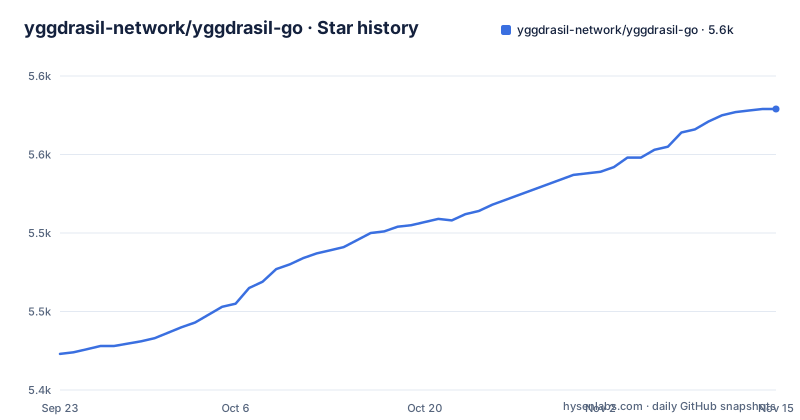
Star history
- yggdrasil-network/yggdrasil-go5,579 ★ · +156
| Repository | 2026-09-23 | 2026-11-15 |
|---|---|---|
| yggdrasil-network/yggdrasil-go | 5.4k | 5.6k |
156 Stars in the last 53 days, measured from the daily GitHub snapshot. Compare with other projects
Editorial analysis
The build script is three steps and a Go version mismatch
Building from source rather than installing a pre-built package takes three steps: install Go, clone the repository, run the build script.
./build
GOOS=windows ./build
GOOS=linux GOARCH=mipsle ./build
Cross-compiling needs no extra tooling beyond the two environment variables, and the README gives those two examples, including a little-endian MIPS target. The build instructions do not name a Go version, but the module file states one:
module github.com/yggdrasil-network/yggdrasil-go

go 1.26.0
So the Go version floor comes from go.mod, not from the README.
-genconf writes either comments or nothing
You generate a config, and the flag that does it has two output shapes.
./yggdrasil -genconf > /path/to/yggdrasil.conf
./yggdrasil -genconf -json > /path/to/yggdrasil.conf
Without -json the output is HJSON, described as human-friendly and complete with comments, which is what you want in a file you will edit by hand. With -json the output is plain JSON, described as easy to manipulate programmatically, which is what you want when a script or a config management tool writes the file. Either way the generated file is a starting point, not a working setup: you need to edit it to add or remove peers, to change listen addresses, and to change multicast addresses. The defaults that come out of the generator are not a network, they are a template with one node's worth of settings in it.
-useconffile keeps peers, -autoconf throws them away
Two run modes sit behind the same binary. One reads the file you generated:
./yggdrasil -useconffile /path/to/yggdrasil.confThe other takes no path at all:
./yggdrasil -autoconfAuto-configuration uses sane defaults and random keys at each startup instead of a static configuration file. That is convenient for a quick look at whether the daemon comes up on a machine, and wrong for anything you intend to keep, because the node identity changes on every restart. Peers you added to a generated config survive restarts only when you pass them back with -useconffile. The choice also decides whether your listen addresses and multicast settings are the ones you edited or the built-in defaults, which is the more common surprise on a second start.
Creating a TUN or TAP adapter needs CAP_NET_ADMIN
Yggdrasil will likely need to run as a privileged user or under sudo, unless you already have permission to create TUN and TAP adapters. That is not a stylistic warning: the daemon makes network interfaces, and on Linux the documented way to avoid running it as root is to give the Yggdrasil binary the CAP_NET_ADMIN capability instead. So there is a real difference between a node started as root and a node started with a single capability, and the second one is the shape most deployments should aim for. The README does not name a capability set for macOS, Windows, FreeBSD, OpenBSD or OpenWrt, all of which appear in the supported platform list, so the privilege story outside Linux has to be worked out per platform. The Ubiquiti EdgeRouter and VyOS entries in that list point at router targets rather than desktop ones.
The transport and the plumbing are visible in go.mod
Nothing in the README names a transport protocol, so the module file is where that becomes visible. golang.zx2c4.com/wireguard and golang.zx2c4.com/wireguard/windows are both in the require block, alongside golang.zx2c4.com/wintun for Windows tunnel interfaces, quic-go at v0.64.1 and coder/websocket at v1.8.15 for connection handling. golang.org/x/crypto, net, sys and text are pulled in as well. Platform-specific plumbing is visible too: kardianos/minwinsvc v1.0.2 for running as a Windows service, vishvananda/netlink v1.3.1 for Linux netlink, and wlynxg/anet v0.0.5, which is the Android dependency. A separate group of indirect requirements exists, including bits-and-blooms/bloom for filters and xxhash for hashing. Four entries are pinned to a commit rather than a release tag: ironwood and phony, both under the Arceliar name, plus wintun and wireguard, so they track a branch state rather than a stable version.
HJSON in the config file traces back to one dependency
The commented config format is not hand-rolled. github.com/hjson/hjson-go/v4 at v4.7.1 is in the require block, which is where the HJSON output of -genconf comes from. Console output is likewise borrowed rather than written: cheggaaa/pb/v3 v3.2.1 draws the progress bar, olekukonko/tablewriter v1.1.5 prints tables, and gologme/log v1.3.0 handles the log lines. hashicorp/go-syslog v1.0.1 is in there too, which is the syslog target a daemon would use when it is not attached to a terminal. Reading go.mod is the quickest way to tell which of these choices are yours to change.
contrib carries the platforms the build script does not
The top-level tree is small: .github, .golangci.yml, CHANGELOG.md, Dockerfile, LICENSE, README.md, build, build.bat, clean, cmd, contrib, go.mod, go.sum, misc and src. Windows gets its own build.bat next to the build script, and the Dockerfile is a one-line file pointing at contrib/docker/Dockerfile, so container work lives under contrib rather than at the root. The README says that folder also holds platform-specific wrappers, scripts or tools, and the supported list runs to Linux, macOS, Ubiquiti EdgeRouter, VyOS, Windows, FreeBSD, OpenBSD and OpenWrt. Those wrappers are the practical answer for the eight platforms, since the build script only knows how to cross-compile. The default branch is develop, and the release trail shows v0.5.15 dated 2026-10-24, v0.5.14 dated 2026-06-19, and its release candidate v0.5.14-RC.1 dated five days earlier. The last push on develop is dated 2026-10-24.
LGPLv3 with a borrowed exception, and metadata that says NOASSERTION
The licence needs two reads, not one. The code is released under LGPLv3 with an added exception that the README says was taken from godeb. Under certain circumstances that exception permits distribution of binaries, linked either statically or dynamically, without requiring the distribution of the Minimal Corresponding Source or the Minimal Application Code. That carve-out matters for anyone packaging the daemon rather than running it, and the LICENSE file in the tree is where the detail sits. The repository metadata is less helpful than that: the licence field for this project reads NOASSERTION, so automated tooling that reads only the metadata will not tell you it is looking at LGPLv3 with an exception. The README also does not state a warranty, and the project describes itself as an early-stage implementation of a fully end-to-end encrypted IPv6 network that works over IPv4 as well, without publishing throughput or latency figures for either case.
Editorial conclusion
Use yggdrasil-go when you need a small encrypted overlay that any IPv6 capable application can join, and you are willing to run a privileged daemon on each node. Do not expect turnkey operations from it: configuration is a file you generate and then hand-edit, running it needs permission to create TUN and TAP adapters, and the project still describes itself as early-stage without published throughput or latency figures. Before deploying, check the Go version your toolchain has against the 1.26.0 in go.mod, decide between a static config and auto-configuration with fresh keys on every start, and read the LGPLv3 licence together with the godeb exception before you ship binaries.
Frequently asked questions
Is the Yggdrasil network safe to run?
It is described as a fully end-to-end encrypted IPv6 network, and it self-arranges with no IPv6 Internet connectivity required, since it also works over IPv4. Running the daemon still needs permission to create TUN or TAP adapters, or root.
How does the Yggdrasil network work?
You generate a config with ./yggdrasil -genconf, hand-edit it to add or remove peers and to set listen or multicast addresses, then start the node with ./yggdrasil -useconffile and that path, or run ./yggdrasil -autoconf for defaults and fresh keys each start.
What is Yggdrasil the god of?
Nothing in this repository covers that. The project here is an early-stage Go implementation of a fully end-to-end encrypted IPv6 network, with installation, configuration and FAQ pages hosted on its own website.
Is Yggdrasil good or bad digimon?
That comparison does not apply to this project. What lives here is an encrypted IPv6 overlay network written in Go, versioned as v0.5.15 in October 2026 and built with a script named build.
Official sources
Add this badge to your README
If you maintain this project, the badge below links readers to this analysis and shows its maintenance status from the daily GitHub snapshot. Paste the markdown into your README; add ?metric=license or ?metric=stars to the image URL for a different field.

[](https://hysenlabs.com/projects/yggdrasil-network-yggdrasil-go)Star history chart for your README
[](https://hysenlabs.com/projects/yggdrasil-network-yggdrasil-go)Was this useful?