ESLint Stylistic: filling the gap from ESLint's deprecated formatting rules
Monorepo for ESLint Stylistic plugins and configs
At a glance
- What is it?
- ESLint Stylistic is a community-maintained monorepo that ports the formatting and stylistic rules ESLint and typescript-eslint dropped from their core packages. Documentation and configuration examples live at eslint.style rather than in the GitHub README, and the package operates entirely within the ESLint workflow.
- Who is it for?
- ESLint Stylistic is the right choice when a project already runs ESLint and depends on the formatting rules ESLint deprecated from its core. Skip it if you are building a new codebase without that dependency, since adopting it now means accepting an unsettled configuration API that can require rework with each update.
- Can I use it commercially?
- Yes. MIT is a permissive licence: you can use, modify and sell software built on it, as long as you keep its copyright and licence notices.
- Is it still maintained?
- Yes. The repository last received commits 11 days ago.
- What is it written in?
- Mainly TypeScript, according to GitHub's language statistics.
Answers come from the project's GitHub data, last synced on November 7, 2026, and from our analysis. They are not legal advice.
Star history
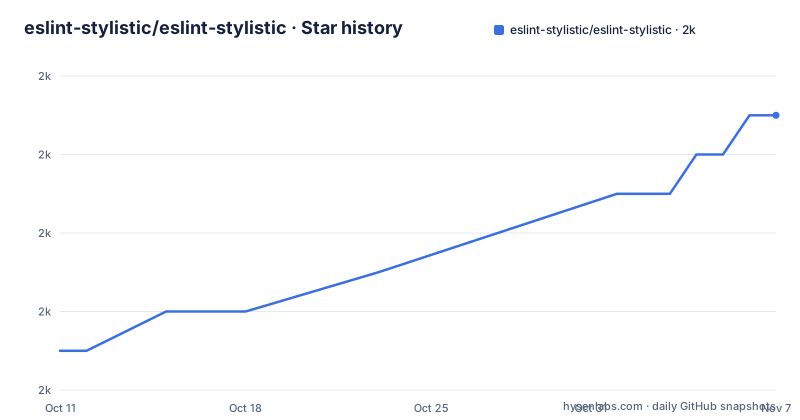
- eslint-stylistic/eslint-stylistic2,007 ★ · +6
| Repository | 2026-10-11 | 2026-11-07 |
|---|---|---|
| eslint-stylistic/eslint-stylistic | 2k | 2k |
6 Stars in the last 27 days, measured from the daily GitHub snapshot. Compare with other projects
Editorial analysis
Why ESLint dropped its formatting and stylistic rules
ESLint's decision to deprecate its formatting and stylistic rules created a gap for projects that depended on them. Both the ESLint and typescript-eslint teams cited maintenance cost as the reason, documented in a GitHub issue at github.com/eslint/eslint/issues/17522. The ESLint Stylistic README links to that issue as the founding reason for this project.
The affected rules are the ones that enforce how code looks on the page: spacing, indentation, bracket placement, semicolons and quote style. Such rules differ from correctness rules because a formatter can apply them automatically, but they still require updates each time JavaScript or TypeScript introduces new syntax. A rule that does not account for a new language construct either misses violations or reports false positives against valid code.
Every revision to the JavaScript or TypeScript specification can introduce constructs that existing stylistic rules do not handle, requiring new logic and new tests for each one. For ESLint's core team, maintaining that surface alongside a correctness linter was a distinct and accumulating category of work. Separating the concerns was the stated rationale.
Porting the deprecated rules into @stylistic/eslint-plugin
ESLint Stylistic's stated job is to port the deprecated rules and distribute them as separate packages under community ownership. Its primary npm package is @stylistic/eslint-plugin, identified by the badge in the README that links to npmjs.com/package/@stylistic/eslint-plugin. Coverage spans both JavaScript and TypeScript.
Repository topics include eslint-config and eslint-plugin alongside eslint-stylistic and formatter. That combination indicates the monorepo distributes both a plugin and ready-made configuration presets, not only raw rule implementations. Config presets matter in practice because a complete stylistic ruleset can involve dozens of individual rules, and a preset lets a team apply a standard configuration in one step.
A packages/ directory sits at the top level of the repository alongside docs/, playground/, tests/ and shared/. Individual publishable packages live inside packages/, not in the repository root. ESLint Stylistic has no standalone CLI and no formatter that runs outside the ESLint runtime. Every rule it provides depends on ESLint's rule API, and every violation it reports goes through ESLint's output pipeline.
The README defers installation and configuration to eslint.style
Installation commands, configuration examples and a rule list are absent from the README. Its functional content is five links: the documentation site at eslint.style, a Discord server at eslint.style/chat, a Why page at eslint.style/guide/why, a migration guide at eslint.style/guide/migration and a project progress tracker at eslint.style/contribute/project-progress. The package name @stylistic/eslint-plugin appears in the README only inside a badge URL pointing to its npm listing.
A developer evaluating ESLint Stylistic from the GitHub repository page leaves without knowing the install command, the configuration format or the available rules. All of that lives at eslint.style, not in the repository. For ESLint Stylistic, the README on GitHub and the documentation site are two separate artifacts with non-overlapping content.
A docs/ directory sits in the repository root, and the root package.json includes two scripts for it: `pnpm -C docs run docs:dev` for local development and `pnpm -C docs run docs:build` for the production build. Documentation is built from source inside the repository but deployed to a separate domain. On GitHub, the README functions as a navigation page, not a setup guide.
The monorepo root is private and does not publish to npm
A detail in the root package.json clarifies how the repository is structured: the root sets `"private": true`, which prevents the monorepo coordinator from publishing to the npm registry and marks it as infrastructure rather than an installable artifact.
The connection between the workspace and the published package is readable from the devDependencies. The root lists `"@stylistic/eslint-plugin": "workspace:*"`, pointing to the local workspace copy during development, while the npm badge in the README links to the same package name on the public registry. Both reference @stylistic/eslint-plugin: the root from inside the workspace, and consumers from the npm registry.
Building all packages in the monorepo runs through `pnpm -r run build`. The workspace uses [email protected] as its package manager, set explicitly in the packageManager field of the root package.json. Individual sub-packages in packages/ carry their own publish metadata and versioning, independent of the root. This structure means changes to the root configuration do not affect what consumers install.
Two test configs and three parsers reveal what the test suite covers
Two vitest configuration files sit at the repository root: vitest.config.unit.ts and vitest.config.fixtures.ts. Two scripts in the root package.json map to them: `test` runs vitest with the unit config, and `test:fixtures` runs vitest with the fixture config. Separating unit tests from fixture tests is a practical choice for a linting project, because rule logic verified in isolation tells only part of the story; running a rule against a complete sample file and comparing actual output to expected output catches edge cases that a minimal constructed input misses.
Parser coverage is readable from the devDependencies. The root includes @typescript-eslint/parser for TypeScript, @babel/eslint-parser for Babel-transformed JavaScript and @babel/preset-react for JSX, covering the three parser configurations a project using ESLint Stylistic commonly runs in production.
Two further entries are worth noting: @eslint/css and @eslint/markdown appear as development dependencies. Both are ESLint plugins for non-JavaScript languages. Their presence means the build or test tooling uses them in some form, but the README does not state whether ESLint Stylistic's own rule set extends to CSS or Markdown linting.
Migration from the deprecated ESLint core rules
For projects that used ESLint's built-in formatting rules before the deprecation, moving to ESLint Stylistic requires a configuration change. The README links to a migration guide at eslint.style/guide/migration. The scope of that migration depends on which rules a given project used and whether each has a direct counterpart in @stylistic/eslint-plugin.
Not every deprecated rule is guaranteed to be present in the current package. The README makes no claim of completeness, and no rule list appears in the repository material. A migration that begins without checking first can encounter a missing rule partway through, which requires reverting the change or finding a substitute.
The project progress page at eslint.style/contribute/project-progress documents which rules are complete. Checking it before starting is the only way to confirm availability for a specific configuration, since neither the README nor the repository files enumerate the full rule set. A project with a large existing ESLint config, where many stylistic rules are enabled, has more items to verify than one with a minimal setup.
The migration guide and progress tracker are the two resources the README prescribes for anyone making this move.
ESLint Stylistic operates only inside the ESLint runtime
ESLint Stylistic depends on the ESLint runtime and configuration system. It has no standalone CLI, no independent watch mode and no formatter that processes files outside of an ESLint pass. A project that does not use ESLint has nothing to gain from this package, regardless of what language it targets or how many of the original formatting rules it relied on.
For projects already running ESLint, continuity is the practical argument. Rules from @stylistic/eslint-plugin run in the same pipeline, report in the same format and sit in the same eslint.config.mjs as any other ESLint rule, meaning the move from deprecated core rules to their equivalents here requires a configuration update rather than a new tool in the build chain.
A Why page at eslint.style/guide/why addresses the positioning of ESLint Stylistic relative to standalone formatting tools. That page is offsite documentation whose content is not reproduced in the repository material. Teams comparing this package to alternative formatting approaches need to read it directly, because the README gives no comparison.
Community ownership, contribution structure and governance
CODE_OF_CONDUCT.md and CONTRIBUTING.md sit at the top level of the repository, and the README links to a Discord server at eslint.style/chat, which together signal that the project expects contributors beyond its founding team. The README's first sentence describes ESLint Stylistic as community-maintained.
The package is MIT-licensed, the repository was last pushed on 2026-09-21, and the three most recent entries in the release list are v6.0.0-beta.4, v6.0.0-beta.5 and v6.0.0-beta.6, all pre-release versions.
For adoption decisions, an unsettled API is the main practical risk: a rule name or configuration key that changes in an update requires reworking every config file that references it. The README does not describe a stability policy or a support window.
A Codecov badge in the README links to code coverage tracking on the repository. Coverage data is collected, but no summary number appears in the README itself. The project progress page at eslint.style/contribute/project-progress remains the primary signal of how complete the rule set is relative to what the deprecated rules once covered.
Editorial conclusion
ESLint Stylistic is the right choice when a project already runs ESLint and depends on the formatting rules ESLint deprecated from its core. Skip it if you are building a new codebase without that dependency, since adopting it now means accepting an unsettled configuration API that can require rework with each update. Before adopting, check the project progress page at eslint.style/contribute/project-progress to verify that the specific rules your configuration uses are present in @stylistic/eslint-plugin, then read the migration guide at eslint.style/guide/migration before touching any existing config files.
Frequently asked questions
What is ESLint Stylistic?
ESLint Stylistic is a community-maintained monorepo that ports the formatting and stylistic rules that ESLint and typescript-eslint deprecated from their core packages. The main installable package is @stylistic/eslint-plugin, covering JavaScript and TypeScript.
How do I install @stylistic/eslint-plugin?
The README does not include an install command. The package is named @stylistic/eslint-plugin and is listed on npm. Installation and configuration steps are documented at eslint.style.
Why did ESLint deprecate its formatting and stylistic rules?
According to the ESLint Stylistic README, the ESLint and typescript-eslint teams deprecated those rules due to maintenance cost. The decision is recorded in a GitHub issue at github.com/eslint/eslint/issues/17522.
Is ESLint Stylistic stable for production use?
All recent entries in the repository's release list are pre-release versions. The README does not describe a stability target, a support window or a policy for API changes between updates.
How do I migrate from ESLint's deprecated formatting rules to ESLint Stylistic?
The README links to a migration guide at eslint.style/guide/migration. Before starting, check the project progress page at eslint.style/contribute/project-progress to confirm that the specific rules your configuration uses are available in @stylistic/eslint-plugin.
Official sources
Add this badge to your README
If you maintain this project, the badge below links readers to this analysis and shows its maintenance status from the daily GitHub snapshot. Paste the markdown into your README; add ?metric=license or ?metric=stars to the image URL for a different field.

[](https://hysenlabs.com/projects/eslint-stylistic-eslint-stylistic)Star history chart for your README
[](https://hysenlabs.com/projects/eslint-stylistic-eslint-stylistic)Was this useful?