SPP: a Go proxy that converts between transport protocols
A versatile, high-performance network proxy and traffic-forwarding tool written in Go
At a glance
- What is it?
- SPP is a Go network proxy that carries traffic for one protocol over another, so a TCP stream can travel over QUIC, KCP, RUDP, RICMP or RHTTP, and it exposes forward, reverse, SOCKS5 and HTTP proxy modes over that tunnel. Encryption is on by default with ChaCha20-Poly1305, login is a HMAC-SHA256 challenge-response, and the project ships its own benchmark table showing what the conversion costs.
- Who is it for?
- Adopt SPP when you have a network that blocks or throttles the protocol you need, since its reason to exist is carrying one protocol over another and it covers TCP, UDP, KCP, QUIC, RUDP, RICMP and RHTTP with SOCKS5 and HTTP proxy modes on top.
- Can I use it commercially?
- Yes. MIT is a permissive licence: you can use, modify and sell software built on it, as long as you keep its copyright and licence notices.
- Is it still maintained?
- Yes. The repository received new commits within the last day.
- What is it written in?
- Mainly Go, according to GitHub's language statistics.
Answers come from the project's GitHub data, last synced on November 7, 2026, and from our analysis. They are not legal advice.
Star history
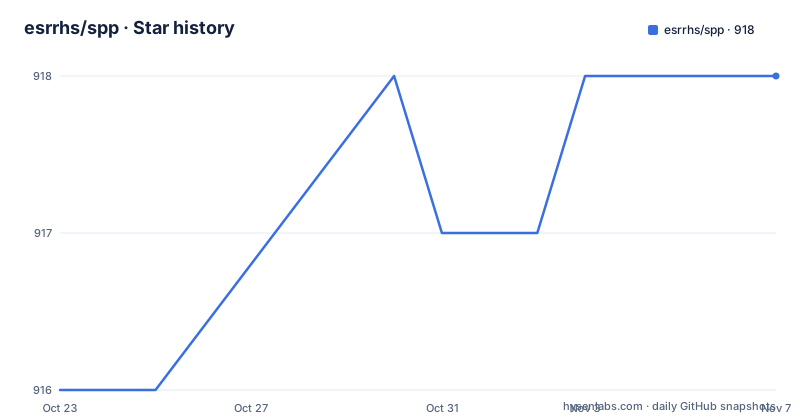
- esrrhs/spp918 ★ · +2
| Repository | 2026-10-23 | 2026-11-07 |
|---|---|---|
| esrrhs/spp | 916 | 918 |
2 Stars in the last 15 days, measured from the daily GitHub snapshot. Compare with other projects
Editorial analysis
One transport under, another on top
The feature that distinguishes SPP from an ordinary proxy is protocol multiplexing and conversion. You can proxy traffic from one protocol, such as TCP, over another internal transit protocol, such as QUIC, KCP, RUDP or RICMP.
The mechanism is that multiple pairs of fromaddr and proxyproto entries each get an Inputer and an Outputer pair, and all of them share the one client to server connection. That means a single tunnel can carry several services at once, each with a different internal protocol, and you are not opening a separate connection per service.
The supported set of transit protocols is TCP, UDP, RUDP for reliable UDP, RICMP for reliable ICMP, RHTTP for reliable HTTP, KCP and QUIC. The reliable variants exist because the unreliable ones get mangled by middleboxes, and RICMP in particular is a way to carry data when only ICMP passes.
On top of that tunnel, the proxy modes are listed: forward proxy, reverse proxy for NAT traversal and intranet penetration, SOCKS5 forward and reverse, HTTP/HTTPS forward and reverse, and a Shadowsocks SIP003 plugin integration through a separate repository.
The project describes itself as a versatile, high-performance network proxy and traffic-forwarding tool written in Go, and it is written in Go, with a go.mod that pulls in quic-go, kcp-go, klauspost/compress for zstd, reedsolomon and cpuid, golang.org/x/crypto and protobuf.
Encryption by default and a challenge-response login
The security design has three layers and no built-in defaults, which is the right call.
Whole-frame AEAD is on by default, with ChaCha20-Poly1305 or AES-GCM. That means each frame on the wire is authenticated and encrypted rather than relying on the tunnel to be private.
Login is a HMAC-SHA256 challenge-response using the key flag, and the documentation is explicit that no plaintext password travels on the wire. The server challenges, the client proves it holds the key, and the password never appears.
There are no weak built-in secrets. The key flag is required, and setting encrypt to empty disables encryption. The phrase in the feature list is that no weak built-in secrets exist, meaning you cannot accidentally run with a default credential that anyone else has read in the source.
Both sides must use the same key and the same encrypt value, and the documentation tells you to choose strong values. That is the operational rule that matters: a mismatch is a silent failure rather than an obvious one, because the two ends simply refuse to talk.
One flag is a trap for the unwary. The name flag is only a log tag and is not used for authentication, so putting your real secret there does nothing.
On performance, compression is zstd with a threshold of 128 bytes by default, the control channel uses a priority queue, and the stated overhead is low CPU and low memory.
Building it and starting the two ends
Precompiled binaries are on the releases page, and the source build is three commands.
git clone https://github.com/esrrhs/spp.git
cd spp
go build -o spp .
The go.mod requires Go 1.26.0, which sets your toolchain floor.
The server side listens on a port and takes the two secrets.
  ./spp -type server -proto tcp -listen :8888 \
    -key 'your-auth-key' -encrypt 'your-encrypt-key'
The client side points at the server, names the local address to listen on and the target to forward to, and picks the internal transit protocol.
  ./spp -type proxy_client -server www.server.com:8888 \
    -fromaddr :8080 -toaddr :8080 -proxyproto tcp \
    -key 'your-auth-key' -encrypt 'your-encrypt-key'
The other client modes are the same shape with a different type. A SOCKS5 client uses type socks5_client, an HTTP client uses type http_client, and both take the same fromaddr and proxyproto arguments.
  ./spp -type socks5_client -server www.server.com:8888 \
    -fromaddr :8080 -proxyproto tcp \
    -key 'your-auth-key' -encrypt 'your-encrypt-key'
The mode types are also settable from a configuration file, which brings up the generator.
The config generator writes a full pair of files
Rather than making you write JSON by hand, the binary can generate a complete set of configuration files for you.
./spp -genconfigThe output is one server configuration and one client configuration per mode, with shared random keys generated for you. The server file listens on all of the main channels, which are tcp, rudp, ricmp, kcp, quic and rhttp. The client files are the forward proxy, the reverse proxy, SOCKS5, reverse SOCKS5, HTTP and reverse HTTP, and they are named config_proxy_client.json, config_reverse_proxy_client.json, config_socks5_client.json, config_reverse_socks5_client.json, config_http_client.json and config_reverse_http_client.json.
Each generated client uses exactly one underlay, tcp to 127.0.0.1:8888 in the default output, and you edit that to another protocol or port as needed.
Then you start the pair you want.
./spp -config config_server.json
./spp -config config_proxy_client.json
There is also an outdir option to send the files to a directory of your choosing, and a force option to overwrite what is already there.
The repository ships example configuration files at the root, config_client.json and config_server.json, and the generator lives in configgen.go with its own test file. The options themselves are handled in options.go, and the proxy implementations are in the proxy/ directory. The version information is a separate package under version/, which is what the Docker build stamps into the binary.
The benchmark table is the honest part of the documentation
The README includes a performance benchmark section, and it is worth reading because the numbers argue against the tool on its default path.
The figures come from maximum single machine bandwidth testing with TCP proxy over various internal transit protocols, tested with iperf. Direct connection is 3535 MB/s. TCP forwarding is 663 MB/s plain, 225 MB/s encrypted, and 23.4 MB/s encrypted plus compressed.
The other transit protocols are slower still. QUIC forwarding is 35.5 MB/s plain and 32.8 MB/s encrypted. KCP is 18.2 MB/s plain and 18.6 MB/s encrypted, RHTTP is 10.7 MB/s plain and 10.8 MB/s encrypted, RUDP is 5.15 MB/s plain and 5.81 MB/s encrypted, and RICMP is 3.34 MB/s plain and 3.25 MB/s encrypted.
Three conclusions follow. First, the transit protocol you choose changes throughput by an order of magnitude, so picking one for resilience rather than speed has a real cost. Second, encryption is close to free on QUIC, KCP and RHTTP in these numbers, while on plain TCP it costs a factor of three, and compression costs far more on TCP than on the others. Third, on TCP the compressed encrypted path is an order of magnitude slower than the plain path.
These are the project's own figures on its own hardware, so treat them as a shape rather than as a promise for your network. The relative ordering is the useful part.
Docker, the Android client and where this sits
The Dockerfile is a two stage build on Alpine with CGO disabled, cross compiled for the target platform through build arguments, and the version, commit and build time are stamped in through linker flags.
FROM --platform=$BUILDPLATFORM golang:alpine AS build-env

ARG TARGETOS
ARG TARGETARCH
ARG VERSION=0.8.0
The final image is alpine:latest with ca-certificates and tzdata, the binary copied to /app/spp, and the entrypoint set to it with a default command of -h. Note the default version argument in the Dockerfile is 0.8.0 while the current release tag is v0.14.1, so the image build does not track the release numbering.
There is a sibling project, spp_client_android, described as a VPN app built on SPP and available on Google Play. That is the most interesting signal about what this tool is for. It is aimed at connecting a phone to a server through networks where the usual protocols do not work, and the fact that a whole VPN client is built on it says the protocol conversion is the product, not the proxy modes.
The README also carries a disclaimer that the tool is intended exclusively for academic, research and authorised testing purposes, and asks that it not be used for unauthorised or illegal activities. The full documentation, the protocol conversion matrix and the configuration options live in USAGE.md.
The licence is MIT, recorded in the LICENSE file at the repository root.
Editorial conclusion
Adopt SPP when you have a network that blocks or throttles the protocol you need, since its reason to exist is carrying one protocol over another and it covers TCP, UDP, KCP, QUIC, RUDP, RICMP and RHTTP with SOCKS5 and HTTP proxy modes on top. Do not adopt it as a general purpose proxy without reading the benchmark table, because the measured throughput differences between transit protocols are large, and the encryption plus compression path is much slower than the plain path. Verify first that you set both the same key and the same encrypt value on both sides, that you keep the key out of shell history, that the transit protocol you choose is reachable through your network, and that you read the project's own disclaimer about authorised use before deploying it anywhere.
Frequently asked questions
How do I install and run SPP?
Download a precompiled binary from the releases page or build with git clone, cd spp and go build -o spp ., then start the server with -type server and the client with -type proxy_client. Both sides must use the same -key and -encrypt values, and the key flag is required.
What does the -genconfig option do in SPP?
It generates a multi-listener server config plus one client config per mode, forward, reverse, socks5, reverse socks5, http and reverse http, with shared random keys. The server config listens on all main channels, tcp, rudp, ricmp, kcp, quic and rhttp, and you can redirect the output with -outdir and overwrite with -force.
Which transit protocols can SPP carry traffic over?
TCP, UDP, RUDP for reliable UDP, RICMP for reliable ICMP, RHTTP for reliable HTTP, KCP and QUIC. Proxy traffic from one protocol over another internal transit protocol, and multiple fromaddr and proxyproto pairs each get an Inputer and Outputer pair sharing the one client to server connection.
How does SPP authenticate and encrypt traffic?
Whole-frame AEAD is on by default with ChaCha20-Poly1305 or AES-GCM, and login uses a HMAC-SHA256 challenge-response with the -key flag, so no plaintext password goes on the wire. Setting -encrypt to empty disables encryption, and -name is only a log tag rather than an authentication input.
Official sources
Add this badge to your README
If you maintain this project, the badge below links readers to this analysis and shows its maintenance status from the daily GitHub snapshot. Paste the markdown into your README; add ?metric=license or ?metric=stars to the image URL for a different field.

[](https://hysenlabs.com/projects/esrrhs-spp)Star history chart for your README
[](https://hysenlabs.com/projects/esrrhs-spp)Was this useful?