eudoxia0/hashcards: spaced repetition where the cards are Markdown files and the progress is a hash
A plain text-based spaced repetition system.
At a glance
- What is it?
- hashcards is an Apache-2.0 Rust tool for drilling flashcards written as plain text, with a local web interface, FSRS scheduling and a content addressed model in which a card is identified by the hash of its own text, so editing a card resets its progress. It is deliberately small: front-back and cloze cards, no note types, no templates.
- Who is it for?
- Adopt hashcards if you want your flashcards in a git repository as Markdown, you are willing to accept two card types and no template engine, and you want a scheduler that uses FSRS rather than a simpler interval scheme.
- Can I use it commercially?
- Yes. Apache-2.0 is a permissive licence: you can use, modify and sell software built on it, as long as you keep its copyright and licence notices.
- Is it still maintained?
- Yes. The repository last received commits 6 days ago.
- What is it written in?
- Mainly Rust, according to GitHub's language statistics.
Answers come from the project's GitHub data, last synced on November 7, 2026, and from our analysis. They are not legal advice.
Star history
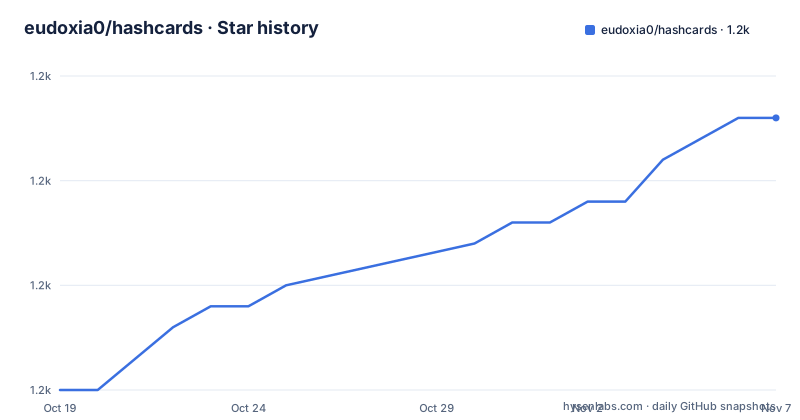
- eudoxia0/hashcards1,188 ★ · +13
| Repository | 2026-10-19 | 2026-11-07 |
|---|---|---|
| eudoxia0/hashcards | 1.2k | 1.2k |
13 Stars in the last 19 days, measured from the daily GitHub snapshot. Compare with other projects
Editorial analysis
Cards as files, progress as a database
hashcards is a plain text based spaced repetition system written in Rust, and its premise is that the cards themselves are ordinary files.
The features list spells out what that buys. Because the flashcards are stored as plain text files, you can operate on them with standard tools, write them with the editor of your choice, and track changes in a version control system. Creating a card is typing into a text file using a lightweight notation for the two sides, or for cloze deletions.
The simplicity is deliberate too. The only card types are front-back and cloze cards, and the project says outright that more complex workflows, such as Anki style note types, card templates and automation, can be implemented using a Makefile and some scripts. That is a design decision stated as a scope limit, and it is the decision you have to agree with or against.
The scheduling side uses FSRS, with the stated aim of maximising learning while minimising the time spent reviewing. A collection is a directory of decks, and the progress lives in a SQLite database, which is what the command set later confirms with the `check`, `orphans` and `export` subcommands.
Content addressing, and what it costs you
The most consequential design choice in hashcards is that cards are identified by the hash of their text, and the project states the consequence directly: a card's progress is reset when the card is edited.
That is a large behavioural difference from a system that stores a stable identifier per card. In a system with stable identifiers, you can rewrite a card's wording and keep its scheduling history. Here, fixing a typo costs you the maturity you had built up on that card, because the text is the key.
The upside is that there are no identifiers to manage. You never paste a long identifier into a file, never duplicate a card by accident in a way that goes unnoticed, and never have a database whose contents cannot be reconciled with the files on disk. The card is the file, and the file is the key.
The dependency list shows the hashing is BLAKE3, the `blake3` crate, and the database is `rusqlite` with the `bundled` feature, so SQLite is compiled into the binary and there is no external database to install.
The reconciliation between files and database is a first class command rather than an afterthought. The `orphans` subcommand manages cards that exist in the database but not in the collection, that is, cards that were deleted from the files, and it can list them and delete them, printing the hashes either way.
The deck format is a few lines of Markdown
A deck is a Markdown file, and the name of the file without its extension is the deck name, which is shown at the top of the flashcard during reviews so that you do not have to state the context inside every card.
A question and answer card is written with `Q:` and `A:` tags, and both sides can span multiple lines:
Q: What are the possible values of electric charge?
A: Any integer multiple of the fundamental charge.
A cloze card starts with the `C:` tag and uses square brackets to mark the deletions, and a single cloze card can carry several of them:
C: The [order] of a group is [the cardinality of its underlying set].Cloze cards can also span multiple lines, which is what makes poetry and quotation cards work, with the source on its own line and its own cloze markers:
C:
Better is the sight of the eyes than the wandering of the
desire: this is also vanity and vexation of spirit.

— [Ecclesiastes] [6]:[9]
The example file in the repository, `example/Geography.md` and its siblings, shows a realistic mix, and the `example/` directory also contains assets such as `macros.tex`, `test.mp3` and images, which the README's linked media resource handling refers to.
The notation is close to Anki's without being Anki's, and the notation for term and definition cards is described in the format section as a shorthand for writing a cloze card, which is the kind of detail that decides whether a card takes two seconds to write or two minutes.
Drilling happens in a local web interface
The drill command starts a session and opens a web interface on the local machine, at `http://localhost:8000` by default. The flow is the one every spaced repetition tool implements: read the question, recall the answer, reveal it with a click or the space bar, and then grade yourself on one of four choices.
The four grades are Forgot, with shortcut `1`, Hard, `2`, Good, `3` and Easy, `4`, and the advice attached to them is to be honest, because if you got the answer almost right you should press Forgot. Mis-grades can be undone with `u`. The session ends when every card has been graded Good or higher, and clicking End finishes it early.
That last point has a practical consequence that is stated plainly: progress is not saved until the session ends, either because you ran out of cards or because you clicked End. A browser closed mid-session loses the work of that session.
The command takes a directory and accepts a set of options that show how the tool is meant to be used in practice: `--card-limit` and `--new-card-limit` to bound a session, `--host` and `--port` to control where the server binds, `--resource-hostname` to rewrite the URLs of linked media resources, `--from-deck` to drill one deck only, and `--open-browser` to control whether a browser is launched.
The rest of the command set
Four more commands round out the tool, and each does one thing.
`check` checks the integrity of a collection, which given the content addressed model is the command that tells you whether the files and the database still agree.
`orphans` manages the cards that exist in the database but not in the collection, with a `list` and a `delete` subcommand. The documented example shows the shape of it, printing one hash per line for a collection named Cards and then nothing after the deletion, since the list is empty:
$ hashcards orphans list Cards
04effc035b71692b66a90a622559479516526e7720c41afa22b29562915d58af
$ hashcards orphans delete Cards
04effc035b71692b66a90a622559479516526e7720c41afa22b29562915d58af
$ hashcards orphans list Cards
# no output
`export` writes the collection to a JSON file, with the output path given by `--output` and printed to stdout by default, which is what you want for a backup or for feeding the collection into something else.
`stats` prints collection statistics, with a `--format` option that offers `html` or `json`, and the documentation notes that at present only JSON output is supported. That is a small unfinished edge, and it is the kind of detail worth knowing before you build a dashboard on top of the command.
The stack behind the interface
The dependency list describes a small async server with a templating layer and a Markdown parser, which is what a local review interface needs.
`axum` at 0.8.8 is the web framework and `tokio` is the runtime, configured with the multi-threaded runtime, filesystem and signal features, the last of which is what lets the server shut down cleanly when you end a session. `maud` at 0.27.0 is the template engine, which is why the interface can be server rendered without a JavaScript framework. `pulldown-cmark` parses the Markdown, `http`, `percent-encoding` and `open` handle HTTP details and launching the browser, `clap` with the derive feature is the command line parser, `env_logger` and `log` do the logging, and `toml` and `serde` handle configuration and serialisation.
The package metadata shows the project at version 0.5.0 on edition 2024, licensed Apache-2.0 and categorised as a command line utility. The release profile is tuned for a small binary, with symbols stripped, fat link time optimisation, a single codegen unit and `panic = "abort"`.
The repository also carries the tooling you would expect from a careful Rust project: a `deny.toml` for dependency licence auditing, a `flake.nix` and `flake.lock` for a Nix development environment, a `pre-commit.sh`, a `release.py` for cutting releases, a `CHANGELOG.xml` with its own `CHANGELOG.xsd` schema, a `.rustfmt.toml` and a codecov configuration.
Vendored assets and how the binary is built
The Makefile is where the binary's non Rust dependencies come from, and it is worth reading because it explains what the application can render.
KaTeX is downloaded at version 0.17.0 from its GitHub release, extracted into `vendor/`, and then trimmed. The CSS font paths are rewritten so that the fonts resolve under `/katex/fonts/`, and the unused distributions are removed, including the CSS and JS variants that are not needed, the contrib scripts, the renderers and the copy to tex script, and the TTF and WOFF font files, leaving the WOFF2 files.
Syntax highlighting is handled the same way, with highlight.js at version 11.9.0 fetched from a CDN and the GitHub style CSS and JavaScript saved into `vendor/highlight/`.
So a card can contain a formula rendered with KaTeX and a code block with highlighting, and both work offline, which matters for a tool whose whole premise is that your notes live in files on your own machine.
The build itself is the standard sequence, and the project also offers a binary from the releases page, an install through cargo, and an AUR package for Arch Linux:
$ cargo install hashcards$ git clone https://github.com/eudoxia0/hashcards.git
$ cd hashcards
$ make
$ sudo make installReleases move steadily, with v0.3.1 on 2026-05-05, v0.4.0 on 2026-07-17 and v0.5.0 on 2026-10-09, and the last push to the repository was on 2026-10-19.
Editorial conclusion
Adopt hashcards if you want your flashcards in a git repository as Markdown, you are willing to accept two card types and no template engine, and you want a scheduler that uses FSRS rather than a simpler interval scheme. Do not adopt it if your existing collection depends on Anki style note types, card templates or automation, because the project states that those workflows are to be built on top with a Makefile and scripts rather than built in, and do not adopt it if you need multi-user sync, since the collection is a directory of files with a local SQLite database beside it. Verify first that a binary is available for your platform from the releases page, that you understand that progress is keyed on the text of a card so editing it starts the card again, and that the `stats` command currently supports only JSON output even though the format option also mentions HTML.
Frequently asked questions
How do I write a flashcard in hashcards?
A deck is a Markdown file. Use `Q:` and `A:` for a question and answer card, and `C:` with square brackets for a cloze card, for example `C: The [order] of a group is [the cardinality of its underlying set]`. Both sides can span multiple lines, and the file name without its extension is the deck name.
What happens to my progress if I edit a card?
Cards are identified by the hash of their text, so editing a card resets its progress. The project states this as the consequence of the content addressable design, where the card is the key and there are no separate identifiers to maintain.
How do I start a review session with hashcards?
Run `hashcards drill` in the directory holding your decks, optionally `hashcards drill $DIRNAME` for a specific one. A web interface opens at `http://localhost:8000`, you reveal with a click or space, and grade with 1 for Forgot, 2 for Hard, 3 for Good and 4 for Easy. Progress is saved only when the session ends.
Does hashcards support Anki style note types and card templates?
No. The only card types are front-back and cloze, and the project says more complex workflows such as Anki style note types, card templates and automation can be implemented using a Makefile and some scripts. That is a scope decision to agree with before you migrate a collection.
How do I check or repair a hashcards collection?
Run `hashcards check` to check the integrity of the collection, and `hashcards orphans list` or `hashcards orphans delete` to handle cards that exist in the database but no longer in the files. You can export the collection to JSON with `hashcards export`.
Official sources
Add this badge to your README
If you maintain this project, the badge below links readers to this analysis and shows its maintenance status from the daily GitHub snapshot. Paste the markdown into your README; add ?metric=license or ?metric=stars to the image URL for a different field.

[](https://hysenlabs.com/projects/eudoxia0-hashcards)Star history chart for your README
[](https://hysenlabs.com/projects/eudoxia0-hashcards)Was this useful?