Culori: one JavaScript colour library for every space CSS Color 4 defines
A comprehensive color library for JavaScript.
At a glance
- What is it?
- Culori is a general-purpose colour library for JavaScript that converts, interpolates, blends and measures colour difference across many colour spaces, with up-to-date support for the CSS Color Module Level 4 specification. It is MIT licensed, ships as ESM and CJS, and the published version is 4.0.2 while the repository was pushed to on 2026-10-15.
- Who is it for?
- Culori suits a frontend team that needs to interpolate between colours perceptually, compute colour difference for contrast or palette work, or convert between the wide gamut spaces CSS Color 4 now defines, because it handles the colour science in one dependency rather than in a hand-rolled set of formulas.
- Can I use it commercially?
- Yes. MIT is a permissive licence: you can use, modify and sell software built on it, as long as you keep its copyright and licence notices.
- Is it still maintained?
- Yes. The repository last received commits 3 days ago.
- What is it written in?
- Mainly JavaScript, according to GitHub's language statistics.
Answers come from the project's GitHub data, last synced on November 7, 2026, and from our analysis. They are not legal advice.
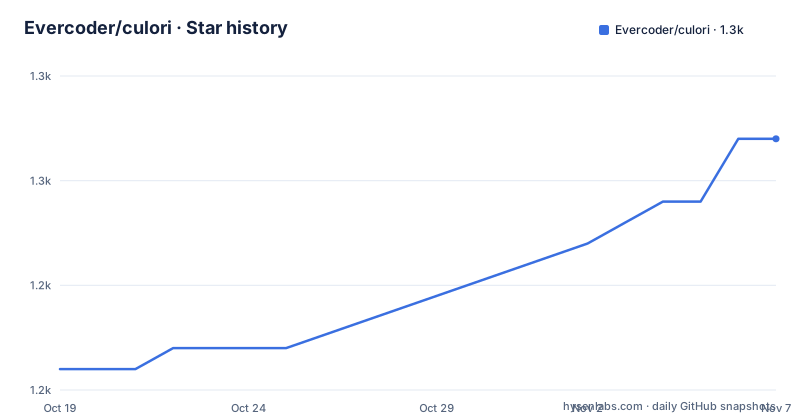
Star history
- Evercoder/culori1,252 ★ · +11
| Repository | 2026-10-19 | 2026-11-07 |
|---|---|---|
| Evercoder/culori | 1.2k | 1.3k |
11 Stars in the last 19 days, measured from the daily GitHub snapshot. Compare with other projects
Editorial analysis
Colour science rather than hex parsing
Culori is described as a comprehensive color library for JavaScript that works across many color spaces to offer conversion, interpolation, color difference formulas, blending functions, and more. The significant word is spaces.
Most colour code in a JavaScript codebase deals with hex strings and nothing else. Culori's scope is the harder problem: taking a colour expressed in one model and reasoning about it in another, and doing so correctly. The topic list shows the breadth of the model support, and it includes the perceptual and cylindrical spaces you would not find in a naive helper library: lab, cielab, cielch, din99, oklab, jzazbz, ictcp, hsl, hsv, hwb. The keyword list in package.json adds ciede2000, cubehelix, hsi, lrgb and yiq to that set.
The practical consequence is that a team can ask a meaningful question. Perceptual difference between two colours, gradient interpolation that does not pass through grey in the middle, and colour difference formulas with published names and known behaviour are all things a colour library can answer, and they are all things hand-written sRGB maths gets wrong.
Two of those deserve emphasis. CIEDE2000 is the standard perceptual difference formula used in print and display colour matching, and its presence as a keyword is a signal about the level of rigour. Oklab and Jzazbz are the newer perceptually uniform spaces that make gradients look right without the muddiness that plain HSL interpolation produces.
The upstream framing is standards compliance. The README says Culori provides up-to-date support for the color spaces defined in the CSS Color Module Level 4 specification, which means the library tracks a published W3C document rather than an ad hoc set of conversions.
One install, then a choice of entry points
Installation is the standard npm line.
npm install culoriThe README points to the documentation at culorijs.org, with getting started, API references and a supported color spaces page as the three entry points.
The package.json is where the interesting engineering decision sits, because Culori resolves differently depending on how you consume it. The package is ESM by type, with the main field pointing at a CommonJS bundle, the module field at a minified ESM bundle and the browser field at a minified UMD build, with jsdelivr pointing at the UMD file as well.
The exports map is the part that rewards attention. The root export offers require pointing at the bundled CommonJS file and import pointing at the source in src/index.js. There are separate subpath exports: ./require for the CommonJS bundle, ./css for a bootstrap module in src/bootstrap/css.js, ./all for a bootstrap module in src/bootstrap/all.js, and ./fn for src/index-fn.js.
So a bundler that honours the exports map and imports from the root gets the source tree, which means tree shaking, while a CommonJS require gets the pre-bundled file. The two bootstrap subpaths are the deliberate way to opt into a larger surface, css for a narrower set and all for everything, and the ./fn entry points at a differently shaped module.
That arrangement is why the package publishes a bundlephobia badge for bundle size. It is a library that is careful about what you drag in, and the entry points are where the care lives.
Building, benchmarking and the test runner
The scripts in package.json describe a project with a real release process rather than a single-file library.
The build is node build.js, driven by esbuild, which is also listed as a dev dependency. The test command is node --test 'test/**/*.test.js', so the tests run on the Node built-in test runner with no extra test framework in the dependency tree. The benchmark is node benchmark/index.js, and there is a benchmark/ directory at the repository root to hold it.
Two hooks are worth noting. The prepare script runs git config core.hooksPath .git-hooks, and there is a .git-hooks/ directory at the root, so the project installs its own git hooks on install rather than asking contributors to configure them. The prettier setup pairs pretty-quick with a .prettierignore, which is the usual way to format on commit without touching generated files.
The publish gate is prepublishOnly, which runs lint, then build, then test in that order. A release cannot ship if the lint fails, if the build fails or if the tests fail, and the order means you never publish a bundle that was not tested.
The documentation is built with Eleventy, configured through eleventy.config.cjs, with @11ty/eleventy-plugin-syntaxhighlight for code highlighting. The docs scripts show a deliberate detail in docs:build, which removes the www directory and copies the minified ESM bundle into it before deploying to gh-pages. The published site therefore loads the same build you would install from npm, rather than a stale copy, and docs:deploy pushes that www directory to GitHub Pages with gh-pages -d www --dotfiles.
The development server is npx esbuild --servedir=., which is a fast local server for the source tree, and eslint with eslint-plugin-import handles the linting.
Where the interest in Culori comes from, and where it stops
There is a real alternative in the platform itself, and any honest assessment of Culori has to start there.
Browsers now expose colour in the CSS Color 4 model. The colour() function accepts colours in lab, lch, oklab, oklch and display-p3, and relative colour syntax lets you derive a colour from another with calc-like channels. For the specific job of rendering a colour in a modern browser, none of that needs a JavaScript library. If your requirement is a gradient between two hex values, or a tinted overlay, the CSS can do it and the dependency is not worth it.
Culori earns its place where JavaScript has to reason about colour rather than declare it. That means computing a contrast ratio or a colour difference for a palette check, generating a scale of tints and shades in a perceptual space, converting a wide gamut colour to sRGB and deciding what to do when it clips, or running a palette extraction where the distance metric determines the result. In each of those cases the maths has to be right and the browser will not do it for you.
The limitation follows the same line. Culori is a JavaScript library, so it is not usable from CSS directly, and there is no standalone browser build that runs colour maths in a stylesheet. There is also no mention in the README of colour management in the sense of ICC profiles or CMYK, and the colour spaces listed are the RGB-adjacent and perceptual ones rather than print ones, so a prepress workflow is out of scope.
The alternative to a library here is not another library but the platform, and the question to ask is whether your use case is declaring colour or computing it.
Version 4.0.2, an MIT licence and an active tree
The version in package.json is 4.0.2, and the release history shows v4.0.2 from 2025-06-27, v4.0.1 from 2024-01-26 and v4.0.0 from 2024-01-19.
The gap between the last tag and the last push is the detail to note. The last push to the repository was on 2026-10-15, which is more than a year after the 4.0.2 release, so the tree has moved on without a new tag. The version number in package.json still reads 4.0.2, which means anyone tracking the package manager version sees the published 4.0.2 and the main branch has unreleased work behind it.
For an ESM package with a v4 major that landed in January 2024, that is a sensible upgrade story, since the major is already settled and the tree is being iterated on without churning the published API. But a team that wants a stable pin should take the published 4.0.2 rather than tracking main.
The licence is MIT, and the LICENSE file is at the repository root, which is the permissive end and imposes no obligations beyond the notice. The author is listed as Dan Burzo.
The contribution process is the other thing a maintainer would want to know. The README says contributions of all kinds are welcome, feedback, ideas, bug fixes and documentation, and asks people to open a GitHub issue or discussion before putting in work that is not straightforward, with more detail in CONTRIBUTING.md. That is a reasonable norm for a library with a large API surface, where a change to a conversion function can break results for someone downstream.
Editorial conclusion
Culori suits a frontend team that needs to interpolate between colours perceptually, compute colour difference for contrast or palette work, or convert between the wide gamut spaces CSS Color 4 now defines, because it handles the colour science in one dependency rather than in a hand-rolled set of formulas. It is the wrong tool if you only need to read and write hex strings, since the platform now has CSS Typed OM and the relative colour syntax for much of that, and it is the wrong choice if you need bundle size to be near zero, because the package ships a bundled build alongside the modular source. Before you adopt it, read the supported color spaces page on culorijs.org, and check whether your build is consuming the tree-shakeable ESM source through the exports map or the pre-bundled file, since the package.json points the main, module and browser fields at bundled artefacts.
Frequently asked questions
How do I install Culori?
Run npm install culori. The package is published on npm as culori at version 4.0.2, and the full documentation is at culorijs.org.
Which color spaces does Culori support?
The README states that Culori provides up-to-date support for the color spaces defined in the CSS Color Module Level 4 specification. The project topics list lab, cielab, cielch, din99, oklab, jzazbz, ictcp, hsl, hsv and hwb, and the keywords add lch, and the package keywords add ciede2000, cubehelix, hsi, lrgb and yiq.
How do I use Culori with a bundler such as Vite or webpack?
The exports map in package.json sends an import of the root entry to the source in src/index.js, while a require goes to the bundled CommonJS file. There are also separate subpath exports for ./css, ./all and ./fn.
Can I compute the perceptual difference between two colours with Culori?
Yes. The package keywords include ciede2000 and the topic list includes color-difference, and the library is described as offering color difference formulas among its features.
How do I contribute to Culori?
The README says contributions of all kinds are welcome, feedback, ideas, bug fixes and documentation, and asks contributors to open a GitHub issue or discussion first for anything that is not straightforward, with more detail in CONTRIBUTING.md.
Official sources
Add this badge to your README
If you maintain this project, the badge below links readers to this analysis and shows its maintenance status from the daily GitHub snapshot. Paste the markdown into your README; add ?metric=license or ?metric=stars to the image URL for a different field.

[](https://hysenlabs.com/projects/evercoder-culori)Star history chart for your README
[](https://hysenlabs.com/projects/evercoder-culori)Was this useful?