Compound Engineering Plugin: A Skills Loop That Writes Down What the Next Agent Needs
Official Compound Engineering plugin for Claude Code, Codex, Cursor, and more.
At a glance
- What is it?
- EveryInc's official plugin for Claude Code, Cursor, Codex, and other agent hosts packages 37 skills around a brainstorm-plan-build-review-compound loop. The core idea is that knowledge captured after each change makes the next change cheaper, but the value depends on how strictly you follow the loop.
- Who is it for?
- Adopt this plugin if you run AI coding agents on a supported host and want a structured loop that forces planning and review before execution, and if you are willing to let /ce-compound write into docs/solutions/ as part of your workflow. Skip it if your team treats agent output as throwaway or if you cannot tolerate the overhead of implementation-ready plans and multi-agent reviews for small changes.
- Can I use it commercially?
- Yes. MIT is a permissive licence: you can use, modify and sell software built on it, as long as you keep its copyright and licence notices.
- Is it still maintained?
- Yes. The repository last received commits 1 day ago.
- What is it written in?
- Mainly TypeScript, according to GitHub's language statistics.
Answers come from the project's GitHub data, last synced on November 14, 2026, and from our analysis. They are not legal advice.
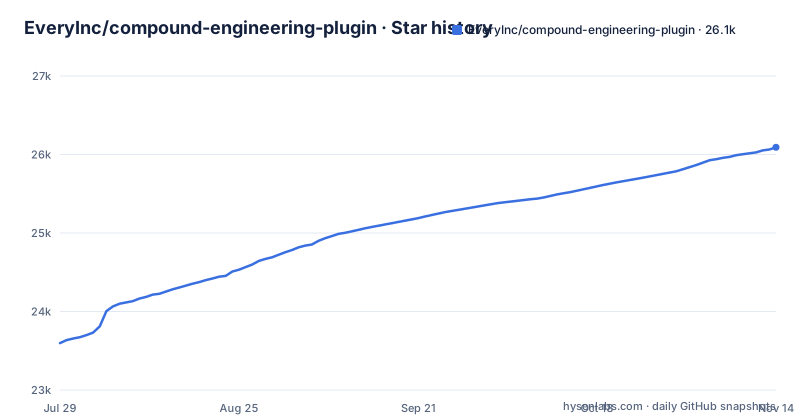
Star history
- EveryInc/compound-engineering-plugin26,092 ★ · +2,495
| Repository | 2026-07-29 | 2026-11-14 |
|---|---|---|
| EveryInc/compound-engineering-plugin | 23.6k | 26.1k |
2,495 Stars in the last 108 days, measured from the daily GitHub snapshot. Compare with other projects
Editorial analysis
What the plugin actually is
Compound Engineering is not a single tool. It is a plugin that installs 37 skills into an AI coding agent, and it is distributed as a GitHub repository under the MIT license. The plugin targets a specific failure mode: every change to a codebase adds local knowledge that the next change has to rediscover. The README describes the inversion: 80% of effort goes into planning and review, 20% into execution. The skills are named with a ce- prefix, like /ce-brainstorm, /ce-plan, /ce-work, /ce-simplify-code, /ce-code-review, and /ce-compound. Each skill has a documented purpose, and the set is meant to be run as a loop, not as isolated commands. The audience is engineers who already use agents like Claude Code, Cursor, or Codex and who want the agent to leave behind reusable knowledge rather than just produce code.
The six-step loop and its return arrow
The README lays out a loop with six steps: brainstorm the requirements, plan the implementation, work through the plan, simplify what you wrote, review the result, then compound the learning. The loop repeats with better context each time. The mechanism is that /ce-compound writes learnings into a docs/solutions/ directory, and the next /ce-brainstorm and /ce-plan read that directory as grounding. This is a concrete data flow: knowledge is persisted to disk in a conventional location, not kept in the agent's context window. That matters because context windows are ephemeral, but files survive across sessions. The design assumes your repository has a docs/solutions/ path and that your team will let the agent write there. If you do not commit those files, the loop breaks.
Install commands vary by host, and some hosts need extra care
The README gives explicit install steps for several hosts. For Claude Code, you run /plugin marketplace add EveryInc/compound-engineering-plugin and then /plugin install compound-engineering. For Cursor, you use /add-plugin compound-engineering in the agent chat. For Codex CLI, you run codex plugin marketplace add EveryInc/compound-engineering-plugin and then codex plugin add compound-engineering@compound-engineering-plugin, then restart Codex. The Codex app is not in the built-in marketplace, so you add it as a custom marketplace with Source EveryInc/compound-engineering-plugin and Git ref main. There is a warning in the README that if you already have the plugin installed, you must refresh the marketplace before updating, because /plugin update alone keeps you on the old version. That is a maintenance trap worth noting before you rely on this plugin.
Skill invocation syntax is not uniform across hosts
The README explicitly states that invocation syntax differs by host. Slash-skill hosts use /skill-name, so you would type /ce-plan. Codex uses $skill-name, so you would type $ce-plan. oh-my-pi (omp) uses a native deterministic form /skill:<name> for manual-only or hidden skills, for example /skill:ce-polish. /goal remains a Codex built-in command. This is a real usability cost: if your team switches between Claude Code and Codex, the same skill has different prefixes, and muscle memory from one host will not carry over. The README also notes that in omp, prompts can model-route to visible skills, which means the agent may choose a skill automatically rather than you invoking it. That is a design choice that trades determinism for convenience, and it may surprise users who expect explicit control.
The plan artifact is readiness-based, not a checklist
The README describes /ce-brainstorm as an interactive Q&A that produces a requirements-only unified plan, and /ce-plan enriches that into an implementation-ready plan. The README describes this as one plan artifact that grows from requirements into implementation planning, rather than a separate document per step. The plugin's value depends on this artifact, so you should read docs/guides/ce-plan.md before adopting. The README also states that /ce-work can execute plans natively or through a qualified cross-model author while retaining host verification, commits, and shipping. That is a notable architectural point: the execution step can delegate to another model, but the host still owns verification and commits.
Review is report-only by default, which is a deliberate boundary
The /ce-code-review skill is described as report-only multi-agent review against the plan before merging, with local apply being explicit. That means the review produces a report, and applying changes is not automatic. This is a safety feature: the agent identifies issues, but a human or a later explicit step applies fixes. The README also mentions /ce-doc-review for documentation review. The multi-agent wording implies the review spawns multiple reviewer agents; the README notes that specialist reviewer behavior lives inside the skills as local prompt assets. The report-only design is a reasonable default for a tool that runs inside a developer's editor, because automatic code changes from a review step could be destructive. However, it also means the loop is not fully autonomous: you must manually apply review feedback, which adds friction. The README claims that a good review catches the pattern, not just the bug, which is a high bar and not something the plugin can guarantee.
Where the plugin is the wrong tool
The plugin is wrong for small, trivial changes where the overhead of a brainstorm, an implementation-ready plan, and a multi-agent review exceeds the time saved. The README's own philosophy says 80% planning and review, 20% execution, which is a heavy process for a one-line fix. It is also wrong for teams that do not commit the docs/solutions/ output, because the compounding effect disappears and the loop becomes pure ceremony. The README warns that the point is not ceremony, but the loop only pays off if the knowledge is actually written down and read later. Another limitation: the plugin runs on 14 agent hosts, but the README's opening install steps cover Claude Code, Cursor, Grok Bot, the Codex app and Codex CLI. For the others, it points to a More install options section. You should not assume those installs are identical. The README also notes that Grok Bot uses your Cursor account, so you install once on Cursor and do not clone the repository onto the Grok Bot computer, which is a specific constraint that could be missed.
A real alternative: a plain markdown knowledge base with agent prompts
Instead of installing this plugin, you could build your own loop with a docs/solutions/ directory and a set of agent prompts that you maintain yourself. That approach gives you full control over the plan template, the review criteria, and the invocation syntax, because you write the prompts for your specific host. The difference is that Compound Engineering packages those prompts as installable skills with a consistent loop, a versioned release (v3.35.0 as of 2026-11-03), and a CI workflow visible in the repository. A hand-rolled version has no release cadence and no multi-agent review unless you build that too. The trade-off is maintenance: the plugin is maintained by EveryInc, and you get updates like v3.33.2 to v3.35.0 within days, but you also inherit their workflow choices. If you have strong opinions about how planning should work, a custom setup may fit better. If you want a ready-made loop and trust the vendor's process, the plugin is the faster path.
Maintenance and license considerations
The repository is MIT licensed, which means you can use, modify, and redistribute it with attribution, and there is no copyleft obligation. The recent release history shows active maintenance: v3.35.0 was released on 2026-11-03, with v3.34.0 on 2026-10-31 and v3.33.2 on 2026-10-29. That is a fast cadence, and the README contains an Upgrading guide in docs/install/upgrading.md. The key maintenance cost is the refresh-before-update step for Claude Code: if you run /plugin update without refreshing the marketplace, you stay on the old version. That is a footgun. The plugin also writes to docs/solutions/, so your repository will accumulate those files, and you will need to review them in pull requests to avoid noise. The plugin is a set of prompt assets and skill definitions, not a runtime library, so the upgrade risk is mostly behavioral: a skill's prompt could change how your agent plans or reviews. Read CHANGELOG.md before upgrading.
Editorial conclusion
Adopt this plugin if you run AI coding agents on a supported host and want a structured loop that forces planning and review before execution, and if you are willing to let /ce-compound write into docs/solutions/ as part of your workflow. Skip it if your team treats agent output as throwaway or if you cannot tolerate the overhead of implementation-ready plans and multi-agent reviews for small changes. Before adopting, verify that your host's skill invocation syntax matches the README (slash-skill vs $skill-name vs /skill:), confirm that /plugin update does not refresh the marketplace (the README warns you must refresh manually), and test the plugin on a non-production branch to see how much time the planning steps actually consume. The plugin is a workflow discipline, not a performance booster, and its value scales with how consistently you run the full loop.
Frequently asked questions
What is compound engineering?
A set of 37 prompt-based skills for coding agents, structured as a six-step loop: brainstorm the requirements, plan the implementation, work through the plan, simplify what you wrote, review the result, and then capture the learning into a file so the next loop starts with more context. The stated principle is that each unit of engineering work should make the next one easier, with most of the effort in planning and review rather than execution.
How do I install the Compound Engineering plugin?
The command differs by host. On Claude Code you add the marketplace and then install the plugin. On Cursor you add the plugin from the agent chat. On Codex, where the plugin is not in the built-in marketplace yet, you add it as a custom marketplace with a specific source and git ref, then install it and restart. Eleven further editors and command-line agents are listed as supported.
how to use compound engineering plugin
You invoke the skills in order for a piece of work: brainstorm, plan, work, simplify, review, compound. The review skill reports findings rather than applying them, with applying left as an explicit separate step. The compound step is the one that persists anything, writing into the documentation solutions directory so the next session reads it. Invocation syntax varies by host, so use the form your host expects rather than the one in the readme.
Does Compound Engineering support Visual Studio Code?
The readme does not name a Visual Studio Code host among the fourteen it lists, which cover Claude Code, Cursor, Codex, the Grok applications, and a set of command-line agents and extensions including Copilot, Cline, OpenCode, Devin, Factory Droid, Qwen Code, Kimi Code and Antigravity. The readme points to a section with more install options for anything not covered in the main instructions, which is where a Code-based host would be documented if it is supported.
Official sources
Add this badge to your README
If you maintain this project, the badge below links readers to this analysis and shows its maintenance status from the daily GitHub snapshot. Paste the markdown into your README; add ?metric=license or ?metric=stars to the image URL for a different field.

[](https://hysenlabs.com/projects/everyinc-compound-engineering-plugin)Star history chart for your README
[](https://hysenlabs.com/projects/everyinc-compound-engineering-plugin)Was this useful?