Pokémon Showdown packs a battle simulator, command-line tools and a game server into one repository
Pok mon battle simulator. [sim/SIM-PROTOCOL.md][5] - The part of the protocol used for battles and battle messages.
At a glance
- What is it?
- The repository behind pokemonshowdown.com is not just a website: it is an importable simulator, a set of command-line tools, a web API client and a self-hostable game server. Knowing which of those five you actually need decides everything else about your setup.
- Who is it for?
- Use this repository when you need the simulator itself: importing it in Node, driving it from another language through the command-line tools, or hosting a server for your own community and game modes. Do not expect this repository to give you a browser client, the Dex or documentation for the site's web API, because those live in the separate client and Dex repositories.
- Can I use it commercially?
- Yes. MIT is a permissive licence: you can use, modify and sell software built on it, as long as you keep its copyright and licence notices.
- Is it still maintained?
- Yes. The repository last received commits 1 day ago.
- What is it written in?
- Mainly TypeScript, according to GitHub's language statistics.
Answers come from the project's GitHub data, last synced on November 14, 2026, and from our analysis. They are not legal advice.
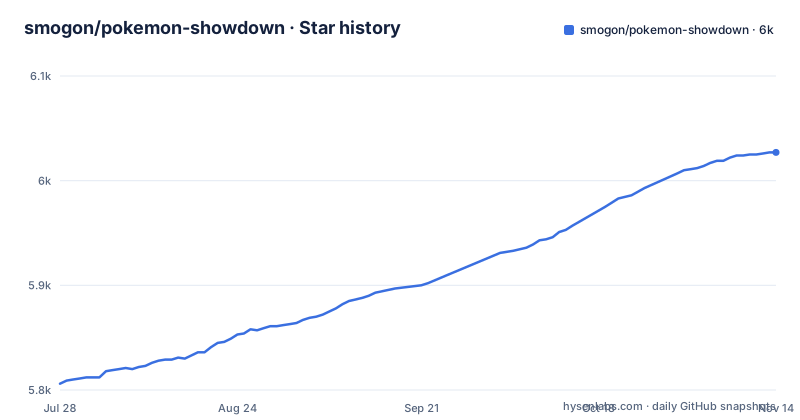
Star history
- smogon/pokemon-showdown6,027 ★ · +221
| Repository | 2026-07-28 | 2026-11-14 |
|---|---|---|
| smogon/pokemon-showdown | 5.8k | 6k |
221 Stars in the last 109 days, measured from the daily GitHub snapshot. Compare with other projects
Editorial analysis
Five deliverables share one repository, and they are not interchangeable
The README opens by saying Pokémon Showdown is many things, and the list is worth taking literally because each entry has its own documentation file. There is a website you can use for battling at pokemonshowdown.com. There is a JavaScript library for simulating Pokémon battles and getting Pokédex data, documented in sim/README.md. There are command-line tools for simulating battles that non-JavaScript programs can drive, documented in COMMANDLINE.md. There is a web API for the site, and its documentation is not in this repository at all but in the client repository. And there is a game server for hosting your own community and game modes, documented in server/README.md. The client and the Dex are separate repositories too, so the boundary of what you are cloning depends on which of the five you came for.
The importable surface is dist/sim/index.js, and the build emits its types
package.json is short enough to read in one go and settles most integration questions. The package is named pokemon-showdown, described as the server for the Pokémon Showdown battle simulator, and versioned 0.11.11. Its main field points at dist/sim/index.js and its types field at dist/sim/index.d.ts, so what you import from Node is the simulator, not the web server. Two scripts exist for that purpose. build-npm compiles sim/global-types.ts and sim/index.ts and emits declarations only, into dist/, targeting es2020 in strict mode. test-npm runs the same two files through the type checker with no output, which is the cheap way to find out whether your Node and TypeScript versions agree with the project. The simulator itself covers singles, doubles and triples for Generations 1 through 9.
Node 22.18.0 is a floor, and linting runs before the tests do
The engines field is explicit about the floor:
"engines": {
  "node": ">=22.18.0"
}
Getting that wrong will not be subtle, because the build and the type checks assume a current toolchain. The test pipeline is arranged so that style errors surface before simulator failures. pretest runs the linter, and plain test is mocha, configured by .mocharc.json at the top level. full-test is the strict version: oxlint with zero warnings allowed, then mocha with an 8000 millisecond timeout and --forbid-only, then the npm type check. Linting has its own configuration split across oxlint.config.mts and oxlint-ps-standard-style.mts, and the lint and fix scripts run oxlint. That sequence is the fastest way to fail the way this project expects you to.
Building and starting: two npm scripts and the entry file they call
The README gives no install steps, but package.json gives you the two commands that matter, and the README points at COMMANDLINE.md and sim/README.md for what to do afterwards:
npm run build
npm start
The build script runs node build, using the build directory at the top level, and the start script runs node pokemon-showdown start against the pokemon-showdown entry file. Whether you need the second one depends on which of the five deliverables you chose: a consumer importing dist/sim/index.js only needs the build, while hosting a server for your own community and game modes needs the start script, the Procfile and the config/ directory beside it. A fresh checkout also carries data/, databases/, lib/, logs/, translations/, tools/ and test/, which tells you the server keeps game data, translations and logs on disk rather than in memory.
Generations 1 through 9, with game mechanics research called out as its own job
Coverage is stated in one sentence: the simulator handles singles, doubles and triples across Generations 1 through 9. The directory layout carries the rest. data/ holds the game data the simulator reads, databases/ holds the persistence layer, translations/ holds the localisation strings a server needs to greet players in their language, and logs/ is where output goes. Game mechanics is treated as research work rather than a side effect: CODEOWNERS sits at the top level to assign review responsibility, and the credits section names two staff members with the role Research (game mechanics), one of them also listed for development. That is a useful signal about where to send a mechanics bug or a disputed interaction, and it is why the simulator can keep up with a new generation without the repository reorganising itself.
The client, the Dex and the web API documentation are all in other repositories
Here is the limit that trips people up. This repository is the server. The website you visit has its own client repository, smogon/pokemon-showdown-client, and the documentation for the web API that the site uses lives there as WEB-API.md rather than here. The Dex has a third repository, Zarel/Pokemon-Showdown-Dex. If you came for the site and expected to find its front end, or if you came for API documentation and found only a link out, that is the layout rather than an omission. The same split shows up in the documentation list: PROTOCOL.md explains how client and server talk to each other, and sim/SIM-PROTOCOL.md narrows that to the part used for battles and battle messages, which is the document to read if you are writing a bot rather than a server.
Optional dependencies decide which databases your instance can talk to
The dependency list is split three ways, and the split is the design. Required dependencies are esbuild, mysql2, preact, preact-render-to-string, sockjs and ts-chacha20. Then there is an optionalDependencies block: better-sqlite3, cloud-env, githubhook, nodemailer, permessage-deflate, pg, probe-image-size, source-map-support, sql-template-strings, sqlite and sqlite3. A third block, secretDependencies, holds node-oom-heapdump. The practical reading is that a bare install gives you MySQL support and the core runtime, while PostgreSQL, SQLite, outbound mail and deployment helpers are listed as optional dependencies. A container built without those extras has no Postgres path and no SQLite path, which matters when the databases/ directory is part of the design you were counting on.
v0.11.11 shipped in July 2026, on top of a master branch pushed three days ago
The maintenance picture is unusually easy to read. The repository is not archived, and the last push to the default branch master was 2026-11-02. Three releases are visible: v0.11.11 on 2026-07-28, v0.11.10 on 2025-02-27 and v0.11.9 on 2023-04-14, which puts the current version string in package.json in step with the newest tag. Between v0.11.9 and v0.11.10 there is a long gap, so release tags are the coarse unit and master is the fine one; if you need a stable point, pin a tag and read CHANGELOG-style history through the commits rather than assuming the branch is the release. The licence is the MIT License, and the README attaches it specifically to the server. Outside the code, the project runs a built-in chat service, points at the Pokémon Showdown forums on smogon.com, and keeps a starter issue for new contributors.
Editorial conclusion
Use this repository when you need the simulator itself: importing it in Node, driving it from another language through the command-line tools, or hosting a server for your own community and game modes. Do not expect this repository to give you a browser client, the Dex or documentation for the site's web API, because those live in the separate client and Dex repositories. Before you start, confirm Node 22.18.0 or newer, decide which optional database driver your instance needs, and read server/README.md rather than guessing at the configuration layout.
Frequently asked questions
How does Pokémon Showdown work?
It is several things at once: a website for battling at pokemonshowdown.com, a JavaScript library for simulating Pokémon battles and getting Pokédex data, command-line tools usable from non-JavaScript programs, a web API for the site, and a game server for hosting your own community and game modes. The simulator covers singles, doubles and triples for Generations 1 through 9.
How do I install Pokémon Showdown?
The README gives no install steps, so the two npm scripts in package.json are the entry point: the build script runs node build, and the start script runs node pokemon-showdown start. package.json sets the engines floor at Node 22.18.0 or newer.
How do I set up a Pokémon Showdown server?
The server component is documented in server/README.md. A checkout ships a Procfile, a config/ directory and the pokemon-showdown entry file that the start script runs, and database drivers such as pg, better-sqlite3 and sqlite3 are optional dependencies, while mysql2 is a required dependency.
How do I use Pokémon Showdown commands?
The command-line tools are documented in COMMANDLINE.md and are meant to be usable from non-JavaScript programs. As a library, the package entry point is dist/sim/index.js with type declarations at dist/sim/index.d.ts, both produced by the build and build-npm scripts.
How do I play Pokémon Showdown?
You use the website at pokemonshowdown.com, which has a built-in chat service and a main server to join. The simulator behind it handles singles, doubles and triples for Generations 1 through 9, and to host a community and game modes of your own you run the game server yourself.
Official sources
Add this badge to your README
If you maintain this project, the badge below links readers to this analysis and shows its maintenance status from the daily GitHub snapshot. Paste the markdown into your README; add ?metric=license or ?metric=stars to the image URL for a different field.

[](https://hysenlabs.com/projects/smogon-pokemon-showdown)Star history chart for your README
[](https://hysenlabs.com/projects/smogon-pokemon-showdown)Was this useful?