ClawHub: pinning installs, soft-delete, and plugin publishing
Skill + Plugin Registry for OpenClaw. Uploaded registry skills use soft-delete/restore (clawhub delete / clawhub undelete or API equivalents).
At a glance
- What is it?
- ClawHub is the public registry where OpenClaw agents get their skills: a Convex backend with embedding search, GitHub OAuth, a soft-delete lifecycle, and a CLI for install, pin, rename and merge. The interesting parts are also the parts that will surprise you.
- Who is it for?
- Adopt ClawHub if you publish or consume OpenClaw SKILL.md packs and want embedding search plus a CLI instead of a folder of files. Skip it if you need offline search or a hard delete you control.
- Can I use it commercially?
- Yes. MIT is a permissive licence: you can use, modify and sell software built on it, as long as you keep its copyright and licence notices.
- Is it still maintained?
- Yes. The repository received new commits within the last day.
- What is it written in?
- Mainly TypeScript, according to GitHub's language statistics.
Answers come from the project's GitHub data, last synced on November 14, 2026, and from our analysis. They are not legal advice.
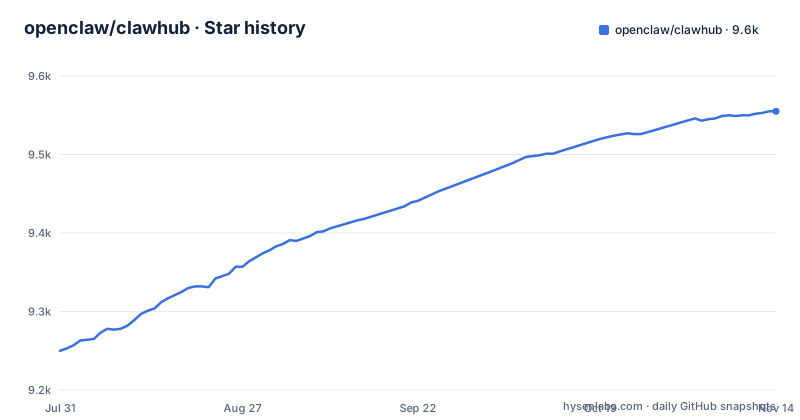
Star history
- openclaw/clawhub9,555 ★ · +305
| Repository | 2026-07-31 | 2026-11-14 |
|---|---|---|
| openclaw/clawhub | 9.3k | 9.6k |
305 Stars in the last 106 days, measured from the daily GitHub snapshot. Compare with other projects
Editorial analysis
Logging in and installing @openclaw/demo with the clawhub CLI
ClawHub stores what an OpenClaw agent reads: a `SKILL.md` plus supporting files, versioned and searchable from a terminal. The README gives no package-manager line for installing the CLI itself, so these are the documented entry points, and `docs/quickstart.md` and `docs/cli.md` are where the project sends you for the rest.
clawhub login
clawhub whoami
clawhub explore
clawhub install @openclaw/demo
clawhub list
`clawhub whoami` prints the account the rest of the CLI acts as. `clawhub install @openclaw/demo` writes the demo skill into your local OpenClaw install, and `clawhub list` shows what you have. To read a manifest before committing to it, `clawhub inspect @openclaw/demo` prints it without installing anything.
One behavior is tied to being logged in. `clawhub install` sends minimal install telemetry so the registry can compute install counts, and the opt-out is an environment variable rather than a flag:
export CLAWHUB_DISABLE_TELEMETRY=1Set it and your installs stop counting toward the number you were reading in the first place. For a remote or headless box the README gives a separate flow, `clawhub login --device`, which is the documented answer to running the CLI where a browser callback cannot land.
clawhub pin freezes a copy that clawhub update --all would rewrite
A pin is a local freeze. Without one, `clawhub update --all` rewrites every installed skill in place, so a skill whose owner edited its `SKILL.md` upstream replaces the copy your agent was behaving well with yesterday.
clawhub pin <skill>
clawhub unpin <skill>
clawhub update --all
clawhub uninstall <skill>
That pin lives on your machine, not in the registry, which is the real difference in approach against the usual alternative: checking skills out of a git repository at a fixed commit. A checkout gives you a diff and a history you can audit, and gives you no install counts, no stars, no soft-delete and no moderators. ClawHub gives you discovery, versions with changelogs and tags including `latest`, and the same upstream that provides those can publish over your copy unless you pin first.
What pinning does not give you is visibility into what you skipped. There is no documented way to ask the CLI what a pinned copy is missing, so a skill pinned three versions ago looks the same from the command line as one that is current. If a frozen skill starts behaving oddly, the fix is to unpin and re-install deliberately, not to read a changelog the CLI can show you.
Search runs on text-embedding-3-small, so OPENAI_API_KEY is not optional
Discovery here is vector, not keyword. Skill text goes to OpenAI `text-embedding-3-small`, the vectors land in Convex's vector search index, and that index is what the CLI and the web search box query. The stated reason is to stop depending on exact words in a title or description.
clawhub search ...
clawhub inspect @openclaw/demo
clawhub package explore
clawhub package inspect <name>
The last two read the unified catalog, which spans skills plus OpenClaw packages carrying family, trust and capability metadata: native code plugins, bundle plugins and experimental whole-agent Template packages sit in the same search surface as plain `SKILL.md` packs.
The cost of the design is a hard dependency on an external key. The README names `OPENAI_API_KEY` as the source of embeddings for both search and indexing, and the visible README names no second embedding provider or keyword fallback.
clawhub uninstall never touches the registry, and hard delete is admin-only
Three verbs, three scopes, and different names for skills and packages. `clawhub uninstall <skill>` removes a local install on your machine and changes nothing on the registry. Uploading a skill instead subjects it to soft-delete and restore:
clawhub delete <skill>
clawhub undelete <skill>
clawhub package delete <name>
clawhub package undelete <name>
Who may run them is a fixed list: the skill or package owner, publisher owner or admin, moderators, and admins. Anyone else has no removal path. Hard delete is admin-only and reserved for management tools and ban flows, so an owner who wants a slug gone cannot free it, and a moderator can soft-delete something you published without your involvement.
Auth is a single GitHub OAuth login through Convex Auth, configured with `AUTH_GITHUB_ID` and `AUTH_GITHUB_SECRET`, and no second identity provider, no API keys and no scopes are documented. Read that next to the role list: the people who moderate the registry can soft-delete content they do not own.
clawhub skill rename and skill merge keep the old slug resolving
An owner can change a skill's name without breaking old links or installs, and can fold duplicates into one canonical slug. `clawhub skill rename <skill> <new-name>` keeps the old slug as a redirect alias. `clawhub skill merge <source> <target>` hides the source listing and points the old slug at the canonical target.
clawhub skill rename <skill> <new-name>
clawhub skill merge <source> <target>
Both need ownership of the skill, so you cannot merge somebody else's duplicate into yours, and no cross-owner merge path is documented.
The redirect is what makes these operations safe for existing consumers, and it is also what makes them awkward to audit. An old slug keeps resolving after a merge, so a consumer that installs by the old name follows the redirect to whatever the target owner published next and receives content nobody on your side reviewed. No documented flag tells you that a resolved name arrived through a redirect, so if a slug matters to you, read the rendered `SKILL.md` of the name you actually resolved instead of trusting the name you asked for.
A code plugin without openclaw.compat.pluginApi will not publish
Code plugins carry a stricter contract than skill packs. A code-plugin manifest must include `openclaw.compat.pluginApi` and `openclaw.build.openclawVersion`, and the README points to `docs/cli.md` for a minimal example.
clawhub package publish <source>
clawhub package publish --dry-run --json
The dry-run forms appear in the end-to-end test list in `package.json`, alongside the behaviors that matter most to a publisher: Plugin Inspector hard errors make `package publish` exit non-zero, while warnings exit zero and print. Warnings will not stop your upload. Bundle plugins and experimental whole-agent Template packages travel through the same `/packages` APIs and CLI flows, with the whole-agent packages hosting and resolving exact artifacts rather than a name to search for. Skills get their own gate too: the test list covers `skill verify help omits the redundant json flag` and `skill verify accepts the legacy json flag`, so scripts written against the flag keep working even though the help text hides it.
nixmode skills gate installs on systems, requiredEnv and stateDirs
A skill can carry more than instructions. A nixmode skill puts a nix-clawdbot plugin pointer in its `SKILL.md` frontmatter so the registry knows which Nix package bundle belongs with it. That bundle ships the skill pack, the CLI binary and its config flags together.
---
name: peekaboo
description: Capture and automate macOS UI with the Peekaboo CLI.
metadata:
  {
    "clawdbot":
      {
        "nix":
          {
            "plugin": "github:clawdbot/nix-steipete-tools?dir=tools/peekaboo",
            "systems": ["aarch64-darwin"],
          },
      },
  }
---
Treat `systems` as a hard gate rather than a hint. The example declares `aarch64-darwin`, so that skill targets Apple silicon macOS only. The sibling pattern declares `requiredEnv` and `stateDirs` (for example `PADEL_AUTH_FILE` and `.config/padel`) so the Nix expression can wire credentials and state paths, which also means the install depends on the user already having those secrets and write access to those directories.
Bun, two terminals and a live Convex deployment stand between you and a local ClawHub
Running ClawHub locally means a Bun workspace pointed at a real Convex deployment, not a static build. Bun is the prerequisite, and Convex runs through `bunx`, so there is no global Convex install to manage.
bun install
cp .env.local.example .env.local
bunx convex dev
bun run dev
bun run seed:dev
`bunx convex dev` is terminal A, the local backend. `bun run dev` is terminal B and serves the app on port 3000. `bun run seed:dev` waits for the deployment, seeds dev fixtures owned by `@local`, refreshes global stats, and is safe to rerun after fixture or schema changes.
The variables you must fill in are `VITE_CONVEX_URL`, `VITE_CONVEX_SITE_URL`, `CONVEX_SITE_URL`, `SITE_URL` (local `http://localhost:3000`), `AUTH_GITHUB_ID` and `AUTH_GITHUB_SECRET`, plus `JWT_PRIVATE_KEY` or `JWKS` for Convex Auth and `OPENAI_API_KEY` for embeddings; `CONTRIBUTING.md` holds the full set, the OAuth app, the JWT keys and database seeding. No compose file or single-command deploy appears in the README, so self-hosting means provisioning a Convex deployment, a GitHub OAuth App and JWT keys by hand. The root `package.json` is private with workspaces `packages/clawhub`, `packages/clawhub-admin` and `packages/schema`. Licence is MIT, releases are v0.25.0 on 2026-11-01, v0.24.1 on 2026-10-28 and v0.23.3 on 2026-08-04, and the last push was on 2026-11-02.
Editorial conclusion
Adopt ClawHub if you publish or consume OpenClaw SKILL.md packs and want embedding search plus a CLI instead of a folder of files. Skip it if you need offline search or a hard delete you control. Before trusting an existing install, run `clawhub list`, see which skills are pinned, and read the rendered SKILL.md of anything that resolves through an old slug, because soft-delete and redirect aliases mean the name you installed is not always the listing you reviewed.
Frequently asked questions
What is ClawHub for?
It is the public skill registry for OpenClaw, where text-based agent skills made of a SKILL.md plus supporting files are published, versioned and searched. It also exposes an OpenClaw package catalog for code plugins, bundle plugins and experimental whole-agent Template packages.
how to use clawhub cli
The documented flows are grouped by purpose: `clawhub login` and `clawhub whoami` for auth, `clawhub search ...` and `clawhub explore` for discovery, `clawhub package explore` and `clawhub package inspect <name>` for the unified catalog, and `clawhub skill publish <path>` or `clawhub package publish <source>` for publishing.
how to install clawhub cli
The README documents no package-manager install line for the CLI, and points to docs/quickstart.md and docs/cli.md instead. Running a local instance of the registry itself starts from Bun: `bun install`, then `cp .env.local.example .env.local`.
how to use claw hub install
`clawhub install @openclaw/demo` installs a skill locally, `clawhub list` shows what you have, and `clawhub update --all` refreshes them. `clawhub pin <skill>` freezes one copy so updates and force reinstalls cannot overwrite it, while `clawhub uninstall <skill>` only removes a local install and never the registry copy.
What are the best skills you can learn from ClawHub?
ClawHub names no best skills and publishes no ranking. Ranking is left to embedding search, stars and comments, with admins and moderators curating and approving skills, so the list you see is whatever the search surface returns rather than an editorial pick.
Official sources
Add this badge to your README
If you maintain this project, the badge below links readers to this analysis and shows its maintenance status from the daily GitHub snapshot. Paste the markdown into your README; add ?metric=license or ?metric=stars to the image URL for a different field.

[](https://hysenlabs.com/projects/openclaw-clawhub)Star history chart for your README
[](https://hysenlabs.com/projects/openclaw-clawhub)Was this useful?