acpx is a pre-1.0 ACP client whose real check pipeline is eight stages, not the three its readme shows
Headless CLI client for stateful Agent Client Protocol (ACP) sessions.
At a glance
- What is it?
- A headless command line client for the Agent Client Protocol, wrapping coding agents such as Codex and Claude Code behind one session, permission and output interface. It is candid about its own instability and unusually careful about scope, naming a filesystem boundary and refusing to start conversations implicitly. The gaps are in the tooling rather than the protocol: a viewer nobody documents, a changed-files check that runs everything, and a protocol coverage roadmap dated in February.
- Who is it for?
- acpx suits someone who wants coding agents driven from scripts and CI rather than from a terminal pane, because the named sessions, the NDJSON event stream, the documented exit codes and the option to embed session primitives without shelling out are all real and all in the MIT package. Before you build on it, check four things.
- Can I use it commercially?
- Yes. MIT is a permissive licence: you can use, modify and sell software built on it, as long as you keep its copyright and licence notices.
- Is it still maintained?
- Yes. The repository received new commits within the last day.
- What is it written in?
- Mainly TypeScript, according to GitHub's language statistics.
Answers come from the project's GitHub data, last synced on November 14, 2026, and from our analysis. They are not legal advice.
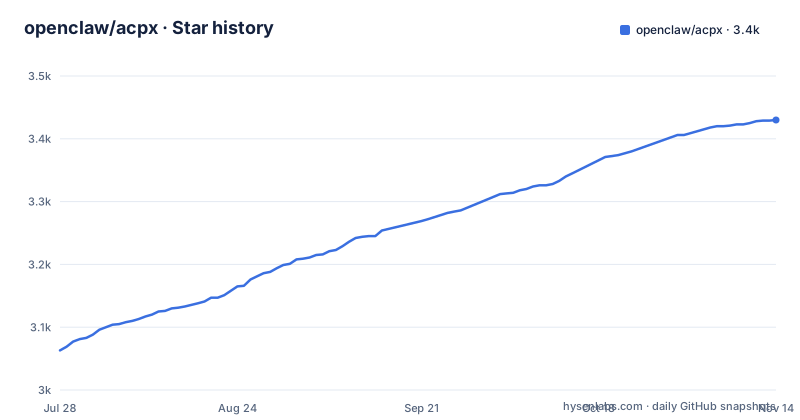
Star history
- openclaw/acpx3,430 ★ · +367
| Repository | 2026-07-28 | 2026-11-14 |
|---|---|---|
| openclaw/acpx | 3.1k | 3.4k |
367 Stars in the last 109 days, measured from the daily GitHub snapshot. Compare with other projects
Editorial analysis
Pre-1.0, with a note telling you to expect the interfaces to move
There is a callout near the top of the file that says `acpx` is pre-1.0 and that its CLI and runtime interfaces should be treated as evolving. The package version agrees with it: `package.json` reads `0.19.4`.
The release cadence behind that number is fast. Three of the recent releases are v0.19.2 on 2026-09-23, v0.19.3 on 2026-09-25 and v0.19.4 on 2026-10-01, which is three releases in nine days, and the last push is dated 2026-10-03, two days after the newest tag.
That combination is worth stating plainly rather than as a complaint. The project is moving quickly and it says so, which is a better position than a stable version number over an interface nobody promises. The practical consequence is on the consumer side: pinning `@latest` in a script or a CI job means your command surface can change under you between runs, and the install section offers exactly that as the default with `npm install -g acpx@latest` and `npx acpx@latest` as the no-install alternative.
The engine floor is firm, at Node.js 22.13 or newer, and the build script targets node22.
The package root resolves to the CLI, and four entry points ship together
The export map is unusual enough to be worth reading before installing. The package root `.` resolves to `./dist/cli.js`, which is the same file the `bin` field points `acpx` at. So importing the package by name gives you the command line entry point, not a library surface.
Four TypeScript entry points are bundled by the build script, `src/cli.ts`, `src/flows.ts`, `src/runtime.ts` and `src/agent-registry.ts`, and all four appear in `exports` alongside a wildcard `./dist/*` and the package manifest itself. Three of them are documented as libraries: `acpx/runtime` and `acpx/flows` are said to expose session and workflow primitives for applications that would rather not shell out, and the registry is reachable as `./agent-registry`.
The published file list is `dist`, `skills`, `README.md` and `LICENSE`. Two things follow. The build output is shipped without the TypeScript sources, so the artifact you install is compiled code only. And a `skills` directory travels inside the npm package, matching the `skills/` directory in the repository, so anything installed globally brings skill definitions with it.
The documented three commands sit in front of an eight stage gate
The Development section gives three commands:
pnpm install --frozen-lockfile
pnpm run check
pnpm run check:docs
What `check` actually runs is longer. It is `format:check`, then `typecheck`, then `lint`, then `build`, then `viewer:typecheck`, then `viewer:build`, then `test:coverage`, then `test:autoreview`, chained with `&&` so any failure stops the rest.
Two of those stages name a component that appears nowhere else in the file. `viewer:typecheck` and `viewer:build` mean a viewer is typechecked and built on every run, and the file never says what a viewer is or where it lives.
There is also a script called `check:changed`, and it is defined as `pnpm run check`, the identical full gate. So the name promises a narrowed run and the definition delivers the whole one. Alongside it sit `check:mutation` pointed at `pnpm run mutate` with a `stryker.conf.json` at the root, `conformance:run` pointed at `tsx conformance/runner/run.ts` with a `conformance/` directory, a `requirements-autoreview.txt`, `.release-it.json` for releases, `.husky/` for hooks, and a `.crabbox.yaml` with a `crabbox:hydrate` script. A contributor reading the Development section learns about three of those.
Permissions have a range, and defaults may come from a file instead of your flags
The permission paragraph is short and load bearing. Permission modes range from read approval at one end to explicit deny or approve-all policies at the other. `--cwd` sets both the session scope and the filesystem boundary. Global and project JSON configuration can supply defaults, and command-line flags take precedence over them.
That precedence rule is the right way round, and it still leaves the interesting case open. The boundary is whatever the invoker chooses, and the defaults can arrive from a project configuration file rather than from the command that launches the run. A repository that ships its own JSON defaults therefore gets to propose the permission posture for anyone who runs a command inside it, and the only thing standing between that and approve-all is whether the operator passes an explicit flag.
Two other sentences bound the blast radius in the way you would want. The session is scoped to the current repository, and creating sessions explicitly is what prevents automation from starting an unexpected conversation, which is why the quick start opens with `acpx codex sessions new` rather than sending a prompt directly. There are separate documents for permissions and for exit codes, so an automated caller has something to branch on.
Named sessions queue follow-ups, and exec is the stateless escape hatch
The session model has four moving parts. Persistent sessions keep context between prompts. Named sessions support parallel workstreams. Follow-up prompts queue when a turn is already running. `exec` performs a stateless run with no saved session at all.
The command shapes show how the flags sit:
acpx codex sessions new --name backend
acpx codex -s backend "trace the checkout timeout"
acpx codex exec "summarize this repository"
acpx --model gpt-5.4 codex exec --config-option reasoning_effort=high "review this repository"
So `-s` selects a named session, `--name` creates one, `exec` bypasses session storage, and `--model` and `--config-option` are global flags that sit before the agent name rather than after it. That last one is the detail worth noting for scripting, because a flag placed in the wrong position will not do what the example says.
State lives under `~/.acpx/`, and the sessions guide is said to cover scope, queue ownership, reconnects, export and import, cancellation and cleanup. Export and import of session state is the capability to be careful with, since that is conversation history and tool output moving between machines as a file.
The JSON stream keeps structured thinking, tool calls and diffs
Text is the default output. `--format json` emits NDJSON ACP events, and `--format quiet` prints only the final assistant text. The stated difference between the human and machine formats is that output events retain structured thinking, tool calls, diffs and completion state instead of terminal escape sequences.
So a JSON consumer receives the model's reasoning content as part of the stream, not a redacted summary of it, alongside the tool calls and the diffs those calls produced. Whatever writes that NDJSON to disk is writing down the model's thinking as well as its actions.
The text format is a rendering of the same events, and the console example shows what that looks like: a tool line reading `[tool] Read README.md (completed)`, then the assistant's text, then a terminator reading `[done] end_turn`. The bracket prefixes are what make the human output legible, and they are exactly the part that disappears in machine mode, where the same information arrives as structure.
Protocol coverage is tracked in a roadmap document, and adapters do not carry the agent
Five launch shapes are given, and they are the same command with a different agent name: `acpx pi`, `acpx openclaw`, `acpx codex`, `acpx claude`, and `acpx --agent '<command>'` for a custom ACP server. One sentence sets the boundary for all of them: the upstream agent must be installed and authenticated when its adapter does not provide that itself.
So `acpx` is not a distribution of coding agents. It is a client that assumes each one is already present and already authenticated, which keeps the package small and means the auth story belongs to the agent rather than to this client. Registry configuration for custom servers lives in its own document, and the registry is also a public export, so an application can drive agent selection without going through the command line.
What is not finished is protocol coverage. The documentation list includes an entry named ACP coverage, described as implemented protocol methods, and the file name behind it carries the date 2026-02-19. A dated roadmap means the set of methods that work is smaller than the protocol and that the gap is expected to close over time. Check that document against the methods your agent needs before designing around them.
Flows are TypeScript you author, running beside an agent with tool access
The extension surface is `acpx flow run`, which executes TypeScript workflows. Those workflows combine ACP turns with deterministic actions, decisions, computation and checkpoints, which means a flow is ordinary program logic with agent calls embedded in it rather than a prompt template.
The same primitives are available without the command line. `acpx/runtime` and `acpx/flows` are exported for applications that need session and workflow primitives directly, and `createSharedAcpRuntime()` is provided for the case where an application and a CLI process need to share one local session owner. That last one implies a local coordination point between two processes, which is convenient and is a design decision worth understanding before two things drive the same session.
The trust boundary here is straightforward to state. A flow is code you wrote, running next to an agent whose tool access is governed by the permission modes, and the two interact inside one process tree. The permission range still applies to the agent side, but the deterministic steps in your workflow are not constrained by it. Examples live in `examples/flows/`, and there is a flows guide plus an architecture note dated 2026-03-25.
Editorial conclusion
acpx suits someone who wants coding agents driven from scripts and CI rather than from a terminal pane, because the named sessions, the NDJSON event stream, the documented exit codes and the option to embed session primitives without shelling out are all real and all in the MIT package. Before you build on it, check four things. How far ACP coverage actually goes for your agent, since the implemented methods are tracked in a roadmap document dated 2026-02-19 and the session interface is pre-1.0 by the project's own note. Where your permissions come from, because defaults may arrive from a global or project JSON file rather than your command line. What you do with the event stream, since it retains structured thinking alongside tool calls and diffs. And what flows you author, because a flow is TypeScript you wrote that runs next to an agent holding tool access. Pin the version rather than tracking latest.
Frequently asked questions
what is openclaw acpx
It is the MIT licensed `acpx` npm package, a headless command line client for the Agent Client Protocol whose `package.json` version is 0.19.4 and whose bin entry points `acpx` at `dist/cli.js`. Session state is kept under `~/.acpx/`, it requires Node.js 22.13 or newer, and it is described in the file as pre-1.0 with interfaces to be treated as evolving.
Does the claude code support ACP?
Claude Code appears in the launch table as `acpx claude …`, alongside Pi, OpenClaw and Codex, so it is one of the coding agents the client is built to drive. The file adds that the upstream agent must be installed and authenticated when its adapter does not provide that itself, so support here means a launch profile rather than bundled agent code.
What is the current version of OpenClaw?
This repository publishes `acpx`, not OpenClaw, and carries no version for OpenClaw itself. Its own version is 0.19.4 in `package.json`, with releases v0.19.4 on 2026-10-01, v0.19.3 on 2026-09-25 and v0.19.2 on 2026-09-23, and the last push is dated 2026-10-03.
Official sources
Add this badge to your README
If you maintain this project, the badge below links readers to this analysis and shows its maintenance status from the daily GitHub snapshot. Paste the markdown into your README; add ?metric=license or ?metric=stars to the image URL for a different field.

[](https://hysenlabs.com/projects/openclaw-acpx)Star history chart for your README
[](https://hysenlabs.com/projects/openclaw-acpx)Was this useful?