Pulsar: eBPF runtime detection for Linux devices
A modular and blazing fast runtime security tool for the IoT, powered by eBPF.
At a glance
- What is it?
- Pulsar is a Rust security tool that watches Linux devices at runtime with eBPF probes, matches kernel events against rules written in TOML, and reports matches as threat events. It targets fleets of small Linux devices, needs a 5.5 or newer kernel with BTF, and splits its licence between Apache-2.0 userspace and GPL-2.0 probes.
- Who is it for?
- Adopt Pulsar if you operate a fleet of small Linux devices, can require kernel 5.5 or newer with BTF enabled, and want runtime detection with rules you can read and edit as TOML rather than a policy engine you have to learn. Do not adopt it as a general endpoint protection suite, because the event categories it covers are processes, file I/O and the network stack, and it detects rather than blocks.
- Can I use it commercially?
- Check first. The repository uses a licence we do not classify automatically, so read its LICENSE file before any commercial use.
- Is it still maintained?
- Yes. The repository last received commits 4 days ago.
- What is it written in?
- Mainly Rust, according to GitHub's language statistics.
Answers come from the project's GitHub data, last synced on November 7, 2026, and from our analysis. They are not legal advice.
Star history
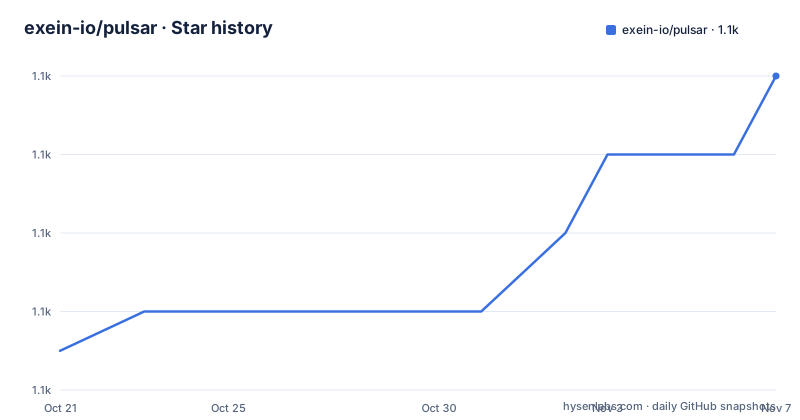
- exein-io/pulsar1,064 ★ · +7
| Repository | 2026-10-21 | 2026-11-07 |
|---|---|---|
| exein-io/pulsar | 1.1k | 1.1k |
7 Stars in the last 17 days, measured from the daily GitHub snapshot. Compare with other projects
Editorial analysis
Runtime detection on devices you do not own the distro of
Pulsar is a security tool for monitoring the activity of Linux devices at runtime, powered by eBPF, and it is described as modular and built for the IoT. The target is a fleet of small Linux devices, which is the constraint that shapes every design decision in the project. On that kind of hardware you cannot install a full endpoint suite, you cannot run a container with a security agent in it, and you often cannot even install a package. What you can do is load an eBPF program into the kernel, which is exactly the mechanism Pulsar uses. The core modules use eBPF probes to collect events from the kernel in a safe and efficient way, and the events fall into the areas the project names: processes, including file execution and file opening, file I/O on disk and in memory, and data from the network stack. The project says Pulsar is built with a modular design that makes it easy to adapt the core architecture to new use cases, create new modules, or write custom rules. The audience is therefore an engineer responsible for a fleet of embedded Linux devices who needs to know what a process on one of them is doing, without an agent footprint that would rule out the deployment.
From kernel interception to a printed threat event
The pipeline is described precisely enough to reason about. When an application performs an operation, it is intercepted at kernel level by the Pulsar BPF probes, turned into a unique event object and sent to userspace. There, the Pulsar rule engine processes the event against the set of rules defined in the rules file, and if there is a match it emits a new event marked as a threat. Finally a logger module prints threat events to the terminal. The important property is the separation: the kernel side only produces structured events, and every judgement about whether an event is bad happens in userspace, in a rules file you can read and diff. That is what makes the tool usable on a fleet. A policy expressed in a file can be version controlled, shipped to a device, and rolled back, and the same rule applies to every device. The rules are TOML, and the example in the documentation is a rule named Create sensitive files symlink of type FileLink with a condition that matches on the destination path:
[[rules]]
name = "Create sensitive files symlink"
type = "FileLink"
condition = '(payload.destination IN ["/etc/shadow", "/etc/sudoers", "/etc/pam.conf", "/etc/security/pwquality.conf"] OR payload.destination STARTS_WITH "/etc/sudoers.d/" OR payload.destination STARTS_WITH "/etc/pam.d") AND payload.hard_link == "false"'
The condition language works on the event payload, with operators such as IN, STARTS_WITH and equality, so a rule reads as a predicate over the fields the probes expose.
Installing with the script, and what the daemon needs
The install is one command that fetches a script and runs it, with TLS version pinning:
curl --proto '=https' --tlsv1.2 -LsSf https://github.com/exein-io/pulsar/releases/latest/download/pulsar-install.sh | shThe documentation calls this the recommended approach and points at the quickstart for the details. There is a second route, pre-built binaries from the releases page, where you download two executables for your architecture, pulsard for the daemon and pulsar for the CLI, and static builds may be published with a -static suffix where available. Building from source is explicitly not recommended, and the project says it is only necessary if you want to make modifications. The requirement that shapes everything is a kernel 5.5 or higher with BPF and BTF enabled, and the full requirements are on the pulsar.sh site. The daemon must be launched with administrator privileges:
pulsardThe reason for the privilege requirement is the eBPF loader, which needs elevated rights to attach probes to the kernel. There is no unprivileged mode described in the documentation, which is a meaningful constraint for a fleet of devices where running a root daemon may be exactly what you were trying to avoid.
A test you can run in two terminals
The quickstart includes a way to confirm the whole stack works, which is a good sign for a security tool since a silently broken sensor is worse than no sensor. In one terminal you trigger a threat event, for example by creating a symlink to a sensitive file:
ln -s /etc/shadow /tmp/secretIn the pulsar terminal you should then see an event of this shape:
[2023-02-07T14:29:09Z THREAT /usr/bin/ln (36267)] [rules-engine - { rule_name = "Create sensitive files symlink" }] File Link { source: /tmp/secret, destination: /etc/shadow, hard_link: false }The line carries the timestamp, a THREAT marker, the process that triggered it with its pid, which module produced it, the name of the rule that matched, and the event payload with the source and destination paths. That is enough to answer the first question an incident responder asks, which is what ran, and it ties the event back to a named rule, which answers the second question, which is why it was considered a threat. The example in the documentation is dated 2023, which is a small reminder that the sample output was captured a while ago rather than regenerated.
Modules and features, compiled in rather than bolted on
The architecture is visible in the Cargo manifest, where the modules are optional dependencies of the root crate. The core feature set is threat-logger, process-monitor, network-monitor and file-system-monitor, and the extra set adds rules-engine, desktop-notifier and smtp-notifier, with the default features being full and tls-openssl. There is a choice of TLS backends for the SMTP notifier, tls-openssl or tls-rustls, and an all-vendored option that pulls in openssl-vendored and sqlite3-vendored for deployments that cannot rely on system libraries. The workspace members list under crates/modules carries the module crates themselves, alongside bpf-common, engine-api and pulsar-core as the shared internals. Two design points are worth calling out. First, the rules engine is a feature, not a hard requirement, which means a build without it is a pure event collector and a build with it is a detector. Second, the notifiers are separate from the detectors, so a device can log locally while a central service handles notification over SMTP, which is the arrangement a fleet needs. The examples directory shows the extension paths the project wants people to use, with a pulsar-embedded-agent example, a pulsar-extension-module example, a pulsar-module-as-library example and standalone-probes.
Two licences, and the difference matters
The licence section is specific and unusual. Pulsar is licensed under two licences: the userspace code is under Apache-2.0 and the eBPF probes are under GPL-2.0, with the two texts in a LICENSES directory and the repository metadata listing the project as a custom licence that GitHub cannot categorise. The reason for the split is structural rather than legalistic. eBPF programs are loaded into the kernel, and a GPL-2.0 probe is what allows the project to keep the permissive terms for the parts that stay in userspace. For an operator the practical effect is narrower than it sounds: running Pulsar on a device does not by itself impose GPL obligations on the rest of your system, because the probes are separate artifacts. For anyone who wants to modify the probes, the GPL terms apply to that work. The badge at the top of the README shows both Apache-2.0 and GPL-2.0, which is the clearest signal that the split is deliberate. A third-party evaluation should read both files rather than relying on the GitHub classification.
Where Pulsar is the wrong tool
The limits are visible from the requirements and the feature set. The kernel floor of 5.5 with BTF rules out most embedded devices built on older vendor kernels, and BTF in particular is not universal in the long-lived images that IoT fleets run, so the first thing to check is the actual kernel of the devices rather than the model number. The root requirement for the daemon is the second constraint, and it is not a small one in a security-sensitive fleet. The third is scope. Pulsar detects and reports, and the documentation does not describe an enforcement or blocking path, so a match produces an event rather than a stopped process, and something else has to decide what to do about it. The event areas are also fixed at processes, file I/O and the network stack, which is a reasonable coverage for a device agent but is not an audit of every syscall. Finally, this is an early-stage project. The current tagged release is v0.10.1 from 2026-09-30, with v0.10.0 shortly before it and a dev build tracked from 2026-10-15, and the last push was on 2026-10-15, so the code is moving quickly but the version numbers are still pre-1.0. Plan for that when you pin it.
Editorial conclusion
Adopt Pulsar if you operate a fleet of small Linux devices, can require kernel 5.5 or newer with BTF enabled, and want runtime detection with rules you can read and edit as TOML rather than a policy engine you have to learn. Do not adopt it as a general endpoint protection suite, because the event categories it covers are processes, file I/O and the network stack, and it detects rather than blocks. Before you deploy, read both licence files, since the userspace is Apache-2.0 and the eBPF probes are GPL-2.0, and confirm the device fleet can run the daemon with administrator privileges before you build a process around the output.
Frequently asked questions
What are the kernel requirements for Pulsar?
A kernel 5.5 or higher with BPF and BTF enabled is required. The project points at pulsar.sh for the full requirements and the available installation options.
How do I install and start Pulsar?
Run the installation script with curl and sh, then launch the daemon with administrator privileges using `pulsard`. Pre-built binaries are also available from the releases page, with pulsard for the daemon and pulsar for the CLI.
How are Pulsar rules written?
Rules are TOML entries with a name, a type and a condition evaluated against the event payload, for example a FileLink rule matching destinations in a list of sensitive paths using IN and STARTS_WITH. The rule engine processes each event and emits a threat event on a match.
What licence applies to Pulsar?
Two: the userspace code is licensed under Apache-2.0 and the eBPF probes under GPL-2.0, with both texts in the LICENSES directory. The repository is therefore classified by GitHub as a custom licence.
Can I build Pulsar from source?
Technically yes, but the project does not recommend it. The documentation says building from source is only necessary if you wish to make modifications, and points contributors to the Developers section of the site instead.
Official sources
Add this badge to your README
If you maintain this project, the badge below links readers to this analysis and shows its maintenance status from the daily GitHub snapshot. Paste the markdown into your README; add ?metric=license or ?metric=stars to the image URL for a different field.

[](https://hysenlabs.com/projects/exein-io-pulsar)Star history chart for your README
[](https://hysenlabs.com/projects/exein-io-pulsar)Was this useful?