article-extractor returns null on failure, which is the one thing to design around
To extract article from given URL
At a glance
- What is it?
- @extractus/article-extractor pulls the main article, image and metadata out of a URL or an HTML string, with sanitization options and per-site transformations. Its result type is ArticleData or null, so every caller has to handle the empty case explicitly.
- Who is it for?
- Adopt @extractus/article-extractor when you need readable article content from arbitrary pages and you can live with heuristic extraction, particularly if you already run Deno, Node or Bun and want a sanitizing default rather than raw HTML. Do not adopt it expecting a deterministic parse, since the result can be null when no article is found and the thresholds that decide what counts as an article are configurable defaults you will end up tuning.
- Can I use it commercially?
- Yes. MIT is a permissive licence: you can use, modify and sell software built on it, as long as you keep its copyright and licence notices.
- Is it still maintained?
- Yes. The repository last received commits 80 days ago.
- What is it written in?
- Mainly TypeScript, according to GitHub's language statistics.
Answers come from the project's GitHub data, last synced on November 7, 2026, and from our analysis. They are not legal advice.
Star history
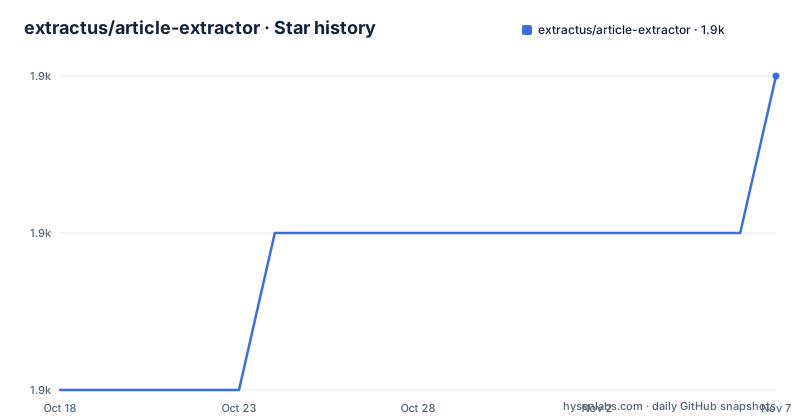
- extractus/article-extractor1,914 ★ · +2
| Repository | 2026-10-18 | 2026-11-07 |
|---|---|---|
| extractus/article-extractor | 1.9k | 1.9k |
2 Stars in the last 20 days, measured from the daily GitHub snapshot. Compare with other projects
Editorial analysis
Install paths differ by runtime, and JSR is now first class
The install section leads with JSR rather than npm, which is the recent change in this package and the first thing to know if you are following an older tutorial.
Under Deno:
deno add jsr:@extractus/article-extractorUnder Node.js or Bun, the JSR route goes through a CLI shim:
pnpm add jsr:@extractus/article-extractor
# or
npx jsr add @extractus/article-extractor
# or
bunx jsr add @extractus/article-extractor
And npm remains available as an alternative:
npm install @extractus/article-extractor
# or
bun add @extractus/article-extractor
The import specifier in the README's usage example reflects this:
import { extract } from "jsr:@extractus/article-extractor";

const data = await extract("https://example.com/article");
console.log(data);
The repository root carries `deno.json`, `deno.lock` and `mod.ts`, so Deno is the primary target with Node and Bun as supported alternatives rather than the reverse. Topics attach `readability` alongside `data-scraping`, which is the honest pairing: this is in the readability tradition, and it inherits that family's approach of scoring candidates and picking the best one.
Licence is MIT, with a `SECURITY.md` and a `CONTRIBUTING.md` at the root.
extract() has three overloads and the third is a fetcher
The signature is deliberately layered:
extract(input: string): Promise<ArticleData | null>
extract(input: string, parserOptions?: ParserOptions): Promise<ArticleData | null>
extract(input: string, parserOptions?: ParserOptions, fetcher?: Fetcher): Promise<ArticleData | null>
`input` is either a URL string or raw HTML content, which means the same function covers both the fetch-and-parse case and the already-have-the-page case.
The third parameter is where the real operational work lives. A custom fetch function has the signature `(url: string) => Promise<Response>` and defaults to `globalThis.fetch`. The README documents several reasons to supply one, including proxy, headers, TLS, authentication and timeouts.
The proxy example differs per runtime because the mechanisms do. Under Deno it uses `Deno.createHttpClient` with a `proxy` option and passes it as `client` to fetch. Under Node it uses undici's `ProxyAgent` passed as `dispatcher`. Under Bun it is simply `fetch(url, { proxy:... })`. Three different mechanisms for one abstract parameter, which is exactly why the injection point exists.
Headers are the case that comes up most often in practice:
const myFetcher = (url: string) =>
  fetch(url, {
    headers: {
      "user-agent": "MyBot/1.0",
      authorization: "Bearer token123",
    },
  });

const result = await extract("https://example.com/some-article", {}, myFetcher);
And timeouts are the case people forget:
const myFetcher = (url: string) =>
  fetch(url, {
    signal: AbortSignal.timeout(5000),
  });
Note the empty `{}` in the middle argument. Because parserOptions comes before fetcher, a caller who only wants to customise HTTP has to pass an empty options object, which is a small ergonomic cost of the ordering.
The result is null or ArticleData, and the fields are all optional
The return type is the thing to design around. It can be `null` when no article is found, and when it is an `ArticleData`, every field is itself optional:
interface ArticleData {
  url?: string;
  links?: string[];
  title?: string;
  description?: string;
  image?: string;
  favicon?: string;
  author?: string;
  content?: string;
  source?: string;
  published?: string;
  ttr?: number;
  type?: string;
}
Several of those fields earn their place. `url` is the best resolved URL, while `links` holds alternatives such as canonical, shortlink and amphtml, which is useful when you want to know which URL variants a publisher considers equivalent. `ttr` is an estimated time to read in seconds where 0 means unknown, computed from a `wordsPerMinute` option. `source` is the original publisher domain and `type` is the page type, for example `article`.
`published` is a string rather than a Date, which is the right call for a library that should not impose a timezone assumption on the publisher's markup, but it does mean you parse it yourself.
The practical shape of a caller: null check, then treat `title` and `content` as optional and handle their absence. A page that returns an object with no `content` is a realistic outcome, not an edge case, because the thresholds that decide whether content exists are configurable.
Thresholds and tag allowlists are the tuning surface
The parser options are what you adjust per corpus. The README documents them as a table with types and defaults.
`wordsPerMinute` defaults to 300 and feeds the time-to-read estimate. `descriptionTruncateLen` at 210 is the maximum characters for a generated description, and `descriptionLengthThreshold` at 180 is the minimum length to keep a meta description rather than generate one. `contentLengthThreshold` at 200 is the minimum characters for article content.
Those three thresholds behave as filters rather than formatters. Lower `contentLengthThreshold` and you accept shorter pages as articles; raise it and you reject boilerplate pages that merely look long. The README's example tightens both at once:
const article = await extract(url, {
  descriptionLengthThreshold: 120,
  contentLengthThreshold: 500,
});
Then there is the sanitization set, which is the security-relevant part. `allowedTags` is a list of HTML tags to keep, defaulting to semantic and content tags. `allowedAttributes` is a per-tag record of attributes to keep, defaulting to src, href, alt and similar. `allowedIframeDomains` lists domains permitted as an iframe src, defaulting to youtube and vimeo.
That last default deserves attention. An extractor that emits article HTML containing iframes is emitting HTML you may render, and the default allowlist means embeds from permitted domains survive sanitization. If your pipeline renders the result for someone else, that is the setting to review first, along with whether you want `content` sanitized at the defaults or narrowed to your own tag list.
Note that `allowedAttributes` is per tag, so widening `allowedTags` without widening `allowedAttributes` gives you elements whose useful attributes have been stripped, which is a confusing failure mode when the output looks wrong rather than empty.
extractFromHtml skips the network, transformations patch per site
The second entry point is for when you already have the page:
extractFromHtml(html: string): Promise<ArticleData | null>
extractFromHtml(html: string, url?: string): Promise<ArticleData | null>
extractFromHtml(html: string, url?: string, parserOptions?: ParserOptions): Promise<ArticleData | null>
The `url` parameter is there to resolve relative links, which matters because without it an image or anchor in the extracted content can end up relative and therefore useless. If you fetched the page yourself, pass the URL you fetched it from.
The README's example is the whole pattern: fetch, convert to text, hand both to the extractor.
import { extractFromHtml } from "jsr:@extractus/article-extractor";

const res = await fetch(url);
const html = await res.text();

const article = await extractFromHtml(html, url);
This separation is what makes caching and rate-limiting tractable, and it is the reason the library can be used at all in a pipeline that must not hammer origin servers.
Transformations handle the sites the default algorithm gets wrong. The API is `addTransformations(transformation: Transformation | Transformation[]): number` and `removeTransformations(patterns?: RegExp[]): number`, both returning counts.
interface Transformation {
  patterns: RegExp[];
  pre?: (document: Document) => Document;
  post?: (document: Document) => Document;
}
The contract is that for a URL matching `patterns`, `pre` runs on the raw HTML, extraction happens, then `post` runs on the extracted article. `pre` is where you strip a consent banner or a newsletter modal that would otherwise be scored as main content; `post` is where you fix up what came out. Both operate on a DOM document, so a transformation is DOM manipulation rather than string handling.
Because patterns are regular expressions against URLs, one transformation can cover a whole publisher, and `removeTransformations` takes patterns too, which means the transformation list is mutable global state. In a long-lived process serving many domains, that shared list is something to manage deliberately.
Where it does not work
The first limitation is the heuristic nature of the whole approach. This is a readability-style extractor, and readability-style extractors fail on layouts that do not look like articles. A product listing page, a documentation index, a forum thread or a page that is mostly navigation will either return null or return the wrong element. The thresholds move that boundary; they do not remove it. If your input is a known set of templates, parsing them directly will beat this every time.
The second is that null is a normal return, not an exception. The README's own example wraps the call in a try/catch, and the type signature permits `ArticleData | null`. A caller that treats a missing article as an error will page someone on every page the algorithm declines. Decide in advance whether a miss is a drop, a retry with different thresholds, or a queue entry.
The third is JavaScript rendering. The `fetcher` contract returns a `Response` and the package parses HTML. Nothing in the documented interface runs a browser, so a page whose article is assembled client-side extracts as an empty shell. If your targets include single-page apps, you need to fetch the rendered DOM yourself and use `extractFromHtml`, and accept that you have just taken on the browser dependency the library was avoiding.
The fourth is rate limiting and politeness, which is not the library's job. It fetches whatever URL you hand it, once, with whatever headers your fetcher sets. The topics include `data-scraping` rather than `crawling`, and the API has no delay, retry or robots.txt handling. Those belong in the layer above.
Finally, check the version situation before depending on it. The recent releases are v9.0.1 published 2026-08-20 with v9.0.1-rc1 and v9.0.1-rc2 the same day, so a major version landed with release candidates minutes apart. The last push was 2026-08-20 and the repository is not archived.
Editorial conclusion
Adopt @extractus/article-extractor when you need readable article content from arbitrary pages and you can live with heuristic extraction, particularly if you already run Deno, Node or Bun and want a sanitizing default rather than raw HTML. Do not adopt it expecting a deterministic parse, since the result can be null when no article is found and the thresholds that decide what counts as an article are configurable defaults you will end up tuning. Before wiring it into a pipeline, set `contentLengthThreshold` and `descriptionLengthThreshold` to match your own content, pass an explicit `fetcher` with a timeout rather than relying on `globalThis.fetch`, and check that the `allowedTags` and `allowedIframeDomains` defaults match what you intend to permit.
Frequently asked questions
How do I install @extractus/article-extractor?
Under Deno use `deno add jsr:@extractus/article-extractor`. Under Node or Bun the JSR route is `pnpm add jsr:@extractus/article-extractor`, `npx jsr add @extractus/article-extractor` or `bunx jsr add @extractus/article-extractor`. npm remains an alternative with `npm install @extractus/article-extractor`.
What does extract() return when it cannot find an article?
It returns null. When it does find one, it returns an ArticleData object in which every field is optional, including url, title, description, image, content, source, published, ttr and type. So callers need both a null check and optional-field handling.
How do I use a proxy or custom headers with article-extractor?
Pass a custom fetcher as the third argument with the signature `(url: string) => Promise<Response>`. The README shows Deno.createHttpClient with a proxy option, undici's ProxyAgent as a dispatcher under Node, and a proxy option on fetch under Bun, plus a headers example and an AbortSignal.timeout for timeouts.
How do I fix extraction on a site the default algorithm gets wrong?
Use addTransformations with a Transformation object holding patterns as an array of RegExp against the URL, plus optional pre and post functions that each take and return a Document. pre runs on the raw HTML before extraction and post runs on the extracted article. removeTransformations takes RegExp patterns and returns a count.
Official sources
Add this badge to your README
If you maintain this project, the badge below links readers to this analysis and shows its maintenance status from the daily GitHub snapshot. Paste the markdown into your README; add ?metric=license or ?metric=stars to the image URL for a different field.

[](https://hysenlabs.com/projects/extractus-article-extractor)Star history chart for your README
[](https://hysenlabs.com/projects/extractus-article-extractor)Was this useful?