EyeTrackVR: a DIY eye tracker for VR avatars
Free and Affordable, Virtual Reality Eye Tracking Platform.
At a glance
- What is it?
- EyeTrackVR is a source-first eye tracking platform for VRChat, written in Python and driven over OSC and UDP, with hardware files, ESP32 firmware and an IR emitter design published alongside the code. Its documentation is unusually firm about eye safety, and the project states plainly that it is not finished.
- Who is it for?
- EyeTrackVR suits a VRChat player with the hardware skills to print a bracket, wire infrared LEDs and flash an ESP32, and who wants gaze data in their avatar without buying a commercial tracker. It is the wrong choice if you need a finished product with support, since the application is still on beta tags, and the wrong choice if you are not prepared to own the safety of an infrared emitter pointed at your own eyes.
- Can I use it commercially?
- Check first. The repository uses a licence we do not classify automatically, so read its LICENSE file before any commercial use.
- Is it still maintained?
- Yes. The repository last received commits 2 days ago.
- What is it written in?
- Mainly Python, according to GitHub's language statistics.
Answers come from the project's GitHub data, last synced on November 7, 2026, and from our analysis. They are not legal advice.
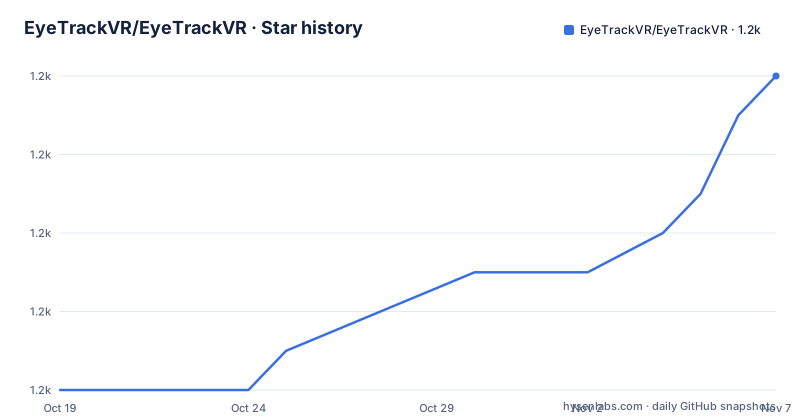
Star history
- EyeTrackVR/EyeTrackVR1,166 ★ · +8
| Repository | 2026-10-19 | 2026-11-07 |
|---|---|---|
| EyeTrackVR/EyeTrackVR | 1.2k | 1.2k |
8 Stars in the last 19 days, measured from the daily GitHub snapshot. Compare with other projects
Editorial analysis
What the project is and what it is not
EyeTrackVR is described as a source-first and affordable virtual reality eye tracker platform, built for VRChat and communicating over the OSC and UDP protocols. The phrase source-first is doing work in that sentence: the hardware design files, the firmware and the application are all published, and the project asks for nothing but a headset, a camera and some infrared LEDs.
The README carries a banner saying the project is in active development and is not fully finished, and the release tags agree, with the most recent ones being EyeTrackApp 0.3.0 BETA 9 from 2026-08-17, BETA 8 from 2026-07-16 and BETA 7 from 2026-07-13. The last push to the repository was on 2026-09-07.
The protocol choice explains why the project exists at all. VR applications read eye position through OSC, so once the tracker can compute where the eyes are looking and send those values on the right channels, avatars in VRChat can move their eyes. That is a narrow problem, and the project is a focused answer to it rather than a general eye tracking platform.
The application is written in Python, the software is licensed under the Babble Software Distribution License 1.0 unless marked otherwise, and the documentation is under Creative Commons CC-BY-SA-4.0.
The hardware: mounts, emitters and ESP32 firmware
The physical side lives in a separate repository, EyeTrackVR-Hardware, which holds the 3D files for the mounting brackets and the IR emitter files, with the parts list published on the documentation site.
The mounting problem is the one that stops most people. A camera and a ring of infrared LEDs have to sit on the headset in front of the wearer's eyes, in front of the cameras the headset already has, without blocking the lenses or the head tracking. Brackets printed for one headset do not fit another, which is why the mounting files are separate from the application code and why the parts list is a document rather than a shopping cart.
On headset support the README is realistic: any headset that can fit the camera and the LEDs can likely be supported, but mounts may not have been made for it, so the parts list is the place to check the dimensions.
The firmware is separate again. The current work has been done with the official firmware by lorow, published as OpenIris, which targets the ESP32. So the chain is a board with an ESP32 running that firmware, an IR camera looking at a pattern of illuminated eyes, and a Python application on the computer that turns the images into gaze vectors and sends them over the network.
The IR emitter rules, which are not optional
The safety section is the most emphatic part of the README, and it is worth reading as a specification rather than a disclaimer.
The instruction is to use non-focused emitters at around 5 mA total power per eye. The README asks users to exercise extreme caution when handling IR emitters, warns in bold not to bypass or remove any safety feature that has been put in place, and states that this can result in irreversible bodily harm, with the safety measures existing to reduce the potential failure risk and all further safety responsibility resting with the user.
Two practical checks are named. Visually confirm with an IR camera that the brightness is correct, and make sure you do not feel warmth. A feeling of warmth means the emitters are putting out more power than intended, and that is the moment to stop.
Three reference documents are linked for the underlying standards: the training library on near-infrared standards, the AN002 details on photobiological safety of LED light sources, and a document on the effect of infrared radiation on the lens. The project says safety testing will be completed and the emitter links and files provided afterwards, which means at the time of writing the emitter design should be treated as something to verify against those documents rather than simply to copy.
The application stack and how it runs on each platform
The dependency list in pyproject.toml describes the pipeline. Computer vision comes from opencv-python, geometry from pye3d, image processing from scikit-image, model work from scikit-learn, and the OSC transport from python-osc. There is also numpy, pyserial for the serial link to the tracker hardware, pydantic for validation, sv-ttk for the themed user interface, and matplotlib for plotting.
The interesting part is that the inference runtime is chosen per platform. On Linux it is onnxruntime-gpu from a CUDA 13 source, which covers NVIDIA and AMD through CUDA and ROCm. On Windows it is onnxruntime-directml, which covers NVIDIA, AMD and Intel through DirectML. On macOS it is plain onnxruntime, using CoreML and the Metal Performance Shaders path, with the Neural Engine in play.
That is a sensible compromise: one model, three acceleration paths, and no need for a separate GPU vendor specific build. The cost is three runtime dependencies to keep in step with the model, and it is the reason the platform-conditional dependency entries are so prominent in the manifest.
Windows-specific extras appear alongside them, including winotify for desktop notifications, pywinstyles for the window appearance, and pygrabber for DirectShow camera enumeration. The comment on that last one explains why it is needed: OpenCV's DirectShow backend opens cameras in DirectShow moniker order, so pygrabber walks the same enumerator and its name order matches the OpenCV index order exactly, which the Windows device enumeration query does not.
Development tooling is conventional for the ecosystem: black with a line length of 120, flake8, pytest with pytest-cov, and pyinstaller for packaging the application into an executable.
Running it from the repository
The project uses Poetry, and the Makefile holds the entry points.
install:
	poetry install

run:
	cd EyeTrackApp/ && poetry run python eyetrackapp.py
There is also a pyinstaller target that builds the application into a standalone executable from the spec file, and a clean target that removes the build output and the cached settings files, eyetrack_settings.json and its backup copy.
The same entry point exists as a taskipy task, where dev runs the application directly, and the pytest configuration sets the addopts to -ra -q with the project root on the python path, so tests can import the application package without an install step.
The Docker route exists as well, with a compose service named etvrtrackingbackend built from the repository Dockerfile and published on port 8000.
The container image, and one version mismatch
The Dockerfile is a careful piece of work. It starts from python:3.10-slim, exposes port 8000, disables bytecode writing and unbuffered output is set for readable container logs, then installs ffmpeg, libsm6, libxext6, libgl1-mesa-glx, build-essential, make and pip, and installs Poetry itself.
The last step is the one that shows attention: a non-root user is created with an explicit UID of 5678, the app directory is chowned to it, and the container switches to that user before running. Running the camera and inference stack as a fixed non-root account is the right default for something that attaches to a device and reads a video stream.
There is one inconsistency to note. The manifest declares Python as ~3.14.0, while the container base image is Python 3.10. That is not a rounding error: a dependency pinned to a 3.14 API would fail to import on 3.10. If you plan to use the container rather than the local Poetry environment, that difference is the first thing to check.
The rest of the repository layout is conventional for a Python project, with the application under EyeTrackApp/, the tests in tests/, shared scripts in scripts/ and repo-tools/ for repository automation, plus a conftest.py, a coverage configuration, a semantic-release configuration and a security policy.
Licensing, community and the state of the project
The licensing is split in a way worth noting. All software is under the Babble Software Distribution License 1.0 unless marked otherwise, and all documentation is under Creative Commons CC-BY-SA-4.0. That is unusual for a hardware-adjacent project, so anyone planning to reuse the emitter design or the mount files should read the terms rather than assume a permissive default from the word open source in the description.
The community channel is a Discord server, and the README asks people to join for updates and questions. There is no separate issue tracker guidance in this README, unlike most projects in this series, so the Discord carries more of the communication load than usual.
On maturity, the honest summary is what the README itself says: active development, not fully finished, with beta tags on the application. The documentation site at docs.eyetrackvr.dev carries the build guide, the parts list and the safety documents, and the hardware repository holds the files you need to actually build the thing.
For an evaluator, the deciding question is whether your headset and your camera can be mounted close enough to the eyes to resolve the pupil reliably, because everything downstream, the calibration, the model and the OSC mapping, depends on that geometry. The parts list in the documentation is where you can check that before buying anything.
Editorial conclusion
EyeTrackVR suits a VRChat player with the hardware skills to print a bracket, wire infrared LEDs and flash an ESP32, and who wants gaze data in their avatar without buying a commercial tracker. It is the wrong choice if you need a finished product with support, since the application is still on beta tags, and the wrong choice if you are not prepared to own the safety of an infrared emitter pointed at your own eyes. Verify first that your headset can be mounted close enough to resolve the pupil, that your camera's DirectShow or Linux ordering matches the index the application expects, and that the emitter power stays at or below the 5 mA per eye the README specifies.
Frequently asked questions
What does EyeTrackVR do and how does it talk to VRChat?
It is an affordable open eye tracking platform for VRChat that communicates over the OSC and UDP protocols. The application computes where the eyes are looking and sends those values so that avatars can move their eyes.
What IR emitters should I use?
Non-focused emitters at around 5 mA total power per eye. The README warns against bypassing any safety feature, asks you to confirm the brightness with an IR camera, and to make sure you feel no warmth, and it links the photobiological safety standards the design should be checked against.
What hardware do I need to build one?
A camera and infrared LEDs that fit the headset, an ESP32 running the OpenIris firmware, and printed mounting brackets. The 3D files for the mounts and the IR emitter files are in the separate EyeTrackVR-Hardware repository, with the parts list on the documentation site.
How do I run the EyeTrackVR application?
With Poetry: the Makefile install target runs poetry install, and the run target starts the application from the EyeTrackApp directory with poetry run python eyetrackapp.py. The same entry point exists as a taskipy task named dev, and pyinstaller builds a standalone executable.
Official sources
Add this badge to your README
If you maintain this project, the badge below links readers to this analysis and shows its maintenance status from the daily GitHub snapshot. Paste the markdown into your README; add ?metric=license or ?metric=stars to the image URL for a different field.

[](https://hysenlabs.com/projects/eyetrackvr-eyetrackvr)Star history chart for your README
[](https://hysenlabs.com/projects/eyetrackvr-eyetrackvr)Was this useful?