Seelen UI: A Rust-Based Desktop Shell That Replaces Windows 10/11
The Fully Customizable Desktop Environment for Windows 10/11. Whether you want a minimal, distraction-free setup or a feature-rich power-user environment, Seelen UI gives you the primitives to build it.
At a glance
- What is it?
- Seelen UI is a full desktop environment replacement for Windows, not a theme pack. It offers a CSS/JSON theming engine, a tiling window manager, and a widget system, but its AGPL-3.0 license and fast release cadence deserve scrutiny.
- Who is it for?
- Adopt Seelen UI if you want to replace the Windows shell with a programmable, themeable environment and you are comfortable with the AGPL-3.0 license, which may affect distribution of modified versions. Do not adopt it if you need a stable, long-term support release, because tagged releases arrive quickly, with v2.8.9 on 2026-10-12 and v2.8.10 on 2026-10-22.
- Can I use it commercially?
- Yes, with strict conditions. AGPL-3.0 is a network copyleft licence: if people use a modified version over a network, for example as a hosted service, you must offer them its source code under the same licence.
- Is it still maintained?
- Yes. The repository received new commits within the last day.
- What is it written in?
- Mainly Rust, according to GitHub's language statistics.
Answers come from the project's GitHub data, last synced on November 14, 2026, and from our analysis. They are not legal advice.
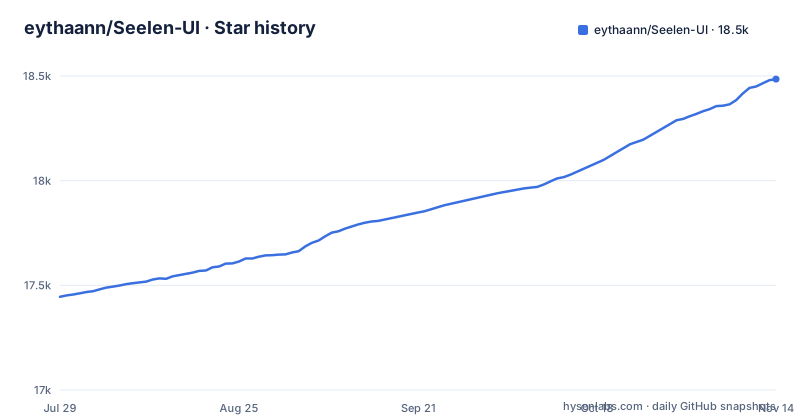
Star history
- eythaann/Seelen-UI18,485 ★ · +1,040
| Repository | 2026-07-29 | 2026-11-14 |
|---|---|---|
| eythaann/Seelen-UI | 17.4k | 18.5k |
1,040 Stars in the last 108 days, measured from the daily GitHub snapshot. Compare with other projects
Editorial analysis
What Seelen UI Replaces and Who It Serves
Seelen UI is not a skin. The README is explicit: it is a full desktop environment replacement for Windows 10/11. That means the taskbar, dock, app launcher, window manager, notification flyouts, and virtual desktops are all replaced by Seelen's own implementations. The target user is someone who finds the default Windows shell limiting, either because they want a minimal, distraction-free setup or a feature-rich power-user environment. The project gives you primitives to build your own desktop, not a fixed layout. This is a different category from tools like Rainmeter, which only add widgets on top of the existing shell. Seelen UI takes over the shell itself, which is a far more invasive change and carries higher risk if something breaks.
The Core Mechanism: CSS/JSON Theming and Widgets
The theming engine is the heart of Seelen UI. It uses scoped CSS and JSON configuration to style every shell element. That means you can control colors, fonts, borders, and animations across the taskbar, dock, flyouts, and other surfaces. Each widget can carry its own independent style, which allows fine-grained control. The README describes a dynamic accent color feature that analyzes your wallpaper in real time and derives a harmonious accent color. That is a concrete mechanism: the shell reads the wallpaper pixels and computes an accent color, then applies it to all themed elements. The widget system renders interactive widgets directly on the desktop layer. You can place clocks, system monitors, media controls, weather panels, or custom widgets. The theming engine is powerful, but it is also a double-edged sword: you need to learn CSS and JSON to make the desktop look the way you want. The repository has a documentation/ directory for anything beyond the feature list.
Tiling Window Manager and Keyboard-Driven Workflows
The tiling window manager automatically arranges open applications into gap-controlled layouts. Supported layouts include BSP, columns, and stacks, according to the feature list. You can resize, swap, and navigate windows entirely from the keyboard. The README claims your hands never leave the keys, which is the core promise for power users. There is also a floating mode that lets you opt any window out of tiling while keeping the rest managed. Per-app rules let you define layout, workspace, and floating behavior for specific applications. This is a genuine alternative to manual window dragging, but it requires a mental shift. You must learn the keybindings and configure rules for apps that do not tile well, such as games or remote desktop clients.
Getting It Running: Installation and Configuration
The README points to the Microsoft Store for installation, with a direct link to the Seelen UI app page. The repository itself is the source code, written in Rust, and you can build it from source if you prefer. The configuration is done through a unified settings interface, which the README describes as clean and searchable with live preview. You can configure themes, layouts, keybindings, widget positions, workspace rules, and per-app overrides from that interface. The theming engine uses CSS and JSON, so you can also edit configuration files directly if you know where they are stored.
Limitations and Failure Modes
The most obvious limitation is the license. Seelen UI is AGPL-3.0. That is a strong copyleft license, and it has implications if you modify the source code and distribute your version. You would be required to release your modifications under the same license. For a personal desktop customization, that may not matter. But if you work for a company that distributes software internally, or if you plan to build a product on top of Seelen UI, the AGPL-3.0 terms could be a blocker. Another limitation is the release cadence. The latest tagged release is v2.8.10 from 2026-10-22, after v2.8.9 on 2026-10-12, while a release named Seelen UI Nightly is dated 2024-10-13, two years older. That is a strange timeline. A changelog.md sits in the repository root. If you install the nightly build, you should expect bugs and frequent changes. The tiling window manager also has a failure mode: applications that require a fixed window size or that draw their own title bars may not behave well under tiling. The floating mode helps, but you must configure it per app.
Alternatives and How They Differ
The README explicitly names Rofi as an inspiration for the app launcher. Rofi is a Linux tool, but on Windows the closest alternative to Seelen UI is something like Windhawk or RetroBar, which modify the Windows taskbar without replacing the entire shell. Windhawk uses a modular approach: you install individual mods for specific behaviors, such as changing the taskbar style or adding middle-click to close. Seelen UI, by contrast, replaces the whole shell and gives you a theming engine that controls every surface. The difference in approach is fundamental. Windhawk works with the existing Windows shell, so it is less risky and easier to uninstall. Seelen UI is a full replacement, so it is more powerful but also more fragile. Another alternative is to use the built-in Windows customization options plus a third-party tiling manager like PowerToys FancyZones. FancyZones only arranges windows in predefined zones, it does not replace the taskbar or start menu. Seelen UI is a more comprehensive solution, but it requires a bigger commitment.
Maintenance and Upgrade Cost
The repository shows regular activity, with a last push on 2026-10-28 and tagged versions. The release history includes v2.8.10 and v2.8.9, which suggests a versioning scheme. That is a real maintenance cost. If you create a complex theme with many CSS overrides, you may need to update it when the theming engine changes. The project is written in Rust, which is a language known for stability, but the shell itself is a complex piece of software that interacts deeply with Windows internals. Upgrades could break features, especially if you are on a nightly build. You will need to track changes manually. The license also affects maintenance: if you modify the source, you are obligated to keep those modifications under AGPL-3.0, which may be a concern for organizations that prefer permissive licenses.
Editorial conclusion
Adopt Seelen UI if you want to replace the Windows shell with a programmable, themeable environment and you are comfortable with the AGPL-3.0 license, which may affect distribution of modified versions. Do not adopt it if you need a stable, long-term support release, because tagged releases arrive quickly, with v2.8.9 on 2026-10-12 and v2.8.10 on 2026-10-22. Before adopting, verify that the build you plan to use works with your specific Windows version, test the tiling window manager with your most-used applications, and check the community theme repository for compatibility with the current theming engine schema.
Frequently asked questions
Is Seelen UI safe to use?
It is a Windows-only shell replacement, and the Cargo workspace includes an `src/hook_dll` crate plus a `win-hotkeys` dependency pulled from `github.com/Seelen-Inc/windows-keyboard-hook.git`, so it operates at the Win32 level rather than as a settings overlay. It is licensed AGPL-3.0, and its plugin widget system and theme engine mean third-party code and scoped CSS run inside the shell.
What is seelen UI?
A full desktop environment replacement for Windows 10 and 11 written primarily in Rust, with a Tauri frontend. It replaces the taskbar, dock, start menu, Alt+Tab switcher, system flyouts and virtual desktops, and adds a tiling window manager with BSP, column and stack layouts, per-workspace wallpapers, and a CSS and JSON theming engine.
how to install seelen ui
The repository carries no install command. The README's top badge links to the Microsoft Store listing, and a `documentation/` directory sits in the repository root for anything longer. For building from source, the `preinstall` script runs `npm run build:lib`, which needs Deno.
how to use seelen ui app launcher
The launcher is described as a keyboard-driven replacement inspired by Rofi, and it surfaces apps, files, shell commands and custom scripts through fuzzy search. The README also lists a separate Start menu replacement under quick-access launchers in the shell and desktop table.
Official sources
Add this badge to your README
If you maintain this project, the badge below links readers to this analysis and shows its maintenance status from the daily GitHub snapshot. Paste the markdown into your README; add ?metric=license or ?metric=stars to the image URL for a different field.

[](https://hysenlabs.com/projects/eythaann-seelen-ui)Star history chart for your README
[](https://hysenlabs.com/projects/eythaann-seelen-ui)Was this useful?