CoTracker3: Tracking Any Pixel in a Video With a Transformer
CoTracker is a model for tracking any point (pixel) on a video.
At a glance
- What is it?
- CoTracker is a point-tracking model from Meta AI Research and Oxford VGG that follows any pixel through a video. It installs through torch.hub or from the repository, and its two modes, offline and online, trade memory against the need to know the whole video up front.
- Who is it for?
- CoTracker suits engineers who need dense or quasi-dense point trajectories from ordinary video and who have a CUDA GPU to run them on; it is the wrong tool if you need a CPU-only pipeline or a hosted API with a service level. Before adopting it, verify the LICENSE.md text against your own use case, confirm a checkpoint loads under your installed PyTorch and TorchVision, and run online_demo.py on a clip of your own length to see where memory actually lands.
- Can I use it commercially?
- Check first. The repository uses a licence we do not classify automatically, so read its LICENSE file before any commercial use.
- Is it still maintained?
- Activity is slowing. The repository last received commits 8 months ago.
- What is it written in?
- Mainly Jupyter Notebook, according to GitHub's language statistics.
Answers come from the project's GitHub data, last synced on November 15, 2026, and from our analysis. They are not legal advice.
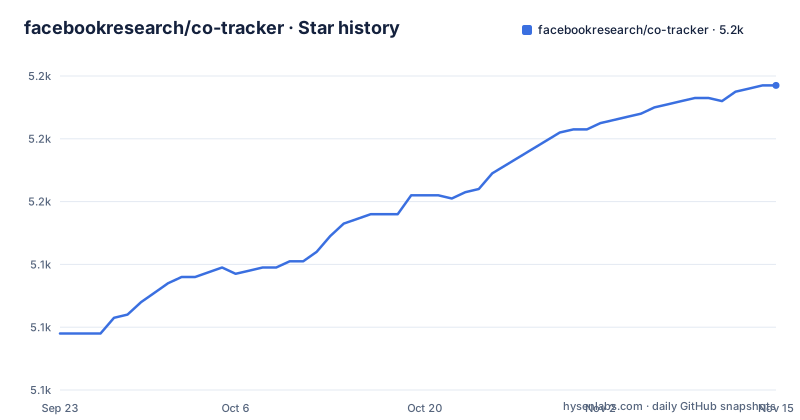
Star history
- facebookresearch/co-tracker5,197 ★ · +79
| Repository | 2026-09-23 | 2026-11-15 |
|---|---|---|
| facebookresearch/co-tracker | 5.1k | 5.2k |
79 Stars in the last 53 days, measured from the daily GitHub snapshot. Compare with other projects
Editorial analysis
What CoTracker tracks, and who needs that
CoTracker answers a narrow question: given a video and a set of pixels, where is each of those pixels in every frame? The README states that it can track any pixel in a video, a quasi-dense set of pixels together, and points that are either manually selected or sampled on a grid in any frame. That is a different product from optical flow. Flow gives a dense per-pixel motion field between two adjacent frames; CoTracker gives named trajectories that persist across the whole clip, with a visibility flag per point per frame. The output shape in the README is B T N 2 for tracks and B T N 1 for visibility, so each of the N points carries both a position and a judgement about whether it is actually visible.
The intended users are the ones who need to follow things, not measure motion everywhere: people doing video annotation, structure-from-motion preprocessing, or any pipeline where a downstream stage wants a handful of stable correspondences. The README points to VGGSfM, a structure-from-motion model built on top of point tracking, as one such consumer. The repository is a research release from Meta AI Research and the University of Oxford VGG, and the version in setup.py is 3.0.
Offline versus online: the same model, two APIs
The architecture is a transformer that takes a video tensor shaped B T C H W, plus either a grid size or explicit query points, and returns tracks and visibility. The README describes CoTracker as a fast transformer-based model that brings some of the benefits of optical flow to tracking. The practical difference between the two entry points is not the weights but how much of the video the model sees at once.
Offline mode loads with torch.hub.load("facebookresearch/co-tracker", "cotracker3_offline") and is called on the whole clip. Online mode loads the same family of checkpoint as cotracker3_online and is driven chunk by chunk: the first call sets is_first_step=True, then a loop advances by cotracker.step frames and passes a window of twice that step. The README says online processing is more memory-efficient and allows longer videos, and that the offline and online variants are the same model with a different API. That is the central design trade-off: offline can use future frames to resolve an ambiguous point, online cannot, and pays for its lower memory with a causal view of the video. The repository also ships online_demo.py for the case where the stream length is not known in advance, which the README explicitly distinguishes from the fixed-length example.
Installing CoTracker and running a first track
The README gives two routes. The quickest is PyTorch Hub, which downloads the checkpoint without cloning anything. The README's own example installs imageio with the ffmpeg extra first, then loads a sample video over HTTP and tracks a 10 by 10 grid on the first frame. The code below is the README's offline example, with the device set to cuda as written there.
pip install imageio[ffmpeg]import torch
import imageio.v3 as iio
url = 'https://github.com/facebookresearch/co-tracker/raw/refs/heads/main/assets/apple.mp4'
frames = iio.imread(url, plugin="FFMPEG")
device = 'cuda'
grid_size = 10
video = torch.tensor(frames).permute(0, 3, 1, 2)[None].float().to(device)
cotracker = torch.hub.load("facebookresearch/co-tracker", "cotracker3_offline").to(device)
pred_tracks, pred_visibility = cotracker(video, grid_size=grid_size)After this runs, pred_tracks holds one trajectory per grid point, shaped B T N 2, and pred_visibility holds the per-frame visibility mask. To look at the result rather than read tensors, the README's Visualizer writes an annotated video: it is constructed with a save_dir and a pad_value, then called with the video, the tracks and the visibility.
from cotracker.utils.visualizer import Visualizer

vis = Visualizer(save_dir="./saved_videos", pad_value=120, linewidth=3)
vis.visualize(video, pred_tracks, pred_visibility)
The second route is a local install from the repository, which the README recommends if you want to run the local demo or evaluate and train the model. It requires PyTorch and TorchVision to be present first, and the README points to the PyTorch site for that step. Once installed, the repository's own demos are single commands: demo.py with a grid size flag for offline tracking, and online_demo.py for the streaming case.
python demo.py --grid_size 10
python online_demo.py
The README states that results from the offline demo are saved to ./saved_videos/demo.mp4. A GPU is strongly recommended for local use, in the README's wording. There is also a Gradio app in gradio_demo/app.py, runnable with python -m gradio_demo.app after pip install -r gradio_demo/requirements.txt, and a hosted Hugging Face Space if you want to try the model before installing anything.
Where CoTracker stops being the right tool
The first constraint is hardware. The README says a GPU is strongly recommended, and every example in it sets device to cuda. The README says that for small tasks CoTracker can be run on CPU, but it gives no CPU benchmark, so a deployment that has to run on CPU-only machines should check the speed itself.
The second is the definition of success. CoTracker returns a visibility flag, which means the model itself is telling you that some points could not be followed. A pipeline that treats every returned track as ground truth, without filtering on pred_visibility, will silently ingest wrong correspondences. The README presents visibility as part of the output signature but does not describe how to threshold it.
The third is scope. This is a research repository, and the README's own update log is a list of model revisions: CoTracker2 in December 2023, CoTracker2.1 in September 2024, CoTracker3 in October 2024. Each release changed the architecture or the training recipe, and the README keeps a link to the older CoTracker tree for anyone who needs the previous behaviour. If your product depends on exact trajectory values, a version bump can move them. Pin the checkpoint and the code revision together, and re-run your own evaluation when either changes. The last push to the repository was on 2026-03-03.
How it differs from optical flow libraries and from SAM-style segmentation
The natural comparison is a classical optical-flow library such as OpenCV's Farneback or a learned flow model like RAFT. Those compute a dense displacement field between a pair of frames, and chaining them into long trajectories accumulates drift with no mechanism to say a point has been lost. CoTracker tracks the whole sequence jointly in the offline case, and its output is indexed by point identity rather than by pixel position, which is what makes long trajectories and a visibility signal possible. The cost is that you get tracks only for the points you asked about, not a dense field for every pixel.
The other comparison is promptable segmentation models in the SAM family. Those give you a mask per object per frame; CoTracker gives you coordinates. If your downstream task needs a region, you would have to derive it from tracked points or run a separate segmentation stage. If your task needs correspondences across views, for camera pose or 3D reconstruction, coordinates are exactly what you want, and the README's link to VGGSfM is the clearest statement of that use case.
Maintenance, licence and the cost of upgrading
The repository is not archived, and the last push was on 2026-03-03. The repository has no published GitHub releases, so versioning happens through the main branch and through the checkpoint names that torch.hub resolves. That has a direct operational consequence: torch.hub.load("facebookresearch/co-tracker", "cotracker3_offline") fetches from the repository as it stands, not from a tagged release. If you need reproducibility, install from a specific commit and vendor the checkpoint rather than relying on the hub entry point.
The licence is recorded as NOASSERTION, and the repository carries a LICENSE.md. That means the licence could not be classified automatically, and the terms are whatever that file says. Read LICENSE.md yourself before shipping anything built on the weights or the code; this is a description of the repository metadata, not legal advice.
Upgrade cost is dominated by checkpoint compatibility rather than API churn. The README maintains a link to the old tree for anyone who needs the previous model. Budget for re-running your own tracking evaluation on a fixed clip whenever you move the pinned revision.
Editorial conclusion
CoTracker suits engineers who need dense or quasi-dense point trajectories from ordinary video and who have a CUDA GPU to run them on; it is the wrong tool if you need a CPU-only pipeline or a hosted API with a service level. Before adopting it, verify the LICENSE.md text against your own use case, confirm a checkpoint loads under your installed PyTorch and TorchVision, and run online_demo.py on a clip of your own length to see where memory actually lands.
Frequently asked questions
What is CoTracker used for?
It tracks any pixel in a video, either a set of manually selected points or a quasi-dense grid sampled on a frame, and returns a trajectory plus a visibility flag for each point. The README lists structure-from-motion as one downstream use, through the related VGGSfM project.
How do I install CoTracker?
The quickest route is PyTorch Hub: install imageio with the ffmpeg extra and call torch.hub.load("facebookresearch/co-tracker", "cotracker3_offline"). The README also supports installing from the GitHub repository if you want to run the local demos or train the model, which requires PyTorch and TorchVision first.
What is the difference between CoTracker offline and online mode?
Both load the same model family with a different API. Offline mode processes the whole clip at once, while online mode is driven chunk by chunk starting with is_first_step=True; the README states that online processing is more memory-efficient and allows longer videos.
Does CoTracker need a GPU?
The README says a GPU is strongly recommended for local use, and every example in it sets the device to cuda. It also says that for small tasks CoTracker can be run on CPU, though no CPU performance figure is given.
Official sources
Add this badge to your README
If you maintain this project, the badge below links readers to this analysis and shows its maintenance status from the daily GitHub snapshot. Paste the markdown into your README; add ?metric=license or ?metric=stars to the image URL for a different field.

[](https://hysenlabs.com/projects/facebookresearch-co-tracker)Star history chart for your README
[](https://hysenlabs.com/projects/facebookresearch-co-tracker)Was this useful?