guizang-ppt-skill ships a template and a checklist, and leaves the deck to the agent
AI-agent Skill for generating polished HTML slide decks: editorial magazine and Swiss layouts, image prompts, social covers, and a WebGL/low-power presentation runtime.
At a glance
- What is it?
- A Claude Code and Codex Skill that produces a single-file HTML slide deck in either an electronic-magazine style or a locked Swiss grid, with a presenter runtime in the same file. It names its own unsuitable cases: large data tables, training courseware and collaborative editing.
- Who is it for?
- guizang-ppt-skill fits a speaker preparing a talk on their own, with a strong opinion about layout and a laptop that will open one HTML file in a browser. It does not fit a team that edits slides together, a training course that needs dense tables, or anyone whose agent cannot write files and run a shell command.
- Can I use it commercially?
- Yes, with strict conditions. AGPL-3.0 is a network copyleft licence: if people use a modified version over a network, for example as a hosted service, you must offer them its source code under the same licence.
- Is it still maintained?
- Yes. The repository last received commits 15 days ago.
- What is it written in?
- Mainly HTML, according to GitHub's language statistics.
Answers come from the project's GitHub data, last synced on November 14, 2026, and from our analysis. They are not legal advice.
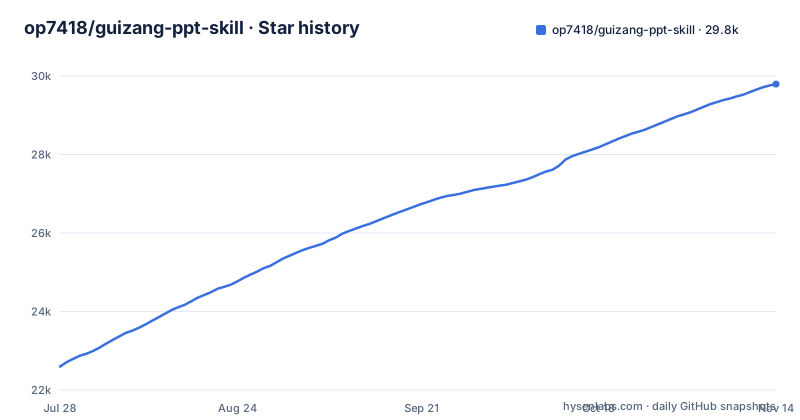
Star history
- op7418/guizang-ppt-skill29,793 ★ · +7,197
| Repository | 2026-07-28 | 2026-11-14 |
|---|---|---|
| op7418/guizang-ppt-skill | 22.6k | 29.8k |
7,197 Stars in the last 109 days, measured from the daily GitHub snapshot. Compare with other projects
Editorial analysis
The fixed files are a skill definition, two templates and a checklist
This is not an application you launch. It is an agent skill, and the repository holds the instructions rather than the output. The top level is small: SKILL.md, README.md, README.en.md, assets/, references/, scripts/, docs/, CONTRIBUTING.md, LICENSE, SPONSORS.md and .github/. The decks themselves are produced per request and live wherever the agent writes them.
The workflow is ten steps, and the first three decide the rest. Pick a style, answer a seven-question clarification list covering audience, duration, material, image needs, theme colour and hard constraints, then copy a template. Style A uses assets/template.html and Style B uses assets/template-swiss.html. Content is filled by making a theme rhythm table first and then selecting a layout skeleton to paste into and edit, so the agent is not writing page structure from scratch.
Step six carries a rule worth reading twice: speaker notes are generated from the outline, and information the user did not supply is not guessed. Step seven is a self-check against references/checklist.md where P0 problems must all pass. So the quality of a deck depends on an agent following two documents, and the reader who wants to change the output has to change those documents.
Three install routes, and the verification step is an ls of three names
The recommended install is one command:
npx skills add https://github.com/op7418/guizang-ppt-skill --skill guizang-ppt-skillThe second route is to paste instructions to an agent that has shell access: make sure ~/.claude/skills/ exists, clone into it, then list the directory and confirm you can see SKILL.md, assets/ and references/. The third is the clone by hand:
git clone https://github.com/op7418/guizang-ppt-skill.git ~/.claude/skills/guizang-ppt-skillThat path is the whole contract. The skill expects to live at ~/.claude/skills/guizang-ppt-skill, so an agent that reads skills from somewhere else needs the directory moved, and nothing in the documentation says which other locations are scanned. Updating is equally plain: go into the directory, run git pull, and report the latest commit. That is a branch-tracking update, not a version upgrade, and there is no tag in the instructions to pin.
The platform table sets out what that buys you. Claude Code and Codex are supported. Cursor and other local agents are usable if they can read and write files and execute shell commands. WorkBuddy is marked as adapting, with a separate listing version being prepared. An ordinary chatbot is marked not recommended, because without a filesystem and a browser preview a complete deck is hard to produce reliably.
Style B only permits S01 to S22, which is the point and also the limit
The Swiss style is described as a stricter layout system rather than a different stylesheet, and the strictness is specific. Body pages can only be chosen from twenty-two named layouts, S01 through S22, and the rule is that new page structures cannot be invented on the spot. The grid is locked at sixteen columns with right-angled blocks and 1px hairline rules, with no shadows, no gradients and no rounded corners. Four anchor colours are offered: Klein blue IKB, lemon yellow, lemon green and safety orange.
Two rules exist because of how the decks are actually used. A headline written entirely in Chinese drops one step on the type scale so it does not eat the body text and image space, and images have to sit in the template's reserved data-image-slot rather than anywhere on the page. Hero images are generated at 21:9 or 16:10 to match. In a left-text right-image layout the body block and the image are aligned along their bottom edges, clear of the footer paging component.
For a talk about facts, a product or a method, that discipline is the feature. For anything that does not fit twenty-two shapes, it is a hard stop, and the honest answer is to use Style A, whose ten layouts run to cover, section, a data poster, image and text, an image grid, a pipeline and a comparison.
The strongest layout checks only run when Playwright happens to be there
Quality control is script-based, and there are two validators. The presenter runtime has one that takes a path and can be given a target length:
node scripts/validate-presenter-mode.mjs path/to/index.html
node scripts/validate-presenter-mode.mjs path/to/index.html --target-minutes 30
Style B has its own validator under scripts/. What the Swiss checks block is concrete: centred headings, experimental layouts, text written inside SVG, and images that have left their slot. Those are violations of the layout system, so a script can catch them from the markup.
The measurements are a different matter. When Playwright is available the Swiss style also quantifies the real rendered result: overflow, bottom whitespace and the gap between the title and the next element. That is a browser measuring a browser, which is why it is conditional. The documentation says the checks run when Playwright can be used, so the difference between a fully checked deck and a structurally checked one depends on the machine rather than on the skill. If the numbers matter to you, verify the pass actually ran.
The project names its own unsuitable cases, and collaboration is one of them
There is a short list of what this is not for, and it is unusually direct. Dense tables of data are out. Training courseware is out, with the reason given as insufficient information density. Anything needing several people editing at once is out, and the reason given is that the output is static HTML.
That third one has consequences beyond feeling. A single file that a browser opens directly is also a file that two people cannot merge, and the skill is built around an agent writing the whole document rather than a person adjusting a few slides. The workflow reinforces this: content is filled by selecting a layout skeleton and editing text into it, and the iteration step adjusts content, font size, height and spacing, all of which are whole-document changes.
The output format is the reason for both the limitation and the appeal. The project argues that a single HTML file needs no build and no server, can be opened, presented, sent and screenshotted directly, and ships the presenter tooling inside the same file. Nothing needs to be installed on the machine you present from, which is a real advantage for a talk in a room you do not control. It is also why there is nothing to log into and nothing to share a link to.
The presenter runtime keeps rehearsal data in the browser and calls nothing out
Both templates embed the same presenter runtime. Pressing P in the lower right opens the presenter view, and the browser opens a second, clean audience window. Everything happens locally: no live captions, no cloud relay, no phone remote control and no AI coaching service. Rehearsal mode records the actual time spent on each page plus a summary for the whole session, stored in the local browser, and it explicitly does not score you with AI.
Auto-advance is off by default. It only engages when the outline gives an explicit number of seconds per page, or when you turn on a global interval in settings, and it pauses when you open the grid, the settings or the circle-select tool, when the page is hidden, and when the audience screen is paused or out of sync. The audience window reports a status: connecting, synced, not synced, frozen, not connected, or blocked by a popup blocker.
Two failure modes are handled explicitly, and both are worth knowing before a talk. If the audience window is closed or its heartbeat times out, the presenter view says not connected and offers a button to reopen it. On exit the audience window is closed automatically, and when the browser refuses to let a window close itself, the audience side shows that the presentation has ended. A pre-talk check covers popups, fullscreen, fonts, images and video and the 16:9 preview, then reminds you to confirm the HDMI cable, adapters and projector by hand.
One key drops WebGL for everyone, so the fallback is a global switch
The decks are not plain HTML. There is a WebGL and canvas animation layer, and the escape hatch is the B key, which turns that off and lets dynamic content fall back to a static background. The same key is also black screen. That overlap is what the shortcut list implies: B and W blacken and whiten the audience screen, while the performance fallback is described separately as switching off WebGL and canvas animation.
The rest of the keyboard map is small and worth having on the slide before you start. Left and right arrow page, Home and End jump to the first and last page, G opens the grid, L is the laser pointer, C is circle select, F freezes the audience screen, and question mark shows the full list. The grid is also where you pick a page in place and return to the two-up preview with the audience screen following.
The README also says the background automatically drops resolution when the computer cannot keep up, and freezes to static if that is still not enough.
AGPL-3.0, one release, and a last push that sits after the tag
The licence is AGPL-3.0, which is a heavier obligation than a permissive licence for anything you modify and serve. There is a single tagged release, v1.1.0, described as the Swiss style and community-ready release, dated 2026-05-15. The last push to the main branch was 2026-10-30, so the branch has moved about five and a half months past the tag and the update instruction is a git pull rather than a version bump. Anyone who needs reproducibility has nothing to pin beyond that one tag.
The repository is bilingual in a practical way. README.md is in Chinese, README.en.md is the English version, and the trigger keywords mix both languages, including phrases like generating a horizontal swipe deck, editorial magazine style presentation and electronic ink styled slides. Image generation is framed as optional and Codex-side, using GPT-Image 2.0 or GPT-M 2.0 to produce documentary photographs, infographics, flowcharts, system relationship diagrams and UI scenario images at the template's ratios.
Support is partly commercial and partly distributed. Sponsorship is recorded in SPONSORS.md with gold sponsorship from 360, Kimi work and Cola Skill plus a ZhenFund token grant, and the skill is also listed on three external channels for people who are not using Claude Code or Codex. None of that changes what the skill does, but it does tell you where the roadmap pressure comes from.
Editorial conclusion
guizang-ppt-skill fits a speaker preparing a talk on their own, with a strong opinion about layout and a laptop that will open one HTML file in a browser. It does not fit a team that edits slides together, a training course that needs dense tables, or anyone whose agent cannot write files and run a shell command. Before you rely on it, run the Swiss validator on a finished deck to see what it rejects, and decide whether the Playwright pass that measures real overflow is available in your environment, because that is where the strongest guarantees live.
Frequently asked questions
What are Guizang PPT Skills?
They are agent skills for Claude Code, Codex and similar tools that generate a single-file HTML slide deck, the images to go in it, and covers for several platforms, with rehearsal and a presenter mode built into the same file. The guizang-ppt-skill project ships two visual systems: an electronic magazine style with ten layouts and a Swiss international style with twenty-two locked layouts.
Does a guizang-ppt-skill deck work without a server?
Yes. The output is a single HTML file with no build step and no server, and the presenter runtime works inside the browser with no live captions, no cloud relay, no phone remote and no AI coach. Rehearsal timings are kept in the local browser. Presenting still needs a second window for the audience screen.
Which platforms does guizang-ppt-skill support?
Claude Code and Codex are listed as supported, Cursor and other local agents as usable when they can read and write files and run shell commands, WorkBuddy as adapting with a separate listing version being prepared, and an ordinary chatbot as not recommended because without a file system and browser preview a complete deck is hard to generate reliably.
Can guizang-ppt-skill make data-heavy training slides?
The project rules these out itself. Its unsuitable list names dense tables of data, training courseware because the information density is not enough, and anything needing several people editing at once because the output is static HTML. Use it for a talk with a strong point of view rather than for course material.
Official sources
Add this badge to your README
If you maintain this project, the badge below links readers to this analysis and shows its maintenance status from the daily GitHub snapshot. Paste the markdown into your README; add ?metric=license or ?metric=stars to the image URL for a different field.

[](https://hysenlabs.com/projects/op7418-guizang-ppt-skill)Star history chart for your README
[](https://hysenlabs.com/projects/op7418-guizang-ppt-skill)Was this useful?